How to Improve a Customer Support Workflow with a Process Map
A walkthrough of a customer support interaction about a plugin issue, then a process map showing how to improve it. The speaker role-plays both versions to show the difference empathy and clearer troubleshooting steps make.
If I were to ask any of you whether you'd like your processes to be better, pretty much everyone is going to say, yeah, I want my processes improved. But the problem is when we're looking so close to the issue, it's hard for us to identify what needs to be improved and more importantly, how do we actually improve it. I know I struggle with that. This video and the series that this is a part of is really to help you bridge that gap. So in this video, I'm going to be sharing an example of what a, let's just say a normal customer support ticket experience is. This is a real one, based on a real experience I have had in my life. And then we're going to observe some of the opportunities where this process could have been better and redo the script using those process improvements. The purpose today is not to nitpick any particular process for any particular company, but to help us all get in the habit of finding those opportunities and demonstrating and easily implementing those solutions in our own processes. So with that, let's dive in to our scenario.
Hello, how can I help you?
Hi, yes, I'm having trouble with your plugin. Yeah, it seems like my homepage, just the login page, it's just not working properly.
Oh, oh, and okay, let me look into this.
Yeah, I just wanted to say a quick update. We've been troubleshooting on our end and it seems to only happen when we have this plugin called Special login Plugin. That's what it's called, Enabled. I don't know if you know what that is, but I just found out from my team. That seems to be the plugin that's causing some kind of issue.
Yeah. Okay, well, I'll need you to email me the FTP credentials for the site to troubleshoot.
How exactly would you like me to give those credentials to you?
Yeah, I'm not. However you normally do, so would be good.
Okay, we don't do this that often, so I guess I'll go figure out something secure.
Awesome.
Okay, I think I've sent it.
Oh yeah, awesome. Okay, great. Let me look. Okay, you sent it enough. Yeah, I can't access that file type on our systems. Could you send it in a different method perhaps?
Yeah, sure, one second.
Great. I see it went through. I'm in the account now. It'll take me a little bit to check in on this, so give me a second. All right, working on things now. Totally not just typing LJK again and again on my computer. Ah, okay, well, I have already accessed your Staging site. And upon my investigation, I see that you've installed a special login plugin. I don't know if you've heard of it. Yeah, that plugin is. It has a known conflict with our platform. So once I deactivate this plugin and disable it across your entire site, everything will be fixed. But if you want to keep both working, you really have no options.
Wait, isn't that what I told you at the beginning?
Yeah, sorry about that. But what you can do is you can go vote on this feature. We have a feature section on the website, somewhere you can go find and maybe it'll change in the future. So. Yeah. Anything else I can help you with today?
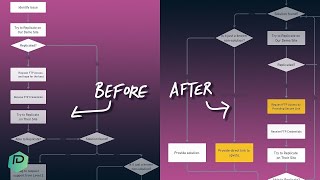
No, I'm good. I'm just. Yeah, we're fine. Okay, thanks. Well, that was a waste of an hour. Well, wasn't that a real joyride? The worst part about this, besides the actual exchange, was the fact that in reality, this was a series of emails, support tickets which spanned almost two weeks of time, back and forth and back and forth, us following up, getting ignored until this finally reached this unfulfilling conclusion. Oh, not going to name company names here, but I think we can all agree there might be some things we can do if we were running that support desk to maybe tweak that process for that particular client to have a little bit of a better experience. So it's time for some whiteboarding. So here we are on the whiteboard, and to start our journey, we are going to document the before. Because in order to improve a process, we need to understand status quo. The thing we don't want to do is start changing things before we know what normal is. So we're going to first document what we just experienced. All right, so let's document how this currently went. So it started off with the support inquiry, then they tried to identify the issue. And then I got a little bit of an assumption here. If you were process mapping your own thing, you'd probably know this. But I'm assuming by some of the silence that the help desk process person was trying to replicate the issue inside their kind of test demo area. So I'm assuming that's what's happening. If they had been able to replicate it, I imagine we would have jump started a little bit. But since they weren't able to replicate it because it was a plugin conflict that they didn't have, we moved on to no. Once at that point, they asked for that access they needed in order to work on the site. Once they received those credentials, they tried to replicate it on the client site. In this case to see if they can again replicate the issue. If they could replicate it, they'd move on to problem solving. And if they couldn't replicate it, then they would move on to probably level two request of moving up the chain for more and more help on this issue. What did end up happening in our exchange was that they were able to replicate the situation. They found a solution, sort of. So we go down here and their solution, if we're being honest, wasn't a real solution. It was just, hey, maybe someday we'll fix this. Let us know if you care. And they provided a canned response to tell you to go put in a feature request. And then they offered you, don't you need anything else? And the exchange was wrapped up based on the flow. Sure it would continue a little bit on past that in the true process, but that's the experience we just had. Now, in a nutshell, I mean, this isn't a terrible support experience. It's not exactly what I would call five star. It's not like you're going to start winning awards for your support team. But, you know, the minimum boxes were checked. But how do we take this experience and make it just a little bit better? By adding a few steps into this flow, maybe adding some forks into our decision tree and helping people be set up to be successful when they're the support agent in a position like this. Well, if you were trying to better serve these kinds of problems in this kind of client avatar, I've got a few ideas for you. Well, let me actually pull over the after chart and I'll show you what I've got whipped up here. This is just a slight modification with very little additional work that gets you through the same journey, but with a slightly different twist to it. All right, here's what it looks like and then we're going to actually act it out in the scene. First up, support inquiry and the issue is identified, same as before. Then we introduced a step of empathy and this is something that I think a lot of support desks do in an inauthentic way where they lead with some kind of apology. I see. That's very often, I think one old school way to go about this that I still see very often is kind of an apologetic leader as a way to introduce a support experience. Personally, not a huge fan. I think it's a little outdated, you know, someone complaining to you and your response being I'm sorry feels like you're just checking a box. However, what I like to use. And what I'm going to inject into this process is empathy. The difference here is I understand why this would be annoying. I would be angry too. These are different ways to put yourself on the side of the customer. And I think introducing an empathy element into this script might help this support experience start off on a better footing with a little bit more rapport. So we'll see what that looks like. Now, once we have that empathy injection, we're going to go searching our internal wiki. Now, I do not know. This might have actually happened in this exchange. It didn't come through that way by the exchange. But what this step means is we already heard some keywords back when we were identifying the issue. We heard the customer say plugin, the name of the plugin login. These are words that tell us something about what is happening. So as the support rep, before we add more work to the customer's plate and have them explain more or dig more or give us access, let's do our homework and see if anything quickly shows up. If I search my internal intranet of SOPS solutions work instructions for how people have solved this issue before on my team, that would be my next step. From there, depending on whether or not we actually have a solution in our internal wiki, we'll kind of have a fork in the road. Let's assume though like was the case in this scenario, we do have a solution. In that case we're going to follow this yes path down and we're going to ask ourselves once again, is it a real solution or is it just the fact that we know there is no solution? If we know there is no solution, we're going to go ahead and provide a direct link to have that feature come to life. And I realize this is not actually in here, this is yes, non solution, we'll add that little name in there. But if it is a real solution, we will then provide that. The update here, the adjustment here is that you'll notice I'm providing a direct link to Upvote. That's a real twist from what we just saw on that exchange. In the former situation, we're basically saying, yeah, we don't have that. It would be nice to have, if you really want it, go do some extra work client. Not really a great impression. The second example though, with this, we're saying, yeah, we don't have that. It'd be really nice if we had that. Here's exactly how you, you can tell us you want to have that in the lowest friction way. As possible. Whether that is you just click the upvote button to let us know you care or to subscribe, or better yet, I upvoted this for you. It's now attached to your account to let you know when this feature ever comes out. That would be a real twist into this process. That would add a softer touch to the dead end of the support ticket. But let's go back up in the fork and imagine we could not find a solution in an imaginary world. What else would we change? Well, first of all, we'd still try to replicate it in our own demo site to try to replicate that experience. If we could, we'd move back and then we try to get that access in order to replicate it on the client side. But one twist I would make here is rather than just saying, hey, give me access, client, and basically saying, balls in your court, figure it out. Let's give them a process. Let's make it easy to give somebody access, particularly if, you know, you're working with people who might have variable levels of tech fluency. So we could provide a secure one time link and say, hey, put your password here. Here's the instructions for how to create this account. Put the login here and we will use it securely to make sure we can check for this information. And hey, we'll also delete it when it's gone so you know your data's safe. This would be one way to speed up that process. If we did have to go into extended troubleshooting once we've received the credentials and we start to replicate on the site and we try to replicate and so on, we might end up looping back to give them that solution. But otherwise we'd move it to level two just like before, eventually offer that, you know, anything else I can do. And we would end the exchange. So overall, looking at this before and after, here we have four minor edits, three of which would be evident in the roleplay section. And with that, let's actually play out this after.
Hi, how can I help you?
Hi, yes, I'm having trouble with your plugin. It seems like the home login page isn't quite working.
Oh, that must be frustrating. Okay, let me look into that.
Yeah, no, and I just wanted to add we've been doing some troubleshooting on our end and it seems to only happen when we have this plugin called the special login plugin enabled, if you know what that is. But my team just told me about it, so it seems to be that plugin has something to do with it.
Ah yes. Well, special login plugin has a known plugin conflict with our platform. Actually, when I deactivate the plugin, regardless of what site we're on, your site will work as expected, typically speaking. But unfortunately, if you want to have both of those on, it's just not going to work. You're not going to have much of an option there. They're always just going to fight with each other. Okay, well, yeah, I know, but you know what, I see your email account here. I'm actually going to send you an email of the direct link for the feature request to make this fixed because I know it's a pain to not be able to use your favorite plugin in order to work with our platform. So just click the link in the email, you can subscribe, upvote that feature request so that whenever it is fixed you'll know and that way our developers know how important this would be to you. I know this isn't a perfect solution, but it's kind of the situation we're in. So while I have you on the phone, is there anything else I can help you with?
Appreciate your help. Have a good one.
All right. Have a good one.
All right. Well, at least I know. Well, I hope you had as much fun watching that as I had making it. I know this is a bit of a goofy way to bring some life into the process mapping conversation, but you know what? We don't give this stuff enough credit. These kinds of maps, these kinds of flow charts, yeah, they're not always fun. They don't always have silly, you know, outfits and things to help you remember them, but they are worth remembering. Taking this habit and looking at your own experiences and finding those opportunities to just dial them in a bit more based on when things don't go so right are how we can actually learn from our mistakes. If you are someone that found this to be quite enjoyable, maybe you want a little bit more process in your life. Maybe you've had SOPs on your to do list for a few years too long. Be sure to like and subscribe and also check out the link in the description below. Beyond just creating these tutorials here, we also work with clients on this kind of question of defining what your processes are, finding the opportunities, and more importantly, documenting how you want things to flow so you can actually have that foundation of processes for your team. So if that's something you'd be interested in, check out that description. But otherwise, guys, thanks for joining me for a goofy video. I'll see you next week.










