HubbSpot Updates 11/19/2025 #hubspotcrm
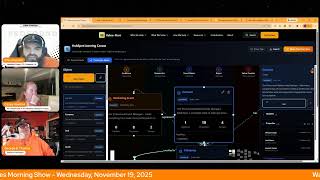
Wake Up, Customer Platform — a HubSpot-focused morning-show episode (Nov 19, 2025) hosted by Chris Carolyn, Casey Hawkins, and George B. Thomas. The hosts announce and discuss product changes: the Report Remix beta has been closed and its functionality will be sunsetted; a new "publish" permission for workflows is now live (adds to view/edit/delete); Projects is broadly available (activatable via the object/data model builder) and the hosts share hands-on experience and limitations (notably lack of tasks as a full object and no custom task properties yet); HubSpot is rolling out the ability to associate orders, invoices and quotes with custom objects (release planned this week, with roll-out to portals by Friday). The episode also covers practical implications for agencies and teams, and points listeners to the Value First Team site for guidance on object configuration.
Questions this video answers
Wednesday, November 19, 2025.
The Report Remix beta is closed and the functionality will be sunsetted.
Orders, invoices and quotes will be able to be associated with custom objects; release planned this week with roll-out to every portal by Friday.
Chapters
Foreign. Wake Up, Customer Platform. It's time to start the day. Discover all the value you already own. Don't let solutions slip away way. Wake Up, Customer Platform. The tools are at your hand. No need to sleep on capabilities that can help your business stand. The answer's right before your eyes. You just need to realize Wake up, Customer Platform and watch your business rise. Wake up. Wake up. The platform's waiting for you. Wake up. Wake up. See what your system can do.
Good morning, HubSpot Nation. It is time to Wake Up Customer Platform with your unofficial HubSpot Updates morning show where we help you discover the platform value you already own.
Chris.
I'm Chris Carolyn, joined by my co hosts Casey Hawkins and George B. Thomas. We're here every weekday morning to make sure you're not sleeping on HubSpot's true capabilities. If you're joining live, drop a hello in the comments and let us know what you're building in HubSpot today. Happy Wednesday, November 19, 2025. How we doing?
Good. Doing well. Busy week here, but we're on hump day.
How are you doing, Chris?
I'm doing good. Having. Having way too much fun, you know. Gemini 3 dropped. Yeah. In the world. Right? Like, oh, man. Hard not to have a good time. I think right now, if you're anywhere near AI and if you're in HubSpot, you're near AI. Yeah. But apparently the team has taken kind of a day off. In terms of updates, we've got two on the list, including a deprioritized one, which is a new blue dot that I've not seen before. But our buddy George has got access to projects now and we'll.
Oh, my God.
We'll get into that. After going through this. I've got a little, little class exercise that we'll go through as.
Oh, no, I don't like the sound of that, Casey.
It is, it is. Anyway, I won't ruin the punchline.
Yeah. So, number one, Report Remix beta is closed and deprioritized. What is it? Report Remix took existing reports and transformed them into new reports based on the same underlying data. The Report Remix beta is now closed and the functionality will be sunsetted.
Why does it matter? Report Remix allowed you to quickly examine your data from multiple perspectives, giving you insight into what's working and what's not. We're using your feedback to continue developing features that make reporting exploration easier.
Yeah, this makes a ton of sense to me as somebody who's not, you know, reporting guru, when you get to the heart of what we're trying to do with reports, I think like just asking questions, having conversations with Bree's assistant probably like accomplishes the end goal here. And I think like, if the goal is report exploration. Right. Generating new. New reports, I could. I could understand why it wasn't. Why it wasn't hitting the mark. But I know that they'll take all of that feedback and. And build something better.
Yeah. It's interesting. Like, I don't know.
Check this out at all.
I didn't. So I don't have any feedback on the specific. But you do bring up a good point about, like, where does reporting go in an AI world? Interesting. Because right now, reporting, I. I spent a lot of time building reports, looking at reports and there. But it's a bunch of numbers on a page.
Numbers.
And some. It. It is hard. Like I'm. As someone that spends a lot of time in Dashboard, it's like sometimes I am just like, okay, what does any of this mean? And do. So maybe there is a world where it's. There's more context just given out of the gate.
Yeah. So believe it or not, they don't ship every single beta. This is one of those. And we appreciate them for having that level of discernment. Get published workflow permission is live today. Let's see if anything on this is new. Of course, we're adding the publish permission alongside View, Edit and delete. Yeah. Are you. Have you set this permission up at all yet, Casey or George?
I have not specifically, but I think it will certainly come up, like, now that it's available. One thing, I don't know if this. I don't know if this is what was new, but there's this line that I feel like I haven't read before, which is, does the publish permission affect simple workflows? And it says publish applies to workflows in the workflows app.
Yep.
I'm a little. So. So I think if you're using a workflow from a form, that doesn't count.
Yeah. Next. Next question. Define simple workflows for me.
Yeah. I guess that's why I'm like they. I feel like they didn't exactly answer.
The question because simply my brain immediately goes to, is it just forms or also the automate under every pipeline in settings? Are those considered simple workflows too? Because there could be a lot of things happening under the hood. Anyway, I have not set this up. I don't have a set of clients that necessarily need this right now. But I'm glad it's Here for when I potentially do or they do need it.
Yeah, I have to imagine it's pretty niche. A couple ditches that come to mind are like the small businesses where everybody's bought into HubSpot and they have some level of understanding of how these systems work and no one real admin and multiple people just trying to get stuff done and automate things. But then also the enterprise of just multiple teams and can't rely on one person to handle the scale. Those are the use cases that, that come to mind and I personally don't, don't run into those too often so. But yeah, this level of granularity is great. George. Yeah. How are you liking projects, my man?
I like it. I immediately ran into some like, oh, for what I was trying to do, it needs this other thing because once I got into it and started messing with it, I realized that it is really built initially for like your team working in HubSpot on HubSpot things versus like for instance, client project management. Because I quickly ran into like I wish I could do XYZ with tasks because then I could like set it up like a project management system for like external things and, and I could even tell with some of the like naming and drop downs in the properties, I was immediately like, oh, this is, this is to manage your HubSpot. To project manage your HubSpot, not necessarily to project manage a client or services that you're providing. But still, I was having fun last night, late into the wee hours of the evening messing around with it and testing it. Once I went in and activated it. Yeah, that was the entire time.
Oh man, listen.
And moaning about, you know, do you.
Want to make a public apology to anyone?
Like here's the thing. Like, well, here's the thing. What I want to say is and I, I feel like I'm the only human that falls right to this. I let my old school HubSpot mindset, oh, they have to activate it for me. Just take complete reigns versus realizing there's a world in there where we actually can go and activate things that they've created because they realize that they've created things that not everybody wants. And so there was this thing I wanted. Didn't realize I had the power, but the whole time I had the power. But I'm so used to being like unlocked for betas or like when, when Service Hub came, just tickets showed up and it was in the portal and like that's the way it's always been.
And well, almost every other object. Right. And that was this is what was interesting. Like, and we say this all the time, like give you from, give yourself permission not to keep up with HubSpot. Right? We're here doing our best every day. And this, this was, this was how it went yesterday. Like I, after the show I emailed the product manager, hey, it would be cool if my boy George B. Thomas could get access to projects immediately after I hit send. I was like, I slacked, George. I'm like, have you checked the object library? Do we have, is this like an activation situation? And in that time the product manager came back, yeah, it's 100% available. It's not beta anymore.
So.
But then we discussed in that thread the problem of like, you know, trying to serve all of the feedback that has come in that where people are not enjoying the scope creep of HubSpot as they decide to launch objects and just shows up in your nav. And so that's why this world exists, of being able to activate and deactivate objects like this. Right? But it's a brand new layer of HubSpot management. Right. That has not existed before. And so in case you didn't know, and I don't know how many objects, like probably just the object library objects, right? Seed tickets is grayed out, so you can't deactivate this object, but we can activate and deactivate projects. They're talking about doing that with leads. You can already do it with leads.
If you don't want leads in your portal. Bye bye.
Yeah, so this world. So please come into the data model builder. Yeah, like there's so much you can do now. By the way, this week they're dropping and I'm waiting for it. I've been waiting for it to show up in mine, but orders, invoices and quotes now can be associated. They are releasing this week plan to be done in every portal by Friday. But they are releasing the ability to associate these three objects, invoices, orders and carts to custom objects, which is a big deal. Like we have not been able to do that. And in all these commerce hub and post sales use cases, there's often things that we need to manage alongside them like licenses and you know, services, deliverables, projects even. Right.
So that's the other thing. Like I know that. So there's a couple things to play. One, I'm, my family is going away, they're leaving Friday. I'm gonna be alone with like just me and the dogs. And so there'll be zero judgment in the amount of time I spend in front of my computer. The reason I say that is because I, when I went in here to activate projects and Chris, you just said the word in conjunction with things that you were talking about. I looked at the services object that I can activate and immediately I was wanting to hover over an eye icon or find some type of information of like, who, when, what, why, where should I enable that? Right. And I feel like immediately I should, but I don't want a knee jerk response. So I already have a tab open with like three videos and two community posts that I know over the weekend. I'm going to be like, and what does this mean for my business? And so, like, I don't think this data model builder is a place where mere mortal humans typically run to. But there's like so much there and so many questions and it's so fundamental to like the thing. Things that they could potentially be doing that right now feel impossible, but wouldn't be anyway. And by the way, like, I'm, I got egg on my face over projects. I'm not a newbie. And so I literally had this moment. I put in slack with Chris. I go, I'm the smartest idiot on the planet right now. Like, how is this even a thing? Right? And I don't mean that I'm really that smart. I'm just saying I know a lot about HubSpot. You could ask me a thousand questions, I'd probably knock about the park, but here I am going, oh, oh, you have to activate it.
Okay.
Like, oh my God, I felt so stupid.
Yeah. But again, we'll give up, give all of ourselves permission to, you know, understand in our own time. Because, because to your point, like, you've already got a project management system set up.
Yeah.
Like, there was no reason, like, outside of what we were doing on the show, that was the impetus for you to actually, like, dig in here.
Yes and no. Like I'm, I'm always on the look for how do I do everything in HubSpot and how do I shrink my tech stack? So, yes, because of the show, but because of the show, knowing that that's potentially something that I could minimize out of the tech stack and then just do an hub. So. And it, and we're, we're, we're so close. Ladies and gentlemen, can tasks be an object and can I get custom task properties, please? Because as soon as that happens, game over. Game over.
Oh, man. Tasks are like the new line items, honestly.
Yeah, they are. They are. There's so much that I want to do, especially when it Comes to like Salesforce HubSpot integrations around tasks and stuff that you can't do because the properties aren't editable. And then also when it comes to this now projects, projects would be 100x of a beast if tasks were an object and you could do custom task properties like and, and if you could edit the task creation pane so that then those custom properties could be in that task creation pane. HubSpot PM Zealand hello. Anyway, I'm just saying a ton of.
Feedback related to this right now.
Yeah, I think like I'm. I hear you George. On like the way the project tool set up right now is supposed to be to help teams manage activities within HubSpot. But that surprises me even because like I would think that you specific like specifically might be in a pretty good use case for using projects because you have clients, you have account records, I don't know, whatever you name, whatever you name them. So you're associating your projects, literal projects, with each of those accounts in HubSpot. And then even I could like, and I know this capability isn't there yet but like in theory you're syncing your calls, your emails, like you're getting requests through calls and emails. Like should wouldn't. Isn't there a world where those are already syncing with HubSpot and then those tasks get created from the culture potentially.
But here's the thing is like I'll give you an example. Like the prod, the drop down on one of these things is like marketing, sales service. I'm like no, no client, right? Like it's not internal. It's so literally one of the dividers is like internal work, external work. And if I use it for clients, I'd literally have to use projects in the client portal, not necessarily my portal for all clients. Like that's where it kind of breaks down the way it is right now. And the other thing is like I forget what I was trying to do. Maybe it was like task, task type, email to do call. And I'm like no, like it's implementation. Like so it's like there's just, there's just a few little fringe things. Like here's one thing I ran into is like I wanted to change project status. Which actually then I realized actually I didn't want to change project status. I, I want to be able to have a task status that is to do in client review. But and, and like you can't change project status because it's a HubSpot project. But then or property but then I was like well that's actually not what I want. What I want is I want to be able to create a task status status tasks but I can't create custom properties for tasks anyway. I'm telling you it was an evening of beverages HubSpot and me trying to figure out how can I make this work right now in this moment and, and finding the pieces that I needed to change before I could be like buy ClickUp. I'm not saying buy yet HubSpot just so you know and maybe that's not your plans to build something that is a. I use this term a lot click up killer or Panda Dot killer or like I talk about these other softwares of like HubSpot is like creating these of OMA. Like there's just ways where we could decrease our tech stack and just be in HubSpot which by the way I think HubSpot would want to do. Maybe not say it publicly but that makes the software super sticky.
Well it also makes the AI work better like having a unified context and I'd say like worst case scenario we have a spot to put this information now we don't have to figure out what to call it, which object to use and rename and then build properties. The way that it enabled the Gantt chart movement and visualizations related to this. There's so many ways to see that stuff next to your customer data, next to your revenue data that at the very least is the big win. But I think to your point what I'm experiencing at least is the association like the, or the relationship between projects and tasks. There's going to be a lot of like where does the property like need to go on tasks or projects and can we innovate a little bit, not think about tasks in the same way that we've been using them in other systems obviously email, call, whatever. Yeah, like and that's where again oh, oh by the way there's still like other teams other other use cases in HubSpot using tasks. Yeah so that's why they can't move on things as fast as we'd like them to sometimes.
But here's, here's one thing I will say that excited me because like and if you're agency you probably had this pain and you may have done something where it's like make.com or zapier and then you push it to Asana or you push it to ClickUp and it's like here's the billing person, here's the. And so like you're trying to extract all of this data out of HubSpot into like a project management system. I know we've all felt the pain. Last night I was excited because within minutes I was like, here's the project and here's the building person and here are the two employees of the organization and here's their association labels based on. So, so now literally the project manager or billing person could come into the project and see like here's the associated company, here's the associated humans. This is who I actually bill and I wouldn't get that question. And then also being able to see like. And here's the deals that they've had historically to which then Chris and I had a conversation about a card in the card library of lifetime value, which blew my. Anyway, I digressed like I'm a human has to spend in HubSpot to understand everything the HubSpot can do is near to almost impossible at this point in time. If you haven't binge watched every video that Chris has made over the last three years, that's probably a good start.
No, I got, I got a better one for you because I'm also innovating into this challenge because at the end of the day I would love for every client to feel empowered to come into this data model builder and just use it to understand what the objects are. Right? But HubSpot has to build this in a way that serves all of their 250,000 plus customers. Are we at 300,000 yet? Almost by end of year, probably. And it's not like it might not be like to George's point, like he needs to now go do some other research to understand how other people are using the object and things like that. To that point, I've started developing on the Value First Team website. From yesterday to today. It is.
Wait, wait, everybody, I want you to hang on, rewind it. From yesterday to today, you see all of this stuff that is now on my screen. Okay? Yes.
Yeah. And we click in here and the goal is to try and give some of that context of strategy and allow you to play around with stuff so that you can just understand concepts and, and then come in like this is not a replacement, right? This is to help you get to here because this is how you manage your CRM effectively. Right? But it can be daunting when you come in here and you see a list and you don't want to like break things at the same time, right? You also don't want to create a bunch of association labels that are going to get in the way of your sales team. And you know, all these reasons. So working on stuff like this to try and help with exactly what you're talking about, George. So check this out on the Value First Team site.
But we need to put a link in the whatever, wherever, so people can do this. But also the fact that your lines are animated on this and I know that you did this with Vibe coding is ridiculous anyway, not why we're here.
Yeah, I just, I didn't realize that until just now. But yeah, it was at the very least. Right? Like come over to like this page and just. Hey, by the way, all these objects exist in HubSpot.
Yeah.
Can we just get there? Right. And so this is where I'd start you, George. See full description what this enables. Right. Common configurations. And then we take it to the next level on the next page. So that's what we're up to.
Being friends with Chris is really weird because I spent my afternoon going to a dentist appointment, driving to sports practices. And then you get back and Chris is like, look what I did today. And I'm like, oh, similar days.
So model.
Remember folks? Yeah.
Oh, there it is.
You probably already own the solution you're looking for in HubSpot. It might be projects sometimes, it might be developing. Activate it. Join us tomorrow morning live at 7:30am Central or catch us anytime on Spotify and Apple Music. Drop your biggest takeaway in the comments and let us know what capabilities you want to wake up to next. Until then, I'm Chris. Carolyn.
I'm Casey Hawkins.
And I'm George B. Thomas.
And this has been Wake Up, Customer Platform. Now go build something amazing. Have a great day, everybody.
Wake up, Customer Platform. It's time to start the day. Discover all the value you already own. Don't let solutions slip away. Wake up, Customer Platform the tools are at your hand no need to sleep on Trackability that can help your business stand the answer's right before your eyes. You just need to realize Wake up, Customer platform and watch your business rise. Wake up, wake up. The platform's waiting for you. Wake up, wake up. See what your system can do.










