HubSpot Mobile App for Admins | HubSpot Admins HUG | January 12, 2023
Martin, HubSpot's senior product manager for mobile CRM, walks through the mobile app's features, permissions, and admin considerations. The session covers target users, feature demos, and permission settings to help admins understand and deploy the app effectively.
All right, we are now recording. Welcome everybody to the HubSpot Admins Hug. We're doing a session on the HubSpot mobile app with Martin here. Martin, do you want to introduce yourself before we hop in?
Absolutely, yeah, absolutely. I'll share my screen here. Hello everybody. Thanks so much, Kyle for having me here at the admin. Hug Admin. Such an exciting group of kind of users and Personas and it's a really interesting Persona for us in the mobile app. So I'm very excited to get to talk to you all about that a little bit. I will skip to my intro because that seems helpless. Not my next slide, but we'll do it on the fly here. So my name is Martin, I'm a senior Product manager and my focus is the mobile CRM. So the CRM features all the of our mobile app for iOS and Android. I'm coming up on four years at HubSpot. I joined on the 1st of April which makes it easy to remember what day I started. And either this is the longest running April Fool's joke or this has been a fruitful career at HubSpot. I'm based in Dublin in Ireland and most of our development team for the mobile app is based on in Europe, which is fun. So I think that gives the app like a nice little sort of continental flair, which I like. And my email address there is on the screen. Emma KentSpot.com Please feel free to drop me an email after this presentation. Can promise I'll reply to you during the presentation, but if you have any questions after this, you're curious want to chat more about the normal app, please do send me a message. You did remember to record Kyle, right? You saw it.
So we are recording now and I just turned on the Q and A functionality. I forgot to do that earlier. So I'll be, I'll be watching the chat, I'll be engaging with you all there. But if you have questions that you know you want to save for the end or, or whatever, please put them in the Q and A. There's the option in that Q and A section to upvote questions. So if you see one in there, you like upvote it and then when it comes time to answer questions, we will get through as many as we can, working from most popular to least popular. So that's. Yeah, that's the community management piece of it. I'm going to mute now.
Okay, so we'll talk a little bit about the agenda then for today. First of all, I want to talk a little bit about who the app is for and some of the benefits that we believe the app provides, then I want to dig a little bit deeper into one of those benefits, compatibility. And I think that's going to be the one that's going to be interesting for this audience of admins as well. We're going to go through some configurations that you can make as an admin in your household portal on web, and what happens or doesn't happen in the mobile app. And then we're going to have some time for Q and A. So fairly straightforward there. I'm going to be demoing the app for you as well. So I'm very passionate about mobile as well. Right. As you can imagine. So for a little like mobile flare here, if you're looking for the link to these slides, you can find it by scanning this QR code with your phone, which would be nice. This is the first little, quick, easy one for the app and another nice use for QR codes, of course, getting the app right. So if you haven't downloaded the app, I realize this is like the first step, please do download the app. This QR code will take you to the app store of the device that you use to scan it, which is fun. The app has ratings of above 4.5 on both Android and iOS. So if you haven't downloaded the app, make sure you do log in, give it a poke around and you'll get to experience the app. So the first real question, right, is who is the app for?
Okay.
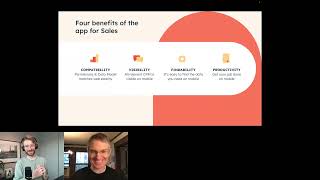
HubSpot is a very broad suite of products with lots of features at different levels of maturity levels and different Personas. And the question is the app just everything? And the answer to that is no. The app is for specific Personas. I want to talk a little bit about those Personas and put that in the context of the history of the journey that we've gone through with the HubSpot mobile app over the years. So the most mature Persona that we've been building for is sales reps. Right. We've been building and focusing on that Persona for a good couple of years now. And that's actually the Persona that I'm going to be sort of talking in most depth about today. So the features that are relevant for sales reps in the mobile app, it's contacts, deals, activity, feed, calling, email, time, tasks is another one not listed there. So, yeah, so the, the tools for sales reps are the ones that are most mature in the app after sales reps. And, you know, we're not done with sales reps. By any means. You know, we've been expanding the team working on the mobile app over the years and you know, we've also added then new Personas but that doesn't mean that we've like abandoned the, the previous ones on this slide. We just get go go broader and Personas and deeper within each of those as well. Well, so the next Persona that we added after sales reps was really the service rep and so we added tickets to the app and we added the conversations inbox as well. And then a little bit more recently we began to take some like baby steps into a manager Persona. And the two main feature sets that we have there for managers are forecasting and reporting. Then the most recent Persona is marketers here. We've really just started with this Persona and some of the first features there are related to social that you can get there. That's a little bit about who the app is for. It's been this journey over the years. But sales reps really the, the focus that I've had for most of the time that I've been here and that's the one that I want to talk a little bit in detail about today as well. So if we think about sales reps then, right, what are the benefits of the app for sales reps? And another way that you can actually express this is what is the product vision for the mobile app for sales reps? And I think about it in these four words which all end with ility, which is something that I know that Dharmesh appreciates. I didn't know that he liked sort of expressions of visions with words that all end in ility. And then he saw I left a comment on our internal wiki when somebody else had this sort of setup and I was like, yes, a few brand new points there. So there's like four, four kind of benefits here that you can think about in the app. And I'd love some feedback actually from this audience if these resonate with you. And I'd also love to hear some candid feedback on how close you think we are to achieving these because these are an expression of the benefit as we see them today, but also an expression of our aspiration for the future. So let's go through them one by one. And the first one is compatibility. So the mobile HubSpot mobile app is designed to be used in conjunction with the experience that you have on web with a full size laptop or desktop computer. And for those two experiences to work well together, for me, the most fundamental attribute of that relationship is that the two experiences are compatible with, and I'm choosing my words carefully here, and we define compatibility and as permissions matching and the data model. Matching. Data model refers to the way that data is organized and connected in your CRM. The next benefit then is what we call visibility. I see a type on the sides there. All relevant CRM data is visible on mobile. I mentioned those Personas there. We think that if you're in one of those Personas, some of the data that can be stored in the CRM is relevant to you and your job. And if it's in there in the CRM and it's relevant to your job, you should at the very least be able to see it on mobile. It should be visible to you. Now, next. That's great. Maybe you've got millions of records in your CRM and you've got tons of integrations and the question is, if the data is visible but you can't find it, it might as well not be there. So we need to give you tools to find the little bit of information that you need right now on mobile. So that's things like sorting and searching and filtering and so on. Okay, so now let's say that you've actually found that little bit of context info that you need in the app. What then? Well, then I hope that you will be able to feel productive on mobile. So again, if you're in those Personas that I mentioned, I want you to feel that you're actually able to get your job done on mobile. This usually means for like a sales rep, for example, that you might actually connect with a prospect or a lead, right? Maybe you call them or you send them an email, or maybe you log something about an interaction that you had with them. You actually create or edit or save some data in your CRM. And that's where all the pieces kind of come together. And I hope that you'll kind of agree with me that all these sort of build on each other. And I think that the last step there, productivity, is kind of where we would all love to be with the mobile app. And some users get there. And I can tell you that our users who do get to that stage are much more satisfied with the app than the users who don't. But I think to be able to get there, you kind of need these previous steps to be in place as well. So with that all said, let's get a little bit more real and specific. What I'm going to do in terms of demos here is I'm going to spend a couple of minutes just running through the app, just showing you the navigation, the screens in the app, just to make sure we're all on the same page. Then what I'm going to do is I'm going to go back to the concept of compatibility between the web and mobile experiences in HubSpot and go into more detail and I'm going to demo specific features and attributes of the app in that kind of category. Let's switch over to the app then. What I've got here, I've got the web app here on the left and I've got the iPhone app here. I'm going to Demo mostly the iOS experience and I'll mention the Android experience once or twice throughout the presentation as well. If anybody has a specific question about Android, please let me know. We can show that as well, because I have the Android app here beside me as well. Let's just run through the navigation of the app, the home screen. When you open it up, you'll get these little widgets with some of your tasks and your meetings and your forecast progress. I don't have so much of that set up in this demo account, but if we talk through the menus is like useful way just to kind of get, you know, somewhat familiar with the app. So it's grouped into these sections. CRM, the biggest one, then marketing inbox and reporting. So even there you begin to see that sort of expression of those Personas and indeed like the maturity of those Personas that I mentioned, where you've got a bunch of options for CRM, which is, you know, the sales Persona there, and fewer for marketing, you know, service conversations and managers with dashboards and forecasting. So, you know, you've got your contacts list. We're going to talk a good bit about contacts and working with contacts and what you can do on those records as well. You can open these up and, you know, you see your timeline for that record, you can see your associations between, you know, this record and. And other records. You can see all the properties for this record and you can edit those properties. You can start calls, you can send them an email and you can log activities, add notes and log activities as well. So it's like approximately what the record page does. And the reason I say record page is because I showed you a contact there. But if I look for, for example, the deals, although the presentation of these a little different in this deals board, when I open up one of these, you see the page is pretty similar in design. You've got the same timeline, you've got associations and you've got your properties. We've also got. Then if we look at a couple of other cool features, more recent ones. Recorded calls. If you have conversational intelligence and you make calls through host while calling, you can record these calls and review them on your phone as well. And I'm not going to demo social because I don't have that set up. But you've got conversations as well then. So you've got, you're able to reply to your conversation threads here and send messages to those and so on. And then your. I'll just very briefly show the dashboards. You've got a couple there. I don't have so much demo data in this portal. You can add and create new data in your CRM as well. So this post button at the bottom of the screen so I can create new records, connects companies, deals, tickets as well, but I can also create notes and tasks and things from here as well and then the search here. So you can search through your CRM here and you'll get results across like a couple of categories. So common companies, deals, tickets, tasks and activity as well. So that's search. So I think I'll just want to pause there because that's the kind of overall run through of the, of the app and just kind of check in with Kyle if we have any Q and A so far or if there's anything anybody would like to me to delve a little deeper in there.
We do, yeah. So if anyone has any requests for things for Martin to demo, go ahead and drop those in the chat. But in the Q and A we have kind of a lot of feature requests. Some of these are posed as feature requests, but I think might exist. So just kind of going through these. Angus says one of the biggest features we need in HubSpot, both on the app and on desktop, is the ability to have a day, week, monthly calendar view for sales reps. Currently the only calendar in the system is for marketing campaigns. A calendar would make sales team management tons easier. I will say, Angus, I mean, no specific promises here. I don't know exactly what's going to happen, But I think 2023 will be a good year for you. In the, in the desktop app, we're thinking a lot about sales rep experience and scheduling and calendaring and coordination and stuff. So I don't know that a day, week, monthly calendar is exactly what we'll build. Maybe it is, but something in that vein I think will come. Martin, on the, on the mobile side of things, what do you recommend?
Yeah, so I Might ask one of my colleagues to connect with you, I guess after the call, if you'd be interested. We're keen to understand this need better for a calendar on mobile. I check my calendar on my phone all the time, so I think it's one of those UIs that makes a lot of sense in mobile. Form factor then.
William says, need the ability to add notes via the app for iOS.
That's easy. Open up a record and tap add notes here and you can add a note.
Trish wants to know, will we get admin features in the mobile app or a separate admin mobile app?
Yeah. Awesome question, Trish. I love that. I love that question.
So.
One of the things that I want to achieve with this webinar is to kind of show you as an admin how things that you do have impacts on the app and particularly how they can affect your user's experience, like your reps experience. I hope to convince you somewhat in this presentation that the app is relevant for you, but in an indirect way. So. So you're correct that the app is. You as an admin aren't in that list of Personas for the app to use it directly. I think a mobile app for admins is actually kind of a cool idea. There is some precedent for that in the market. There's other offerings for admins I think you could imagine you need to urgently change one of your users permissions. They have the wrong permission settings and I think it could be cool to be able to resolve something like that with the mobile app. But it's nothing that we are investing in or looking into this year other than me thinking it's a cool idea one day.
Cool. Then Angela says, I'd love to see. She's got two comments here. I'd love to see some access to custom objects and it would be amazing to be able to customize the app. I've seen use cases for reps other than sales that would benefit from the app.
Yeah, cool. Custom objects. Just to talk about custom object support, iOS has very limited custom object support. Android has more custom object support. Let me just show you actually the Android app in Android here you've actually got custom objects. Here in the menu here is actually a list view of your custom objects which you can see and you can do some edits to these. You can actually edit these properties on Android now on iOS you can also find view only access to custom objects, but it's a little bit hidden and it is quite limited. The only way to access a custom Object record on iOS is to go through associations. For example, I can see here that Jana is associated to this custom object. Let me just search for this person here. If I open up Jana here, go to associations and Jana's associated to this dog Sigja, and I can actually open up this record. This is actually a custom record on the iOS app, but it's only accessible through associations to Connex Companies Deals. Connex Companies Deals tickets. And it's read only. You can't edit the properties. That's just the state of the world for custom object support on Android and iOS.
Cool.
Customization. We'll talk a little bit about that throughout the presentation as well.
Yeah, yeah, we'll come back to that later. Anita says we find that dashboard reports show in full on iOS but not Android.
Yeah, Please open up a help ticket and we'll try and dig into that issue specifically.
Cool. John would love to see reps be able to create and send quotes from the mobile app.
Yeah, that's a super interesting use case as well. I've spoken to many users over the years who've, you know, told me what a positive effect on, you know, closing rates, being able to send a quote to an interested prospect quickly. Like how, you know, how much easier it is to close when you can get a quote in people's hands, like as soon as they ask for it. I think that makes a lot of sense on mobile. One challenge is that the quote building flow is pretty complex. Not least like cognitively it's just like a lot of things to fill out and keep, keep straight. So it is a challenging UI to pull off on mobile, but I 100% see the need and the benefit of getting a quote to people quickly is obvious.
And the HubSpot keyboard can send existing quotes. Right? Is that. Am I.
Yes, that's right. Yeah. So if you've got a quote that's published, you can quickly get grab the URL to that quote. So you know, if somebody kind of says to you like, oh hey, like I, I'm ready to sign that quote, but I can't find the link to it. Can you. Can you quickly send it to me and you're, you're, you know, having that conversation with them through any app on your phone, email, Slack, sms, whatever it is, you can use the Ultflow keyboard to get the link to that quote.
Yeah. Or I guess maybe if you're at your computer, you could create the quote and then instead of emailing it, pull it up on your phone and text it.
Perhaps that's. That's one. Right. There's also. Yeah, you can. You can see your quotes on Andro as well. That's one of the other Android only features. Let me see if I can just find an example. I don't have a good example.
Okay, last comment here, then I'll let you get back to your flow. Debbie, who's a solutions partner, would love to be able to see the partner tab accessible in the app. Solutions partner, I believe is another omission in your list of Personas.
Indeed it is. There. Yeah, exactly. But yeah, I'd love to be able to offer that one day I guess. You know, there are so many other HubSpot end user Personas that aren't on our list there, you know. So I think realistically we would probably add like another type of user Persona, actual HubSpot user, before we get into get into partners. But I love the passion for the moment for sure.
Cool.
I think we'll jump back into the presentation then.
Yeah. Sorry crew, I just noticed there are lots of comments in the chat, which is exactly where I told you to put them. If you want to move some of those over to the Q and A, we'll make sure to get back to them at the end. But I want to make sure Martin has time for the rest of what he has planned.
Perfect. Thanks, Scott. I want to jump back then to this selection of benefits and the one that I really want to zoom into that I hope this will resonate with this audience is this one. Compatibility. Let's define this in a little bit more detail. For me there are two crucial elements here. The first is permissions. This might feel stupid. Simple. Let me know if you think I'm being ridiculous to try and claim credit for any of the work that we do in this category. But for me, the mobile app must not be a workaround or backdoor to any CRM data permission or restrictions that admins can configure. In a sense, I hope that you take this for granted. Right. You absolutely should and you should expect this from any service that you, that you use. And I'm kind of letting you know that we spend a lot of effort in this and we pay attention to this a lot. And I'm going to show you like in detail some of those examples and I really am keen to get your feedback on how good a job you think we've done here and where we've got holes and how important this would be and maybe even what would happen if this wasn't respected. Then the next or other attribute is the data model, and this is about the rules and business logic that define the way that data is connected between web and mobile. That's a little, tiny, little bit fuzzier concept. It's a little bit different from the visibility category of the benefit of the app, which refers to being able to see data or not. If there's data in your CRM that you can't see, that doesn't mean that we're not respecting your data model. It's just that our view of it has got gaps. But an example where I wouldn't accept a mismatch is something like associations. If you've been around HubSpot for a couple of years, you remember that about two years ago we started completely overhauling the way that associations worked. That was a major project for us on mobile. So association supports association labels, multiple company associations, primary company associations. All these concepts are there and they really are examples of the data model matching exactly between web and mobile. So let's do a little bit of specifics and some examples here. So I've got screenshots to save me from the vengeful gods of the live demo. Let's start super basic. Let's just talk about record permissions. You're aware that you can configure permissions for your users. You've got view, edit, delete, communicate permissions. I just want to show you a little bit about what it looks like if you play with some of these dials for different users on the left here, this end user is looking at a contact record, but they don't have permission to communicate. The call button is grayed out, the email button is grayed out, the text button is grayed out, and the log activity button is grayed out. But you can still add a note and you could actually still edit this contact as well. One interesting interpretation of communication permissions is that you've got a phone in your hand. Communication permissions on HubSpot, the browser, like it makes sense because even if you could see someone's phone number, you still can't call them through HubSpot browser, right? If we switch off your communication permissions, but on a phone, you've still got a phone in your hand, right? So we know that you could just go and check the phone number of this person and just dial them through your phone's native dialer, we can't stop that. No way of getting around that. But the way that we interpret communicate permissions on mobile is, is that we do disable this call button here. So, you know, it's not airtight, but we can't stop you from having access to the phone number and having a phone app phone dialer on your phone. So edit permission then there's a little edit button here normally where you can edit properties. So this is just actually removed. So there's like a little bit of a different design decision. I actually prefer this design where actions that you don't have aren't available to you are visible, but in a disabled state. I prefer that to just hiding things, but we're not there on that design pattern. Every aspect of the app, pretty basic. Then record permissions. Let's go a little deeper and talk about field level permissions as well. This is getting a little bit more subtle now. Here you've got two screenshots. You've got the rep view on the left and you've got the admin view on the right. And there are two special properties shown here, right? So you've got job title, which appears to be empty in the rep view. And there's this symbol with like an I with a slash through. I don't know about you, but when we were working on this project and everybody was throwing the phrase around, slashed eyeball around, I just like intense, visceral recoiling reaction to this, this term. So I'm a little bit like traumatized by this, by this project. So this lovely symbol whose name I won't use again indicates anyway that this property is not visible to you. And that's a tiny bit different to the symbol below, which is just this ban symbol which says, yeah, you can see this value, but you can't edit it. And I just want to point out one other really subtle way that we handle these properties. Because when you don't have permission to view properties, some property values are shown in other places in the app. For example, on the contact record, the job title is actually showing up here. What we do in that case, when you don't have permission to view that is we actually hide it. Here the case is handled as if this value was empty. We do that because we can't put these eyeball symbols all over the app. In that case it's just hidden. And another example of when field level permissions, the values is hidden is the deals board. So here, for example, this rep doesn't have permission to view any of the deal amounts, so they're all hidden there. And as well the aggregates are hidden. So if you were an admin, you would see here like 11 deals and the total value of the deals in that stage in that pipeline. So that's field level permissions and how we kind of do respect those. Next I'll go into requiring properties to create records. So this I guess comes into is somewhere in between that sort of data model and like permissions restrictions. You know, you as an admin, you say, look, I don't want any contacts in my CRM that don't have this property. And if you say that and you configure that on web, I want to make sure that mobile respects those things right. So here's an example of the settings screen to edit your contact form. And I've got Martin's custom contact property and this VIP property. One's required, one's visible and you can see that those are shown there on mobile as well. And you won't be able to create a contact without doing these. I see a question there from Jen in the chat. So our permission is the mobile the same as Jesper. We have to set separately for the app. So know that you don't have to set them separately for the app. So all these things that you set up here on web will be respected on mobile, you know, and that's our ambition and that's, you know, a big reason that I want to do this presentation is because we don't really tell you that this is going to work. And I hope that, you know, you just trust that it do because it should and you should be able to take it for granted. Another example then that's in the same vein here is when you say, look, I don't want a deal or ticket to enter a given stage without these properties being filled. Does it have a name Update stage properties? I guess it's the name there. It's hard to see in the screenshot, but here on the web settings I've said that if a deal is going to enter the closed 1 status or stage in this pipeline, I want close date and close one reason to be filled in. And so this is the screen that a rep will see then on mobile when they try to move a deal into the closed one stage. So that's stage change properties now onto a little bit more of a more recent one. Unique value enforcement. This is pretty new. HubSpot has made sure that you have unique emails for contacts in CRM for many years. But relatively recently we launched this ability to say that when you create a property that you want it to only allow unique values for this property. So this might be one that I will try and do a quick live demo for. How about that? What do we Say, I think we need to spice this presentation up a little bit.
Live demos are living on the edge, man.
It feels living on the edge, right? Exactly. We've got our app over here. I'll do this with tickets so you can see what I'm talking about here. Um, okay, so I've got a ticket here. So first of all, I've set this up already that you can see in the screenshot. That you can see in this screenshot. So I've set this up for a property called Unique Ticket Property. And this ticket here, common Wombat. I've got a lot of problems with animals in my support pipeline. So it has a value of 1, 2, 3, 4, 5 in this unique ticket property. Property. So let's go and find a ticket. Another troublesome animal, this marsh bird, a lot of trouble there. So if I go in here and about and I search here for unique. So here's my unique ticket property. I'm going to edit this, sorry, ticket property. All right, and now let's try and put in the value 1, 2, 3, 4, 5. Actually type it right. If I hit done here and now I hit save, I get this error message. Am I super proud of this ui? No. But have we satisfied the condition of this definition of compatibility where if you set up this restriction, you say, I don't want any more than one record to have this particular value and mobile, although the error message here is completely unhelpful, at least we have actually respected that rule. And so it's really not a good error message at all because it says failed and you can tap retry but nothing will happen. It's going to fail every time because this rule is being applied. So this kind of UI design and so on, when we invest in these things, you know, we are taking time away from investments that we could make in other parts of the app. And these kind of trade offs are really, really difficult to make and challenging to make. And like, in this particular case, this is like a really new restriction and we don't really know, you know, when we launch it how many people are going to use it and how widespread it's going to be. And if you think about the sort of the funnel of how many people are going to use this, you guys, the admins, right? You've got to actually observe this new feature. Watch Kyle's LinkedIn post about it, figure it out, think about where to use it, create a new property, configure this thing, set it up, make it all work for your business and your business processes, then One of your end users, your reps, they need to be using the mobile app and then they need to go to a ticket or a record, any record that has this set up, and then they need to go and try and edit it. So the question is like, how many mobile people are going to hit this error state? Right now, I think it's probably not a huge amount. They're the kind of tough trade offs that we have to make where we sort of say, okay, you know what, we've respected the rule that you guys have configured and set up. We've got a terrible experience, but we think that one that's going to be met by very few users and we can move on to other projects in the app and add other features, like many of the things in the Q and A chat here, features flying by, right? And then of course, we can watch and see how many people do actually meet this, this really ugly error message. And we always have the option to improve this with actual error messages that say, hey, the reason that this ticket failed to save is because the value 1, 2, 3, 4, 5 in this particular property isn't unique. And you know, this other record has that value. So either go and clear it from that record or, or put something else in this, in this, in this field. So that is unique value enforcement. Okay, now I want to touch on a Android iOS difference. This one here begins to get into a little bit of a different sort of proposition here where we're getting into setting up the CRM in a way that can make it more or less convenient for your reps. This one for me strictly isn't part of my strict narrow definition of compatibility. What feature am I talking about here? I'm talking about something that in our desktop centric knowledge base, refer to a sidebar customization. You tell me if you spot any sidebars in mobile app, because we don't have them. Uh, but there's a feature anyway which lets you say that. Okay, for given users or given property values, I want certain properties to be shown in the left hand sidebar of the record on web. And I actually love this feature. I think this is an incredible feature because one of the tricky things with properties in Homespot is you can have tons of properties that's great. That lets you store tons of information for all sorts of different business processes and kind of user profiles in your business. But the trade off with that is that now you've got tons of properties and when you're trying to find one, it gets really hard. And I love this feature, because this feature lets you have your cake and eat it. Where you can have loads of properties with loads of different values for different types of users and different stages in your business processes, but each individual user can be presented with the ones that they need to know. This moved down, I think just recently from Enterprise to Pro. The conditional sections, which is like the most powerful part of this. I've got this set up here in the web screenshot. So I've got the about this contact section, which account wide section. This is like the oldest in HubSpot history. And then these two sections, record customization section and another conditional section. I just want to show here that on Android we match this exactly. This area here of about this contact will match exactly what this user would see in the left hand sidebar on web. But iOS doesn't support that. IOS you see the about this contact section, which is this one, but you don't see the record customization sections, what these things are, although they're styled similarly. These are property groups, not sidebar sections. This one for me. Is this a violation of our compatibility principle? No. Why? Because the rep can see all these properties anyway. This thing doesn't hide properties or values from a rep, but it just makes it more convenient for that rep to work with those properties by surfacing the ones. For me, this is actually a findability tool where, yeah, all the data is there for you if you go and look for it, but it's really hard to see what you want to see. A feature like this record customization makes it much easier. So it's a findability tool that's like an example there. Cool. So I might. There are the slides and screenshots that I did there. So I'm going to pause again and open it up to Q and A. And I'm particularly interested if there's anything of those features that I mentioned that you'd like to go deeper into or see like a live demo or other little tweaks on it.
Yeah, I'll say. Just personally, when you said you were going to show some screenshots, I was like, what screenshots? But actually, I feel like the screenshots were super helpful to be able to see things side by side. Here's state A, here's state B. Here's how they're different.
I.
You've convinced me that screenshots are good, so you converted me something that came up. I've lost it now. Noah asked about filtering records in the mobile app. You've kind of done a little of that, but do you want to talk a little bit more about like saved views and.
Yeah, absolutely. Let's do save view live demo. Then let's get this here. Just got these changes. Let's do context. I love save views. Save views are an awesome, awesome feature in HubSpot. The way this works on mobile is you can obviously create a new saved view. This one, for example, give me context whose territory is north? And I've saved this here as a save view. So like, let's just make a new one. Let's do add view and create a new view. And of course the mobile app will respect these kind of sharing settings. Right. So if you do private, it will only be for view, but you can do it for other people, you know, for your, for, for the team and for everybody. So if I do south territory here, save this. Actually what I'll do, we'll do real live demo. So just to show you on web where we are or sorry, on mobile, where we are here on the context page, this is this sort of save view picker. And okay, it's too fast, but I just created site territory and now it's there available for me to pick there. It doesn't have any filters in it. Right. So I'll get like all my 1000 contacts you see there. So let's see how fast this updates. Sorry, territory is south. And let's close this and save this. Okay, so now let's switch over to the north territory which is 27. And let's check here. So, okay, this hasn't quite refreshed. So these things do take like a minute to refresh, I think.
You actually didn't add the filter.
Oh, did I not add it? Oh, filters. No, I didn't. Territory size.
You got to apply it.
Where's my apply? Oh, there's my apply button.
There you go now, now you've got it.
Okay. Okay, There you go. Yeah. So this is like very much worth the effort to set up. Definitely do this and do think about how you can build save views for your apps, particularly on mobile. Right. Can everybody see the screen share? I'm seeing some stuff in the chat there that maybe you can't see the screen share.
I am seeing it.
Yeah. Okay, great. You can see it.
Some people are seeing it.
Perfect. Yeah. So, yeah, so please do set up save views. We support save views on mobile for contacts, companies, deals and tickets as well. And it's great. This is really good stuff to do to make like working in mobile more efficient and especially as a rep, thinking about how you can, you know, set your. Sorry. As an admin, thinking about how you can set your reps up for success. This is an awesome, awesome thing to do for them, particularly because, you know, on desktop, like, we've got this, we've got width in our screen to play with, right. So we've got this kind of spreadsheet like presentation which is not feasible on mobile. So I can see, you know, dozens and dozens of records here on web with loads of different property values per record, but I just can't, I just can't see the same thing on mobile. So it's really important to, you know, have to see a really relevant, you know, subsection of your, of your records. So save views is an awesome thing to do there as well. So, yeah, you'll really benefit on mobile if you set up those save views in advance.
Cool. We've got a goodly number of questions in the Q and A, but none of them are directly relevant to what you were just talking about. So if there's something else you wanted to cover before going to the Q and A.
Sure, I'll just, I'll just show this slide then. So this is, this is gold, right? So this is something we've never published before. This is like first we're, we're, you know, in fairness, like, we're not great at publishing this information. Right. Which is basically of all these kind of configurations and setups that you can do, which ones are supported and not supported on mobile. I've talked through some of these here and these all link to our public knowledge base, if you're not exactly sure what I mean by these things. These are the knowledge base articles just to kind of refresh your memory of what they are. So go and check this out and kind of see what's there. A couple ones that I want to highlight that we don't support on mobile.
So.
Configure association. Whoops. Configure associations when a record is created. Let me demo here. If I go to create a deal, for example, I know many people prefer if their deals are associated with the contact when you create them. And the deal create form just doesn't have a contact association picker here. You just bypass that. So all deals that you create on mobile are created without associations and very, very new in HubSpot, you can set on web that you want to make it required and then it works like a required property. So your deals created for mobile will bypass that restriction at the moment. Now the workaround is fairly straightforward, which is that once you've created that new deal, you can just go over to associations and associated to your contact that way. So that's like a little bit of a sort of a point of training that you'd want to do with your reps if you really want to make sure that you don't have deals without associations. And then others are basically all betas. Right. So the lack of mobile support will at times be reasons that these things are still in betas. Right. But there's a couple of those there that at the moment we don't support. Yeah, let's do quick fire question brand.
All right, here we go. Going up to the top again. I'm going to go in order of most upvoted and we'll get through as many as we can. So if you all want to head over to the Q and A tab and upvote ones you like, I'll keep mashing this sort by upvotes button to re sort them. Megan asks, what would you say is the most underrated app feature?
Philosophical answer and then a specific question or specific one. And you might feel this is super simple, but I know that a big challenge for admins is CRM adoption. I know that you've built these incredible reports and unbelievable workflows and, and all that's needed is for one long suffering rep to just make sure that that one property that the whole thing hinges on has an up to date value. And you know, God love you, but you tried everything, carrot sticks, the lot to get these last recalcitrant holdout rep who just cannot see the value for him or her in keeping their deal stages up to date or whatever it is. And for those people, I would encourage you to say show them the mobile app. If you just want them to keep one or two properties up to date on three or four records, the mobile app can be an incredibly, incredibly fast way to do that. I think that's in a way like this underrated features like edit a record property on mobile because it's so basic, but it also underpins so much of the power of HubSpot and if you can get your reps to do that, that's an incredible way to do it. So yeah, so that's like not exciting or interesting, but the value of it I think is the highest, you know.
It'S a good product Manager answer.
Yeah. HubSpot call if you want new and flashy like HubSpot calling is incredible. Right. So if you, if you have HubSpot calling set up on your portal. Let me see, do I have this set up on this portal. I think I do that. The mobile app is a full on VoIP app, which is just incredible. So your reps can call your contacts from numbers that are not the number on their device and then it can be recorded from your phone as well. And then you can go and listen to the transcript. That's amazing. If you were previously using Housewife Calling or thinking about subscribing, the launch of this on mobile just sent the value of that just through the roof and at no extra cost to you. So that's new and just super cool.
Cool. Awesome. Everyone, I just dropped a feedback survey into the chat, if you wouldn't mind giving us some feedback on this session. And there's a text box if you have ideas, requests for future sessions of the admin hug. I am always open to that. I would love for this to be as driven by your interests and needs as possible. But let's keep working through these questions. William Martin, you may recall he asked, how do you create a note? And you're like, oh, that's easy, here's a note. He's back. He says, I should have been more specific on the adding of a note and comment feature. When a user is tagged in a meeting or call, they cannot add a note or comment to the meeting or.
Call within the app. Yes, that's correct. But that is coming in the next version of the app. I'm here pre release version of the app and it is coming. You can add your comments now. I only had one here, but there's a note with a comment in there. So you'll be able to see those and reply to those on iOS. You've been able to do that on Android for a while. I don't have an example, but there, yeah, so yeah, that's coming on iOS in the very next, next release. Cool.
You heard it here folks.
World record fastest time from feature request to delivery.
Yeah, no, that's, that's fantastic. Juan says any chance the sales rep can pin location and get it loaded in the contacts or deal dashboard?
So like locations on mobile. Working with locations on mobile makes like obvious, obvious sense and I would love to sort of learn more about, you know, reps and admins needs for working with locations on mobile. Like obviously people have meetings in physical locations and they drive to those, you know, or they meet clients at their locations and obviously, you know, maps and routing and so on. Makes a lot of sense. Or if you do territory sales and you go, you know, you're in a city and your meeting is canceled, and you want to check do I have any other contacts nearby me? Like those use cases make perfect sense on mobile. We don't really have anything else, any offerings in that space at the moment, but I'd love to know more about that. So, you know, please drop me an email. Just like little sort of almost Easter egg feature, but street address properties are in blue here. So if I tap on this, you actually get to open that in Google Maps or Apple Maps. Now the destination, we're just going to search Google Maps for whatever is in that properties. All I had was literally the street address here. So Apple has decided that the 46 Dryden Drive that I want is the one in Virginia. Are there other 46 drives and drives in the world? Probably yes. So the more data that you put in the street address property, the better that will work. That works in Android iOS.
Okay, so you called out that associating contacts when you're creating a deal is not a thing the app currently does. Is that on the roadmap? Is that a thing that's coming?
So I don't have any timeline for it, but it is in that category of respecting your data model. So if you say that, look, I don't want any deals without associations with them. The mobile app shouldn't be a workaround for that ultimately. But I don't have any timeline to share on that. That's another tiny feature that is actually supported on Android. If I create a deal, not a deal, it only works for tickets. There you go. On Android, this is the ticket create form and there you've got associate with and I can choose contacts and companies. It doesn't respect the requirements setting that you now can set here, but that is the UI that you could expect that we should have for all object types on both Android and iOS. Nice.
Okay, these next questions I think will be true Fire round. I think you can probably answer most of them in just a couple words depending on the type of license. Do you have different features in the app?
So yes, I'm really not that like expert to say that. We're also not great at publicizing that. And I think that can be a frustrating experience. Like for example, the record customization, like conditional records sections, you know, going from enterprise to pro. I could imagine you excited to be refreshing your app to sort of see that come and then it doesn't come. So that's frustrating. So. So the answer is yes. You know, like there's like snippet support in notes here that the number of snippets is dependent on the. If you have a seat and so on that you can add there's like really subtle little ones. The I think the transcript analysis, that's like an enterprise one. So yeah, the short answer is yes, but in general it's pretty subtle and.
Kind of matches what you experience in the desktop. There's not like specific features to mobile app that if you upgrade to enterprise you will get.
No, that's true. There's two mobile only features that have no equivalent on web and that's Scan Business card and the HubSpot keyboard. But they're available to everybody. Yeah.
Does the size of the CRM database affect the speed speed of the record load time or search result load time?
Yeah, that's a great question. I hope not. And we've invested a lot in making the app sort of more tolerant of even bigger CRM database sizes. So as our customers database sizes have grown and grown and grown, we've kind of kept pace there. If you're having sort of performance issues, please let us know and we'd be keen to dig into that that with you as well. But it shouldn't.
Cool. We are just about at time. I'm just going to pick my favorite last question. Daniel asked can you share the improvements that the new mobile app brought versus so this like new navigation here that just came out.
Yeah, so. So this one. Right. So this is the new navigation. So basically the design compared to the old one is that the old one had five items down at the bottom here and then it had a. And the fifth item was this thing called More which we lovingly called the junk drawer. As we launched new Personas, new features, everything went in the more overflow menu thing and it was completely disorganized and made no sense. Whereas this basically just gives you the menu is the more now there's only more. But it makes way more sense because the tools are kind of grouped into those Persona bases. And you know, more tools are available with like one, you know through one tap, open the menu and then also it gives you the plus this plus right. So for example previously notes, you know you could, you had to navigate to the record first. Now you can like go to this create a note directly and you know previously you could only create these objects from their screens but now you can do it anywhere in this create button as well. So that's another benefit.
Cool. I think that is all we have time for. Thank you so much everyone for coming. I'm dropping the survey in here again if you want to go us any feedback. Martin thank you so much for being here. Right at the beginning, at the top. You shared your email address. Is that the best way for people to get in touch with you? Is there? Y. Yeah.
Please do. Yeah, absolutely.
Cool. And that's. That's it. Thank you all so much for coming. I'm gonna shut this down. The recording will be available later today, and I'll. I'll email it out to all of you, but. Yeah, Martin, thanks again.
My pleasure. Thanks for having me, Kyle. Thanks for all the questions.
Okay, Bye.
Bye.
We'll see how long it takes to shut down today. I've ended the webinar. Can you tell it's ended.










