HubSpot Updates 1/28/2026 #hubspot
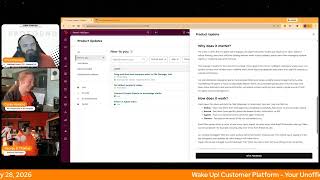
Wake Up, Customer Platform (YouTube episode, Jan 28, 2026) — Hosts Chris Carolan, Casey Hawkins, and George B. Thomas present four HubSpot product updates and practical examples: (1) File Manager improvements (marquee select in Grid View; drag-and-drop in Grid and List); (2) ability to set default property values applied across record creation methods; (3) syncing custom-object-based segments to Knowledge Vaults so agents can query business-specific data and associations; (4) redesigned Agent Inbox filters for execution status, source, and agent instance. Tone is informal, conversational, and aimed at marketers, admins, and implementers; hosts provide use cases (video production pipelines, Salesforce integration fix, inventory/equipment tracking) and a call-to-action to join live shows.
Chapters
Foreign.
Wake Up, Customer Platform. It's time to start the day. Discover all the value you already own. Don't let solutions slip away. Wake up, Customer Platform. The tools are at your hand. No need to sleep on capabilities that can help your business stand. The answer's right before your eyes. You just need to realize Wake up, Customer Platform. And watch your business rise. Wake up. Wake up. The platform's waiting for you. Wake up. Wake up. See what your system can do.
Good morning, HubSpot Nation. It is time to Wake Up, Customer Platform with your number one unofficial HubSpot updates morning show where we help you discover the platform value you already own.
Chris.
I'm Chris Carolyn, joined by my co hosts Casey Hawkins and George B. Thomas. We're here every weekday morning to make sure you're not sleeping on HubSpot's true capabilities. If you're joining live, drop a hello in the comments and let us know what you're building in HubSpot today. Happy Wednesday, January 28, 2026.
Happy Wednesday. I would like to put on the record publicly that I was the only one that showed up in Orange. The only one.
No, no, no. There's no proof of that. There's no proof of that. No recorded proof. I don't know if it's true or not. I may or may not have changed in the fastest time humanly possible before this show. But hey, we're thriving.
We're flirting. We are thriving.
I'm actually mad that I alerted George of the. Of the M.
Something like that. Yeah, we were. We wear Orange on Wednesdays, folks, if you haven't been with us before. Yeah. Something else we've started doing on Wednesdays is the HubSpot Helpline in a couple hours time. Join me, Casey, George, Rob Jones and Kyle Jepsen. We had a nice live visitor. Addison, last week on the show gave us a good discussion about deal pipelines. So we'd love for you to join us and help us do some. Some HubSpot help live on LinkedIn.
I hope.
In the meantime. In the meantime, we've got four updates today. Number one, Drag and Drop and Marquee select in File Manager Tool. What is it? You can now bulk, select and move files more easily in the File Manager with new Drag and Drop in Marquee selection tools. Select multiple files at once using your cursor or keyboard controls, then drag them into folders in one smooth motion. Note, Marquee select is only available in Grid View, not List View. Drag and Drop is available in both List and Grid views.
Why does it matter? For content marketers managing large volumes of video files, every click counts. Previously, selecting and organizing multiple files required checking each item individually with marquee select and multi file Drag and drop. Organizing assets is faster and more intuitive, reducing friction in your workflow so you can stay focused on creative work. This is nice.
Yeah, I. I'm. It's funny, I'm sitting here like, feeling myself get excited and I'm like, really? I'm getting excited about a file manager update. But yes, yes, I am. Like, I'm fundamentally, this is nice. I mean, and let me explain why I think this is cool. And maybe it's because sometimes we connect these updates to where we are in life. And yesterday I was working on a client for a project where we're using HubSpot projects for their video production pipeline. And so we literally were creating stages and we were creating like the project and like some custom properties for the projects and cards and all sorts of fun stuff where the owner of the company will shoot video uploaded to HubSpot. They'll use projects to put it through a flow. And what's fun is they're using HubSpot editor slash descript, HubSpot integration in conjunction with like. So they'll need to be able to drag and drop files and be able to see them easy. And so knowing. Or being able to rest assured, as somebody who is giving them the suggestion to use these tools and build that kind of production flow, this one brings me great joy.
Yeah, it's like, man, you mentioned the whole, the whole workload there. Yeah, like inside of HubSpot, including the project management piece, folks. Yes, beautiful thing. I do need some help though. Marquee select.
I think it's dragging. The. Dragging your cursor across multiple things and it's selecting them.
Okay, this, this.
Yeah, okay. Being able. Having to click, click, click, click, but being able to drag over it and then you have those four and you can drag it, I believe is what that.
That's nice. I also didn't know what that meant, but I just thought that everyone else did. You know what this is? This is why. This is why.
Yeah, in the post. That's the new word that I was not clear on. And now that George, like by. By deduction here, like, I. I know what everything else in the screenshot is called. I probably didn't know. I obviously didn't know.
This is. This is why we keep the old fart on the show, because he knows words that the young whippersnappers don't know. So Like I'm. I'm providing my value here today.
It takes a village always, that's for sure. Number two Set default I was going to go like deep on what you're just saying, but we'll move on. Set default property values this is an exciting one. What is it? You can now set default values for properties in HubSpot. When creating or editing a property, admins can define a value that will automatically be applied whenever a new record is created. Default property values are applied consistently across HubSpot, whether records are created manually through workflows or via APIs. So commonly used values are automatically set, saving users a step and keeping data consistent.
Why does it matter? Many teams rely on the same values being set repeatedly when creating records without default values. This often leads to repetitive manual entry, inconsistent data, or complex workflows built just to fill in the blanks. With default property values, you can save time by pre filling commonly used values. Reduce data gaps and unknown states. Eliminate workflow workarounds used solely to initiate initialize data. Improve overall data quality and consistency from the moment a record is created. This makes record creation faster for end users and data management simpler for admins. When we first brought this up a couple days ago, we judged the example they gave. But I did run into this earlier this week where this was a great solve for so I do have a better use case than setting everyone to cat lovers by default. I was working on a HubSpot Salesforce integration error. Salesforce requires certain values to be filled, so we had contacts that we were trying to push to Salesforce but didn't have this value set. So it's like kind of a background value about the type of Salesforce record that should be created standard or special, basically for all intents and purposes. So I was able to use this to set everyone to standard by default and then if we want to make them special, we can.
That is a beautiful use case right there. Oh man. Yeah man. That could solve tons of integration issues. Very cool.
Go Casey.
Also now I have provided my value for the day.
There you go.
Also very cool. Connect custom objects to Knowledge Vaults.
Oh my.
What is it? Knowledge Vaults now sync with HubSpot segments built on custom objects, making all custom object data and associations available for agent queries. A new capability that allows users to connect HubSpot custom object focused segments to knowledge Vaults, making business specific data accessible to Breeze agents and custom assistants. Users can select segments built on custom objects like inventory items, orders, or any unique business entity through the existing Knowledge Vault connection flow. And the Vault Will sync all records, properties and associations for intelligent querying.
Why does it matter? Companies rely on custom objects to capture business specific data, but agents previously could not access this information for queries or assistance. Companies store critical business logic in custom objects, from pet records at kennels to vehicle inventory at dealerships to order tracking systems. Currently, knowledge vaults only access standard CRM objects through segments, Creating a significant blind spot where agents can't answer questions about a company's unique data model. This limitation forces incomplete responses and reduces agent effectiveness for business specific workflows. By enabling segments of custom objects, agents gain complete context about how a company actually operates. This means personalized, accurate responses that understand the full scope of their business, Whether that's querying, inventory availability, Tracking custom workflow statuses, or reasoning about unique business entities and their relationships. This feature transforms agents from. From helpers with partial information into knowledgeable assistants who understand the complete data structure that powers each business. I think George has some thoughts.
I think this is huge. I think this is huge. My brain is actually going a couple different directions. I remember back in the day when I worked at Impulse Creative and we had a custom object that was courses that, that tied into Hub LMS before HubSpot, like created a courses object and to be able to like have that custom object or any customer learning object or the examples that they used as well, to be able to be into the agent, I think is super interesting. Just it opens up a world of possibilities. I'm literally thinking of a roofing client historically and they were tracking like all of the equipment in a custom object and now all of a sudden they would have access with an agent to the, to the equipment and who has what equipment and this, that and the other thing. And when it needs to replace, like, there's just so much this, this has unlocks. But then I gotta be honest with you, my brain tied to this thing of like, hey, hang on a second, like there's a. There's definitely a divide of like knowledge vaults and agents, internal HubSpot agents. But then I was like, well, can I add a vault to customer agent and do like, would that be smart in any way? So my brain went sideways, but also in just the glory of what we're actually seeing being unlocked today.
Yeah, man, this is, this is why just getting your data into HubSpot, like so powerful. I'm waiting for this to happen. Because it's literally all these objects on the left side. Some of them are custom, some not. Even George's example with the projects related to video, the project data you're going to be able to query. Just get into HubSpot, folks. You don't need all the other tools that are going to suggest they can come in and like. Let's build your business specific data set. It's right here. It's already here. Okay, Number four Filters in Agent Inbox what is it? A redesigned Inbox experience that introduces comprehensive filtering capabilities across agent executions. The new filter system allows users to view and organize Inbox items by execution status success, error needs approval and running. Can also request Source Breeze Studio Automation, MCP Connector, API or CRM Card, and specific agent instances. The unified interface combines Inbox items for individual users and administrators, with execution data replacing the previous separate executions view.
Why does this matter? The Inbox is often the first place users engage with agent execution results and requests for input. Without robust filtering, users face difficulty finding relevant information in busy inboxes, particularly when managing multiple agents or reviewing execution histories. This redesign transforms the Inbox from a simple chronological list into an intelligent workspace where users can quickly surface what matters most, whether that's items requiring approval, executions from specific sources, or unread notifications for Administer. For administrators managing teams, the enhanced filtering provides visibility across all agent activities while maintaining the ability to focus on personally relevant items. By consolidating executions into the Inbox with clear status indicators and status and source attribution, we reduce context switching and create a single source of truth for agent activity management.
We're just talking about building transparent systems. We were on the AI show this morning.
We were.
It's not a black box, folks.
Yeah, it's so funny. Life is fun.
It is. It's a blast right now. Remember, folks, you probably already own the solution you're looking for in HubSpot. Sometimes you just need to wake up to it. Join us tomorrow morning live at 7:30am Central or catch us anytime on Spotify, Apple Music, and the profoundly HubSpot updates blog. Drop your biggest takeaway in the comments and let us know what capabilities you want to wake up to next. Until then, I'm Chris Carolan.
I'm Casey Hawkins.
And I'm still George V. Thomas.
And this has been Wake up, Customer Platform. Now go build something amazing. Have a great day, everybody.
Wake up, Customer Platform. It's time to start the day. Discover all the value you already own. Don't let solutions slip away. Wake up, Customer Platform. The tools are at your hand. No need to sleep on capabilities that can help your business stand. The answer's right before your eyes. You just need to realize Wake up, customer platform and watch your business rise. Wake up. Wake up. The platform's waiting for you. Wake up. Wake up. See what your system can do.










