HubSpot Updates 11/5/2025
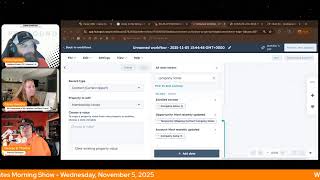
Chris Carolyn, Casey Hawkins, and George B. Thomas cover two HubSpot updates: granular permissions for content embeds with separate view, edit, and publish controls, and improved search for data variables in Workflows to make personalization easier and surface data-quality problems.
Chapters
Foreign.
Wake Up Customer Platform. It's time to start the day. Discover all the value you already own. Don't let solutions slip away. Wake Up, Customer Platform. The tools are at your hand. No need to sleep on capabilities that can help your business stand. The answer's right before your eyes. You just need to realize Wake up Customer Platform and watch your business rise. Wake up. Wake up. The platform's waiting for you.
You.
Wake up. Wake up. See what your system can do.
Good morning, HubSpot Nation. It is time to Wake Up Customer Platform with your unofficial HubSpot Updates morning show where we help you discover the platform value you already own. Chris I'm Chris Carolyn, joined by my co host Casey Hawkins and George B. Thomas. We're here every weekday morning to make sure you're not sleeping on HubSpot's true capabilities. If you're joining live, drop a hello in the comments and let us know what you're building in HubSpot today. Happy Wednesday, November 5th. How we doing today?
I am doing well. George is taking a walk around his.
Office checking on the fishies.
Fish were hungry. I forgot to feed them this morning and if I don't do it now, I'll forget. But I'm, I'm doing great. It's nice and chilly out for my morning 45 minute walk that I went on but it was, it was brisk. It woke me up. I'm ready to talk about HubSpot updates. How you doing Chris?
I'm doing well. Also got the morning walk in and got to listen to this week's episode of Hub Heroes. Yeah, getting into Taylor from the Loop marketing playbook. Interesting conversations. Good to see. Yeah, so good to hear some of my favorite things about doing content and just talking to people about HubSpot in general. Are there the different words that people use for the same things and how everybody understands everything just a little bit differently and the challenges and opportunities we'll say that that presents in this ecosystem that we, we know and love, which is why we're here each day trying to just say things out loud so one people can understand that they exist and then we can have the conversation of what that means. Right? Only two updates on the list today, so we'll dive in. Number one, new granular content embeds permissions. What is it? We are introducing dedicated permissions for content embeds. Previously, access to embeds was bundled into broader marketing permissions. With this change, three new permissions now provide more granular control which are permissions, as you might imagine, for viewing, editing and publishing.
Why does this matter? By giving embeds their own dedicated roles, admins now have a clearer and more flexible control over who can view, edit and publish them. This update makes permissions easier to understand and manage while keeping user access aligned with you with role expectations.
Did you ever get into the content embed game, George?
I've messed with it and shown a couple clients because they're on WordPress, but because we host all of our sites on HubSpot CMS, um, I haven't dug into it a ton other than just teaching it and seeing what they've done.
Yeah. And I imagine this could be the lack of this control might be something that has been getting in the way for people. I can one of those all or nothing things that especially when you're managing content at a modular level. Right. You don't necessarily want everybody being able to do all the things. So very cool to see this progress, but very interested to hear if you're out there using content embeds. Love to hear from you. And your experience sounded like an amazing idea when it first came out and I just haven't heard that much about it.
Well, so here, here's the thing though, like where it gets really powerful is when you start to do smart content around it. And the hurdle is not a lot of people are doing smart content. And the hurdle of the hurdle is a lot of people on WordPress don't even think about doing smart content. So like there's a lack of education to the fact of the superpower that actually is kind of masked under the words content embedded. Like it's potentially a freaking customer experience machine for your WordPress website sometimes is dumb compared to the stuff that's in your CRM. Okay, I'm done here.
Oh man, so many ways to go there. Touches on the conversation I was just having with Nico on the AI show. Like we don't always. A lot of people are having struggling with what HubSpot is doing when it comes to AI and this need for personalization at scale. Right. Well, you've been able to use HubSpot to personalize stuff for a long time and you just haven't, you haven't been doing that. So there's going to be education, but there's also going to be a bunch of AI tools already here that are going to try and execute that on your behalf because that's what your buyers and customers are asking you for right now. So love seeing this Progress. Update number two as we make things more complex inside of our HubSpot we need to make it easier to find those things. And with this update, which is live Improved organization and search for data variables in workflows what is it? A newly organized data panel that makes it easier to find and use all the data from your CRM and workflow.
Why does it matter? Adding data variables to your workflow actions is essential for crafting tailored automated experiences. But with so much property and workflow run data available, locating exactly what you need can be time consuming. Also, the previous grouping by dropdown menus made popular options like associated record data hard to find. This made it seem like a lot of your CRM data simply wasn't available, limiting your customization options. In the newly organized data panel, your range of options are clearly presented up front, helping you discover all that's available. The new data organization helps you navigate to different types of variables while reducing clutter and overload. We've also dramatically improved the search experience. Instead of manually navigating through individual categories, you can quickly find any data variables from all your sources with one powerful unified search. You'll notice a similar update for actions that act on associated records. For example, when using a set marketing contact status action in a deal workflow, new defaults are automatically chosen for you for the most common uses. While the process to choose custom logic for selecting related records, it's easier and faster. These updates make it easier than ever to build precise personalized workflows that drive real results. I had to sneeze at the beginning of that and I was really nervous, but it went away.
Good job. You did wonderfully.
You did wonderful.
You did. What's coming to mind, Jordan, as you see this and hear it like, I feel like there's lots of quality of life things happening all over the portal like this. It's hard to put. Again, we're in a scenario where like, you got to know that you can do the thing, but also like the strategic question of that you're going to go into workflows to. To look for these things that are not already known. I don't know. Where's your. Where's your brain go here?
I mean, I don't know if my brain. It's pretty. I mean, you said it. Quality of life, right? Making it easier for us to do the things we're trying to do. I don't know if my brain immediately explodes into like some massively like, dope direction, but I think HubSpot will continue to find ways where they make things easier. I also think HubSpot will find ways to make things more Difficult before they make things easier. That's all.
I'll say.
So I think, like, for people that work a lot in workflows, myself included, we're used to the interface. When they changed the initial build interface, there was a lot of chatter online about that.
Would you be willing to show us this right now? Casey, I know a lot of the content that you do. You're often building workflows live. Because something that I'm experiencing, continuing to experience and I'm just weird in that I always like notice that this the smallest of things. I was looking for properties in a portal yesterday in the properties area. And I think a lot of this relates to how much better the search functionality has gotten right everywhere in the portal and I misspelled the word and it still showed me the properties that I meant to be looking for. Nice, right? That's new. That's at least this year that's new. I don't know exactly when, but there was always those scenarios where it's like you, you have to tell people like, like, don't type the whole word because you're gonna misspell it and as soon as you misspell it, you're not gonna find. So just type the letters that you need and then watch the search results come. Come out. And if you don't find it, just like delete one letter at a time and maybe you'll like. Right?
Yes, yes, right.
We don't have to go through that in a lot of ways. And again, that's where because of that history, like, we're kind of built to like, have very specific intentions for everything that you're trying to do. When now, as new things become available in the portal, when you can loosen up a little bit and let's just say like, oh, let's see if this thing exists. Maybe we can try to do it like this. Right. If they're building it for, for that.
So I want to show the old way real quick. Just like, I think that's helpful for context. So this is a portal that's not current. Then the update's not currently active in. And in this case I'm going to edit a record. That's something I do quite often in a workflow, is edit a record and I often reference another. Choosing a data variable to update this record. Basically, and this was the, the old way. It's choosing a data variable from your enrolled contacts and it's a list of the properties on your enrolled contacts record in this case. And it'll. It's separated by like the property groupings, which has always been a little bit funny to me because they're not the property groups that you group on. You can set up property groups, but this separates it into like the type of property it is. So this has always been kind of.
Funny to me because we all know what Boolean properties are, you know. Right, George? We all know exactly what we're going to find in there.
Exactly, exactly.
So all that to say, like, I'm. I've always just searched here because scrolling is like basically impossible.
Search for. For scroll.
Search before scroll. This is the one case where I actually follow George's advice and search before scroll.
Wow.
One case in Casey's life.
Baby steps.
Yes. But what they're solving for here is this is showing all of your contact properties. However, I can actually, and I often do reference associated properties and other things here, but you have to go here to drop that down. You can also reference action outputs. This becomes more relevant in the world of AI, where we ask AI something in the workflow and then we take the output from that AI query and put it into a property. That's something I'm doing a lot of these days. But to get there, you actually have to drop down from enrolled contacts and choose action outputs. And then also you can, you know, reference the most recent company deal and you can add other things here too. These are just the ones that I already have set up in this workflow. However, for many users it appears that you can only reference your contact properties because for many users you don't notice this. So here's the new beta that's coming out the new way. So same thing, editing a contact record. I'm actually editing the same property just for ease of everyone's lives right now. A couple things I like here are these popular suggestions. These are things that people may be populating in this instance. These aren't really relevant, but in the screenshot from the beta, it's suggesting an internal email notification where I might very well likely would be using the email first name, last name here. So that all makes sense. Then instead of dropping down here, it's kind of dropping you into choosing this next. So now I'm going to choose immediately. Do I want to use the enrolled contact or do I want to look at an association? Here are some recommended and recent associations I might want to reference. I like this. However, if I'm used to this, if I'm already used to this, I am often referencing contact records. I'm now adding another step here. I now have to click enrolled Contact and then find the property I'm looking for from here, which this isn't even organized at all anymore alphabetically.
Search. It's in an organization that makes sense to everyone on the planet. As far as alphabetical instead of.
Okay, I didn't, I just didn't. I didn't see any categories at all. I was just a little like categories. So I will say like this is a better experience for, you know, referencing other sets and, and getting a better understanding of what you can do from this. However, for people who are used to this and especially when you're already using contact properties, I anticipate there being a little bit of friction with now adding another click. I was on the Monday morning briefing with Max this week and we were talking about segments previously known as list and the changes that they've made to the filters there. At one point you were automatically dropped into contact Properties. Then they kind of backed out of that because there's more options. Very similar actually where now you are put into something more like this. It's actually even different now I think. But that's a whole another. But still to this day, often when I get to here in the segment creation, I'll start typing in first name. However, check this out. That worked in segments. It doesn't. You have to still select the enrolled. So it appears that I could do. Let's do company name. This is cool.
This is the part that I think everybody needs to pay attention to, right? It's just like in the other, in the old way it said choose your data token, I think choose your data variable and then if you can go on the other tab choose data variable and search contact properties. So it's already like pigeonholing you in a very specific way versus the new way. It just says all data tokens and then before you type in company name it says search all data. This is the part where people can do a lot of extra work because they just thought it was on, they thought it should be on the contact record. Everybody's been using it on the company record. So there's like a whole schema built out over there. But you're like, oh, I just got asked for this report. It's a contact based report. Now we need the data there. I'm not even thinking about companies. All of a sudden we start building properties and automation and all this stuff to make sure it works. Meanwhile, if we had something like this, which we do now, you can search for the name of that thing and be like, oh, it exists on these other objects already. Maybe somebody else is working on this. Maybe somebody else in the past already thought of this. Maybe this was a report that was asked for last year. And because we were just different humans back then, and HubSpot could do different things back then, we built it out in this other way. Right?
Yeah, I mean, I just. If I had a dollar for every time that a client has asked me, hey, can you look up the property on sweater color? And I'm like, is that a contact property, company property deal property? Like, you know, where is. Where does that live? Versus like. Yes. This is so much like. This is much more intuitive. It doesn't matter where it lives. I can find it. So it's more powerful with the misspellings.
So here's, here's where my brain goes on this one, because my brain does go somewhere.
We've got it.
Yeah. One my brain goes to. I hope this happens across all parts of HubSpot because it changes the way that users would use it. By the way, my search before scroll becomes even more important to pay attention to. But warning, warning. When you do this, you might see the absolute ish show that you've created in duplicate properties way easier than you historically did. So can you do me a favor, Casey? Can you hover over the I under the enrolled contact company name?
Maybe.
Okay. Can you hover over the I under the account most recently updated? Ladies and gentlemen, if you have not added descriptions to your custom property, you are going to be screwed. Okay, I'm done here.
Yeah. And this brings us back to the change that nobody liked right out of the gate, which is. Oh, I'm used to choosing my object first. Right. This is why. This is why they don't want you to do that. They're giving us all these capabilities to associate things and data model and get better at that stuff. That will help with data cleanliness.
My brain goes somewhere else too. HubSpot Academy, can you please redo the workflows training, please. There's a hundred thousand humans. Well, maybe not that many.
There's a lot of humans, like a million actually.
Yeah, there's. There's a lot of humans that need to know the new way to think about and do this. I don't. I don't think last time I checked that it's been updated to these things in this way, please.
Well, appreciate you digging into this live, Casey, because I. This is a super impactful update, like the improved organization and search that we're seeing all over the portal. You just have to approach these things a little bit differently. In ways that you're not not necessarily used to. But when you can, you will realize that you probably already own the solution you've been looking for in HubSpot. Sometimes you just need to search for it. Join us tomorrow morning live at 7:30am Central or catch us anytime on Spotify and Apple Music. Drop your biggest takeaway in the comments and let us know what capabilities you want to wake up to next. Until then, I'm Chris Carolyn.
I'm Casey Hawkins.
And I'm George B. Thomas.
And this has been Wake Up Customer Platform. Now go build something amazing. Have a great day everybody.
Wake up Customer platform It's time to start the day Discover all the value you already own. Don't let solutions slip away. Wake up Customer platform the tools are at your hand no need to sleep on capabilities that can help your business stand. The answer's right before your eyes you just need to realize Wake up Customer platform and watch your business rise. Wake up Wake up the platform Phones waiting for you Wake up Wake up See what your system can do.










