HubSpot Updates 12/3/2025
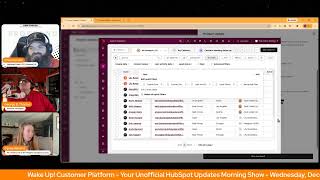
Chris Carolyn, Casey Hawkins, and George B. Thomas cover HubSpot's latest updates: CRM contact property editing, partner admin permissions, recaptcha for live chat, payments in forms, and Descript app integration for video production.
Chapters
Wake up, customer platform. It's time to start the day. Discover all the value you already own. Don't let solutions slip away way. Wake up, customer platform. The tools are at your hand. No need to sleep on capabilities that can help your business stand. The answer's right before your eyes. You just need to realize Wake up, customer platform. And watch your business rise. Wake up. Wake up. The platform's waiting for you. Wake up. Wake up. See what your system can do.
Good morning, HubSpot Nation. It is time to Wake up, Customer Platform with your unofficial HubSpot updates morning show where we help you discover the platform value you already own.
Chris.
I'm Chris Carolyn, joined by my co hosts Casey Hawkins and George B. Thomas. We're here every weekday morning to make sure you're not sleeping on HubSpot's true capabilities. If you're joining live, drop a hello in the comments and let us know what you're building in HubSpot today. Happy Wednesday, December 3, 2025.
Oh, I screwed up. I'm wearing red. Oh, my gosh. Until you said Wednesday, I totally didn't even think about it. And you didn't warn me before we got on the show. Shame on you guys. Oh, well. Breaking all the rules, Breaking the law. Breaking the law.
We're all taking a turn. Well, I had my turn last week.
If you've been listening to the show for a while. You know, when we first started this, I was terrible at wearing orange. I forgot every week for the first, like, month probably that we did it. And so it always feels good. It feels good.
And we. It was so much work to get Casey in line with this that we had to enlist the help of Taylor Swift to actually come up with a whole new orange era.
Yeah.
And now Casey has a wardrobe of orange cardigans apparently that she can just pull out.
This is actually not my Taylor Swift one. This is one that I bought at the Goodwill in an effort to have more orange stuff.
There you go. That's. That's how it works.
Love it.
Speaking of orange, let's talk about some orange updates. Even though this. It's not even that orange anymore, sometimes.
Right, we have to. We all wear burgundy or something. Yeah.
That doesn't roll off the tongue as well, does it?
It doesn't. Really doesn't.
Customer agent can now view and edit contact properties directly in your CRM.
That's what it is.
That's what it is. And we actually mentioned this yesterday. And now that George is with us, he gets to tell us what. What he thinks about this. But yeah, customer agent can now view and edit contact properties directly in your CRM. Why does that matter?
Kasey, your CRM holds a ton of context about your business and your customers. And now the customer agent can tap into that context to have smarter and more personalized conversations, making customer interactions smoother and more meaningful than ever. It's a pretty nice update. One thing I was happy to see was you get to control which properties it has access to. Like it's, it's not just like all or nothing.
Okay, okay. So. So yes, because my brain immediately went, I don't know if I want this now. Now let me back up. I do want the view. Like I want you to view it all and use all the context. But that edit thing made me nervous. However, if I were to like put my, you know, marketing sales business owner hat on, if they could update their email, if they could update their phone number, if they could update like, you know, a handful of four, five, six properties that might change over time. Now all of a sudden that gets pretty dope. Or like, let's just not even say edit but like create, like create like new. Like if, if we're asking like five questions, for instance, how would you best describe yourself? And all of a sudden they say this thing and then we can set the Persona property because maybe there's like some type of system behind there that, that gets interesting. So very interesting. Shocking at first. Interesting when I give myself a minute to think about it.
Yeah. And something very cool that I discovered for the first time yesterday was this ability to. Like, because we got to use email, it's like authorization. You can build authorization into the agent without needing a self service portal. Like in logins and memberships and all that stuff. Right. Which is a new world available to people without having to build a portal that's very powerful.
Oh yeah.
So even have some security in here again. And looking at this picture, configuring what it's going to do, give it instructions, when should the agent use this data. Right.
It's also kind of interesting. Like you can disable the view of a property but enable the editing. I think like email might be an instance for that. You might want that or phone number where like they don't necessarily need to be able to view it, but being able to edit it. I don't know. I don't know.
Yep. So use, use with great, great care and responsibility.
Please.
Number two, expanded partner admin permissions is live. What is it? We've updated partner seat permissions to provide more Flexibility and streamlined access to more HubSpot tools.
Just saying, just saying.
Why does this matter to George? HubSpot solution partners or providers often need a high level of access in customer accounts to do their work. The partner seat now has expanded functionality without granting the unlimited access of a super admin.
Very nice, thank you.
Remove the word off in there. Yeah, yeah, always. We need, always need this access.
Pretty much.
It says so. Partner admin permission gives nearly all permissions included in super Admin but excludes billing access. Read sensitive data add, remove other super admins.
Very nice.
Yeah, that makes sense.
Yeah, makes sense to me.
There's also something happening here where we're trying to get better about a partner seat versus partner admin and trying to help clean that up. So very good progress being made there. Number three, Recaptcha for live chat is in private beta. What is it? You can now opt in to recaptcha to protect against bots and spam in live chat.
Why does it matter? By implementing recaptcha you can reduce incoming chat volume from bots and spam if you're using customer agent. This can minimize credit consumption from bots and spam. Interesting. Yeah, when I just scanned the list before we started, this was the one I was kind of most excited about. I have some clients using live chat and one of the complaints I often get is that there's a lot of spam coming through from live chat. So. Happy to see this.
Yeah, it's a delegate balance to play like if you want to be available and accessible. Like the more friction you put in front of the people who are not spam. Like that goes both ways there. So again, use with care. Good to be reminded there's still a non customer agent chats available on on websites. But yeah, I, I agree, Paul. This is what we might end up with very easily. Bots chatting with bots.
Yep.
We'Ll go ahead and as George has already done request that beta.
I did, I did immediately. I hit the chime and I requested that. Bad boy.
Number four, payments in the new forms editor. What is it? We're adding support for payments in forms allowing you to integrate digital payments directly into forms built in the new editor. Collect payments at submission. Visitors can complete a form and make a payment in a single streamlined process. Yeah, you can access payment and submission data. Both form responses and payment details are stored in HubSpot for easy tracking. Flexible payment redirects, simple redirects to direct all visitors to a single payment link and do some conditional redirects should send Visitors to different payment links based on the information they provide in the form.
That's really nice.
Yeah.
This update simplifies payment collection, improves conversion rates, and ensures a smoother experience for you and visitors.
Why does it matter? Businesses often need to collect payments alongside form submissions, whether for event registrations, donations, or product purchases. With this update, you can now seamlessly collect payments through forms in the new editor, making transactions easier while keeping all form submission and payment data in HubSpot.
Very nice, very nice. After hearing wasn't yesterday because I wasn't here maybe Monday about the legacy forms builder not being in portals after a certain date. This absolutely makes sense to have functionality that you once had in a place that you now only have if you're a new HubSpot user.
So.
I'm. I guess I'm gonna have to start using them, their new forms, I guess.
Do you still. I. I still default to the old one.
Oh yes, yes, I do.
A creature of habit. I do sometimes now depending on my like mental bandwidth in the moment. I'll try with the new one. But to be honest, that's mostly because I'm like they're gonna sunset the legacy forms at some point and I'm gonna have to migrate this form over. So if I just do it now.
Yeah, yeah, yeah. Forms Forms Product Manager, if you're listening, we would love to have an unboxing session with you so that we can have a little more confidence in starting to use the new forms editor. But this, these are exactly the kind of things like if you did any kind of innovation with your forms, like it was just it was real easy to run into walls in the new editor, especially when payment links and meetings and things like that. All of the links basically. So good to see this progress and I'm curious as I continue to build out on the new Value first site with carts and E commerce in mind, does this put us where we need to be to make that a much easier thing? Excited to check that out. Number five, scale video content production with the Descript app for HubSpot. What is it? The new Descript app for HubSpot seamlessly connects AI powered video editing with your marketing platform. This bidirectional integration enables you to send HubSpot videos directly to Descript for editing and export finished videos back to HubSpot for distribution and reporting.
Why does it matter? Streamline your video production workflows with connected platforms. Previously, marketing teams manually moved video files between platforms, creating bottlenecks that slowed time to market. Now videos sync seamlessly between descript and HubSpot. No downloading or manual file management required. Prove videos impact on leads and revenue. Without video engagement data in the CRM, marketers couldn't connect video content to business outcomes. Now videos edited in descript and published to HubSpot or automatically track engagement so customers can measure video performance across channels. Improve roi. Bring loop marketing to life with video production at scale. Before, marketers struggled to meet buyers across fragmented channels, social feeds, creator videos and community spaces. Now the descript app helps you implement loop marketing by using AI to scale video creation and reach prospects where they are transform one recording into channel specific variations. For email, for social email landing pages and blogs. Watch the new Academy video. Why should you integrate with descript? Really doubling down the HubSpot on a video.
Yeah, you know they mean serious business if there's already an Academy video. Yeah, about the thing.
Yeah, yeah, I was thinking the same thing on that. It's, it's interesting where my brain goes.
I'm very curious where your brain is going right now, George. There is a.
So, so I'm trying to like, there's the update side of this, right? There's the, hey, we want to do what we've done before, where we're creating an integration with an app that we know that a lot of people use. Beautiful. That's the, that's the good human thing to do. You know, the hub of the things. But then the business owner of me goes, is this really smart without knowing that you're being really Smart or HubSpot, are you doing what I think you might be doing? Which, which, here's the thing, there's a complete ecosystem of humans that use description and there's also an inline editor in HubSpot. And so if you're already comfortable with descript, how hard is it then to decide or see that there's this other editor and just to kind of move over to that. And now that becomes very sticky to who you are as the video editor in your company. And so now it's not just sticky to the marketer, but it's sticky to the editor and video guy or gal. And like, is. Is there also like a vein of like scroll all the way to the bottom? Does this go out to like starter, Pro and enterprise or like, it's like professional enterprise? Okay, so like, you know, my, you see where my brain's going? Like, is there unintentional or intentional play around a community of editors and what HubSpot is already building in HubSpot? Either way.
Cool.
It's just that's where my brain was going.
Yeah. Now this is. We're getting closer and closer to this. Like one stop shop for video. All things video.
Yeah.
Right. Last thing on the list is just help us create. Help us record it in the first place.
Yeah, yeah, yeah, yeah.
Have you used descript?
Oh, we use. We use it daily here.
Okay. Okay. Okay. Yeah, because I really like it. That's all I was gonna say. Like, I know there's the HubSpot video editor, but I. I still use.
Yeah.
Script. Just because there's more functionality.
Yeah. Seth. Seth, one of our video editors uses descript. Noah uses it. Yeah, we. We use it. So again, why My brain kind of went in the direction it went at being who I am with the people around me that I have that use the tools that we use. Anyway, I. I digress.
Yeah. This might be the last straw. I need to start using descript as well. We'll see. Number six today. Fully customizable index page Quick Filters is live. What is it? You can now customize the Quick filters on your index pages, add custom Quick filters based on any property, and remove default filters you don't use, and reorder filters to match your workflow.
Why does it matter? Teams have different priorities and the default Quick Filters don't always reflect what matters most to your business. By customizing your Quick Filters, you can focus on the properties that relate to your work, reducing clutter and helping you take action faster. And this is. You can customize them like by view. Correct. It's not like by portal, it's by view.
You know, definitely by view.
Because I think that's what I have over the last year to become a big believer in views. Even more so now that there's like different layouts for views, but views have different purposes. And.
I finally made my way into the reporting layout yesterday on. On a client call. What was what? Yeah, so we've got Table View, Board View, Report View, Calendar View, and Gantt Charts available in this space. Now, depending on which view you want, it's going to matter which object you're viewing, whether you have access to that or not. But I think the calendar view is probably the most underrated thing right now that I haven't heard many people talking about, but almost always comes up in terms of visit, the kind of visibility that people want with almost any of any kind of data inside of HubSpot, being able to display it in like a calendar view that matches what you're used to like Sunday through Saturday, whatever you're viewing in other places. If it's got dates on it. If the object has dates on it, you could probably make use of that calendar view in some innovative ways. So definitely check that out.
I think I want to start tracking the updates by what their test data is like. The CRM view is an office themed test data. I know I've seen Hogwarts test data. I'm just curious what the different product teams interests are based on their test. The data that they put in.
Oh like here.
Yes.
Dunn.
Yeah test data.
I I have a portal that it's all superhero. Peter Parker, Bruce Wayne.
Like that's on brand.
Yeah. DC and Marvel characters.
Whenever if you see me make a video and I have to make a test person, it's always Taylor Swift that I'm creating my CRM.
That's funny.
It's the special interest of the team.
There you go.
Indeed. I got a Final Fantasy one in the works. Remember folks, you probably already own the solution you're looking for in HubSpot. Sometimes you just need to wake up to it. Join us tomorrow morning live at 7:30am Central or catch us anytime on Spotify, Apple Music and the Profoundly HubSpot Updates blog. Drop your biggest takeaway in the comments and let us know what capabilities you want to wake up to next. Until then, I'm Chris. Carolyn.
I'm Casey Hawkins.
And I'm George B. Thomas.
And this has been Wake Up, Customer Platform. Now go build something amazing. Have a great day everybody.
Wake up, Customer Platform. It's time to start the day. Discover all the value you already own. Don't let solutions slip away. Wake up, Customer Platform. The tools are at your hand. No need to sleep on capabilities that can help your business stand. The answer's right before your eyes. You just need to realize Wake up, Customer Platform. And watch your business rise. Wake up. Wake up, wake up. The platform's waiting for you. Wake up. Wake up. See what your system can do.










