#HubSpotTipsAndTricks LIVE | Q3 2022
Kyle Jepsen and Mark walk through HubSpot's 75+ Q3 2022 feature releases. New tools include live subtitles, custom goals, a Custom Object Builder with data visualizer, workflow delays tied to dates, and parent-child company imports. Most updates work across the entire platform, not just individual hubs.
Chapters
We are now recording so let's kick this off. A couple things I want to call to your attention. Google Slides does live captioning. One piece of feedback I got from the the only other time we've done this when we did it three months ago is people wanted subtitles. So we have subtitles. So long as we're looking at my slides when I go over and start live demoing that the it's the captioning will go away and I'm sorry for that but I'm hoping this isn't a step, a step in the right direction. And for the recording I will embed closed captioning. When I share that recording out then you'll have captions throughout the whole thing. But that is now here another piece of feedback we got. I did not make it clear as I was going through updates last time what hub and tier and subscription level and stuff they're tied to this time you'll see as we go through the top 10 the slides will have little things in the top right corner telling you what slides subscription level you need to access any of these features. So hopefully that adds some clarity. And Mark, what was the third thing we added? A third thing we did.
I'm glad that you asked the three things. So one people we asked how can we make this better? First thing, subtitles you can see right there on your screen we've got subtitles and we'll include subtitles and the follow up. The second was links. You wanted actual links to resources so we've got those links that will be shared in the slide deck in the follow up email. And did you talk about the product here's right. Yep.
Yep. So yeah, you want additional resources learning how to use these things. Links to Knowledge Base articles and documentation and stuff are embedded in this deck. We'll share the deck out when we share the recording so you can go deep on all the things you want to go deep on. And I think that's it. We're recording. We're broadcasting LinkedIn live. I think I've remembered everything. So let's go ahead, hop in and get this party started. I'm Kyle Jepsen. I assume you all know this at this point. I've been doing tips and tricks on Hub about HubSpot on LinkedIn for close to two years now. Joined by Mark who was here last time to help me run this live event. I love Mark so much. You all love Mark so much. Lots of kind remarks in the the, the survey I sent out so asked him to do it with me again, with delight he said yes. We initially connected, we became friends because we both like dinosaurs and so I didn't update that this time. Last time I had a dinosaur theme throughout the whole deck. That is not the case this time, but Mark and I are friends because we like dinosaurs. And you will hopefully also be a speaker here. Some of you. Last time we had Adam and Eric who just were so excited about Playbooks that they came on stage with us and they turned on their cameras and turned on their mics and they told us all about how they were using some of the new features that have been released. We want that to happen every time in this event. I live kind of in a world of theory. I'm happy to tell you how the products are supposed to work and what the product team intends for you to use them for, but I love nothing more than hearing the novel use cases you all come up for the real world problems you all solve. So as we're going through this, if you have used a feature I'm talking about, or if you have an idea about a feature, or if you have anything you want to share that you think would get the group excited, just pipe up in the chat. Mark will be watching. I can give you permission to turn on your camera and mic and we'd love to have you come on stage and just share for a minute or two what you've been doing with some of these features. For those of you who are joining from LinkedIn Live, I I can't directly from LinkedIn Live bring you on stage the event the link to this event is in the description on LinkedIn Live. So just click that and come on over into the main webinar platform and then we can bring you on stage if you have things you want to share. But we would love to make this a fully interactive experience, get some real world stories told here and help you connect with each other. So that's where we are. Let's talk about updates. HubSpot launched kind of a lot of features this past quarter. So last quarter when we did this event, I did a forecast looking ahead at this quarter July to September, what do I think will be released? I said, you've gotten accustomed to seeing me every single day saying here's something new that might slow down a little bit in Q3. Our big things we're polishing and getting stage ready a stage worthy ready for inbound. I will still have a lot of things to announce, but I want you to know you're going to see maybe a slight slowdown in my velocity, I don't expect there will be 58 videos next quarter. So foolish, so naive that I thought HubSpot might ever slow down last. So that quarter I did 58 videos. This quarter I did 62 videos. So in this slowdown we actually sped up. Now, in full transparency, not all of these were product updates. You know, there was the one where my kids abducted me and forced me to take a week long vacation. Delightful, but not a product update. There were a couple where I talked about my inbound sessions, both that I got a second one and then that I was running it as a webinar afterward. Great, but not product updates. And then I did one where I, I shared how to do programmable email, which was not a new feature. There was a true HubSpot tip, tip or trick. It was not a, not, not an update. Which, which means somehow, mystically, I landed back at 58 product update videos again.
That's a guer. That's a gu.
Stand by me.
That is a guccher. Go buy a lottery ticket right now. That, that's a lot. That's a lot. That's.
I know, so weird. Like the, you know, I said I don't think there will be 58 videos next. And, and I thought, as I prepared this deck, I thought I'll just snarkily say, yeah, there weren't 58, there were more than that. But as I, as I actually went through the details, I realized like it the, the one way I could have actually been fully wrong, I managed to nail it. I was fully wrong. There were 58 videos again this quarter, just like last quarter. Very interested to see what will happen in the current quarter with holidays and stuff. I do expect it to be a little lower, but I been wrong before, obviously. Now another thing you should know is that even though I did 58 videos, that was insufficient to cover all the updates that happened because so a lot of these, I had to shove more than one update into them. Like this one where I did four updates about Data sync. And this one where I did three updates about payments. And this one where I did five updates about the CRM. This is a thing, it turns out I do kind of a lot. I have so many updates and they're sort of thematically related and so I shove them all together into a single video. And so if you parse all those out and if you want to know how many product updates I told you about in the three months of July, August, September, that number is 74. 74 updates from HubSpot in this quarter and that was not all of them. This is my real Gmail folder where I store the emails I get internally about updates that are coming. And you can see Currently today, 32 unread messages in there and a lot of them are from September and earlier. Some of them are not. Some of them are for this quarter. But honestly, probably close to 100 updates in this quarter, which is why we need this event, right? This is why we have to come together and talk through them because there's just no way any person is able to stay on top of all this. So, question for the group. Which part of HubSpot do you think got the most updates this quarter? I'd love to hear your guesses. Those of you who were here last time might remember I asked this question and it was a trick question. Last time the chart looked like this. The part of the system that got the most updates was just general platform features that were not tied to a specific hub. That is true again this time. But I'd love to hear of the five Hubs, Sales, Service, Marketing, CMS and Ops. Ops. Which one do you think knows the head outside of platform updates? Do we have any guesses? I can't have a virtual drum roll
or like the Jeopardy music, but again, royalties don't want to pay. I still gotta call my royalty guy in Chicago, Jimmy Royalties to get me all the royalties to all the music that we want. But in the interim we should have virtual drum roll.
Yeah. So honestly, this quarter, if anything, HubSpot got even more platformy. And so actually this is a really hard question to answer. If we look at Marketing Hub, which I think, I think is the hub that won, but you'll see in a minute why it's hard to define. These are all the updates I announced about Marketing Hub in the last quarter. But these four over here are also available in CMS Hub. Because you have CMS Hub of a certain tier, you get Hub db. This one is available in CMS Hub and also Service Hub. And then these four down at the bottom are, are assigned to Marketing Hub, but they're in the free Marketing Hub tier. So you don't have to be paying for Marketing Hub. If you have HubSpot, you have access to these. So they sort of feel like platform updates even though we brand them as Marketing Hub. And so like, how many updates did Marketing Hub have? Do I go with 5? Do I go with 10? 14? I don't know. So this makes the chart very hard to build, but I've done my Best to build the chart and here's how it looks. We have a ton of just straight up CRM updates. We saw new property types, property validations, these sorts of core elements of the CRM got updates and as you can see there were like more than 20 of those. And then this ability to manage your own betas and opt in and out of things, that was a cool update. That's platform wide. We had an update to the mobile app where you can use it as your two factor authentication thing. That's cool. That's platform wide. Integrations a couple of big integrations came through. A couple of updates to reporting which is across the whole platform. Workflows saw several updates. Payments saw a ton of updates. And for those of you not in the US I always feel a little bad when I talk about payments. But we're making huge investments here so that when we do expand out of the US we have a fully ready to go, very robust payments platform for you to use. This is a huge focus for HubSpot in the next if you, if you hear Yamini talk about our three year plan, payments and commerce is, is a key piece of that. So you are going to see expansion here eventually. I wish I could tell you when but we're not there yet. And then Sales Hub, Operations Hub and Marketing Hub got free features which again cut across the whole platform. Even though we assign them to these hubs, they aren't in any way that actually affects you directly. Part of those hubs. If you have HubSpot you get all of them. So like we're already nearing 50 updates and all of these are available to all HubSpot customers. Some of them like workflows, you know you have to have a professional tier for example and, and payments you have to be US based. But the point is they aren't tied to a hub which is, which is wild. Look at this investment in just the platform and now finally on top of it we can layer in a messy sort of way the the updates to the different hubs and I think this is the best way to do this. Visually I recognize this is probably really confusing. Marketing Hub does seem to stand above the rest. CMS Hub got updates but they're all the same updates as those Marketing Hub ones which is why you get those slashes. Service Hub pulled in updates from Sales Hub and CMS Hub which let it knows above. Sales Hub in terms of number of updates. Operations Hub is the one that kind of just stands on its own over there. But this is the chart, this is this is what the updates look like as best as I can figure out how to represent them visually. The main thing I want to call out here, beyond the fact that this is a huge like proportionately we are. The vast majority of these updates are platform level updates. I also just want to call out the scale here. Notice that we're approaching 60, right? What did I say? There are 75 updates. If we stacked those hub boxes on top of each other, we would get up to that level. But look, look again at last quarter's chart, I only had to go up to 27, right? But my scale is so different. And again if, if we stack these bars on top of each other, maybe we get a similar number. Maybe we even get a higher number of total updates. I don't know. But look how, how these were like last quarter I was trumpeting about how we're investing in platform and yet most of the updates were not in the platform. This quarter that is not the case. We are all in on the platform giving tools that benefit the entire HubSpot environment. And then the hubs kind of get a special secret sauce on top. So that's, that's how the updates shake out.
There's some love in the chat real quick. Number one, people love the graphic. I'm tempted to print it out. I'm tempted to print it out, take it to the grocery store, give it to five random people and just say what does this tell you in the world of HubSpot? But also we're getting some serious 70s vibes from this color scheme. And I thought it's like the regal beagle from Three's Company. It's got some. So I think we're, you know, we might be getting a vibe here, but huge, huge updates. Please continue. Just the shout out from the chat here.
I actually the 70s vibe stood out to me too. It's funny to me. I'm just trying to do shades of orange and like warm colors to say like this is the heart, the central part of HubSpot. But it definitely like it, it feels like, I mean I'm the youngest of six kids so even though I was born in the 80s, I grew up with toys and things from the 70s and I all, all of our board games had this thematic coloring. You would move marbles around on a board and it was all like shades of brown and orange. So.
Well, if it continues, I'm going to show corduroy husky pants that I wore as a child. I'll wear that and a nice button down shirt, spread collar for the Next one thing.
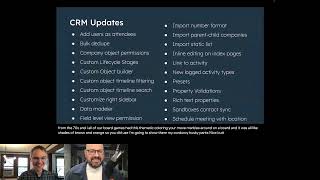
Nice. Awesome. So here are. Here is a list of all the 75 updates I did. The formatting on these slides gets kind of gunky because I just have to shove so many stuff, so many words onto a single slide. But here are some CRM updates. I'd love to hear any of these stand out to people. Any favorites among the crowd? Either LinkedIn is really quiet or it's broken and I'm not able to see the chat. I'm not sure which of those is the case. How are things in the webinar?
We are looking good in the chat. People are loving bulk delete. We got Francis loves bulk delete meetings with locations, parent child companies, which I know we'll hear about in just a little bit. Custom Life cycle stages from Carolyn. People are loving a lot of these new CRM updates. A lot of love for the custom life cycles for sure. Wow. It's so funny because as I reviewed the Jeffies coming into this, I'm seeing in the chat that there is such a variety of the updates that people love and this is just good to know that the product team is really hitting the zero for our people here. This is awesome.
Yeah. Just to let you all in on the inside joke there, HubSpot has an internal wiki where any employee can publish pages behind the scenes. Sort of in preparation for this event, I do a post on our wiki called the Jeppies J E P P Y the Jeppy Awards where I just take my top performing LinkedIn videos of the past quarter and give kudos to the product teams who built the the products that I announced in those videos. And it's just an opportunity for me to shower praise on the the excellent work those teams are doing at such an incredible rate to get these things out there. But yeah, all of these are great updates. Not all of them won Jeppies, but all of them are worthwhile and I love hearing that they are an asset in your lives. Moving on from CRM updates, if I can find my mouse platform updates, this is the worst. Those of you who like Design are probably really offended by this slide and it's the worst one. I promise after this they get better. But again, just trying to fit as many things as I can onto here. Lots of updates to payments which I know excludes some of you and I'm really apologetic about that, but integrations, beta management, reporting workflows, mobile app. These are available everywhere. Any favorites on this page? Cool. We can move on. So here's sales and service Hub updates. So Sales. Interesting. Sales Hub only got free updates, updates to its free tier or updates to features that are also shared with Service Hub. Which I think is really interesting that we're sort of sharing the, the magic of Sales Hub so broadly with, with users. And then Service Hub got a got a few updates of its own, which is how it knows the head Sales Hub in my, in my chart there.
Kyle, we had a quick question in the chat. Are most of these for enterprise? I know as we get into the top 10 we're going to identify which tier they're in. But when you look at these updates, are you seeing more in the enterprise level or where are you seeing them?
That's a great note. I haven't I Mark, can you jot down somewhere? Remind me next quarter I'll do a. In addition to a breakdown by Hub, I'd love to do a breakdown by tier. I do feel like the enterprise tier has, has gotten a lot of love recently. You know, anything relating to custom objects is going to be in an enterprise tier. Anything relating to sandboxes, it's going to be in an enterprise tier. But I mean we're also, as you'll see here, we're seeing lots of investment in the free levels too. Starter and professional. I'm a little fuzzy on, I don't have good intuitions on, on how many features are showing up there. I will call out a couple as we go through the top 10. But yeah, I'll go next time around. I can go a level deeper and maybe figure out some little tags or symbols I can put on these to to indicate if they're enterprise or professional or starter or free or what they are.
I'm seeing another BART graph in our future.
Yeah, yeah, we'll get even more 70s colors next time around when we come together in probably January. Cool. And then here's Marketing Hub. So I mean there was a Marketing Hub slide previously, but here's just the free updates here on the list left. Apparently I did not know this, but it is, it is somewhat contested. Maybe some of you have strong opinions on lists being branded as a Marketing Hub feature instead of a core CRM feature. But anyway, they're free and so Regardless, all all HubSpot users have access to or all HubSpot customers have access to those lists and then some paid features in the paid tiers of Marketing Hub. Again, these aren't broken out by tier, which I should probably work on, but I think most of these, maybe all of these are professional. I forget where comment mode lives, but social is Professional email product recommendations. I think products. The product library is a professional feature. I forget.
Yeah. We're also seeing in the chat the Instagram Carousel post feature. People love it.
Yeah, yeah, yeah. So I gotta tell y' all marketing. I've spent my entire career at Hubslide Academy teaching people about Sales Hub. Right? So Marketing Hub is our, our oldest, longest standing, proudest, most mature product line. But I'm a little blind to what's in it because I spent so long in sales land and so marketing features come through and I never have. I don't have any intuitions about what will be exciting, what won't. And Instagram Carousel, like I shared that and so many people were so excited. Apparently this is a thing a lot of you wanted for a long time and I'm so delighted that you. You have it now that HubSpot can do that for you. And then these updates are all. This is kind of my CMS Hub slide. But all of these are available in Marketing Hub. That bottom one is also available in Service Hub. But Hub DB getting lots of love and more love planned for it in the future. Getting a lot of things that I know a lot of you have wanted for a long time. Drag and drop reordering of rows. Huge. Such a little thing that was driving so many of you bonkers for so long. I'm really glad to have that, that blocker removed for you. So I believe. Oh no. Operations Hub. How can I forget? Operations Hub. Operations Hub saw some really cool updates with the Data Quality Command center, showing you how your properties have changed over time, how your integrations are doing. Dynamic webhooks now the webhooks action inside of workflows can have dynamic values in it, which is huge. The ability to identify and fix formatting issues. We'll look at that in just a minute. But that one's totally new and so fun, so awesome. Then the format data workflow action where you can capitalize or remove spaces or whatever now has a preview where you can see what the output will look like before you save the action, which is going to save you a lot of time with with designing and troubleshooting those. I believe that's my last slide on the list of all the updates. I don't know if anyone was keeping count, but it should be right around 75. Any comments before we head into the top 10?
Right now in the chat there's some good suggestions. People are running tagging contacts in LinkedIn. People really liking lists and how we're seeing some updates there and how they're going to be UPD in the future. The custom cards pipeline also I think is a big one for a lot of people. Now I know as we start to head into the top 10 from the quarter, we get that deep context and again, as Kyle starts to go through these, if you've used these updates, let us know in the chat. We can bring you on stage, you can actually show us or tell us how you've actually used these updates. This is meant to be kind of share with everybody and we'd love to have you join us up here and share how you're using the top 10 HubSpot tips and tricks updates from Q3. 3.
All right, yeah, absolutely. As I go through the top 10, I will live demo each of these and again the subtitling will disappear during that and I apologize for that. But if anything, I show you sparks inspiration or you've implemented these things and you can tell us what it's really like when you use it at your real business. Let Mark know in the chat and we'll bring you on so you can share your experience with everyone. I think peer to peer learning is really powerful and I'd love to to lean into that here. So without further ado, top 10, these are in a totally arbitrary order. So in 10th place, custom goals. So the, the goals app inside of HubSpot recently got updated and and a new interface and a few new options and that was cool. But now in sales and service enterprise, notice the yellow in the top right corner here you can create fully custom goals for your sales and services team. So if I just come over here to HubSpot real quick, I can show you this. If we go to settings and tracking and analytics, this new goals area here is where all the magic happens. And when you create a goal, you now have this option to create from scratch. And again, this is sales and service enterprise. So you can do sales and service goals this way. So we'll call it that. That's a great name for a goal. Make a note of that. So you can look at different objects. Call, deal, meeting and ticket. So obviously ticket is more for the service teams and deals are more for the sales teams. Calls and meetings could go either way. But look at all the options we get here. If we go with deal again, I always kind of default sales hub because that's my home base. We could do days to close, right? Deal, Days to close and we can choose an aggregation type. Let's do average days to close. I'm a really speedy salesperson as you can see here tracking method. You tell it right, in this case, lower value is better, right? We want those deals closing faster, I presume so you, you set it that way and then you can filter with a, you know, by close date or create date or whatever you want to do. You can choose specific deal stages to look at, look at if you want to. Specific deal types, new business or existing business, whatever you want to do. You can define this goal and then you can set goals using this fully custom goal instead of just using the standard goals that come with HubSpot. This is, this is a lot of flexibility. If you want to get really granular with your data and the sorts of metrics you hold your teams accountable to. This is a game changer for, for you.
Real quick, Kyle, question in the chat here, it says beta on that. Is that a live feature? Is it in enterprise? What's the status?
So this is an enterprise. Yes, it is still in beta. I forget exactly. If you need to opt into it, we can just explore that together real quick. Or if it's just there. So sometimes beta features you don't have to opt into and sometimes you do have to opt into them. But if we look at the current betas here, I don't see it. So I bet if you have sales or service, enterprise, this is just there. We're keeping the beta tag on there because it's still in the early stages and we're trying to get it exactly right. But it is, I mean, it is available to you now.
Got it. Trish, we'll follow up with you after. I'll drop you a message. Trish is saying she's not seeing it even in beta. So we'll follow up and see if we can make it happen. I'll talk to my beta guy. I gotta talk to my beta guy.
Yeah, yeah, Trish, reach out to me, email me, DM me on me on LinkedIn, whatever's easiest for you. And I'm happy to dig into that with you because it's a fun new world of goals. So that's 10th place in ninth place. This is kind of cheating. This is not one feature. But we've seen a lot of customization options coming to HubSpot recently and I lumped them all together into this 9th place thing. You can now customize deal cards by pipeline and you can, which I believe actually that one might be a free, free feature, but then you can customize the right hand sidebar in your CRM records. And that is a professional and enterprise feature. With professional, you can just customize the default right hand sidebar and then with Enterprise you can do it per team. So let me just show you real quick what this looks like. If we go to our settings page again. Well, I mean just quick orientation. Real quick. How about if we look at a contact record here? My beloved wife Katie. All CRM records inside HubSpot have this three column layout. The left hand sidebar, you've kind of always been able to to pers to customize what properties appear here. The right hand sidebar. We just recently announced the ability to to customize and then one of the first announcements of this quarter we're in currently. So too early to be included in this award show is the ability to customize the center pane. But let's take a look at this right hand sidebar. If we customize go to Record customization tab. We're going to do this for contacts, but you can do it if you look at your objects list here. There are a lot of different objects you can do this for. If we want to customize the right sidebar, we can just click on this. And if you have Enterprise you can create a team view. If you create. If you have professional or Enterprise, you can edit the default view. And here what we're seeing is the list of the, the, the cards, the sections in that sidebar. Right? So right now I have Playbooks up at the top. If you don't like Playbooks up at the top, you can drag and drop. Bring it down here and now for everyone. Companies will be at the top. Then Deals, then Playbooks. Right? And Cars. That's a custom object I've got. If that's not actually important to you, you can remove it. It can just go away. Workflow memberships, right. Maybe you don't care. Contact, create, Attribution. Don't even know what that is. Away it goes, right? And then there are other cards you can add here if you want, like Sales Navigator. Right. If you're using that integration, you can add that in and you can save it. And then you know, if we want to go back to a contact we can, we can see now that this is totally different companies is at the top deals. Playbooks is now here. So this is, this is what this update has given you. So that's kind of like one piece of customization. Totally unrelated but still very fantastic is the deal card customization. So when you look at a deal board, you see these cards that represent the deals and you can drag and drop them to the different stages and you, if you have I believe starter or above or is it a professional above. You can have multiple pipelines. You can now customize those cards per pipeline. So if you go to your deal settings and you go to your pipelines, you can customize the deal cards. Right. And you can choose what properties appear on here. You can add more properties if you want, you know up to five looks like and you can, you can reorder these and make it look however you want and make sure that your, your reps are seeing the most important information on those cards. So that's the little bit about customization that is in ninth place.
Got it. And again when we share the slide deck with you after, we'll have links to a lot of these different knowledge based articles or videos that might give you some more context to what those customizations are. So thanks.
Okay. 8th place import parent child companies. I, I know one of you called this out in the chat as one of your favorite features. This one is huge. There was not a good way to do this previously and now you can totally just do it in the import. If we just quickly go to import and export since we're here in settings and we'll go to import. And this is specifically for companies with company records. You can have parent child relationships. So if you think of Maria the hotel chain as a parent company, they have a bonvoy and a whole bunch of, you know, garden suites and all kinds of different sub brands, right. That can, that you want to, you might want them as separate company records, right. Because they have separate domains, they have different employees. Right. But you want them all rolling up to that Marriott main parent. So you can now do that in an import which used to be impossible. So if we're importing some companies here and if we choose a file my downloads got a lot in here. Nope, none of those. Inbound import. Yep. Okay, there we go. This is the one I used as a demo at inbound. Look here, look. The main thing I want to call your attention to is parent id. So if you, if you can see here the names, these are all sub brands of Toyota Motor Company, Motor Corporation, whatever Toyota is called. And this is the parent id. And so you can just map this now and if you go search for parent company it will map it and this validator validates it. Right? They were just numbers, now they're links. And if I click on this, we can double check to make sure you're assigning these to the correct. Yep, Toyota. Perfect. Close that tab. We're back here. So cool, so powerful. So now all the, all of these, if I imported them, I've already imported them, so it wouldn't do anything super magic in this demo. But if we went through the process, these would all get associated as Toyota's children companies, child companies, and that is just going to save a lot of folks a lot of time.
Curious real quick for folks in the chat, it looks like we got about 73 people here in the platform, a whole slew of others on LinkedIn, parent child companies. Is that something anybody has used so far just in the chat give us? Yes, we've used it. Not yet. Just curious to see who's using that as we get on. Good. We see Heather, a few people actually here in the chat that are actually using it already. Very cool.
Nice. And I'm curious. So the import, obviously, maybe not obviously. In my mind, the most basic obvious use of the importer is you're first getting started with HubSpot. You got to get some data in there. Maybe you're coming from a different platform, maybe you just have everything in spreadsheets, but you pull it all in that way. I'm discovering as the import tool has received a lot of love and investment from the product team over the course of 2022, you all seem to be importing pretty regularly. I would love to know when are you importing? When is this relevant? Is this a regular thing you have to do on a, on a cadence? Does it just come up occasionally out of nowhere and you have to make it work? What is your importing life like?
Interesting. We're seeing some answers here pop up. Chris Higgins says after trade show, so after big events, gonna do a massive import of people. Same with Jenny, new sales members onboarding is coming up, but a lot of people saying kind of after an event. So like event based imports, right? You go to a trade show, you go to a conference, some events. So a lot during events we see some folks also that are doing like moving contacts in from other systems, cleaning up data. That's all a lot of people use. Importing is a way to just kind of clean up data. So I think that's really. Yeah, Mike, really, really good comment there, Jen. Obviously saying for their clients, no more often than importing for their own portal. So Jen, you're using it a lot for your clients, but in, in yours, it's kind of like your own initial import.
That makes sense. Yeah. You partners, you, you're probably setting people up all the time and import is an important part of that. There have been just so many updates to the import tool over the course of this year, us and even last year too. I was having a conversation with an admin friend a couple days ago and I'm thinking maybe someday at the admin hug here we will do a session just on importing because there are so many tiny settings and different knobs you can turn and choosing whether we overwrite existing values or not and just a lot of options. I think a deep dive on that to make sure you're all using this optimally would be be beneficial. That'll probably be 2023 sometime, but stay tuned.
Well, if we have an import party, we got at least seven guests for the import.
I will be there too, so make it eight. Moving on to seventh place presets, I so I was prepping for my Inbound presentation and I was going to talk about teams and hierarchical teams and primary and secondary teams and I got so confused I could not keep it straight. And so I reached out to the product team that's in charge of that and they sat down with me and walked me through it and told me those are actually changing. We're actually in the process of rolling out clearer names for those features, but they also dropped on me presets. They said, oh, and by the way, this probably won't be ready by Inbound, but we're doing this thing called presets. And and I asked them, can I live demo this at Inbound? Because I think people really like it. And they're like, yeah, sure. So they, they gave me access to it early in my portal. It's now live. You now have access to it too, if you have professional or enterprise. But let me just show you this in the same way I showed it at Inbound, because I think this was my favorite moment of my Inbound presentation. So I'm talking about users, I'm talking about teams, and I said, and there's this new tab coming called Presets. You don't have access to it yet, but you will now. You all have access to it. That's great. Or you can create a preset and you could define what someone's homepage is, right where they will land when they log into HubSpot, what their default dashboard is if they're looking at a dashboard, their language and their date and number format and for heaven's sake, their email signature inside the CRM. And this is in both my sessions. So one time I got an applause. Except for the very end of People love the ability to set email signatures. I've heard from so many of you for so long that you really have wanted a way to set standardized email signatures across, across users. Here you can do it. You can use personalization tokens to pull things from their user profile, right, like their profile picture, their meeting, their default meeting link, you know, first name, last name, email phone number. And also we've got this ability to drop in HTML so if there are images or formatting you want, you can make this match your brand exactly the way you want. Once you've got it all set up, you can come in here, select some users to apply it to, and it will just work for all emails sent from inside the CRM. So this is, this is a really exciting update. I'm so happy that it's now out and this is one. I fully expected it would be an enterprise only feature. I feel like a lot of things that deal with managing users on a grand scale end up in enterprise. I was so happy and relieved when it was released in professional and enterprise. So if you have any professional tier or if you have any enterprise tier, you have the ability to set these presets and I think that's such a game changer if you're onboarding a lot of users at one time or if you just want to standardize things like email signatures, right, and what dashboards people see there's just for you as admins, there's so many things you can do here to, to make your team's life better and I think that's great.
Kyle, quick question coming in regarding presets for email signatures. Will it override their current signature? So is it a preset? If you go kind of like organization wide, will it override their current email signature?
That's a great question. And I actually had that question as I was talking just now because I saw this. I don't know exactly. I think it probably will. I don't know what this toggle switch is for. I feel like that's fairly new. But that's a great question. Feel free to follow up with me afterward on that again. In the speaker notes for these slides we have links to documentation, so when I send the slides out afterward, be sure to check there too. But yeah, if you want me to get you a definitive official answer on that, reach out on email kjepsonubspot.com or DM me on LinkedIn. And I'm happy to ask that the same engineering team that gave me early access, I'm certain can explain to me the logic of how it works and I can get you that answer, no problem. Cool. Let's power on to sixth place property updates. We had a couple of huge updates to Properties and I love that both of these are just in the free CRM. If you're using HubSpot, even if you aren't paying us anything, you have the ability to put property validation rules in place, which is huge. And there's this new property type for rich text, which is incredible. So let's take a look at these real quick. If we go back here to Properties and we create a new property, and this property I'm very cleverly going to call that, and we'll put it there and if we. This works, I believe, just for text and number properties at this point. But you can put validation rules in place. You can set a minimum character limit, a maximum character limit. So if you want this, if this is some sort of ID number or something, and you know it has to be exactly 10 characters, you can set the min and max to 10 characters and then people will only be able to save a value in here if it's exactly 10 characters. Or you can make these arrange, right? Like if you know it needs to be between 7 and 14 for whatever random reason, you can do that. You can also restrict it to numeric values. So no letters allowed and no symbols allowed. Or you can just restrict. We don't want symbols. It can be numbers, it can be letters, but we don't like ads and hashtags and ands. One question that came up during a webinar, I was doing this with the team that built this feature. Someone asked, what about names with apostrophes in them? We took that into consideration. This will not bar apostrophes, so that's, that's worth noting. But this is, this is just a new standard part of how properties are built inside HubSpot, which I think is so exciting. Then the other thing that's really cool is this new property type called rich text. And, and the thinking behind this is that you can look if spoiler, you can now edit properties from the index page. We'll get there, be excited. But you, you, if you create a rich text property type, you can change the font of the text you put in here. You can change the size, you can do formatting stuff, you can change the color of it, you can drop in emojis, you can actually paste images and videos and things in here. You can put basically anything rich text you would like to put in here. The thinking when we built this was that you would use this to personalize CMS pages. You could Put cool values in here and put that on certain contact records. And then you could have personalization tokens in emails or in website pages and pull in cool formatted text instead of just plain text where you would have a personalization token. That was the thought process we had what we were discovering. The very first people to adopt this, the ones who were most vocally excited about it. We're using it for links, right? Because you can hyperlink text here. We're using it to embed like video thumbnails. We're using it to, for all kinds of clickable things. Right. And it works great for that too. So if you wanted, you know, if I was going to send out a, an email with a link to a Vidyard recording for something, I could drop that in here and then it could be included. So that is. This just opens up a wild world of flexibility in terms of what you can put into a property and what you can therefore pull into a personalization token. And I'm just so excited to see how, how people use this.
People are asking if there's great examples. So we just put something in the chat here. If people. Anyone has an example of how they're using the rich text editor?
Yeah, I would really love has anyone here used it to great effect. Is anyone really happy with the way rich text has been working for you?
I just popped it in the chat. Let's move forward. Just we're checking on time but if somebody does we can maybe bring them on in just a few.
Yeah, I would love that.
We want you all to participate. If there's something, an update you see that you've used already, give us a shout in the chat here. We'll bring you on screen to share.
Cool. In fifth place, lots of updates to workflows. Probably not going to be able to demo all of these just because we are a little pressed for time. But you can now delay until a specific date. That one I will show you because I think it's so cool you can now delete contacts. That's just a simple action in contact based workflows that deletes a contact. So if that's the thing you need to do, you can now do it. But that's one of those. With great power comes great responsibility sorts of things. Careful with that one. And then inside Operations Hub you get dynamic web hooks and format data preview. I already mentioned those a little bit earlier on. So let me just show you this Delay until date action. The thing I love best about this is that it's just a Standard workflow feature. If you have workflows, meaning if you have any professional or enterprise level hub, you have this ability to delay until a date. I thought for sure when this was coming out it's going to go Operations Hub because Operations Hub seems to hog all the cool workflows update. But this one is just available to every workflows user. So let me just show you here. If we go to workflows and if we create a workflow from scratch and we'll just do this, that's fine, wait for it. We can add delay until a date. So this new one right here, and this is so cool. This is so fun. You can delay until a particular calendar date, right? So if this is like if you're going to run an event and you want to send an email two days before or a day before to remind people, you can, you can just put that date in right here, right? A date and a time. That's when we're going to delay to. Or if you want to use a contact property, you could get even fancier, right? So if people are registering for events and if those event date and times are getting stored in a property, right, an event date property, then you could delay until that property. Or if you want to send something on their birthday or whatever, I don't know what you would use it for. You can send it on the date. You can send it a couple days before the date or a couple days after the date, right? And so this is pretty powerful, right? I love this just all by itself the way it is right now. But maybe my favorite part is this little thing right here. Look at this pro tip. If a contact reaches this delay after the date, you can add a branch branch to send this contact to a different set of actions. So let's just, yeah, let's, let's put a date in here. Let's say yes, add a branch and look what happens. So we now have our delay right? Until October 20th at midnight. And then this branch is looking at the outcome of this action, right? And if they were assigned on the date, here are the actions we're going to take, right? So if we are waiting until this date comes, but if someone gets enrolled in this workflow on, let's say October 21st, what happens? Well, then they're going to come down this branch of the workflow, right? So now you can think about what it is you actually want to accomplish, what behavior you're trying to drive on this particular date and how people might be coming here. And if this is like an event date. Maybe here you're sending people registration information and maybe here you're sending people the recording afterward. I don't know, whatever you want to use it for. But I just think, I feel like the product team really thought this through and tried to give you all the options you need to really succeed in delaying until a particular date. And they've just made it so easy to. To do it just by checking that box. This, this branch gets built for you. So that's really exciting. Again, that is in all versions of workflows. So if you have anything professional or enterprise, doesn't matter if it's marketing, sales, whatever it is, you, you can do that trick.
Yeah. And just to clarify that if, then branch you can apply the custom date to. Like if it's Tyler saying, if there's an event, we could say, hey, if it's before this date, take this action. If it's after the date, take this action. Like, send them a recording to the event that took place. You can have that function within the if then branch.
Cool. Okay, 12 minutes to go and four more places. I got to talk a little faster. Not the thing I ever thought I'd say. Custom object builder. I won't spend a ton of time on this one, but custom objects launched in 2020. Now, two years later, finally, you don't have to know how to run an API call to be able to build a custom object. Which is just great news for anyone who doesn't know how to run an API call. It's funny, when we first launched custom objects, we said we want to have this barrier. We want to make it a little hard to put custom objects in because we want to make sure you're really thinking through it and being responsible. We've decided we trust you to not ruin HubSpot. Now, it's pretty easy if you have an enterprise tier to create a custom object. And let me just show you real quick how that works. If we come in here to our object settings and go to custom objects, there is just a create custom object button and you can just come in here and give the singular name and the plural name and then the primary display property and secondary display property. So the primary display property, if you imagine, for example, a contact record, and in that left hand pane up at the top, you see the contact's name, right? Or when you're looking in index page, you see the name listed and that's what you click to get to the record. That's the primary display property. So what is this thing called? The individual records. Is it a name, is it an ID number? Whatever secondary display property appears on associations. Right. So that right hand sidebar we were customizing earlier. If you had a card for this custom object and that primary display property was big and bold at the top, what would the second the littler property underneath it be? You can just set that up here and save and you get a custom object. Awesome. Rolled into this update. A delightful surprise. Maybe nobody was expecting and nobody thought even to wish for, but I think is wonderful is this data model overview where you can see all your properties listed out with their associations and how they connect to each other. This is an early version of this. As you can see we arrange it in a grid and that's not always optimal. It's a little hard to tell where some of these lines are going. But you can mouse over this and see tickets are associated companies, contacts and deals, which is great. But this is going to get prettier in the next little bit. And so I'm excited to see how we iterate and improve this over time. But as you're thinking about adding new objects and where they might fit, you can remove some of these, just hide them to get a sense of how things are connected to each other. And man, pets aren't associated anything. Deliveries man. Maybe we should fix that. Anyway, that's the Custom Object Builder and the data Visualization tool. Which enterprise? Any tier.
Kyle, question I know we got 10 minutes left. Tyler and Sarah are asking what would be some good examples of when to use a custom object.
Yes, that is not a thing. I can answer simply in one sentence I will say custom objects. There's a fire burning inside me. I am going to do some custom objects workshops. I'm going to try to get one in before the end of this year and then I'm probably just going to do it quarterly or something because this comes up a lot and I think it is something you really need to think through. How do you think about when to use a custom object versus some custom properties versus maybe like a row in hubdb and how do associations fit in and all. There are so many different places you can store data inside of HubSpot. I will give you a masterclass on that rather than a one sentence answer. There is a lesson inside HubSpot Academy called something like Managing your your data in HubSpot. If you just search for custom objects. It's the only lesson with custom objects in the title. You can watch that it's a little outdated. It's from when custom objects first came out. And the webinars I'm going to run are kind of early versions of an update to that lesson that I'll do later.
Can we bring Trish on real quick again? I know we're coming up in eight minutes. Trish has said it's got some great examples of those custom objects. We got a few folks asking in the chat, so let's do it. Trish Erickson, come on down. Sorry, that's the price.
Give us our music. Mark, you should now have the ability. Here she comes.
All right. Can you guys hear me?
I can.
Perfect. I don't have the ability to share my screen.
What?
Nope.
Well, I'm gonna push this button and hope I don't regret that you're now the host. I don't know if that means I'm not the host. Oh, I gotta stop. Sharing is the problem. There we go. Is it better now?
Yes.
Way overthinking this.
I utilized the custom objects when I was. Can you see the full screen on my screen? It looks like half of it is. Okay, cool.
Yeah, I'm only seeing half of it. Also,
let's try. Try sharing one more time with feeling.
Here we go.
There we go.
Yes.
Excellent. So we have a unique business model. We're in the facilities management industry and we have a pipeline for franchise who do our service cleaning and then we have a pipeline for customers. So we pull in the customers, we also have the franchise owners and we pair them together. We are going through a bit of a choppy patch with our ERP system and so there was no way to really tell. Okay, if I have this customer, who is the service provider servicing this customer? I created this one with a pull from our ERP system that is eventually going to map to all of these fields and update HubSpot via API. But the custom object now takes the contract ID and pairs both company records, if there are any. Because I couldn't pair companies except for parent child, and that's not what I wanted to do. And this was my solution for that. If you go on any of these company records here, you can actually see all of their contracts as well. Same for franchise. You can go see all of their contracts and all of their buildings that they're servicing. That is how I implemented custom objects as soon as I got access to it.
Nice. I love that. Thank you so much for sharing. Sure. I hope that's helpful to those of you who are looking for examples.
Thank you for having me.
Yeah.
Five minutes left. Go, Kyle.
Go, go. Okay. Bring back my shared Screen Trish. I really appreciate that. I'm always so happy when people come up here with me. It shows how these work in the real world instead of the hypothetical examples I'm forced to come up with. In third place, this new option of fixed formatting issues. We will do this super fast. This is an Operations Hub feature. It's in Starter, which I think is so great Operations have started getting a little bit of love. So under the Actions tab here, there's now this fixed formatting issues option. And this is a new tool that identifies here, look. Oh, this capitalization, that's not right. And you can just accept these suggestions and it will fix them for you. And it also, I think this is really cool. Email address likely temporary or invalid, right? These, these email addresses I've just made up or taken from like burner email address websites. It's identified and you can, you can remove them the emails to, to save your sender score. This is super cool, this ability to accept them. Onesie2z that's in operations Hub Starter, what's in Professional and above is the ability to automate some of this stuff. So you can say I always want to first name capitalized, I always want last name capitalized, right? We can, we can fix these sorts of things and just create the automation right here. Turn it on and then these issues will never occur. When you do your imports, when you have things coming from integrations, they will all just get cleaned up in the moment, which is fantastic. Three minutes to go. Custom Lifecycle stages. These already got some love and I hope you all know that this exists. It's one of the most exciting updates ever. My understanding is more than 100 HubSpot product teams worked on this and it took them more than a year to get it done, more than three years to get it done. But now you have this ability. You can decide what life cycle stage is set when various things happen. And you can edit, delete, add, reorder, rename your lifecycle stages. Common question, can people now go backwards through lifecycle stages? That limitation is still in place. This update does not address that. But if you have ever thought why do we even need other or why do we even need evangelists? You can now just delete those. Or if you think we don't call them opportunities, we call them something else, you can rename them, right? Or if there's a stage you really just need to add, you can go ahead and add it in. So that is now live. And then I think my favorite, the most delightful, the biggest update I already showed it to you a little bit. I'll show it to you again. Now, this index page that's kind of laid out like a spreadsheet actually is editable. Like a spreadsheet. You can put things in there that you want, whether it's text, whether it's checkboxes, whether it's a date, whatever you want to do, you can just do it. And when you're done editing, you can save. This is going to save a lot of people a lot of time, and I couldn't be happier with that. It's not an update any of us was expecting. It came out of nowhere. Just a bit of delight for all of you from the HubSpot product team. So those are the updates with the minute and a half. I have left your forecast for Q4. We already know how my forecast for this quarter went, so let me just say I have no idea what's going to happen with HubSpot in the coming three months. All of the big things we plan to do in 2022, we've now done. Journey analytics just came out. I imagine that'll be in the top 10 when I do this. You'll be able to customize that middle pane of the CRM records that's out now. I don't know what else is in store. I don't know what surprises are coming right now. Our product teams are very busy setting their priorities for 2023, the big vision, what we're going to build next year. And I will just let you know about the updates as they come out. We have 45 seconds left. Thank you all so much for coming. I am going to drop into the chat a survey, so I am honestly just kind of making up these events as I go. I would love to know if they're actually helpful. I would love to know if you got out of it what you were hoping you would get out of it. If you can just give me some feedback. Last time, the feedback we got was we want captions. We figured out captioning. We want documentation. As I said in the speaker notes of this deck that I'll send out afterward, you now have links to documentation and you also said, we want to know what tiers things are in. Seems like I go even deeper on that one. But I look forward to pleasing you there in January where we come back together. So thank you all so much for being here. 5 seconds left to go. I'm gonna go ahead and shut it down, but thank you, thank you, thank you. Have a great Friday. Great weekend. And I'm sure I'll see you around LinkedIn before long.










