#HubSpotTipsAndTricks LIVE! | Q4 2022
Kyle Jepsen and Mark Hands walk through HubSpot's latest CRM, deal management, and marketing features from Q4 2022. They demo custom objects, show how to use the new tools, and answer questions live from the audience.
All right, we will share this. The classic trick. I'm sure you've all done that if you've ever used Google Docs. All right. Oh, and we wanted to turn on. So Google Slides has this cool feature captions. Let's see, is it going to work? Haha. Okay, now we have live captions courtesy of Google. So hopefully that helps a little bit with accessibility when I Toggle over to HubSpot and do some live demoing. HubSpot does not have live captioning at this point. Put that feature request onto the Ideas forum. But we will, we will use this as long as we're on slides and hopefully that is helpful to somebody. So this is HubSpot tips and tricks Live. I'm Kyle Jepsen, this is Mark Hands. This is the third time we've done this. Now, Mark, is that right? That is correct.
Third time's a charm.
Yeah. Quarterly roundup of HubSpot's updates. So this time we're talking about everything that came out kind of post inbound October through the end of the year. I watch a lot of TED talks. Mark here has actually given a TED Talk and I have watched it. Science Fist is, you should, you should know Google, it's Science Fist. You should, you should check it out. But there's a third speaker here. Hopefully we've had very good luck the last couple events. These new product, these new features coming out from HubSpot, they're having an impact on you as HubSpot users. Many of you are implementing them right away and doing remarkable things. I live mostly in a world of theory. I can tell you what the feature does, I can tell you what we hope you'll use it for. But I would love it so much if one of you would. If you've been using one of these tools we're going to talk about, if you could let us know in the chat, I would love to bring you on camera with us and you can demo a little bit, something you've built, something you're proud of, just to give others inspiration. I think this peer to peer learning is one of the most powerful things we can do. If you are joining us on LinkedIn Live, I have put the link to the actual webinar in the description. I can't bring you on stage from LinkedIn Live, so if you have something you want to share or think you might want to share, head on into the actual webinar platform. So we can, we can bring you on, but we've got a lot of great updates to talk about. And I'm hopeful that we can have some participation there. So HubSpot launched kind of a lot of features this past quarter. I, in fact, used this exact same slide three months ago. I said the same thing. HubSpot launched kind of a lot of features this past quarter. Last quarter there, I released 58 videos on LinkedIn. And. And some of them covered multiple features. So there were 74 updates I highlighted in Q3. This quarter was not quite as big. There were only 58 updates, which only. Right. Like, so easy. You probably don't even need a webinar to keep on top of them. Right. The truth is HubSpot continues to move at an incredible pace. We are releasing features all the time and these are just the ones I am noticing and choosing to highlight. Right. I do one video a day. That's kind of my limit, I think more than that. And it would stop being useful. And so there were even more updates than that that got released. And some of them just in the background we may not have noticed. But today we're going to focus on these 58 that I. That I highlighted in my LinkedIn videos. And, and so, standard question, which part of HubSpot got the most updates this quarter, do you think? I'd love to see some guesses in the chat. This continues to be a trick question as we are going to talk about a lot today. Sometimes it's very hard to categorize which part of the platform a. A feature belongs to, but I'd love to hear from you. Your guess is George Logan says marketing CRM is a. Is always a safe answer because that's what HubSpot defines itself as. So.
Ooh, Ops. Hubs. Oh, Mandy.
All right.
Or cms. All right. Security. All right. All right. They're coming in. Keep that chat live.
Yeah, keep guessing. We're going to build another chart. This is the first one I did two quarters ago. Then last quarter I did this one. And you all said that this is a nice 70s regal beagle color theme. I'm sticking with what I know. And we're going to do that again here. Yes. We had a large foundation of CRM updates. The things that are just in that core CRM functionality. I have some slides breaking these down in just a minute. But there are other things. This deal management category, I will talk to you about this in just a minute. You might be thinking deal management is definitely a CRM feature. And you are right. I. I don't have an argument against that, but I'll explain to you in a minute. Why I separated it out as its own category. I think some very interesting things are happening with the way HubSpot is being developed. Lists. What's your opinion, guys? Is Lists a marketing tool? Is it a CRM tool? Is it some other kind of tool? I put it in its own category. Lists got a lot of love this last quarter, which is really cool to see. This is one of our oldest, most fundamental tools inside of HubSpot and it got some cool new things going on. It's getting some revitalization. So I'm excited about that mobile app. Saw some updates, conversations, got a couple reporting, got a couple. And then payments is still us only, but it got the payments actually got a lot. I've held off on doing videos about payments because I feel bad. Everyone outside the US is always like, kyle, another one of these videos. It doesn't apply to me. So I'm kind of holding a lot of payments updates in reserve. I'll probably do a power video at some point and just go through all of them. The couple enterprise features, custom objects, we'll talk about business units. Had a limit change if you have enterprise. There are some features that are not Hub specific, but they are enterprise specific. And they got some updates and then one update to some integrations, one update to workflows and then the Hub by Hub breakdown which continues. Just visually I feel like this is a disaster, you guys. Last quarter you didn't hate it. So this quarter I did it again. Operations Hub is kind of off on its own, doing its own thing. But like CMS and Marketing Hub, what I'm trying to convey here is CMS got two updates, but one of those is in HubDB, which Marketing Hub also has access to. So that's that dotted line along the bottom. And then Marketing got a ton of features that are just unique to marketing. I would say of all the Hubs, Marketing got the most that's unique to it. But then up at the top, this, this WhatsApp integration is incredible, you guys. And it exists both in Marketing Hub and Service Hub. That's that one at the top. If any of you have been using the WhatsApp integration, I absolutely want you to come on camera with me and talk about it. That's going to be a hard one for me to demo because I don't have a WhatsApp business account and it's just so cool. I'm so excited to hear what you guys have been doing with it. Service Hub. Look at this disaster. It's not a disaster. I actually love this about HubSpot that so many features are shared across hubs. I think that's fantastic. We're becoming less hubby, less hub centric and just giving you the features you need and putting them in the package you might have. But sales and services shared a ton of updates. These are mostly Playbooks updates and then call analysis updates. But sales did get one update that was just unique to sales service. Got a couple that two or three it looks like that were just unique to service. And then again WhatsApp was shared across the top. So here's my latest attempt at graph building. I'd love your feedback on whether this makes any sense at all. The main piece of feedback I got from you guys on my chart like this last quarter is that you like this breakdown by product line, but you also want a breakdown by tier. So new this quarter, a breakdown by tier. I'm going to go through these slides which are going to list all of the updates that, that I've, I've highlighted in my videos. But they are going to be color coded and have these little, I don't know what bullets or buttons or whatever you want to call them to indicate what tier they belong to. And hopefully this will make it a clearer to you of I, I spent more time than I'm proud of on these.
Be honest with the people. We said this like Kyle, this is the time you gotta let them know how is the sausage made? Right? You all go to so many webinars. They could be sterile, they could be good, they could be great. Kyle, how much time did you spend on these color coding making these little icons?
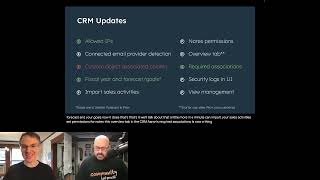
Yeah, so my first idea was I'll just color code them. And I came up with this color coding team and I color coded them. And then I was looking at the slides and like I don't even remember what these colors mean. Nobody else is gonna remember what they mean. And so I got rid of all the color coding, just went back to plain white text. I was like, you know what I'm gonna do? I'm going to replace the bullet points with these little circles with, with an F and S, a P or an E to say what tier it's part of. So I went through and I did that, but it wasn't color coded, they were all white. So they basically just looked like bullet points. It's like this isn't helpful either. I got to do both. And so then I went through and I did both. And here you are, all the first to see world premiere color coded bullet point button things. So here you Go. We're going to do a few slides of these CRM updates. So somebody mentioned security. We do have some security updates allowed. IP's is super cool. It makes it so if you want to limit so people can only log into your HubSpot account from certain approved IPs, you can put that in place. That's a. That's a starter feature. Ta da in green. Hooray. Connected email provider detection. That always when you have connected a personal email to HubSpot, you've had to say I'm using Gmail or I'm using Outlook or whatever. And then it would work. Now if it can, it'll automatically detect it and save you that step. That's for everybody. That's free. Custom Object associated columns so on your index page, if you create a custom object called cars and here are all your cars listed out, you can now add a column that shows what contacts those are associated with. That's a thing a lot of people have been doing a lot of workarounds for. It's one I've done a workaround for. But this column just works so well. It's so great. I love it because you can click into those records and see them and it's awesome. Fiscal year now works with forecast and goals so we've had this fiscal year setting for a long time. It used to not work in your forecast and your goals. Now it does. We'll talk about that a little more in a minute. Import your sales activities set Permissions for notes this overview tab in the CRM super fun to customize on individual records. Required associations is now a thing and security logs and UI view management. Yeah, are you seeing my slide here, Mike? Julie doesn't see the slides moving yet.
So I'm dming with Julie right now.
All right. The webinar platform we use is a little weird sometimes, so I have now moved on to a deal management update slide. Let me know if you're not seeing that. Let's talk about deal management. This one is so interesting to me. As I was making this slide, I had to research what each of the tier each of these updates are in because I often don't know. I get the feedback all the time. I should say this in my videos, but sometimes when I make my videos, I honestly don't know what tier these things are in and I'm too lazy to research it. But for all of these, I research it for these slides. The ability to lock editing on a deal when it moves to a certain stage. The ability to add required properties for deal creation per pipeline. All these things you're seeing here, you might think, oh, these are starter, these are professional. Probably in Sales Hub. Right? That's what I thought. But actually, no, if you have any, if you have Marketing Hub professional, you can do this deal stage lock thing. You can set up per pipeline properties, which is just like what deal stuff is becoming decoupled from Sales Hub. And I don't know why I don't have the inside scoop on what that means, but I wonder if this is HubSpot creating some space where maybe you'll start to see this kind of logic on other objects, not just on deals. Maybe you'll, you'll start seeing the ability to have more customizable, more flexible record creation flows, for example, on contacts and on companies and on custom properties. I don't know, I don't, I'm not, I'm not saying I have been told this is happening, but like this packaging decision to take these deal management things and not put them in Sales Hub, to me portends something and I think it's an area worth keeping an eye on, which is why I made it its own section outside of CRM. I think it's, it's, it's very good thing to keep an eye on. And actually if I back up to the CRM updates, I probably should have put required associations in the same category. Right? You can now when a deal is created, certain associations have to be filled in that, that is also not coupled to Sales Hub. And so I wonder if that's going to be, you know, maybe we could make those sorts of requirements for contacts or companies. I'm not promising it, I'm not saying it's coming. I'm just saying like this suggests to me that maybe HubSpot is at least thinking in that direction, which I think is so exciting.
Is it going to impact the beautiful graphs that you made at the beginning? Because that's really what the people are curious about.
Yeah, no, we'll see. This is an evolving space, you guys. Every quarter we're going to have a new adventure here. I'm not going to read every single one of these. This is, I apologize for the design of this slide. I got to shove things in wherever I can. But there's a lot of stuff that have come out across the platform not tied to any particular hub. Would love to hear any, anything here. Live graph edits. No, Jen, no, no. Any, any, anything here standing out to you. All things you're, you're excited about. Oscar. Yes. That's a great Note, I will make sure to send out this deck when I'm done because I know it's a lot to take in as I'm just scrolling through it. Yeah, so there was. Yeah, we'll just click through some of these sales and service Hub updates. One thing I want to call out here, the center column, sales and service. You'll see there are what, three call analytics updates, five Playbooks updates. That's, that's a pretty big investment in, in a couple of tools and I, I think there is more coming there. I'm actually in March hosting an event through the admin hug about Playbooks and we're going to talk about the roadmap before that tool is going. I think a lot of exciting things are coming. Yeah, workflows to create line items. Huge, right? Yeah, we'll talk about that one a little more. That's a very exciting update.
We want examples of that one if anyone's using it. We were dying for examples for that one.
Yeah. Yeah. Stephen, I'll be looking at you for that. Marketing Hub, similar to how in sales and service we see a lot of updates to Playbooks and to call analysis here. Campaigns. My goodness, the Campaigns tool in 2022 got a lot of investment from our product team. So many things you can do now. Campaign spend templates, permissions, exporting campaigns, influence contacts for campaigns. Got a huge update. So many things I. That is. Yeah, you guys are great. I love your comments. And then CMS Hub and Operations Hub I saw. Was it. Was it George? Guess CMS Hub got the most updates. I, I did not highlight very many CMS Hub updates. CMS continues to be in a scary other world for me. So I mostly only give updates when I'm confident that I can update them, which for probably skews this data away from CMS Hub. But I know a lot of exciting things have been happening there. So with that breakdown, I assumed you wanted another chart. This one's a pretty straightforward pie graph, but have a sense of which tiers are getting the most updates. I guess I won't pause and make you guess. This is how I count them. The reason I called out that Playbooks and Call Analysis and Campaigns all got a lot of updates is because those are all professional tiers. Professional tier features. And so as you can see, professional is the biggest one here. But if we collapse those down, if we said, you know, Playbooks got multiple updates and campaigns got multiple updates, we would see that professional and free are about on par with each other. Free and professional seem to be the two tiers that are getting the most love and then enterprise and starter are lower, they're getting a little less love. But I think it's awesome that so many of these updates are totally free and then that professional level, I think a lot of people really, really thrive there. So that's all my charts for you today. Open to feedback on whether these are helpful or not. But let's, let's, let's power ahead to the top 10. So just looking at these, these videos I've. I've published on LinkedIn, looking at your responses to them, the number of reactions, the number of shares, which, which product updates did people get most excited about? Based on the little segment of the world I see through LinkedIn, I've chosen 10. So in 10th place, the ability to import sales activities. You guys were so excited about this. This is one of the few features that LinkedIn beat me to the punch, right? Like I was, I was probably like the fourth or fifth person to make a video about this. This came out and, and everybody just went nuts. I had no idea you had all been waiting so hard for so long to be able to import sales activities and now it's just a thing you can do. So here we'll, we'll leave my, my slides for a bit and I apologize if you're. You're relying on the live captioning. I haven't found a good solution for that while demoing yet, but if we go to the importer you can see what this looks like. Just go to import, start an import, get a loading screen. That's fun. I wonder what happened. There it is. So I I a tip or trick. Not really a new feature, but something I learned this this last quarter is that you can just hit enter when you're in this flow and move from one to the next, which is. Saves a lot of time. It's a long journey for the mouse up and down. But here are the activities, calls, emails, meetings, notes and tasks, all here available to be imported. It's worth noting if I deselect contacts here. Tasks and calls can be imported individually by themselves, without being connected to anything. Because there's a space in HubSpot where they exist that way. There's a calls page where calls can live. There's a tasks page where tasks can live even if you don't associate them with anything. They can go, they can live there. These other three emails, meetings and notes, they have to be associated with something. A contact or a company. Wherever you want to put them is up to you. But if we did contacts and then did emails, meetings, notes, these would all live on the timelines of the contacts where we're importing here. So this is. Matt is asking if the emails import with formatting. That is a great question. I've not tried yet. I would love to hear from anyone who has imported some emails if they've been able to preserve formatting. My inclination is to say no because so many imports come from CSV files which don't have any formatting. But our importer does support just regular spreadsheet files, XCLS or whatever they are. Assuming those can hold formatting, I think it might come through okay. I don't know for sure. That is a good thing for. For me to go back and, and test. So anyway, that's tenth place. That's. That's importing, sales activities. Ninth place. List, performance and detail. So I mentioned Lists has been getting a huge investment lately and I'm so excited to see this because again, it's. It's one of our oldest tools, tried and true. The backbone of so many things you all do. And we've got these cool new reports. So if we exit the importer here, if we go over to lists, we will just grab a list here that has. Well, we'll do this one. So there's this performance tab. Now, it's new. So here are the filters, right? And to the right of that you can see the performance. You come over here and you get these charts and you can see like I made a mistake and deleted some filters I shouldn't have. And all of these, you can save the report. If you want to add this to a dashboard so you don't have to log into the list to see it. If you just want to put this on one of your marketing dashboards or something, you do that. You can see contacts broken down in a variety of ways. Well, I guess there aren't any contacts here, so that's less interesting. And you can see any actions they've taken. That's really cool. One thing we added a little later is the ability to do this by version. Actually, I think this did come out in Q4, but my video for it I maybe still haven't published yet, I don't remember. But you can see version one had that many and version two had that many. Version three down here, purple. Oh dear. There's where it broke. There's where things went wrong. That's pretty cool. Then the other piece of this is this Details tab, which I think has existed for a while, which, well, We've added a lot to it. There's this seven day change, right? In the last seven days we lost 17 contacts. It went down. Something happened, you know, that's obvious from these charts. But if you were working with much bigger numbers to see that there was a net increase or decrease of 20 or 500 or whatever could be very interesting. You can see the last time a contact was added to this list and you can see when it was created and last updated. Here We Can See January 4, edited by Kyle Jepsen. And that correlates very well with when it dropped to zero. So maybe we should follow up with him and see what he was trying to do because pretty sure he didn't do it. So that's lists. Lists have gotten this analytics piece that I think is going to be really powerful and open up a lot of reporting opportunities for you all. And again, those reports in that performance section can be added to your dashboards elsewhere, which is so good for just having all your information in one spot. So that's ninth place. In eighth place. Creating line items with workflows. So again, as Mark said, we would love to hear some use cases around this one. Let me show you how it works. But I would love to hear from you if someone has used this. If you've gotten it in place and you're having good success with it, I'd love to know more about the problem you're solving. So if we go to workflows, so the way this works is if a workflow is creating a deal, the workflow can now add line items to that deal. If we create just a new blank. Sure. Contact based workflow, that's fine. What we're going to do is we're going to use the record creator, create record and we're going to create a deal record. You can add all the things you've always ever added. This is all the same as it's ever been. But then down here at the bottom you can add line items. Right? So my assumption, and I, I would love to hear your input on this. My, my assumption is some of you have very clear packaging, right? People take actions and a deal is created automatically and they have indicated to you or you just somehow know that this, this is a package deal that comes together, right? So we're going to give them 10 shirts, right? But also if, when you buy 10 shirts you get an hour of consult consulting also, right? Like maybe, maybe we really want to make sure you understand how to use these shirts before you get them. I don't know what it is, but we can add. You'll see on my screenshot here. I added a lot. I don't know if there's a limit to how many line items you could add here, but this is a powerful new feature. Previously, when a workflow created deal, there was no way to associate line items with it. Now you can do it. But I would love to hear.
Got a question in the chat here, Kyle from ume.
Yeah.
Can we copy line items from the deal enrolled to a new record deal created via a workflow. So it seems like maybe once the deal is created via the workflow, can you copy the line items from that deal?
I don't know. Also, I'm seeing you're all having troubles with our. It's interesting that this problem is not flowing through to LinkedIn Live. Those of you on LinkedIn, the 44 of you over there, seems like maybe you've made the right choice. Valerie is seeing everything. It's fine. For Mandy, it's hit and miss. I apologize, kid. Guys, this. This webinar is. It's. It's special. It has its quirks. And Dean, you're doing both. Me too. So we'll just keep moving along the best we can. As for copying information, I don't know of a way to do that exactly. I don't remember who asked the question. So when you create this ume, you're just selecting products from your product library. I. I don't think there's even a way to add a. A custom line item here at this point. You. You. You just have to select them from your product library and they're. They're going to be the same every time this workflow creates. Creates a deal. So that's, that's part of why I'm curious to hear the use case for this. I assume more functionality will come here later. I assume this is just like a first step in a. In a broader vision, but I don't even know what that vision is. And so if you all have ideas, I'm happy to pass that along to the product team.
And as always, even after this event, hit us up on LinkedIn. Drop us a note if you find a great use case for this. We're really curious about this one to see how you all are going to be using it for sure.
Yeah, so Lizzie says, I think I got overexcited earlier. Unfortunately, you can't set line items after the deal is created, which is when I would want to do it. Yeah, so that's kind of what I was imagining, too. Like the deal gets to a certain deal stage and now line items get added to it based on properties that have been updated or whatever the case may be. That is, that is not the way it currently works. It currently works when the workflow creates a new deal, it can create line items on it. And I'm with Lizzie that that is maybe slightly less exciting, but still cool and like I said, a step in the right direction. I'm really optimistic that, that we're going to see more and more functionality there. 7th place approvals for email. This, I feel very strongly is an indication of the future of what Marketing Hub Enterprise looks like. So there's this ability now if any of you have ever played with quotes for a long time, Quotes has had the ability to require approvals, right? And you can even have workflows that define when approvals are required. But if I'm a sales rep, I'm creating a quote, I. I get to the end of the flow. And instead of being like publish, quote or save or whatever, the button usually says you have to request approval, right? And then it goes to my manager or whoever. They look it over. Yes, this quote is okay. Now you can send it to the customer. We are seeing a very similar functionality in Inside Marketing Hub now with, with marketing emails, but I feel like it's even better because it's inside this collaboration sidebar. So this sidebar we've been investing so much in where you can comment in different parts of Marketing Hub and collaborate with your team. The approvals flow is right inside there. If a user is working on an email and they want to send it but they don't have permission, they can request an approver to approve it and they can add comments into the sidebar and you can have a conversation back and forth and then the approver can click this approve button and then the email can be sent. This is just for emails right now there are some private betas for some other parts of the tool. So it really is. I think it's set to expand pretty aggressively and I'm just really excited to see exactly how that develops and what it looks like a year from now. So that's seventh place, sixth place. Let's talk about campaign templates. So campaigns got a lot of love. There are a lot of cool things that have happened in campaigns. It's got, honestly, a lot of functionality is needed for a long time. It's also got a lot of functionality that's just new and cool. But my favorite, and I think your favorite too, which is why it's on this list are these campaign templates. So if we go over to the campaigns tool, I just think this is so cool, so powerful because I am a person. I've had to demo campaigns a lot on LinkedIn lately because so many new features keep coming. But I, not really a marketer, don't really know anything about creating a good campaign. You can see a lot of my names here are just gobbledygook and then gobbledygook cloned, right? And this is a test and sample, right? This is how good at marketing I am. But if we create a campaign instead of just starting from scratch, now there's this option to start with a template and there are two templates in here, one for generating leads and one for promoting an online event. And I'll just. We'll choose promote online event. I don't know. And yeah, we'll call it. That looks great. We'll create this campaign. Oh, that already exists. How about that? Surprise, surprise. Okay, we'll call it that. And look at this. We get this builder thing. We have forms where we can add. We need to create a registration form. All right, and we can add that here. We need to build a landing page and we can add that here. We go through. And this is a drag and drop editor like we see in other parts of HubSpot. Like if you were creating a form or something like, oh yeah, I definitely want to make sure we have some social posts, right? That's a thing that has to happen and we can even select them and stuff like this. This is so powerful, right? And it's so easy that even I can do it. So you all would have no problem mastering this and we could just save it and view it. And now we have a campaign, right? That is so much better. And you know, if you're promoting event or if you're trying to generate leads, which are two things that I think a lot of companies are trying to do almost all of the time, then this, you know, you almost get some best practices here. Don't forget to create that form. Don't forget to create that landing page and just all gets laid out for you. I think it's so cool. I think it's so powerful and I hope you all really love it too. So that was our sixth place, 1/5th place. Editing and deleting custom objects. So this. Let me tell you a funny story, sort of an embarrassing story. I worked through embarrassment by sharing it with everyone until it's not embarrassing anymore. And that's where we are at you are going to therapize me a little bit. I appreciate you all being here.
112 listeners on Bevy right now. I don't know how many on LinkedIn, but no, please spill the beans. Kyle, we're ready.
So I, I was speaking at a different hug. I think it was the Caribbean hug, actually it was on Zoom, so I didn't get to enjoy the Caribbean. But I was, I was talking, the topic was how to decide if you need a custom object or not. And we were going back and forth on all these different examples. And I was saying like, now, you know, if you're like students at a high school, like those should be contacts because they might have like phone numbers and email addresses and stuff. And like same with. But finally we came around to like, what if I run a daycare and they're just like infants, right? And we talked about it. I was like, yeah, you know what? I think that that's probably a pretty good custom object, right? Because you'll want it associated contacts where the parents. The parents are the ones you're actually doing business with. But the baby, you might need to collect information around dietary needs and medications and stuff. And so I was like, yeah, yeah, Babies I think is a pretty good custom object. And we had just released the functionality to create custom objects. I said, let's go into HubSpot. I'll show you how easy it is to make a baby. Which was not the right thing to say. But since we're here and I've said it, I'll show you baby is like, if I did want to create a custom object, there's this create custom object button and you give the singular and the plural. Because baby is actually a great example because you don't pluralize baby in English just by putting an S on the end. You have to change the Y to an ie. This is part of why we ask. The object appears in the plural in certain parts of the product and in the singular and other parts. We got that right. Primary display property would probably be like name and we would make that a single line text. And then secondary display property. I don't know, maybe we make that age and we can make that a number property. This was released at or around inbound. Ta da. As easy as that to create a custom object. But if you're like me and you're burning with shame because you said to the Caribbean hug, let's go make a baby, it would be really nice to be able to delete this, right? And now you have that ability. We've added the ability to edit, delete, and see where objects is used. This little action dropdown did not used to be there. You can see where the object is used right now. This isn't used anywhere, obviously, because I just created it. But if you want to see how many reports or workflows or pipelines or whatever else it's used in, you can see that all here. And you can see up at the top, it's used in a total of 0 places. You can edit it, right? Like if I. If I misspelled it or if I decide, like, oh, it's so embarrassing. I called it baby. We're actually going to call these infants, right? We could rename it we want. We'll. We'll make it infant and infants. Let's go. Make an infant is maybe a little less embarrassing. I don't know. But look, now it's. Now it's infants. Easy as that. But then at the end of the day, the thing I really wanted, the thing I'm so happy exists, is just this ability to delete it. If this was used somewhere else, this little warning would say, I think I even show in the screenshot, this is being used in three different places, so you can't delete it. But this one isn't being used anywhere. We already checked that and verified it. It's okay to delete this if you understand this cannot ever be undone. I understand that. I am okay with this never, ever being undone. Let's just. Let's just delete the infants. There's no good words.
Sideways, man. This just went sideways. We got a question in the chat real quick.
I'm sure we have a lot of questions in the chat. I have questions too, but lay them on me. All right.
Martin DeGroot wants to know, is it possible to select mandatory stage properties soon for the custom objects? It'd be really helpful for his team.
It would be really helpful. I haven't heard for sure, but just in general to questions like this, when, Whenever. The question is like, hey, when will we be able to do with deals? This thing we can do with contacts, right? Like, when will we be able to make a deals list? Or like, when will we be able to do with custom objects? This thing we can do with deals and tickets, like required properties. Anytime you're asking about parity between objects. I don't have clear insights into what those timelines are, but we are doing big architectural work to the underlying databases that make HubSpot go so that you get perfect parity across all objects that's a huge multi year project. I don't know when it will be done, but it is something we're always actively working toward. And you will slowly see little things just bubble up where we have made progress, right? That happened when company lists became a thing like, whoa, it's only ever been contacts. Now it's contacts and companies. Every now and then we have startling victories like that, which is fantastic. But I don't for that specific one and for honestly most specific questions like that, I don't know when or how that will come about. But I can say with some confidence we will get there eventually. That is like the grand prize we are always marching toward. And so you will see continued progress on that front. But I don't know specifically when we'll get required stuff in custom object pipelines. But I hear you and I understand exactly why you would want that because I think it would be so valuable.
And I would just like to say when you and I were talking before we started, one of the examples you gave for custom objects was like, oh, hot dogs or hamburgers, right? And then you just, you went with babies. And now the chat is all about babies and infants and it's a lively chat. We're gonna move on though.
The Caribbean is a wild place. I intend to visit again sometime. So let's go on to the fourth place. Deal management updates. So here again, we've talked about this a little bit. I kind of lumped them all together here. But stage properties and deal builder, such a big thing so many of you have asked for for so long, right? So, so what that means is if we go to the deals page and we're looking at a deal pipeline, some of these stages I have added required properties too. So you know, I can't move a deal to qualified to buy until I've identified a competitor is the arbitrary requirement in this particular pipeline. And so but there's always been this gaping loophole where if I just go to create deal and I choose the qualified to buy stage, that requirement would not pop up. That's no longer the case. If I put qualified to buy here. Whoa. Competitor appears, right? And if I move it back to appointment scheduled, it disappears. This flexibility where the required the requirements for each stage are reflected in the builder was a huge leap forward. But we did not stop there. If we edit this form, there are a lot of things here that were not here before. For one thing, you can add different associations, right? Even your custom objects, you can add these here and you can say, I want this to be Required. You cannot create a deal unless you have created a shipment also and you have to select it here. Contacts and companies probably make more sense for this example. But this is a thing I know a lot of you have wanted for a long time and we finally have it and we're so excited. But I think maybe the most mind boggling thing is the way we've implemented this pipeline logic. If we leave the fields bit and go to pipeline logic, I'll just remove this for a second. Let's add some logic where if the pipeline is. I have four different pipelines here. When, when you are creating something in the touchless sale pipeline, for example, we want certain properties to appear, right? We want those to be added here and we want that one to be required right Wherever the case may be, we have this logic by pipeline and then you can add it and you can see it's sort of an if then thing. Now this is, this is kind of early days. Some of you have pointed out to me that, that these properties that get added here, they get put in alphabetical order instead of the order we added them here. That's a thing we're working on. We're going to fix it. That'll be done soon. But again, like the reason I wanted to call out that this thing that really feels like a sales hub feature is not tied to sales hub gives me a lot of hope that you're going to see this kind of logic in other record builders soon. Eventually. I don't know. That's just total speculation on my part. But the fact that we didn't. Even though this is just like per pipeline properties, at this point you can totally imagine that this flow would be more than just pipeline, right? That you would have other options you could select here. You can imagine this being applied to other, other objects in the future. The fact that this is not coupled from a packaging perspective to sales hub makes me really excited. And like I have, I. I'm just so eager to see how this unfolds, to see if I'm right, to see if that's how will develop. But that's not the only deal management thing that came out right. Required associations I showed. But lock access to deals in certain stages. If I leave without saving, that's fine. If I go to my pipelines, we've added this new column here. You've always been able to give the different stages a name and a deal probability. And for a long, long time you've been able to add properties here and make them required. But we've added this editing access thing where once a deal gets to close one, maybe we only want super admins to be able to edit it. Maybe we don't want sales reps or anyone else to be able to go in and tamper with deals that have already been closed because that could throw off our reporting. This is also, I think, very exciting and a big leap forward. I've gotten a lot of feedback from you, like, why super admins? What if I have different sales teams and there's like a BDR to to AE handoff in here somewhere? I hear you. I don't know whether we're working on that or not. Honestly, we just wanted to get something like this out the door and let you use it and get your feedback to see how we can make it better. So give, give your feedback, put things on the ideas forum, upvote things on the ideas forum. This is a very new kind of way for us to approach permissioning inside HubSpot. And I'm really excited for the teams to hear your feedback and, and take some action on it. So those are my favorite deal management updates. There were others. There's a whole team dedicated to deal management right now at HubSpot and they are doing incredible stuff. Well, let's move on to third place. Fiscal year and goals and forecasts. I already raved about this a little bit earlier on, but this is this one. It felt like almost a personal gift to me because let me tell you how I learned about this. One day a person on LinkedIn had reached out to me and was like, hey, Kyle, I'm having trouble with some fiscal year stuff. Can we just have a quick zoom? I was like, sure, let's have a quick zoom. And we got on zoom. And she was like, I want my, my forecast to work based on fiscal quarters instead of calendar quarters. I was like, no problem. Here's the fiscal year setting. Just set it. It's like, no, I've already done that and it didn't work. And I was like, honestly speechless. I was like, oh, I don't even know what this feature, what this setting is for if it doesn't do that. Literally that same day I went to this internal meeting called CRM show and Tell, where the engineers who work on the CRM show each other things. They're working in progress. It's an engineer's only meeting that I have bribed my way into. And they were talking about this very thing. They're like, hey, as it turns out, fiscal year doesn't work in forecast. It also doesn't work in goals. So the forecast team and the goals team came together and, and they made it work in both places and it was out like a week later and I went back to that customer, was like, hey, I fixed it. You know, I totally took credit for it, even though I did literally nothing. But this is, I mean, there's, I don't think there's a whole lot to demo here, but it works basically the way you would hope it always works, right? So if your fiscal year is August to July, right. You set that here in your account defaults. And then if you go to, I'll show you in the forecast tool because I don't know for sure if I have any goals set right now. You can look at your quarters, right? This fiscal quarter is apparently November to January, right? HubSpot did that math for me very quickly and now I can see my forecasting broke down that way. The, the goals works the same way. I wrote go figure on this because this is one of those things where I'm sorry it didn't work this way before, but I'm so happy it works this way now. And I just love our product and engineering team so much because goals and forecasts are like completely different teams and that fiscal year setting is as a third team and they all just came together and solved for you, our users, to make it work the way you've always wanted it to work and now it works that way and it's awesome. So big round of applause for that one. I'm really happy they did that. Second place customer journey reports. If you had asked me three months ago, what's going to be first place in Q4, I would have said Customer Journey Reports because it had already been announced at. At Inbound and everybody was super excited about it. But it's second place still. You, you all are very excited about it and I'm excited about it too. This is a big new thing, Marketing Hub Enterprise, getting this really cool new way of reporting. You can see in the screenshot, I tried to make one and like, I was not very good at it. There's not a lot of really cool data inside my portal for building reports like this, but I would love to hear from you all. Do you. Has anyone been using this? Anyone built Customer Journey reports so far? I would be so happy and grateful if someone had an example because my data is so bad. But the idea here is that you can choose up to, I don't know, six or seven stages, maybe 10, I don't know that a person might go through different actions they might take. And then this Sankey chart shows you, oh, 10% of people actually skip steps two and three and go straight to step four. Well, 90% of people go to step two and then, you know, and, and you see all the different paths. I think it's so exciting. I think it's so cool. I'm not going to live demo it because reporting continues to be my Achilles heel and I just don't have very good data. But they're beautiful charts and I hope somebody is using them. So, so no, it's, it's a, it's an enterprise feature, Teresa. The Customer Journey reports is in marketing. Hub Enterprise only at this point, which I know makes a lot of people sad, but I don't make these decisions, so I'm not going to try to say they're good or bad. I'm sure if I made them, they would all be bad because I would just give everything away for free. So, first place, I teased this a little bit earlier, but WhatsApp, our WhatsApp integration, is incredible. I love it so much. Like, I'm not a WhatsApp user. I was at Inbound and fellow Academy team members were like, hey, let's do WhatsApp to stay in touch. And so like, I had to install it and make an account and I almost kind of used it a couple times and then I uninstall it as soon as Inbound was over and that was it. And then not long later, I was at an internal meeting where this integration was demoed. And at the end of it, I was like, WhatsApp is my favorite thing in the world. And HubSpot just keeps getting cooler and cooler. I was so in love with the way this integration works. You have to have a WhatsApp business account, which I don't have. So again, demoing this is hard for me. But basically your WhatsApp conversations come right into your Conversations inbox. And even if someone sends you like a voice recording message, an audio message thing, you can play it right in line there in the Conversations inbox, just listen to it and reply. And WhatsApp business apparently has templates and you can use Those inside of HubSpot to restart conversations when people have gone cold. And, and there are things you can do with workflows and there's so many different things you can do and it's just, I think it's so powerful and I would really love to, to, to hear if any of you have been using WhatsApp, and if so, what, what doors. It's open up for you.
Yeah. So I know Ari had mentioned he was a beta tester and he has been using it. I just dropped him a message to see if. If he's able to jump on. I haven't heard back yet, so we'll pause for a second.
All right. Ari Haas, my old friend. Yeah. All right, let's do it. All right, so bring Ariane. Thank you so much for saving me here. Where are you? There's so many attendees here. Okay, presenter mode on. Okay, here comes Ari. We'll give him a second to figure out how to turn on his camera mic. Thank you so much for doing this. And again, all of you, I. I feel like so much of the value of this meeting is for you to be able to share with one another what you've been working on. So if you ever, at any point, have something you'd like to show off, this is the place to do it. I will absolutely let you come show.
Hey, hey, hey. I'm not gonna beat your. Your energy, Kyle.
That's all right. You just be you. Tell us about WhatsApp.
Yes, actually, WhatsApp. I've been begging the product team, I think before even they considered it for years, literally, because I use it personally. I know it's not popular in the US But I use it personally, and most of our clientele uses it, so it's a very important channel, and we're super excited to be part of the beta and use it on a regular basis now. So I know, really, the ins and outs, and I even know some of the stuff that is, like, up and coming, like, so I'm definitely excited. And, yeah, I would agree that it's the number one.
Yeah.
Release. Yeah.
Yeah. I wasn't expecting, but it. It changed.
I know, I know. So, yeah, they even featured me on the product page there.
Oh, nice. Wow. Congratulations. So tell us a bit, like, tell us your business and. And then tell us how you're. You're using WhatsApp with it.
Yeah, so I run a. An Agency, a HubSpot partner agency, actually, and we use the HubSpot inbox to serve our clients. And while we can use email until now, WhatsApp is the channel that they're actually using, like, to quickly, like, send a voice and all. Can you check this? Can you do that? So instead of just, like, forcing them, send those emails because we can't, like, handle it on our personal devices, this enables us to really, you know, collaboratively manage those for them. It's like just a voice not away. And for Us the handling is, is like super easy. It's like linker reply. Ari can reply, Sam can reply. And to the customer it's one digi, like one the company just like. And you can have the same comments and stuff and workflows. Yeah, it's really amazing. I can, I can share my screen. Does it allow me to share my screen here? I hope so, yeah. So I can show you here. Where are we? Inbox. Okay. So here I just have like a sample conversation that I have with someone. So you can see the WhatsApp icon there. So it indicates that it's WhatsApp specifically and it has the icon here as well. In general, like I just created like a separate folder here in the index. So I can just go to WhatsApp message directly. And as you can see here. So Surrey checks in any updates here. So Susan, 130, like just two minutes later. Like it's not like did I check my email? It's like. And it works on the mobile app as well, which is amazing. So it's like, it's not like limited to the desktop.
Yeah.
And here we comment back and forth like internally with the notes and obviously the customer doesn't see this part. And then from 1:28, what was it? 1:28pm? 2:00pm okay. Was updated, you know, like 30 minutes.
Yeah.
And we're good. So now obviously the big confusion with WhatsApp is the 24 hour timeline and template thing. So I've studied it for a long time before even HubSpot had it. Like it is pretty complex to understand but once you understand that it's, it's, you know, like all other things. Like it's, it's simple. So here for example, you can see that I cannot message here suri because 24 hours have passed since her last message to me. So like the way it works, 24 hours after the customer's initiated conversation, you can go back and forth. After the 24 hours pass, you can only initiate a conversation with WhatsApp pre approved templates to which. And you, you know, you can basically I should have a couple here to show it's like, you can see here continue the conversation. So you see it's automatically going to use the tokens already. So hi Siri, tap to continue the conversation. And it's not, they don't even have to write back. I this, this you need to set up in, in Facebook directly which is, you know, but they just tap continue and it comes in as a reply. And here I can have different versions here's you know, yeah, go ahead, whatever. Welcome. And you can have it in different languages and obviously there's some Facebook complexity to it. Just like the first time they need to approve your account, they need to approve every template because they obviously want to avoid like this from becoming a spamming channel. Yeah, but, but yeah, once the customer then replies, then you get another 24 hours. Like each message gives you like 24 hours of like survival time, you know, so.
Yeah, so hard and forced sla.
Yeah, yeah. I actually asked the team to, to put that same SLA clock from the outside so that we can know actually like to like. Okay, let's answer this before. Because a templated message, you're always going to be limited with a language. You know, it needs to be more as a template and not like spammy or anything. So. But you can get pretty creative on how to, you know, go through it. And, and it's available as a workflow action as well. So like reminders and stuff. It's super helpful. It's like, like I mentioned there in my testimonial, like, it's, it's even for sales. It's like the channel that. It's their most accessible channel for people that use WhatsApp. They, they look at for like their phone, like the calling app before text messages even. It's like their home. So close, close rates are better and tickets. Close, close rates are also better. So.
Yeah, yeah. And I love that you've shown us here. There's internal commenting right in. In line here. So as your team collaborates and trying to figure out, like, what do we need to say to this person that's all in one spot. And like WhatsApp, you can, because it's in the conversations inbox. You can change channels here if you want to move over to email or something else. It just like it's all in one place right inside. And you mentioned I hadn't even. Of course. Conversations is there too. Yeah, yeah, yeah.
And the templates as well. I know someone mentioned on LinkedIn, for example, like, I wish HubSpot would let you send templates from the mobile app. And I sent them a screenshot. Well, they. You could. So, yeah, so, yeah, so they're on top of the game. One thing that is still not here yet, just for people to be aware of. You can't compose a new message. Like, I can't go and hit the compose button here and just start a WhatsApp message yet. Yet. But I've been on calls with the product team on the UI about it and I have had some. My opinionated opinions about what's better. So that is coming. So, yeah.
Awesome. Well, Ari, thank you.
That's WhatsApp.
That's what's up. That's what's up. All right, well, thank you. Thank you so much. That is so much better than any. Any. Any demo. Oh, sorry I cut you off there. Well, he's still there, but thank you. That's way better than any demo I could have done of WhatsApp, because I'm not a WhatsApp user. But, like, you just heard it from Ari how powerful this can be. So we have just a final few minutes here. I'm not going to pull my slides back up. I love to end these meetings with sort of my forecast of what's coming. And we have all learned historically, I'm very bad at that. Things move so fast, change so fast here. And honestly, like, on a more serious note, you all, it's been a kind of a hard time for a lot of people, a lot of companies these last few months. We've seen a lot of harrowing news on LinkedIn. A lot of my personal friends are losing jobs and things. I don't know how you all are doing personally. I hope you're doing well, but I want you to know, Mark and I, we're here personally. Like, if you're. If you're struggling, if you need something related to HubSpot, reach on out. And near as I can tell, you know, it's January. Product teams are setting their goals and things. I see no indication of HubSpot's product development slowing down at all. I fully anticipate three months from now we'll get back together and we'll talk about how There were another 60 updates and how these all changed the game for all of us. I'm very optimistic about the future. I hope you all are, too. And thanks so much for coming and hanging out with us again. I do have a survey. I would love to get your feedback. This event in particular is so driven by the feedback I get from all of you. My charts keep changing and getting more complicated and colorful and ugly to give you the information you want in the only way I can figure out how to do it. So please continue sending your feedback to me. Would love to hear from you how I can make this event more and more helpful to you as time goes on. But to the 74 of you here in Bevy with me and the 37 over on LinkedIn Live, thank you so much for being here again, Mark, thanks for joining. Always an excellent co host. And we'll do it again next quarter.
Sounds great.
I'm hitting the end button and then there's always a lag. So, yes, I have ended this event now. Can you tell? I guess we'll just hang out so it disappears.
Yeah, we'll have to get cranking on the baby certification. That is coming from HubSpot Academy, apparently.
Yes, that's an important one.
Yeah. That was wonderful. I'm really glad Ari came on. He was messaging me saying, oh, I use the WhatsApp integration quite a bit. So that was wonderful. Yeah, super awesome. Can't wait for the admin boot camp. Mandy, get ready. Mandy, giving you a heart emoji.
Mandy, so generous. Mark, so sweet.
I'm just tossing those emojis out.
Cool. I do not know why this is not shutting down. I'm going to hit the end event for all button again, but we might just have to close the tab and walk away.










