Leaning Into the Lead Object | HubSpot Admin HUG | December 12 2023
This is a YouTube video titled "Leaning Into the Lead Object | HubSpot Admin HUG | December 12 2023" containing a detailed presentation and discussion from December 12, 2023. The session features Tyler Smoney Spronk, CMO and co-founder of Simple Strat, and Kyle, who host a HubSpot Admin user group meeting focused on the HubSpot leads object. Tyler explains the purpose, functionality, and best practices of the leads object in HubSpot, including how it differs from Salesforce leads, its integration with contacts and companies, and its role in sales processes. The video includes a live demo, Q&A, and discussion of current limitations and upcoming features. The content is instructional and targeted at HubSpot administrators and sales teams looking to optimize lead management within HubSpot.
You're all good. There we go. All right, welcome to this session of the HubSpot admins hug. Super excited to have Tyler here to talk about the leads object. I'm just going to turn it over to him and stop breaking things.
Awesome. Thank you, Kyle. Thank you, Dana. Very, very excited to be here. I know this is a topic that we get a lot of questions about from clients and from prospective clients. I know I've seen a lot of questions in the community. So very excited to break down our experience rolling this out for ourselves. And we've also rolled it out for quite a few clients. So excited to share what we've learned so far. So let me get my screen shared here and we'll get into it. All right, so this is our agenda for today. So today we are going to do a little demoing. But I know that a lot of the questions I get aren't really about like, how do I use this thing? It is pretty intuitive if you haven't used it, if you haven't experienced it. We are going to show you that today. But a lot of the questions I get are more like, should I use this thing? We're doing this today. Is it worth migrating if I start using it, what does that look like? Is there anything I should be worried about? That's what we're going to cover today. We're going to talk about what it is, give you an overview and also what it's not. I think that's just as important as you're figuring out if it makes sense for your team. Also talk about if your team should use it. There's a couple teams that might not be super valuable for. Can be valuable for a lot of people. So we'll kind of break through those differences and then why should you use it? So what is the value that it can provide if you do start using it? Do a quick demo and then we'll get into some best practices and some pitfalls. There are a couple things that we've run into as we rolled it out. We rolled it out in beta. We're still using it today at Simple Strat. And then we rolled it out for quite a few clients as well. So we'll talk about what works well as you roll it out and then a few things that you should be aware of. So I'm Tyler Smoney Spronk. I am CMO and co founder at Simple Strats. Just like everybody here, Kyle and Deanna, we put out a lot of content. I know there are a lot of ways to get help. So here's two more. If you're looking for more ways to get help, we do run a YouTube channel called HubSpot Hacks. So quick to the point tutorials. And then if Kyle's list of all of the amazing events coming up wasn't long enough for you, we do also do a monthly webinar where we cover all the updates, but more importantly, we cover the use cases. So Kyle's got you covered on his LinkedIn for updates as they come out. If you're thinking about, you know, what are actual use cases for these, how can I use them in my company to get value? Should I be using those? We do those first Wednesday of every month except for January 2nd Wednesday. So we've got one coming up on January 10th. So enough about that. Let's get into the actual leads object. So, so what is the leads object? So if you're, if you're new to it. I was looking to see if HubSpot had like a definition. I couldn't find like a one sentence definition, so I made one up. So to me, the leads object is a tool for salespeople to easily manage the process of engaging a prospect and qualifying them for a new opportunity. So if you've never seen it, this is the table view of what it looks like. We'll get into that. But I think just as important as what, what the leads object is, it's what it's not. I think this kind of put it puts it into context because lead is not a new word for us. We have all kinds of connotations when we think about lead from other systems we've used from our current use of HubSpot. So let's get into what it isn't. So the first thing is it is not the same thing as leads and Salesforce. So if you're familiar with the leads object in Salesforce, it's not the same thing. And I think it's far better. So uh, the leads object in Salesforce is, is really like how you load a contact into Salesforce when you don't want it to be a contact yet because you don't really know enough about it yet or they might be a contact in the future. Like it's super confusing. I think in Salesforce it's much easier in HubSpot and we'll get over why. But it's not, it's not the same thing. So just want to clarify that it's also not a replacement for contacts and companies. So this isn't gonna be something that's we're already using contacts and companies and we gotta add in leads too. Is that's like totally different thing. It's a layer on top of your contacts and companies. Similar to like deals is a layer on top of your contacts and companies. Right. So we'll talk more about that. And then it's also not a replacement for Life Cycle Stages. This is more of I think my opinion, I think also HubSpot's intention. I have seen a couple things in the community about, you know, using this in place of Lifecycle Stages. I don't think you should do that. I think Lifecycle Stages still have a user. We'll talk about how they work together here later today. I do think it can be a replacement for lead Status. So if you're using the lead status property, I do see this as a replacement for lead status. We are still kind of playing with that. There may be some use cases for lead status from reporting standpoint, automating some lead status changes based on what's going on with leads. But that's still something that we're experimenting with and playing with. But I can tell you for sure it's not a replacement for Lifecycle Stages or should not be. So how it works. So we're going to get into like how you actually use it, but just kind of the high level of how the leads object works here. So it's always associated to a contact and or a company. So the andor. I'll put a little asterisk on that. You can associate it with a company without it being associated with a contact. But you're probably going to want to associate it with a contact. A lot of the features around leads, a lot of the things that you can do with leads really become possible when you associate a lead to a contact. So we'll get into that a little bit more here. And what it represents is a single instance of a salesperson driven prospect engagement journey. So there's a lot of words in there but this is a. When a salesperson is trying to engage a prospect, it's a single instance of that happening. Just like a deal is a single instance of an opportunity process. And somebody might have multiple deals, single contact or company might have multiple deals over the lifetime of their interactions with your company. Same thing with leads. So you can use leads multiple times per contacting company. Somebody's you're trying to engage somebody now and then a year from now you're trying to engage them on a different sale. You can, you can create a lead and track that journey through again. So we're going to get into a lot more details about how it works. But I told Kyle I'd pause at kind of every step for to take to take two or three questions if anything's coming up on anything I've covered so far. So I'll let him do the monitor. Any questions so far, Kyle?
So far most of the comments are about the large LEGO bricks in your background. People like them.
Yes, they are. So this is a product of COVID So we used to have an in person office and we were like when we first started our company we crammed a lot of people into a very small office and so we bought these to make like little, like they actually made little phone booth rooms for us in our office. And then when Covid hit we went remote and we're like, what do we do with these Legos? So now there are zoom backgrounds and if you ever see me on YouTube or my partner Ali Schwanke, you've probably seen the Lego blocks a lot.
Great. Other than that, I don't think there are any super relevant questions I can confirm. Yes, HubSpot would prefer people to use the lead object instead of lead status property. That's definitely the direction we're nudging everyone. I don't expect the lead SaaS property to ever go away because we can't delete that. But that is the future.
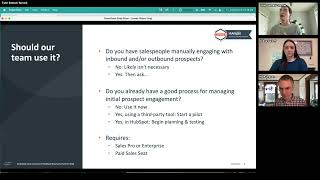
Awesome. Very cool. Glad. Hopefully nothing I say Kyle's like, actually HubSpot doesn't think that you should. All right, so who should use it? So I kind of have like a little framework that I think about when we work with new clients. Either clients that are new to HubSpot or people come into to us to help them use HubSpot better. This is kind of the process that we think through about should we be moving this team to the leads object now. So the first question is, do you have salespeople that are manually engaging with inbound and or outbound prospects? If the answer is no, you probably don't need this tool. So if you've got a fully self service, you know, somebody comes to your website and buys it's transactional. There's no salespeople engaging engaging with somebody and moving them through a process, then this tool probably doesn't give a whole lot of value for you, at least not yet. If you do, then we ask do you already have a good process for managing that initial prospect engagement? Good process is subjective. So we'll talk more about what a good process might mean here in a second. But if the answer is no, I would say use it now. So if you don't have a ton of clarity around that initial process of engaging or there's a lot of friction there and for a lot of teams there is. We'll talk about what some of that friction is here in a second. I would say use it now. There's really no reason to wait. It works well and it works and I'm liking it. I also manage a lot of our sales. I like to use it. A lot of our clients like to use it. If you do have a good process for this, but you're using a third party tool like you're using a sales loft or an outreach, I would recommend starting a pilot on this today because obviously if you can get all of the things that you can get out of your third party tool right in HubSpot, there's a lot of value in having that all be in one tool. You're like, they're already paying for the license. So I would say start a pilot. I think you're going to like it, but obviously you don't want to totally rip and replace a tool without testing it out. So I would say pick a few salespeople on your team, start a pilot, give it, put it through its paces. I think it'll win out. But that's my recommendation. If you're using a third party tool, if you've got a good process and it's in HubSpot, I would say right now I would think about planning for this move and testing it. So I don't think you necessarily have to move right now, although you may want to after this presentation. But I will say that all of the signals are pointing to this is going to be a really big focus of hubspots in Sales Hub and they will be, I think they'll be adding to this, they'll be enhancing this. I think two years from now it'll be totally crazy to not be using this tool if you've got salespeople engaging these leads. So I do think it's a matter of when, not if. So I would say you're happy with your process in HubSpot now. There is no friction. I, I would still start playing with this leads tool, testing it out and kind of planning for that migration. So just to note, it does require Sales Pro or Sales Enterprise. And to use this, everybody that wants to use this tool does have to have a paid seat on Sales Pro or Enterprise. All right, so let's say you fit in that category. Why would you use it what value does it actually provide? So I think there's a few things here. The first one and what it's really intended to be is greater clarity on that pre opportunity sales process. So before we create a deal, how do we keep track of those people? How do we know if we've got them engaged? How do we know if a salesperson needs to engage them? How are we tracking that and how are we making that very easy for us as admins for our salespeople that are using the tool? So that's really the primary purpose of it and I think it does a really good job of that. It's also easier for salespeople to focus on revenue driving activities. So it's part of the prospecting workspace. The whole idea around the prospecting workspace in HubSpot was to give your salespeople a home base inside of, inside of the tool where they can go and really focus on the actions they need to take to drive prospects and deals forward and to make more revenue. Right. We don't want our salespeople focused on clicking through a bunch of tabs in the CRM, entering a bunch of data in the CRM. We want them to be focused on the activities, doing the work required to do that in the CRM. But we want the CRM to enable more activity, more effective activity. And that's really what this tool is designed to do as well as the prospecting workspace, which is where it lives and then it better supports the repeats, better supports repeat buying. The lead status. So if you're using lead status, the question, one question might be like I've already got lead status, why would I use this? If somebody comes back and buys, then you're looking at, okay, now we've got to reset this lead status. We lose all that historical data of them moving through. And so because you can have multiple instances of a lead per contact or company, when somebody comes back, comebacks and buys, you're not limited just having one property on that contact your company record. Okay, so I'm going to break those out in a little bit more detail here. So pre deal clarity I mentioned, I think this works well with lifecycle stages and really what it does is it sits in between your, your lifecycle stages and your deal properties. So I like to think of our life cycle stages as our 10,000 foot view. Every prospect buyer, customer in your CRM should be assigned a lifecycle stage. That's where you can very easily see where they at in their journey with us. From that 10,000 foot view and then our lead stages is what's going to sit in the middle here and really allow us to double click on our qualified leads that we're trying to create a deal with. And then once we create a deal, obviously we're using deal pipelines. So one of the things that we do a lot at Simple Shred is we help a lot of people that kind of watch us on YouTube and they're like, tyler, I need more help. Civil shot, I need more help. And so we do a lot of portal auditing for people that are like, HubSpot's a mess. I just took it over from a new admin and I don't, I don't really know what's going on. I can say one of the things that we see all of the time for, for, for HubSpot portals that aren't really working the way we want them to be working is a lack of understanding of how to use lifecycle stage correctly or a lack of understanding on how to use deal pipelines correctly. And the thing we see most often is we see people trying to represent the pre deal process in a pipeline. And so we see a lot of deal stages like this. So you can see this is a real screenshot from a client. I won't, I won't say who it is. And it's being fixed right now. This is literally. We got their buyers Journey workshops, so is literally from last week. So you can see we've got advisor introduction, couple advisor introduction stages, slow burn prospecting. We don't get into active project discussion until the fifth stage. That's really where Ideal should start. So we've got a lot of best practices that we recommend around deal stages. One of them is engaged at every stage. So if you would ask a buyer, are you like, hey buyer, are you actively talking to company X about buying something from them? If they would not say yes, they should not be in a deal, right? So deals should not represent all the people that you're trying to get engaged. They should be, they should represent the people that you already have engaged. But the question I get when I give that is like, okay, that's cool. But I still need to see all the people I want to engage. I still need my team to be able to see them very easily. And deal stages are a great way to see all of that. Why? Why should I not use deal stages or what can I do instead of dealing with stages like lead Lead object is your answer used to be lead status. But they didn't really fill all the gaps. Lead Object was created to do exactly that. So what we can do is we can take these first stages. I have like half a project discussion because they're probably like a very clear milestone in the beginning there that should, or in that middle of that, that should trigger a deal. You can take all of this and represent it in lead stages. So we're going to move all that into lead stages. It's going to sit between lifecycle stages and pipelines and allow us and deal pipelines and allow us to double click on those qualified leads that we're trying to engage easier for salespeople. So again, good CRM should enable salespeople to take more action, more effective action and allow them to focus on revenue generating activities. We're going to do a lot more of this in the demo, but quick screenshot shows you. So this is, you've got a list of lead objects on the left hand side. When you click on one of them, the right hand side is what you see. And you can see I've got all the information about the contact associated to. But more importantly, I've got all of these action buttons that you would see in a contact record. I've got them all available to me right there. So I didn't have to click on a contact, wait for that contact to load and not be able to see all my other contacts right there. I click on the lead, pops up right away and I can take all of the same actions as I can from the inside of that contact record. I can email them, I can leave a note, I can roll them in a sequence, I can call them and so I can move through leads very, very quickly, take the actions that I need to take and move on to the next one and then repeat buyers. So I mentioned that, I mentioned earlier that you can create multiple instances of a lead for a single contact or company as they come back and buy from you. So this is kind of what that looks like. So when you open up a lead, so this is kind of zoomed in on that right hand side we just saw, what's going to happen is it's actually going to show you all of the past leads that have been open for that same contact. So we can see for Heather, we've got an open lead that's brand new that we need to reach out to. But I can see that in the past, we had a lead in the past for Heather that was qualified and a new deal was actually created from that qualification. And if I want to see what the details of that deal were, I can click on the deal name right there and do that. So very easy to see past lead activity. And if I were to go to Heather's contact record, I would see in the right hand sidebar where I see all my other associations for Heather, I would see a leads card and I can again see all of the current and past leads that have been associated to Heather. All right, I know it through a lot. We're going to demo some of this, but Kyle, any questions?
So lots of positive feedback on your flowchart and, and your way of talking about deal pipelines. One question I asked a follow up question that has not been answered quite yet, but Tom asked, where would you put rfi, deal or lead? And I assume that's request for information. Actually, I did not clarify that point.
Yeah, so there's many answers to that question. It really depends on your process, but often it's probably going to go in lead. So if you've got, if you've got somebody on your team that needs to respond to them that would come in as lead, it would be new. And then your, your, whoever you assigned to, whether it's an sdr, a sales rep or whatever, would then know to reach out to them. As soon as they reach out to them, that'll move through the stages and we'll kind of go through what that, what that works, what that looks like today. I hate giving answers like this without like really understanding your process, but I would say generally it's going to go into a lead.
Okay, I think you can go ahead and hop into the demo. Bill, I am reading your question. We'll get to it in a minute. But yeah, it'll take me a second. So power on.
All right, demo time. I'm going to go through this. I know I move really quick. I got a lot to talk about today, so I'm going to go through this really quick. We do have a video on our YouTube channel. Obviously this will be recorded and I do think once you get in here and play with it, you'll find that using the tool really is intuitive. Again, the part that's a little bit confusing is like, should I use the tool? But using the tool is really intuitive. We're in the leads view right now. So what this is is a salesperson goes to their prospecting workspace. They're going to, typically they're going to see summary. We've got this leads tab across the top and this is where a salesperson can see all of their leads. So that's where I'm at here. I am as, as salesperson me. I can see all my leads. This is a dummy portal, so it's all fake data. So it's a little messier and weirder than a normal portal. So just, just that I'm also not sharing anybody's, anybody's actual information. So here I've got four leads here. So I'm going to walk through like how to, how to, how do you can work with these leads. But for people that are new to the tool, there's a few different ways to create leads that I'm going to walk through here really quickly. So one option, just like you're used to for pretty much everything in HubSpot, there's an orange button in the top, right that allows you to create it. So I can click here and add a lead. So notice it's the first thing that's going to pop up is contact and company. So again, this is not a replacement for contacts. This is not something that you do pre contact like you do in Salesforce. This is something that you attach to an existing contact or company. And what's going to happen here is it's going to populate a search for all of the leads that are all the contacts or companies that this salesperson owns. So we're going to talk about some assignment things at the end. But this is really around when a salesperson is using it. It's going to populate the contacts they already own. So you're going to want to make sure that as part of your process, if you've got salespeople creating their own leads in this way, part of your process needs to be making sure they're getting assigned the contacts that they would need to create a lead to. We can type in a number, a name here. Let's see. No idea what I've got in my test portal, but I'm probably in here somewhere. We have a client called Blazing Hog. That's why Hog is in the name here as a test for them, I can add this lead and it's just going to pull in, going to pull in right here for me. And if I click on this, I've got some information about this contact. I've got Playbooks. So this first tab is really an overview, but also like the place where you can take action. So all my recent communications, my playbooks, I can see information about, so properties about that contact. I can see past notes, associations for that contact. So a lot of the information that you're going to be able to see on the contact record. But what's great is I don't have to wait for a contact record to load, I don't have to go into that contact record, do what I need to do, click the back button, like I can do all everything I need to do with Tyler here and then move right on to Heather. So that's one way to create the lead is this Add lead button. You can also pull in leads. So when you're first using the tool, pulling in leads is probably going to be kind of the first thing that you have your reps do. So we're creating all the leads for the contacts we're currently working. So the way to do that is to go into actions here and you've got this pull in leads and it's going to walk you through a little flow and essentially what it's going to do, it's going to ask what life cycle stage you want to create leads for. So in this case we would be creating a lead for all the marketing qualified leads that I own. So all the contacts that are in marketing qualified lead that I own that have reached marketing qualified lead in the last 30 days. I can adjust these lifecycle stages. I can also adjust this time window. If you are an admin, if you've got property, if you got permissions to edit the the lead object properties, you'll also have an automation settings. But I'm going to talk more about that in the future. So do that, go to the next screen, pull in those leads and it's going to populate all of the leads for the matching contacts right here for you. You can also create leads in bulk. So from any view of contacts you can highlight. So I can click all of them, I can highlight a few of them and this create leads button is going to show up here. So if you've got different filters that you want to use other than lifecycle stage, to create your initial batch of leads, you can go into a contact view, use your advanced filter, filter it however you'd like, or go into a saved view. If you already have those filters set up and you can click the create the highlight all of them and click the create leads button to pull them all in. And then the last way to do it is from inside of a contact record using this leads card here. You can see We've already got two open leads for Mr. Testerson here, but you can click add and add it here as well. All right, so those are all the ways to create leads once they're created. Actually working with them from the prospecting view is where I Think really the magic is right. So I mentioned we've got this table here. We can open up a contact, we can take any actions here. So we can create a note, send them an email, make a call, meeting, task sequences. All those same things you can do from context. I can do all of that from right here without ever having to leave the window, which is great. I can also take some actions right here. So we've got a lot of great information in this table. So we've got labels here, hot, warm and cold. These are predefined from HubSpot and manual. Right now, I believe the intention is to be able to allow these to be editable and eventually apply filters somewhat like deal tags. Right now they're manual and limited to those three. I can see the company associated, I can see what stage they're in. So we're going to go over stages here in just a second. I can see what stage they're in. I can see the last activity and if I want to repeat that activity, I can do that as well. And then I can see the next activity. So you can see I'm not doing a very good job in my demo portal. I don't have any of these people scheduled for next activity. Let's say I want to fix that. I can schedule a task to for any of our task types or schedule a meeting to get that next activity. Right there. I see some questions about owners. We're going to go over assignment here in the next section. There are some best practices and some pitfalls around assignment. Okay, so the other way we can see leads to take action. So this is kind of a view of all of our leads. We can filter here. HubSpot does have something called lead queues as well. I think it's a little bit confusing to get to, I'll be honest. But once you get to it, it is a nice tool. So you have to get to it from the summary today. But if you scroll down in the summary, there's a lead section here. What it's going to do is it's going to break out your different stages of your lead process and you can click on this follow up button and it's going to open up somewhere. It's like a task queue. It's going to open up a queue of all of those leads. So now we've got a list of all of our leads that are new. We can take whatever action we want to update them however we need to. And if we want to move on to our other stages, we could do that. From this dropdown here. All right, so the stages. So the stages are really important. It's what gives you that visibility that a lot of people are trying to recreate in deal stages today. Or if you're using lead status, hopefully this is the way you're using lead status. But every lead has some stages here. You can customize them. We'll talk about customization in a second. But by default you've got new attempting, connected, qualified and disqualified. What I love about these stages is not only does it give you the clarity about where a lead is, but it also advances automatically. So I don't know if there's any admins here that have built out these workflows to automatically update lead status when activities happen. Those workflows are a pain to build. I've built a lot of them. We don't have to do that anymore, which is awesome. So what HubSpot is going to do is if I'm assigned a lead that's new, let's see if I can here. We'll just don't actually have any emails set up, so if I. Well, sorry, we're not demo portal, so I don't actually have any way to call here emailing people. But if I were to send an email, what would happen here is as soon as I send that email it's going to go from new to attempting. So you can also do it manually, but HubSpot would do that automatically for me, so I sent that email. It's going to move it to attempting. The same thing is going to happen if I log a call and I have that call outcome selected as anything but connected. So if I say I left a voicemail or couldn't reach any of those other call outcomes, it's also going to move it to attempting. As soon as somebody replies to an email or you mark a call as connected, it's going to move it to the next stage which by default is connected. And then once I'm ready to qualify somebody, I can move it to qualified or if I've talked to that person and I disqualified them, I can also move it to disqualified. We've got a couple options here with qualified and disqualified. So if we want to, we can also make the system have the system make the system have the salesperson create a deal every time we market a lead as qualified and for disqualified we can make the system require a disqualified reason. So if you've got dropdown reasons for close lost deals, we can do the exact same thing for our leads here. So there's a Few pieces of setting this up initially, but it's really, really simple. So if you're already in the leads tool and you click settings, HubSpot's great about giving you context and taking the right spot. But if you're not, if you just go to your settings from another screen, it's under Objects and leads. So we've only got two tabs of the setup here. So the first tab is we can going forward so I should pull in past ones. Going forward. You can automatically create leads whenever a contact reaches a specific lifecycle stage. You can select multiple lifecycle stages here. Please don't and I'll tell you why at the end. And then you can also do the inverse. So if a contact, if you have a contact and you create a lead for them, you can automatically update their lifecycle stage. This only moves it forward, not backwards, similar to other lifecycle stage updates and HubSpot. So if I would say, you know, contact today is a, is a lead lifecycle stage and I'm up creating a lead for them, upgrade them to SQL, you can set that up. I will say the lead object. I really wish HubSpot would have called it Prospects cause it's very confusing with the lead lifecycle stage. Cause usually it's gonna align with sales qualified lead or marketing qualified lead depending on your process and where your hand off to a, to a physical person is. We've also got a lead stages here so you can edit those stages. Keep in mind though that default stages are going to have the automation built in. So when you think about editing the, adding, editing those stages, I'd be a little bit leery about adding too many stages. Keep it simple. I would say run your pilots on the default stages and if you absolutely need a new stage then add it in. But my recommendation, I think all of the clients we have are using the default stages and it works really well. You can rename these stages though if you want to. So if it makes more sense for your organization to keep the same automation but not call it new, you could do that. And then this is where you also would turn on those rules that I mentioned. So when a lead is qualified require a deal to be created. What's nice about this is you can either create a new deal so it's going to pop up on that right hand side, the deal creation form, or you can they also have the option to add an existing deal. So if they forgot to mark a lead qualified and they went and created the deal first, they can go back, qualify the lead and Associate an existing deal and the disqualified again, we can require those that disqualification reason and we can edit the reasons right here. So there is no opportunity for us to customize properties on the leads object yet. I think that's coming. The one exception would be the stages and then our edit reasons for the disqualification, the reasons for our disqualification reason dropdown and then last thing I'll demo quick is I just want to I won't like build out a workflow because I'm sure a lot of people on the call have built that workflows. But we do have several workflow options with leads so we can do lead based workflows. So we can have a workflow trigger when a lead advances stages for example or becomes qualified and we want to send out internal notifications or update properties or anything like that. We can do that with lead based workflows. We can also create a lead as an action in a contact based workflow or a company based workflow. So we've got interactions here. We can create a record and we can create a lead record when something happens with a contact. So you do have quite a bit of automation capabilities both for creating leads and for and for doing things when things update on leads. What I will say is just be a little bit careful about this because we do. If you have workflows that create leads automatically and you also have that setting set, so leads automatically created on a certain lifecycle stage, you can end up with duplicate leads. So to tread carefully here, you may want to turn off the automatic lifecycle stage setting if you're creating a bunch of leads through workflows. So I know I went through a whole lot of stuff in that demo. I've got a couple best practices and pitfalls but I'll stop there for questions. I think I showed you pretty much everything you could do with leads, so hopefully there's a ton of questions but I'll answer what I can.
Okay, the Q and A is overflowing. A lot of these are product questions that I am happy to tackle. Tyler, if you have additional opinions or insights you're welcome to. But there are a couple of things we know we need to add. We know you want custom properties for leads. We don't have it yet. We know many of you would like lead owner to be separate from contact Owner to have more flexibility. About that we've heard that a lot and we know that you would love for target accounts and account based opportunities to be a little smoother inside the leads space which right now is very contact focused. I Would say those are the top three feature requests we're getting on this and those are all things we are currently working on. Designs for, I don't know timelines, I don't know exactly what the end states will be, but we know we got it. So, Tyler, I don't know if for any of those three things you have thoughts or workarounds.
At the end of my deck here. So I don't have a ton of workarounds for them, but I do. I'll talk a little bit more about how they work for people on the call that are like, seeing the complaints and like, wait, what? So I'll talk more about what. What those complaints are about. But I. Yeah, I don't. There are. They are mostly product limitations at this.
Yep. Okay. Yeah, so I would agree with that. And. And seeing you all both give this feedback and upvote this feedback just validates the conversations I've already had with many people on the product team and I assure you, like these are. Some of them were actually, I will say lead owner was a conscious omission at the beginning. The product team hypothesized that that would be a thing that in an early version people would not need and it turns out you need it. So we're getting there. Similar with, with custom properties and people have asked. We're investigating a lot of things people ask a lot about. Can we have separate lead pipelines? Like we have separate deal pipelines and like some people ask can we just have different lead types? And that's a dropdown and we're kind of trying to figure out what of these should we build as part of the default offering. What of them should we just allow you to customize yourself? There's a lot of research and development going into it And I think 2024 will be the year all your dreams come true for the lead object. But it's going to take us a little while to get there.
Yeah, don't hold. I'm not on the HubSpot product team and I don't unfortunately have any sway over them, so don't hold me to anything I say. One little hack in HubSpot is oftentimes if you just go look at the properties of an object, you can tell what the product team is maybe planning for or creating contingencies for. When you edit the columns of the leads view, you can see all the properties. Here we're seeing things like buying role. To me, fingers crossed that when we do ABM Target account stuff, there's going to be a Lot more features coming out there. There's also I think somewhere in here a pipeline property. To me that probably wouldn't exist if there was never a plan to add pipelines. I do think that we'll see a lot of new features come to the leads object over the next year. At least that is my hope then.
The one other common theme I'm seeing from product limitation is people asking about TeamView or admin view or can I see other people's stuff more than one person at a time. And that is. That is another one that we're trying to figure out whether that lives in this space. Is there like an admin view? Do we. Do we enable that some other part of Sales hub. But it's a need we know needs to be filled and I expect a clever solution to come eventually. But that one to me feels a little farther away. Things like adding a lead owner, enabling custom objects on leads, different pipelines, all the stuff I just listed. Like we are actively working on the admin thing. We will get there, we will give you that. But we're still trying to figure out what exactly that looks like.
So yeah, if the product team is listening, I would make a request for just give me an index view the same way you gave it to me for contact companies, calls, Mark day events. Put it there, put it in that dropdown and let me see that.
Yeah, so I did, I did some product research on this and lots of people said that and the product team was like what really we were like we built this thing because we thought you were tired of index pages. But I think there is a very big difference between the end sales rep user and the sales manager person. I think sales manager admin person, you all in this room would love an index page that looks exactly like every other index page that can be filtered and sorted and viewed and put in tabs and then the end user can sit in their more automated space in the prospecting workspace.
So Matthew, I did see. I just realized I didn't show you anything about reporting. So if you do go into. We used to be called sales analytics. They do now have. Where is it at? This lead funnel is a new report. So similar to like your deal waterfalls, you can create a lead journey report which you could save and add to a dashboard. It's taking forever to load here, but it's basically. Basically the same as your. Yeah, don't have any data that's actually moving through here for my test portal. But this is the same as your deal water flow waterfall report and you can add different stages and all kinds of things. I think you can even incorporate lifecycle stages into this. So. But it's under reporting reports, sales and lead funnel. There's a couple other reports you can do, but that's kind of the primary one that we're using for clients today. So I didn't believe that. Cool. Okay, so I know we've got like 15 minutes left. I'm going to run through best practices and pitfalls, just going to talk about some of the complaints, and then we'll wrap up with any questions until we're at the end of the hour. Good, perfect. Okay, so I'm gonna start with best practices. So if this is something that you are considering, I would say get your lifecycle stages and pipelines in order first. So if you're not using lifecycle stages, if you're using some sort of. I created a custom lifecycle stage property. Cause I didn't understand HubSpot's lifecycle stage property. If you've got really messy deal pipelines, lots of stages that have. That are unengaged, I would say do that work first. So we've got some content on Lifecycle stage best Practices. Deal Best practices on our blog and on our YouTube. We do have a product for this called the Buyer's Genius Workshop or help we help clients go through this. HubSpot's got a lot of content, but I would say do this first. As you can see, a lot of the automation is built around Lifecycle Stage. So if you don't have a good way of using lifecycle stages, you're gonna have some friction. And then in order to have a smooth transition from lead to deal, you want to make sure you at least got the first stage really well defined. What does that trigger? Where we know somebody is engaged in a sales process. So I saw some questions about should it be mql, SQL Lead really depends on your process. Probably shouldn't be lead. It's either going to be MQL or SQL depending on where in your process you hand that off to a salesperson. So I don't get too far in the weeds there. It depends on business size and things like that type of business. But it's usually gonna be either MQL or SQL Enforce Activity Tracking. So we saw that one of the great things about leads is that it automatically updates people through the stages. We don't have to ask a salesperson to do that. It can only do that though. HubSpot knows about the activity. Right? So make sure your salespeople are logging their emails, make sure they're tracking call outcomes correctly. So did you connect to that person? Did you leave a voicemail? If they're not doing that today? It's not that you can't use the leads tool, it's just that you're missing out on a lot of the the automation value that leads tool provides. Run initial pilot if you have a large team. Honestly it's just the best practice for any new feature that's going to be this instrumental to your processes. You want to run a pilot, work through the quirks, get some champions on your team and then roll it out to the larger team. Only choose one life cycle stage for automatic lead creation. I've said it once, I'm going to say it again later that that should not be a multiple select in my opinion. Product team. Please change that. Only choose one there and then please do turn on. Mandatory deal creation and mandatory disqualification reason. It's going to make sure that your leads aren't falling through the cracks so that every qualified lead does go into a deal and it's going to make sure that you've got reporting on. Okay, half of our leads are disqualified. Why was that? And you, you want that report? Okay, so we've heard whispers of some of these as Kyle was going through the Q and A. What are the pitfalls? What are the. What's the friction that people are experiencing so far? So I just want to make sure like make it clear I am still a fan of this tool. I like this tool. I love HubSpot. These are the places where people have run into issues. I just want to make sure you're aware of them before you move 100 sales team to them and like oh crap, what is this? So assignment issue. So the way that it works is the lead owner is the contact owner falls back to the company owner if the contact owner is unassigned, full stop. As of right now, there is no way to change that. A lead can only have one owner. So if you currently have with your contacts, you've got to set up where you've got multiple properties, you've got an actual owner and then maybe you've renamed that to AE and you've got another SDR property or whatever. We have multiple owners on a contact. Can't do that with the lead today it is only one owner and it's going to use HubSpot's default contact owner property. So if right now all of your AES are the owner of a contact and you've got a second property for your SDRs. But you want SDRS to be owning the leads. You gotta flip it. So that is. That does kind of suck. And you can't reassign leads, but if you reassign the contact and the lead is already open, the lead will reassign to the same person you reassign the contact to. So it does follow contact ownership, which is great. So if it's assigned to me today and then I reassign it to Ali on my team, the lead assignment will move with it, which I do think is good. So you still can reassign. You just have to do it via contact. Not easy to see other people's leads. So you can do it one rep at a time. So if you do have the permissions, you can go into your prospecting. You can change this to anybody else on your team and then go into the leads tab to see their leads. That is clunky. It is not a list of everybody's leads, but you can do it in. In that way. Duplicate lead creation. So said I was going to say it again. Do not have two lifecycle stages for this property. What will happen is as that contact advances through your lifecycle stages, another lead will be created. So if you're creating leads at MQL for Kyle as a contact and then you upgrade him from MQL to SQL, another lead gets created even though that other lead was open. So only select one stage here or do it all in workflows and leave this off. Yeah, workflows. Manual lead creation can further exacerbate this issue. So I would say at this point, I would probably say either workflows or this. Unless you know that somebody is, you know, somebody that you're creating a lead for in a workflow will never be marked as an SQL. So for example, if you're creating leads for current customers and the lifecycle stage is customer and you're not moving that backwards like you shouldn't be, then you're probably safe. But if there's any way that somebody could meet that the lifecycle stage you have set here and meet the trigger of your workflow, then you could end up with double lead creation there, which isn't. Isn't ideal. And then this is really annoying to me. If you do end up creating duplicate leads, usually where you find out about that is in the contact record. And you can see in their card here I've got like three open leads for a contact. You can't delete a lead from that sidecar view. You also can't click into that to go to the prospecting view to delete it, you have to go back to your prospecting view, find the lead and delete it there, which is a pain. So hub product team, if you could work on that too, that would be great. Hopefully there's probably nobody from the product team on this. I'm just talking to imaginary people. That's all right. All right. It can get messy for accounts with multiple buyers. So ABM people, the verdict's still out for me on this. So here's how it works. So basically what ends up happening is you end up only tracking one buyer from this account when oftentimes there are multiple or you have multiple leads for a single account. And if you get different contacts assigned different accounts, that can get messy too. If you've got one rep working on five different target accounts, 10 different buyers for each target account. Now, I've got. I don't remember numbers, I said, but do the math. You've got a bunch of different leads and you can't really group them by account very well. So it is a little messy there. My Recommendation is use HubSpot's Target Accounts feature. Lean on this. I think it could be supported by the leads object. I think that's going to take some thinking through, depending on what your processes are and how your team operates. So I would say the verdict is still out for me on this. My hope is that these tools get a lot better, more integration and we can start to see things like that buyer role, property and things like that in the leads view. But right now, this, this does still feel like it's. It's. It's sort of in its infancy. So it is a little bit messy for multiple buyers for one account that you're trying to track through that process. Okay, sorry to end on the bad note. I, again, I do like the leads tool and I think for. I think for the vast majority of people, it does work super well.
No, I, I love it. I'm. I'm very close to the team that built this and I, I'm sending. I, I'm just gonna export out the Q A and send that to them because I feel like most of these questions are for them, not for Tyler. And I'll be sharing this recording with them also. They are hungry for feedback and input.
So I.
You will be heard, Tyler. I can. I, I will, I will advocate for you. But I mean, remember, also, this is a very new piece of real estate inside HubSpot. And, and if you've been using HubSpot for more than a month. You know, we never leave real estate alone. We'll keep developing it, it'll keep evolving and if we ran this session again next December, I'm sure it would be entirely different. Maybe there'd be new pitfalls, I don't know. But there would certainly be a lot of improvements. Also, one thing I want to make sure we get to before we shut this down. Tyler, if people want to connect with you after this, do you have a preferred social or means of them to find you?
Yeah, for sure. LinkedIn. So I know my name is like super long, but if you, if you search me, Tyler Simone Sprunk. If you get half my last name right, it's pretty unique. Both of them are. So you'll probably find me. So yeah, LinkedIn is, is the best way to find me. I also share a lot of the, the content that we're creating right there.
Cool. People are also asking for the deck. If you want to send that to me or Deanna, we can send circulated afterwards. Cool. And then lots of praise and lots of questions. I don't know, there's so many feature requests in here, I don't know how to prioritize. Anyway, do you feel good? Is there anything else you want to cover?
Yeah, I feel good. Hopefully. Hopefully. If we're missing any questions, we've got a burning question that isn't, that isn't for the product team. Do feel free to shoot me a message in LinkedIn and I can try to answer it. I know, I think a lot of the questions, I've seen a few of them. I think a lot of the questions are like, should it be MQL or SQL? Or like how, like how it works in your process? I will say that is a difficult conversation to answer without digging into your process. So we do a service called the Buyer's Journey Workshop and literally it's a two part workshop. We usually do it in about a two hour session depending on complexity of your team. The first hour is literally just us asking a ton of questions about how you generate leads, what your conversion points are, how you, how you hand them off, and even when there are gaps in the process, we want to know that too. So we spend like an hour asking questions before we answer any of those questions and there's really good reasons for that. So some of those questions are difficult for me to answer off the cuff. But happy to help anyway I can.
And I will emphasize too, you made the point. Maybe don't use just the lead life cycles. I think that's important. Because a lot of. A lot of contact creation things in HubSpot default to leads. So if you're creating leads for all of your contacts that are labeled lead, you might get every contact you import or every contact that comes in through a form, or every contact that comes in through an integration dropped into your prospecting queue, which may not be what you're looking for, but, yeah, I think that's good. Tyler, if I can have the screen back from you for just one second before we shut it down. I told you all at the. At the beginning, we're adding events all the time. One has been added. As this meeting has been going on, we now have all of January and February booked out. On January 16th, we're having an event called Proactive Post Sale Order Management. Chris Caroline, a member of the community here, is going to be talking about how some custom things he's built out. So don't miss that. Thanks again to Tyler for being here. Thanks to all of you for coming. Hope you all enjoy the rest of your December and we'll see you all in the new year.
Yeah, thanks for having me. Happy holidays, everyone. See you next week.










