Monitoring and Managing Workflows at Scale | HubSpot Admins HUG | February 2023
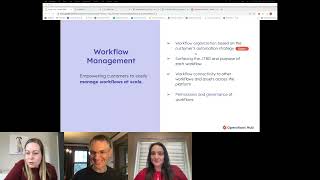
Jessica Hartnagel from HubSpot walks through workflow monitoring and automation management at scale. The session covers current challenges with organizing workflows, risk monitoring, permissions, and recovery tools, plus what's coming next based on admin feedback.
Go.
Okay. Welcome officially now to this session about workflows. So excited to have you all here. Thanks. We've got 129 people in the room so far. It's a good crowd. Feel free to make use of the chat. I've also turned on the Q and A function, but we will try to keep up with the chat because it's always very active. So feel free to let us know your thoughts there. And, Jess, I'll let you take it from here.
All right, thanks everyone so much for joining us today. So excited to be here. I'm going to go ahead and share my screen. We good? All right. Yes. Thanks everyone again for taking the time to be here today to talk with us about automation management and monitoring and managing workflows at scale. My name is Jessica Hartnagel or Jess. My pronouns are she, her, and I'm a senior product manager for HubSpot's automation management team. So what are we going to talk about today? First, we're going to dig into what is automation management, just to clarify what it is that, you know, this team at HubSpot is working on, and then we're going to show you what we're working on. So, pretty straightforward but really exciting opportunity here to collaborate on some of the problems that we're solving and get feedback from all of you. So I'm going to request that you engage in the chat as much as you're willing to. We'll be monitoring it and try to get all of those insights as we're. As we're talking through the problems that we're trying to solve for all of you and the rest of our customers. All right, so that. Okay, so when we talk about automation management, just want to clarify, we are not the team who is focused on building new types of automation or adding actions or triggers or even new templates. Those are really important parts of the workflows product. And we have other automation product teams dedicated to those opportunities and in problem spaces. So when describing what automation management is, I think of one of the simplest ways to explain it is that we manage a lot of the data that's generated after a workflow is created or executed. And as you can imagine, there's so much that we can do with all of that data to make your jobs easier and to create just a really great and robust management and monitoring experience. So, for example, you can see the list of areas that this team has been focused on in the past and that we're still working on enhancing. But there's a lot of things that we can do with that data, like being able to provide you with all of the lists of your workflows, errors that are related to workflows, and on the details pages, all of the behavior that is captured for each individual workflow. So there's a lot that we can do with this data and we're constantly listening and trying to learn the needs that you have and want for this data. So with all of the research that we've been conducting and requests that we've been receiving, there's definitely an overarching theme that's been very clear and something that we are keeping in mind when focusing on all the different problem areas that we're focused on in 2023, and that is that we're really trying to empower all of you to see what we can see. Right. So with monitoring and managing, you know, there's a lot that is already on the surface, but there's a lot of opportunity for really, for servicing a lot more to make it easier for you to grow and scale your automation with confidence. So, so with that, I want to get to the be part of the group of customers that I connect with on a regular basis to share ideas, validate ideas or designs. I would love for you to reach out to me and connect with me. I'm going to go ahead and pop my email address into the chat here and would love to stay connected with all of you who want to be part of this group of customers providing regular feedback for this area of our product. So with that, the, the first thing I want to talk about today is workflow management and the different problem areas that we are focused on. So we're currently thinking about these four products, these four problem spaces, and I'm going to quickly go through them and then we're going to circle back and I'm going to ask a couple questions about a few of them and then we'll do a demo of what we're working on for this first problem space here, which is workflow organization. So if you have any questions or need any clarification on any of these problem areas, please feel free to throw them into the chat. Otherwise I will be asking you some questions here in just a bit. So for the first one, workflow organization based on the customer's automation strategy. So this is just the capability to organize your dozen or several dozen or hundreds of workflows, surfacing the job to be done and purpose of each workflow. So after that workflow is created and if you've added those actions and created all of those different branches without having to go in and study that workflow one by one, by each workflow, one by one by one, really surfacing very. In a very quick, easy way. What the job to be done is of that workflow without having to go back into it and reassess it and analyze it is the idea there. Workflow connectivity to other workflows and assets across the platform. As you're all very well aware, I'm sure we have lists of workflows and there are folders for workflows, but. But really trying to surface all of the different ways those workflows are connected to one another, as well as the different commonalities of those workflows, as well as how they are connected to other areas and other assets across the HubSpot platform, like campaigns, forms, emails, et cetera. And then we have permissions and governance of workflows. So when we're thinking about this problem space, we're really trying to dig into what is the granularity of permissions that customers are after when it comes to workflow access as well as. As well as just the governance overall of. You know. Sorry, I just got distracted by the chat. So, yeah, permissions, permission, granularity of workflows of the. At the overall workflow level as well as within the workflow of actions and things of that nature. So I'm going to go ahead and pause there for a second.
Yeah, so we're talking about the change from workflow errors to workflows at risk, and some folks are thinking it's a semantic change. My understanding is that it's actually broadening. It's errors and maybe some other stuff, but people are all kind of unanimous and they have no idea what the other stuff might be.
Okay, great. That is one of the things we're going to talk about when we talk about workflow monitoring and just few minutes. So I'm so happy that everyone is. Has that on their minds and that they want to engage and discuss it because I want to hear what everyone is thinking when we talk about the word risks. And. Yeah, so we're gonna circle back.
Yeah, yeah, no rush for sure.
Okay. So of these four problem kind of spaces, when it comes to workflow management, which is a little bit different from workflow monitoring, which we'll get to again in just a couple minutes. Just curious about when thinking about better ways to organize your workflows, what are some ideas that come to mind to you? Is there anything in particular that comes to mind when you think about. Oh, if I had these things or if HubSpot could solve this particular problem about how I'm trying to organize and manage my workflows, this is what I would ask for. So if there's anything that comes to mind when thinking about that. Okay. Exportability. Love it. Overview of consecutive workflows would be amazing. Okay. Definitely would like to copy sequence steps, branches, tags, search by description, search by actions within the workflow. Wonderful. Clone to another portal. We hear that one quite a bit. Search for a single field. Yep. Finding errors that are caused by other workflows. Checks and balances, portal cloning, all the portal cloning Love on Valentine's Day today. Ability to know how many other workflows are utilizing the same fields. Yes, yes. Seeing that workflows will be triggered, these are all great. Keep adding to this. I'm going to dig into another. I'm going to dig into something else. But if you could continue to add your thoughts here. Definitely will read the transcript after the webinar and potentially follow up with those ideas on some of those ideas. Okay, so the next thing I want to ask more specifically about is are there ways that you are managing, are you using tools outside of HubSpot to manage your workflows and like your organization of workflows? Whether that's like an Excel sheet or a lucid chart or Miro boards. Yes. Flowcharts. Miro. Okay. Blueprint even. Just like some of our customers have shown us these really great examples of what they're using just even by using like whiteboards and paper and pen just to like figuring out this is our automation strategy. Yes. Love it. There's nothing wrong with paper and pen. It gets the job done sometimes. Right. So all right, awesome. Thank you for sharing. Not going to necessarily show you a solution for all of this today. Just again looking for the opportunity here to also collect some insights and feedback on things that we're thinking about. We'll definitely, like I said, follow up and dig in further as we continue to explore some of these problem spaces. So with last question before we go into a demo and collect specific feedback on something we're working on for this workflow management category with permissions and governance for workflows, are there any specific levels of permissioning or of governance again that feel as though they would be super important or are necessary for your business as you're growing your team having more people using workflows, having potentially more people enrolling, having access to enroll and workflows approval required to switch on view only for workflows. Okay. Restricting workflow access to specific teams or people. Love it. Approvals, approvals, approvals. Wonderful. Okay, this is awesome. I love when there are insights shared for things that we haven't necessarily thought about it. It's also great to see the insight shared for things that we're already thinking about. So really appreciate your feedback here. And yeah, we're going to go on to the demo for Workflow Organization, but again, really excited to collaborate here and have this opportunity to get your insights on some of these different problem areas that we're focused on for workflow management. So thank you for that. And again, if you want to keep adding insights, we'll definitely review them. All right, so going to steer away from the presentation here to dive into a demo on Workflow Organization and this is actually work that we are in QA with at the moment. So something that we hope to have in beta and the not too distant future. So excited to get this out to you. So again, would love any reactions, comments, thoughts about anything that you're seeing as you're seeing it, or anything that I'm saying as I'm saying it. And please, all the possible questions that you can think of would be great. Okay, so the first thing I want to ask before digging in specifically to some new organizational tools that we're working on is just this overall, like, look and feel does what? Is there anything that comes to mind or that strikes you as you're seeing this page, and if not, that's okay. All right. Events, data, the consistency from other objects. Yes, yes, you got it. Okay. So one of the things that we are really trying to lean into as we're adding new functionality, right, because we want to make sure that we're adding new customer value for problems that we're trying to solve. But at the same time, we're trying to bring in consistent UI and elements from the other parts of the HubSpot platform. So this should look familiar to when you're in the CRM area or when you're in the campaigns area. So we're trying to bring in a consistent user experience and UI as we continue to evolve our products in HubSpot. So thank you for noticing that. Yes, the Folders tab, we're going to get to that. There are also certain tabs right now that are not here that will be brought back. So don't forget, feel alarmed that we're taking away everything that you're currently used to seeing. This again is in qa. So we're still adding some additional features here. But I love the observations. So the main things that I wanted to touch on here though, was first of all, the consistency of the UI to the other parts of the HubSpot platform. And that includes like this new tab approach here, right, that looks a little bit different. We're going to be adding back in before we go to beta, the other tabs that you're used to seeing, with maybe one exception, but if we have time, we'll get into that. But so we have the Workflows tab here where we will list all workflows and then we'll have the additional tabs included recently, including recently deleted. Some of the new things that we're looking to add in here though, just like we have in other parts of the HubSpot product, is the key capability to create a custom view. So if you were to filter down to a specific type of workflow and wanted to save that as a custom view, and you know, you could add as many filters here as you would like, you could then after those filters are added, create a new view, just like you can in other parts of the HubSpot platform. You could, you could keep it private, you could share it with your team, you could share it with everyone. But the capability essentially of creating those custom views so that you can monitor and manage your, your workflows in a way specifically aligned with your business needs. So really excited to be able to offer this pattern and this functionality that we already have in other parts of the HubSpot product are views connected to folder structures. And we will talk about folders in just a minute because there's that folders tab there that someone pointed out just a couple minutes ago. So yes, to be. Just one second, we'll get to folders. So yeah, the idea here is that while, you know, we have all of these possible filters that you can filter on and then you could create custom views for however you would like to monitor or manage the workflows or how your team would like to manage those workflows. Okay, so are you planning in terms of a certain date? I will have to circle back with that. Love the custom view idea. Okay, before. Yeah, let's, let's go ahead and move on to the folders question that came up first. So when thinking about folders. Yeah, we have this folders tab over here. So just the, the, the UX is a little bit different. Gonna be a little bit different for being able to access folders. And so when we click on this folders option here, you can see that we have what is listed here as unfiled automation Workflows. So you could have the workflows that are not in a folder listed here and then. And you can search for those, of course, but then you can create a folder and then another folder and then another folder so that you have your nested subfolders and you can create. Yay. Okay, I was hoping for this response. So, yeah, we are bringing subfolders to to workflows and also that searchability within those folders so that you can easily find your workflows as well as custom views when we release this new experience here. And hopefully again, this will hopefully be in beta in the next like month, around the next month or so so to be determined on the exact date there. But we'll definitely keep the Ideas forum, Customer Ideas Forum updated for when this beta goes out. And again, if you're interested in providing any specific feedback on this or have any specific use cases you want us to keep in mind, would love for you to email me and share any insights or thoughts that you have on custom views and the subfolder experience that we're adding here. All right, so with that, go back. All right. How are we doing on time? All right, we are good. So next I have a couple things to show you and ask for feedback on for workflow monitoring.
Real quick, before you move on, a relevant question squeaked in here that I don't want you to have to circle back to. Will the search function only search the current. So there's a little search bar inside the folder you showed us. Is that limited to just the folder you're in?
So as of today it is. We are going to see if we can expand that by the time we get to beta or at least put it as a request if we have enough feedback from customers who believe it would be more useful and valuable to be able to be at this top level. Put the name of a workflow and then have it drill down to wherever that workflow actually lives within a subfolder. I would love any thoughts or feedback on the capability to search across all folders for a workflow versus just within a specific folder or subfolder for that workflow.
Cool. And then what fields does the search search across.
This. This specific search right here is. That's a good question. I believe it's just searching on the workflow name, which is different from our overall search, that is outside of folders, which searches on most of the most of the information for workflows. So the search and you know what it could be, I will have to get back to you That's a good question. As far as the searching within folders, if that searches across all of the columns, since this is in a QA environment, I'm not seeing all of my columns and folders, but we will have all the columns that you see here available in that folder view. So I'm going to make a terrible. I'm going to do a terrible thing and assume that it's going to work the same way. But I don't want to promise that. But the general search will work very similarly to how the current search functionality works and workflows, which, you know, as you are probably familiar, it searches for name, it searches for a lot of the different elements that are in the various columns that are displayed within workflows. Within the workflow index page, I'm seeing.
A request specifically for being able to search description. And then just for your peace of mind, it seems like everybody is aligned with you on it should search all folders. John would like to see it limited to just the folder you're in and its subfolders. So especially I think, tell me if I'm getting this wrong, but I think especially if there's going to be a lot of results from your search, if it's not just like, here's the one workflow that match what you were looking for, but if there's like 20 spread across all your folders, to have it limited to the folder you're in could be really great.
Yeah. So for example, right here we have the Re Engage workflow. And yeah, it shows me nothing when I go to like a higher level. But if I go here, it finds it. Right. So I'm with you. That makes a lot of sense. So we'll definitely let our team know that we have confirmed with customers the need for this broader search capability.
There are 168 people in the room. I haven't seen anybody who's like, no, don't broaden it.
Awesome. You guys are the best. Thank you so much. This is exactly what I was hoping for today. So. So, all right, so as far as searching on descriptions, good news. That capability was added and it is in production now or is in like your, you know, live portal now. So this is some. This is something that we're going to talk about when. Well, not this, but this is part of the demo for the next piece, which is workflow monitoring. But I can go ahead and, and show you the description. So send internal email. So when I go to start typing and click this here, then that matches the description. So it's a little. It's a little hidden, right? So I could understand why it may have not been discovered that this is possible because you have to start typing in to the search field before that Search Description option or Match descriptions toggle becomes available. So if there is any feedback on that, would love to love for you to share it as well. Okay, so for the sake of time we'll go ahead and move over to workflow monitoring. Unless there's anything specific to the folders subfolders experience that we were just talking through. Happy to continue pausing and answering those questions. Otherwise. Workflow Monitoring so monitoring workflows at scale. We know that this is an opportunity that we have to serve you better, including monitoring workflow performance. We have, you know, the enrollments at an individual workflow level and activity at an individual workflow level, but we can continue to improve upon that individual workflow performance experience as well as bring that up to the holistic overall overarching workflow level to see enrollment kind of patterns, things of that nature. Also want to bring better risk monitoring and we'll talk about risk in just a second and what that means monitoring notifications for workflow for things like workflow errors, enrollments and other types of risks that you feel are important and needed in order to effectively keep your automation up and running. And then we're also looking at from a monitoring standpoint and a management standpoint way to help make recovering from unintentional actions or risks that have been encountered. We want to make that recovery process easier by creating functions like undo redo for actions while you're building a workflow or even a full restore to a particular version or revision within the revision history. Then workflow reporting and bringing all of the data that we have from workflows into custom report builder so that you can not only again see at the broader level what's happening across all your workflows or over time what's happening to specific workflow. But you could also tie that workflow data back to the other parts of the HubSpot platform. So these are the four problem spaces that we're thinking about for 2023. Again, like this is there's a lot to unpack here and a lot that is possible. So a lot of these problems and opportunities will span beyond the 2023 time period. But really looking to make some good progress here and are excited to show you some of the ideas that we have for risk monitoring and notifications and this workflow recovery idea and problem. Okay, so first are we good to move on Kyle, anything you want.
Let's do it.
Okay, awesome. So we'll go ahead here then. All right, so yeah, less than a week ago, we rolled out this new what we call experience. We replaced workflows with errors with at risk workflows. The tab that was here before allowed users to see workflows that had encountered an error within the last seven days. And you could have gone and fixed that error or addressed that error, but it was still, still going to stay on that tab for that like seven rolling day period. Right. So while, again, while we were, you know, at the time using the resources and tools that we had to surface something to help with monitoring, there were definitely some opportunities there to make it easier to know what was going on with that workflow when there was an error or a risk that was being encountered and then providing the capability to make that problem go away or remove it from the tab once it's been reviewed. So curious if several, if not all of you have tried going through this at risk workflows tab since we re released it. Okay. Love the updates with workflows. Okay. Okay, great. So happy that there are some people here who have already interacted with it. If you haven't, that's totally fine. Would love to get any thoughts, ideas, feedback you have as well as you're seeing this for the first time. So wondering when we see the word risk here, if there's anything that comes to mind and when just initially seeing it upon first glance, if, if that is equivalent to something for you or if it, if it's confusing in any way, would love to hear any just thoughts or, you know, sentiments on that. Okay. Risk sounds like higher level log levels. Makes a ton of sense. I did. Okay. Excuse to ignore. Okay. Problem children would work. That would work. I agree. Very clear. Something that needs to be actioned. Okay. That is what we were hoping for. Again, if there's any feedback that is differing from that, love it, want it, share it, please. So the idea here is as of today, risk is kind of just replacing errors from. Based on what was previously there. But to Kyle's point earlier, we are looking to broaden this. You know, what we're. What we're allowing people to do with this tab and in this area of the workflows product. So while it's monitoring of errors today, we hope to include additional types of risks and add that to this tab and provide the capability to filter down to certain types of risks. If you're looking at enrollment risks or anomalies as a potential risk. If there Are certain types of of activities or certain types of events that you would consider to be risky. Would love any and all feedback ideas you have for what is a risk to you. And yeah, as we're thinking about the future of this tab, would love to hear all the possible use cases. You can share some in the chat. I can chat with you one on one so would love to get some more insights there.
One that came through that has. There's so many chat I lost it in there somewhere. Someone mentioned that they'd like to be able to mark a workflow as at risk. To say like to just move it to the screen maybe rather than or addition to HubSpot having a defined list of things that move the workflows here automatically to flag them on your own would be cool.
Absolutely. I love that. Okay, that's really great feedback. Thank you for sharing that and continue sharing please. Okay, so when seeing that you know, when coming to this tab and seeing your list of or maybe hopefully not too many workflows that have risks slash errors today, is it clear what actions or if there are any actions that should be taken in order to like once you're. Once you're as you're reviewing this list so specifically I'm wondering if there's any confusion or if if anyone would pause when thinking about clicking the name of the workflow or clicking the View Risks button here. They do the same thing by the way spoiler and they okay, not super clear. Not sure whether I should ignore or not. Okay, awesome. Keep Please keep the feedback coming. So once you do click on that that workflow name or the View Risks button, then we bring you to this Risks tab that is on this is the Details page and we bring you to a new tab that's been created here called Risks. And we show you the specific types of risks which you know this information was previously in another part, but we're again we're trying to make this process much more streamlined and efficient. So surfacing these are the specific types of of risks that are currently occurring with this workflow was something that we wanted to make easier. Then the way that it's designed is that after you review these risks and figure out what action you need to take in order to remove it from the list of being at risk. You can click Ignore all until they repeat and it asks are you sure you want to do this? You click ignore and they're gone from the list. So now you can see the counter goes down to zero here. The currently at risk list is now down to Zero. There's no indicator here. If you want to get back to see the risks from the past, you don't lose them. They're there. Don't worry, they're still there. If you ever need to go back and see what was at risk at a certain period of time, at a certain point in time, so want to make sure that you have the opportunity to get back to where you were if you need to. And the same thing goes for this risks tab. You can see anything, any types of risks that the workflow encountered at one point in time versus what you have on your list as current risks for that workflow.
You're getting a ton of thoughts in the chat here. So I, I think one thing that's emerging is people would like to be able to ignore individual risks instead of ignore all. And people would like it and ignore forever. I think this goes back to what I was saying previously. It sounds like this group would really love more customization over what. What counts as a risk, what doesn't, and be able to have some more control over that. People are saying lots of things around categorizing risks and different views of. So some people. It's interesting. I think there are two main camps here. I'd love to hear from you all whether these are irreconcilable. But some people, when they click on the list in the risk the risk, they looking at the workflows with risks and they click on it, they want to be taken into the workflow builder to the specific action that has a risk. Other people really want something more like the lists tool that lists all the risks everywhere and you can filter and sort and interact with them.
Makes sense.
Jocko mentions would love to have recommendations for risks. Like the SEO tool makes recommendations for how to make your SEO better. How do I do? Everyone let me know if I missed anything. There was a flurry of comments right there. Okay, get them all.
That is all incredible feedback. Thank you. Now, in regards to being able to specify what you know of, like the risks that were surfaced, to be able to manage those at a more granular level or to be able to kind of set preferences for those, I have a surprise to show you.
Surprise.
Okay, so this is something that we are actively working on and essentially. Sorry, I have to move over so I can see my screen a little bit better here. Okay, so when you see the list of risks, this is the next iteration of this feature, right? So we're trying to surface value for all of you. As soon as we're able to deliver it while still iterating and building upon the feature set in order to make it to really solve the pain at a much deeper level. So when you get to the list of current risks. So here's that Details tab with the risks. Instead of having just the ignore option or ignore all option, you can drill down to each risk type and you can decide how you want to ignore those risks moving forward. Do you want to ignore it every time just and so until it repeats again, do you want to ignore it until a specific date or point in time? And so this is the next piece that we will be rolling out to have a greater level of control of what shows up on that at risk tab and what essentially is quantified as a risk there. And in addition to this, we'll be adding in the capability for you to receive an email notification based on these preferences that are set.
That all seems pretty popular with crowd.
I don't think anyone's not happy about that. Would also love yeah, Reporting dashboard. It's coming, I promise. I don't have the demo for that today, but yeah, if you have again if you want to share additional use cases, insights on reporting, I'm collecting those now. We will, we will. We are working on reporting this year for sure. So one additional question though that I have about this risk specific kind of theme is so initially we're going to start out with the notifications being email notifications. Are there other channels for notifications for receiving notifications about risks that would be valuable or super important for you? Like is email the best channel? Slack? Like are there other.
Lots of votes for Slack. Okay. Unanimous support for slack.
Okay.
Oh Slack and in app. There we go.
Okay, great. So you can keep those coming if you want. So as we are, you know, again like continuing to iterate on this area that could help determine what we focus on next as far as the notification piece is concerned. Okay. So if I'm going to move on to the next demo, let's go back really quickly here. All right, so that was risk monitoring and notifications for errors. Again, other types of risks will eventually live in the at risk experience with capabilities to manage and monitor those specific types of risks. So as you, you know, as you're getting used to or acclimated around this idea of like the error for error monitoring and the more granular capabilities for that and notifications would love to hear any thoughts, ideas or feedback you have for additional types of risks there. Next. Okay, email and sms. Great. Next going to move on to the the area of recovery that we talked about. So as you're building a workflow and wanting to be able to recover quickly and gracefully as well as just after the fact, after a workflow has been built and you're. Or maybe you've edited it and you realize that the previous version of it was more optimal being able to go back to that without having to go and manually review the revision history and make those updates. So those are, I know two different problems and those are both very important. The problem that we are actively working on solving right now is the undo action. Undo redo actions while in a workflow and building a workflow. So very similar to. Oh, hold on, this is. We have a lot of the back end already built for this, but I don't have enough of the front end built to show you in a QA environment at this point point. So I'm using our, our design, our prototype to show you what essentially this feature or this what, what we're going to be solving with this problem space first. So the idea is very similar to what all of you I'm sure are used to. When using any sort of like Google Doc or she or anything across like the Google platform, as well as in HubSpot's email tool, you have this capability to undo and redo actions that are being taken while you're building your email. So conceptually very similar there. We're also going to have this revisions panel that allows you to see what the revisions were or what the actions were that are being taken. So if you do the undo, you'll be able to see back to like what action you will actually be undoing and redoing. I keep clicking it as though it's a real product and it's not prototype. Okay, so any, any thoughts about the undo redo capabilities while on the workflow canvas here? Always love an undo button. Can you revert back to an old version several? Yes, you can go several. Depends on what you mean by old version. So if it's within the same session, you can go back as far as you would like this initially. When we roll this out, it will be specific to that session. So if you've spent an hour building your workflow and then realize, you know while you're in the process of doing so that it's not working the way that you would like and you wish that you would have just left it the way it was 30 minutes ago, you can do undo until you get back to that point where you think it was optimal.
Throughout the webinar today, people have mentioned the idea of going to previous revisions because you can in the logs now see you can look at different revisions and see what happened. To be able to revert back to a particular revision would make people really happy, I think.
Yes, for sure. And yes. So that is on our roadmap for 2023. It is not something that is currently in progress at the moment, so I'm hesitant to like talk too much about it, but it is something that is on our 2023 roadmap. As, as you know, one of these problem areas that we're going to be focusing on along with reporting reporting is coming up very soon. Then we're moving on to workflow revisions. So there's yes, yes, yes for revisions recovery for sure. Keyboard shortcuts. That is a good question. Let me confirm that I'm not sure. Usually we try to implement keyboard shortcuts with most of the actions that we're adding. So likely I just can't say definitively.
Are there currently keyboard shortcuts and workflows?
There are keyboard shortcuts to different things and workflows.
I did not know this.
Yeah, yeah, it may not be everything Kyle, but for some things all right, so I know that we're coming up on time. If there are any additional thoughts or questions around the risk monitoring ways to make that easier, notifications, undoing, redoing while you're building a workflow. Would love to hear about those. Last but not least, I wanted to make sure to point out as I'm I'm sure you guys are already all of you are already following but in the HubSpot community area the different ideas that are shared on the customer ideas forum. This is something that I personally engage with all the time. So if you like an idea or think an idea is important, please upvote it. Please add your comments. Would be more than happy to have you reach out to me one on one as well, but would really love if you wouldn't mind taking the time to go and upvote some of the things that are important to you by drilling down to workflows, either submitting your idea or upvoting your idea. The workflow, draft permissions, workflow, publish permissions, ideas already living heat and breathing here with some upvotes. So continue to support that there. And and yeah, that's one of the the main ways we start kind of doing discovery or figuring out like where we need to, you know, invest in ideation, discovery, validation, things of that nature. So would love to see all of you engage there if you're not already or engage more if you already are and then yeah. I just want to again thank everyone for sharing your thoughts and your time today and would love to stay connected if you would like to be part of helping to evolve the different problems we're trying to solve for in Automation Management in 2023. So thank you so much.
Yeah and if before everybody leaves if you could fill out a feedback survey. Look at that timing. Amazing. Deanna just dropped that in there. We have migrated to HubSpot. We're no longer using SurveyMonkey. We're very excited about this so give it a try. It's even branded and everything thanks to Deanna. If I admit it it would not have been. And Jess, I dropped your email in there. I think we got through all the questions and everything so thank you so much for being here. This has been great and I think we'll call it there. Thanks everyone.
Thanks bye bye everybody.










