Playbooks | Admin HUG | March 14, 2023
This is a YouTube video titled "Playbooks | Admin HUG | March 14, 2023" containing a detailed presentation and live demo by Drew McDaniel, the product manager for HubSpot's Playbooks tool, hosted by Kyle. The session covers the evolution, features, and upcoming enhancements of the Playbooks sales enablement tool, including advanced recommendations, embedding sales content, and integration with CRM properties. The content includes a Q&A segment addressing user questions about packaging, functionality, and future plans. The presentation is aimed at HubSpot admins and sales enablement professionals to help them better utilize Playbooks in various sales and customer success scenarios.
Welcome everyone to this session on Playbooks here at the HubSpot. Admins. Hug. Super excited to have Drew McDaniel here. He owns the Playbooks tool, the development of it here at HubSpot. Drew, I'll just hand it over to you.
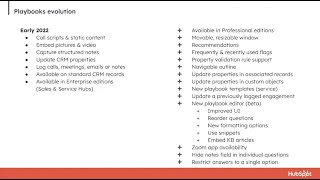
Okay, great. Thank you, Kyle. Let me share my screen here. I've got a few slides I'll take you through and then, then I'm going to show a demo and show you how Playbooks can be used to support some common use cases. First of all, can you guys see my screen? Just great. As Kyle mentioned, my name is Drew. I'm the product manager on our sales enablement team. And if you scan that QR code, you'll get my contact info and my meetings link in case you'd like to follow up. Ask me questions about some of these features or if you have suggestions for other changes to Playbooks. We're always happy to meet with Playbook enthusiasts. Let me start with a little bit of history. Playbooks initially came out in about 2018 and it kind of, it was enterprise only right out of the gate. And it was really a good tool for call scripting and capturing structured notes. And it sort of stayed around. The product got a, a little bit of a cult following, but was underused for a long time. Early last year, we spun up a team devoted to sales enablement use cases and starting out focusing on Playbooks, really building out Playbooks into a robust enablement content delivery tool. That's what we've been focused on for the majority of the past year. That brings us here to early 2023. Now, what do I mean when I say a tool for delivering enablement content? Let me sort of try to explain that with a bad analogy. If you think of Playbooks this time last year, it was kind of like a compact car. If you needed to make a quick run to the grocery store, you could do that. It's perfect tool for small things like that. What we've spent the past year doing is building it out into a real professional delivery mechanism. More like a professional delivery van can hold all sorts of new things, more stuff that can deliver all kinds of things to all kinds of customers. So that's kind of how I think of Playbooks. And if you get into the details, this time last year, again, it was enterprise only. It was really good at call scripts and delivering static content that you needed to have at your fingertips in a specific CRM record. You could embed pictures and video. You could, you could use it to capture some structured notes. You could use it to update CRM properties directly. You could use it to log calls and meetings, email or notes. And it was available on the set of standard CRM object pages, companies, contacts, deals and tickets. And as I mentioned, it was enterprise only in sales and service hub. Since then, we've added a ton of new features, make it way more flexible and capable, usable in a lot of different scenarios. Where it wasn't quite a fit for before starting off, we brought it down to professional editions with some limitations, but it's there for all professional customers. And then I won't go through this whole list. You'll see a lot of these things in the demo I'm going to do. But the point is we've really invested a lot in it over the past year and if you haven't, if you use Playbooks, you've probably seen a lot of these features. If you haven't used Playbooks, if you checked it out maybe in 2018 or 2019 and it wasn't right for you at the time, I would really encourage you to go in and play around with it again because it's really a different tool than it was a year ago. All right, okay, so I'm going to jump into a couple demos here in a second, but really I want to talk to you about how you can use Playbooks to support the entire sales cycle. It's really a flexible tool. It's not really like purpose built for one specific thing. It can be used for a lot of different things from prospecting to closing to post sale activities, support and customer success and renewal conversations. I'm going to focus on four specific cases here. A BDR qualifying a new lead, an account executive working on a deal and and handling objections handoff from an account executive to service and support teams once a deal is closed and then how a customer success manager can use Playbooks to support renewal conversations. All right, so with that, let me jump into the demo and let's see. First of all, let me show you how you can use our upcoming Advanced Recommendations feature to show exactly the right enablement content to your sales reps at the right time. In this case, I'm acting as a business development rep and I've got a lead that I need to get in touch with and ultimately qualify. Using advanced Playbook recommendations, we can show exactly the right discovery Playbook to the BDR based on attributes of the contact or company. Here you can see the Midwest Mid Market Discovery Call Playbook is recommended right at the top of the list. And that's based that's recommended based on attributes of the lead itself. So because because this contact is associated with a company that's located in a midwestern state and the number of employees is within a certain range. Playbooks. The system is using that information to show me this specific discovery call playbook. There's a whole other set of discovery call playbooks here, but it's choosing this one and putting that right at the top of my list because of the attributes of the specific lead I'm working on. Let's see. Let me open this playbook and you can see. First of all, one thing I'll point out is I can move and resize this window. Kind of a minor improvement, but this time last year the window was anchored. You couldn't move it or resize it. We've also added this really cool clickable outline that is really useful in long playbooks. You can click and it'll pop down to exactly the section you're looking for. One new thing that you may notice here if you're sharp eyed Playbook user is we've got this Playbook is personalized for the contact I'm looking at. You can coming soon anyway, it's not out yet. You'll be able to use personalization tokens in the body of a playbook. So I'm on the phone with this lead. I'm filling out my discovery playbook, choosing answers and filling in notes.
Thank you Kyle.
That's exactly right. You can use any property in any object. Custom properties and custom objects as well. The whole purpose.
Sorry, custom objects is new. You were just saying it used to just be standard objects.
Yeah, that's right. I'll show some some more custom object stuff in a second. But as far as setting up recommendations, you can include properties from custom objects or you will be soon when this feature is out. Really the whole purpose of it is so you can have really specific enablement content and put it in front of your users exactly when they need it. So if you have a lead that meets a set of like really detailed criteria, you can show them the playbook that aligns with exactly the lead they're working and you can use this again. You can use this in deals, you can use this in companies and contacts tickets and.
That'S awesome. We are getting before you move on, we are getting some questions here. A lot of questions around packaging. I Is that still TBD or do you know?
Yes, yeah, that's still under discussion. I should have a final answer for that in the next few days, but that's still tbd. Obviously the one major restriction today with Playbooks is that to access object properties in the playbook, to leave notes and update a property directly, you have to have an enterprise seat. And so any feature that uses that property update capability is going to be enterprise only.
Sure. Okay, then one specific question people were asking if in these, as you're selecting properties, if list membership shows up as an option there.
Oh, good question. Let's see. I should have said this earlier, but the usual caveat about live demos applies. This is still work in progress, so you may see some. Get a real peek behind the curtain and see some bugs.
Yeah, if you're really eagle eyed and you look at the URL here, you'll see he's@app HubSpot qa.com this is a, there's a QA portal. This is not a live feature yet.
So it looks like the answer is yes. You can include list membership in recommendations, recommendation criteria.
People love it.
Great. Great. All right, so let me move on to our next use case. I want to talk about objection handling during deal negotiation. So for this use case, I'm going to change, change roles here. I'm an account executive and I am going to be working on a deal and I know that, I know that the potential customer I'm working with is also evaluating one of our main competitors. Okay, so I'm going to pull up my, my deal here that is in progress and you can see the competitor that they're looking at has been flagged here. Alpha Corp is the competitor and my, my enablement team is really great. They've compiled really specific battle cards for every competitor that we commonly go up against. And because Alpha Corp is flagged here, the AlphaCorp battle card is right at the top of my list in the deal. So I can just pull that open and when the customer starts talking about features or AlphaCorp pricing or something they heard about AlphaCorp's products, I can pull up my battle card and I've got all the talking points I need to respond to the customer's objections. It's another example of how really specific enablement content can be connected with your sales reps exactly when they need it most. All right, and this one. Yeah, this one again, the recommendation is driven based off of the deal stage and the values in the competitor. Competitors field in the, in the deal. Okay. All right, next up, I'm going to talk about handoff facilitation. I think somebody earlier in the chat asked about handoffs. Pay attention to this part of the demo. In this Scenario, I'm again acting as an account executive and I'm going to pull up a deal I just won. So I've won the customer's business here and I put my deal into closed one, the closed one stage. And because I've closed the deal, the system knows to that I need to provide before I can hand off this account to our support and customer success teams, I need to provide some basic information that they will need to manage the account going forward. And I've done that in the form of a playbook. And so because this, this deal is in closed one status, it will recommend the account handoff playbook. And this one. Sorry, let me reload the PA.
We'Ll blame the rain. It's washing out your Internet.
Yeah, it looks like it's having trouble loading. Well, like I said before, this is a live demo. Okay, here, here it comes. This looks better. Okay. Okay. So I know that before I can hand off this account to our post sales teams, I need to provide some basic information so they can hit the ground running. Basically, they don't have to ask the customer the same questions they've already answered. They have the history of what's happened with this account so far. And I'll open my account handoff place playbook. And I have a custom object here called account plan that's associated with this deal and the company in this case. You can see that my playbook is set up to update properties in the account plan object. How much do you anticipate this account growing? I'm going to say by $25,000. And what challenges do you expect the customer will encounter? I'll say adoption. And another thing you'll notice is that all these questions are marked as required and you must provide a response before you can log a note. It's not going to let me log the note until I've filled out all of these these questions. Another one I'll choose that'll another question I'll answer that will update my account plan. And let's see. And then just a standard notes, notes field question. Now, once I've entered values for these all these questions, it'll let me log the note. If I, if I don't know the answer to some of these questions, I can fill out what I know and then close the playbook and it'll save a draft. The account plan won't actually be updated until I log the note, but my answers will be saved and so I can open it up later and finish what I'm doing Once I'm Done. I log the note and it will be added to the deal activities history here and available to the next team that takes over this account.
Awesome. We're getting. We're getting some good questions here. I want to pause you for. So first question. Well, actually, we'll save that. One more simple question is, along with the draft, as you fill things in, they get updated. If these are connected to properties in that Enterprise Playbooks feature and a property has a value, will those be piped.
In to the Playbook? Sorry. I can show you how that works. Now, when I pull up the account handoff Playbook again, I've already logged the note and the properties are updated. If I want to change the value, I can do that. Let's say I want to change it to 50k and it'll show me that the current value is 25,000. So the account plan has 25,000, but I'm changing it to 50,000.
Cool. Then the other question is whether in the Playbook were they marked as required? Is that a Playbook setting? When you're setting the Playbook up, you set that there.
Yes. I can show you how that works. Actually, this is a good thing to show. I'll point out a couple new configuration settings that are in there too. So that's done at the question level. You just mark it here as required. And this is not out yet, but it's coming soon. A couple other things we've added recently that the Playbook users on the phone may notice. You can show or hide the Notes field. Until recently, there was a Notes field that just automatically came with each question. I know many customers, they wanted their users to enter answers in a certain format or to choose answers. And having that Notes field was kind of a distraction. They were capturing stuff that they didn't want to capture or in the wrong format. And so a lot of customers would put red text above a question saying, don't use the Notes field. That's not necessary anymore. You can just hide it.
That is a huge.
Yeah. A couple other things we've added recently. You can. If you're using the list of answer options question type, you can restrict the user to only providing a single answer. So if you have five options, then checking this box will allow them to only pick one. And let's see. I think that's. Yeah, those are the three main new options. These two Hide Notes and Restrict to single answer are available now in all production portals. The required Questions setting is coming soon.
Cool. And then Josh asks, can you require a Playbook to be completed in order to move a deal card to a new deal stage. So looks like you have an answer to that.
That question comes up occasionally and the answer is no, not directly from Playbooks. There are some ways you can work around it, but it's not something we can do with Playbooks today.
Yeah. So you can, Josh, add required properties to deal stages. So a deal can't be moved in unless those properties are filled in. And in the enterprise version of Playbooks, you can have a Playbook that fills in deal properties, which can then meet those requirements. But there isn't a way to require that the actual Playbook is completed all the way through.
Right? Yeah.
Cool. Then lots of questions. Wow. Okay, they're gone now. But there were lots of questions about like people wondering about can people outside of HubSpot access playbooks or can you export Playbook content? Is that something you're thinking about?
Yes, in some ways. That's a pretty broad question. So I'd love to learn more about the use cases behind that. But you can't export Playbooks today. But we are sort of. We're looking into that potentially. Another thing we're looking at is how to the best way to share the results of a Playbook. So if you log a note or you log a call, how can you. How can you share that beyond just the timeline in the record you're looking at? I don't have an answer for that yet, but we are looking into that problem.
Then. Charles, I was going to type and answer your question, but I'll just say it out loud. Charles is asking basically about. He calls it branching logic, I think, like conditional questions. I wonder if things you're about to get to with the Playbooks in Playbooks thing. We'll get to that a little bit.
But yeah, I hope so. Stay tuned because we have some things that may help what you're trying to do. It's not directly like logical branching, but it may make what you're trying to do much more possible. Kyle, I also saw a bunch of questions about custom objects. And so right now, if you open a Playbook on a company contact, deal or ticket, you can access and update custom object properties, just like I showed a few minutes ago with the account plan. But you can't actually add Playbooks. You can't access playbooks on custom object. Right. Record that is coming soon too. So we're working on that and it should be. Should be available in the next couple months. Okay.
There. I want, I want Drew to continue with his demo. There are a Lot of us in the room here, friends. We're doing our best to keep up on the chat. If you've asked a question and we haven't answered it yet, if you could go over to the QA tab, Q and A tab and drop it in there, we will work through everything in there would but the chat is scrolling so fast we're having trouble keeping up. So favor move it over there. Drew, go ahead, show us your next demo.
Okay, great. Next, I want to show you how you can deliver really rich enablement content through a playbook in the case of customer success manager working on a renewal. So let me go back to my deals and I'll pull up a deal for a renewal. So this is a customer that, it's a current customer and they're about a month and a half out from renewal. And my job as a customer success manager is to get in touch with them, sort of take their temperature, see how they're feeling about renewing, see if they have any, any problems I can help with or any questions in advance of their renewal. So because, because this is, this deal is existing business and the close date is more than 30 days out, the system is recommending my pre renewal check in Playbook. So I'm going to get on the phone with the customer and open up this pre renewal check in Playbook. And this is, this is kind of a call script that guides me through this regular check in I should be having with my customers. I can go through and ask them these standard questions. And it's kind of loosely meant to loosely structure the conversation, not like a script that I follow word for word. And I can, you know, I can use it to facilitate like a more organic conversation by skipping around, using the outline to skip around and address topics as they come up. One new thing that is coming soon, new feature coming soon is I can embed documents in my playbook. So if there are assets, you know, PDFs or slide decks that I want to be able to share with a customer at a specific time or their documents that I need to refer to, I can embed them in a playbook and then all I need to do is click one and it'll open it up in the Documents tool and I can share it with my customer if I need to. So you can embed a list of documents. Now in this case, I'm talking to my customer and they throw me a curve ball and say they're thinking about not renewing, they're considering going with a competitor. And so what I want to do is I want to be able to counter their objections. So I'm going to skip down to my objection handling section of the Playbook and you can see that I've got my battle card Playbooks embedded here in this customer check in Playbook and they said, they mentioned, oh, I'm thinking about going with Omega Corp so I can click on my Omega Corp battle card and it'll go to, it'll open that Playbook and I can can go through and sort of respond to the customer's concerns. And at any point, you know, once that conversation is over, hopefully I've convinced them not to go with Omega Corp and to renew with us. I can go back to my pre renewal check in Playbook and continue filling out my the answers to the questions I need.
Okay, I'm coming off mute again. So I love the breadcrumbs at the top. That's awesome. You don't just get lost in another Playbook and have to hit your browser back. You know where you are and you can get back. I think that's cool. People are really excited about the documents thing you showed. So this is using HubSpot's documents tool and people are like, Whoa, PDFs. Can I do like a PowerPoint? And so like, yeah, whatever you can upload to the Documents tool, which I forget exactly what that list is. You can just take your documents and embed them right here. Other sales content also, right? Drew, I don't want to steal your question, but.
I know, yeah, so I've shown documents and then other Playbooks, so nested Playbooks. Another thing that you can do, let's say you're finished talking to the customer in this case and you want to send them a follow up email. I can customize it and send it to the customer immediately. It makes it really easy to follow up quickly using a specific template. In addition to documents, Playbooks and templates, you can also embed sequences, snippets, and I always forget the complete list, but it's on a slide coming up here. You can see, you can see everything you can embed. Yeah, any type of. Any of the sales content tools you'll be able to embed in a Playbook.
I'm trying to respond to things in the chat, just can't keep up. I hope you're seeing this, Drew. There's so many exclamation points and capital letters, which is just how I operate all the time. Andy, I think I've lost you. Someone asked about packaging again and just want reiterate a Lot of the. That's still being determined. Drew told me yesterday. I hope it's okay. I tell you this, I tell everyone this. Drew told me he wants to put all of this in Pro, but ultimately it's not his decision. There. There are other people who make packaging decisions, so some of these may end up enterprise features, but that has not been determined yet.
I would like to give this to everybody who wants it. But yeah, we're trying to be thoughtful about what we put in Enterprise versus Pro, and stay tuned because we will have a final answer for that in the near future. Let me show you how the embedding works in a Playbook. I'll open my renewal check in Playbook. Here's what it looks like on the editor side. To embed other sales content, I just go to this insert menu and I choose sales content. And then it gives me access to documents, snippets, templates, sequences, and Playbooks. Depending on what you choose, you'll see different things that you can choose to embed. Somebody asked about logical branching of questions earlier, and we're not supporting that directly yet. I'm not taking that off the table. It's something we may do in the future. But between nested Playbooks, you can have Playbooks nested within Playbooks that you can kind of create these paths. And then between that and the clickable outline, we think you should be able to do most of what's really needed in cases where people ask for branching like that. But we may still investigate, you know, question logic and branching in the future.
And just to reiterate, because the question keeps coming back, we don't know what the packaging of these features is yet.
Yeah, I'm sorry, I wish I had a concrete answer, but this. These are still works in progress, and we're still working out the details.
Yeah, cool. Yeah.
That'S everything I wanted to show. Well, I think I mentioned this already, but personalization token support. I'll just point that out while we're in the editor. A couple other things that are in the product today, but you may not have noticed, but you can insert knowledge base articles. You can also use snippets. So if I do that, and I think. I don't think I have any snippets in this portal, but you can use snippets the way you can in the rest of the product. I think those are the big things here. Okay. Okay. So let me go back to my slides and a bunch of the things that I showed are coming soon. Advanced recommendations is right on the horizon embedded sales content tools is also coming really soon. We're finishing that up. There's a set of other things that we're working on. Personalization tokens is also just about done. Availability on custom object record pages. That is also coming soon. We are working on making Playbooks available on specific objects. If you have a Playbook that you only want your users to access on a deal, for example, and nowhere else, you'll be able to set that up in the Playbook. If you want to give your users the flexibility to choose how they're logging Playbooks, let's say you want to give them the option of logging a call or, or a note or a meeting. You'll be able to do that. Right now you have to pick one. And then last year we made a change so that Playbooks only updates CRM properties when you log the engagement, not at when it's saving a draft. We did that intentionally to support property validation rules and just because the behavior it seemed more polished. A lot of customers had problems with property values unintentionally updating because people were entering draft values in a playbook and they didn't actually want to update the record yet. But that caused some unintended consequences. There were customers who were using Playbooks just to update CRM properties and they didn't want to log the engagements. And so we're adding that level of flexibility. You'll be able to click a button and just update properties without logging a new engagement on the timeline. And a little bit farther out, like later this year, we're looking at Playbooks Usage Analytics. I've probably spoken to some people on the webinar about this. Lindsey, our team's designer, and I have met with a bunch of customers to flesh out this feature that's coming later this year. We're also working on. We're working on ways of. If you go back to the delivery truck analogy for a second, right now we've got this delivery truck, but it can really only stop in a couple places. It's in the side panel on Record pages. We're working on exposing Playbooks in a lot more places throughout HubSpot, and one of those places will be in the Record page overview tab. We're working on a tile that customers can put in that Overview tab that will surface recommended enablement content. And similar to the ability to embed sales content tools in a Playbook, you'll be able to embed conversation intelligence resources. So recorded calls or excerpts from recorded calls or playlists of recorded calls in A playbook. One big use case behind that is if a rep is preparing for a call, a demo or something, and you have a playlist of other demos that have been really successful that you want the rep to watch before they do their own, you'll be able to include that in a playbook. And then we're also working on the ability to embed content from HubSpot Academy. So if you have a playbook that is meant to help onboard a new sales rep or to teach you want to teach your sales team a new skill, you can include HubSpot Academy content in the playbook. Okay, so I think that's everything. That's the laundry list of stuff we've got in the pipeline at this point. And yeah, I'll pause here for more questions.
Drew, I think you have about 200 new best friends, and about half of them have perhaps passed out on the floor at this point because they just can't handle everything you're telling them. You're making so many dreams come true. I hope you and your team know how big of an impact you're having. These are going to make Max Cohen says his brain has fallen from his skull, and I'm pretty sure he's not the only one. So that is where we're at. Friends. We've got, I think, plenty of time for Q and A here. We have a lot of stuff in the Q and A, so if you could all. But I'll start serving these up to drew here with 15 votes. Given the new properties ability, does that mean that we'll be able to weave Playbooks into workflows as well? We've gotten lots of questions about the relationship between Playbooks and workflows. I'd love to hear your thoughts, just in general, about what that might look like.
Yeah, that's a really good question. And we want Playbooks to be able to be used seamlessly with workflows. I think we'd have to probably. I'd have to learn more about the specific use cases to figure out how that could work. But yes, we want playbooks to be usable with workflows.
Just spitballing here based on features I've known about for less than 24 hours. Given the advanced recommendations, you could have a property that's like, which playbook do you want to use? A workflow could set that and then that could make that Playbook recommended the other way around. If you have the enterprise version of Playbooks, Playbooks can update properties, and Properties can feed into workflows however you want. You can get there. It's not an explicit connection, but because everything centers around properties, you can. It's only one step removed.
Yeah, yeah, yeah. I mean, if there are cases where you discover that Playbooks can't interact with the workflow the way you expect it to be able to, then I'd love to hear about those. But, yeah, there are lots of ways to do this stuff. And I think I mentioned before you started recording, Kyle, that I love seeing the creative ways that customers use our product. And Playbooks is so flexible that, like, you can do a lot of things with it. Just it just creativity sometimes.
Well, and now I am so excited to see how people are embedding sales content and what they use it for. This is one of those features where, like, we cannot even imagine all the clever things our brilliant users will come up with. And the 167 admins in this room, I'm sure all have ideas bubbling already that are just going to. They will come back and blow your mind, which is what they do. And that's why I love this hug.
Sounds like a challenge, Kyle.
Yeah, no, go for it. Lily wants to know about reporting on Playbooks. I think you mentioned analytics, but you want to talk more about that?
Yeah, sure. I can tell you that we're kind of approaching it in two stages right now. Customers have no visibility into whether their Playbooks are being used or how they're being used. They, in some cases they're reporting on activities. And because they've mandated that Playbooks have to be used to log activities, they're kind of drawing some conclusions from that, but it's not very clean. So the first stage is just to give customers some basic. So flexible that, like, you can do a lot of things with it. Creativity sometimes.
Well, now I am so excited to see how people are embedding sales content and what they use it for. This is one of those features where we cannot even imagine all the clever things our brilliant users will come up with. The167 admins in this room, I'm sure all have ideas bubbling already that are just going to. They will come back and blow your mind, which is what they do. And that's why I love this hug.
Sounds like a challenge, Kyle.
Yeah, no, go for it. Lily wants to know about reporting on Playbooks. I think you mentioned analytics, but you want to talk a little more about that?
Yeah, sure. I can tell you that we're kind of approaching it in two stages right now. Customers have no visibility into whether their Playbooks are being used or how they're being used.
Used.
In some cases, they're reporting on activities. And because they've mandated that Playbooks have to be used to log activities, they're kind of drawing some conclusions from that. But it's not very clean. So the first stage is just to give customers some basic insight into how their Playbooks are being used. Whether their sales teams are using them, who is using them, who's just viewing them versus actually using them to log engagements, that kind of thing. And then farther out, we want to layer on top of that what impact Playbooks are having on the customer's business. That's going to be a little bit harder, but ultimately that's what people want to know. When my sales team uses this Playbook, is it actually resulting in closing deals faster or higher win rate or that kind of thing? That's what we're aiming towards, but we're going to kind of do it in multiple phases.
Got it. So this question From Chad has 14 upvotes. I think it was the first one to come into the Q and A section. I know you kind of touched on some of this already, but I'll just read the whole thing. Will Playbooks ever update the original meeting or call that was scheduled in HubSpot? Meaning log the data to the scheduled zoom or other meeting that the sales rep and attendees join. So we don't have duplicate engagements in our contact and deal timelines right now. It makes our sales or support reps look like they're making more calls or meetings than they are when using Playbooks. Is there a specific reporting reason Playbooks log is a new engagement every time?
Yeah, that's a really, really good question. That's something we've been grappling with for a while. So we're aware of that issue, that if you use a Playbook, it can result in multiple engagement records that really represent the same conversation, same meeting or same call, and we're chipping away at it. It's a bigger problem than you may expect. And we're improving it. We have improved it already in some ways. And let me show you specifically. Actually, this deal probably has it one change, a very subtle change we made recently. If I open up this deal that I used earlier, I logged a note on this deal using this account handoff Playbook. If I open up the account handoff Playbook again and I want to make an update to the account plan or an update to the note, say I want to Change this to 50,000 instead of 25,000 previously, all you could do was log A new note. Now, if I click on this caret button next to the log button, I can choose to attach to a recent engagement. This one was logged just 26 minutes ago. If I do that, it'll update the note with new details. It just appends the previously logged note.
I did not know that existed. How long has that been there?
Just a couple of weeks. We just snuck it in recently. That's one way that doesn't solve the problem that was asked about totally, but it's one way we're trying to improve it. Ultimately, we want one representation of a specific meeting and a playbook should be able to add to that or update it.
When you use that attached to recent dropdown, what appears as options in there.
There is a time limit. The use case this was built for is if you're using. I don't think I have my call. I don't have calling set up here. But if I have my call communicator open and I'm using that to actually make a call to a customer, but then I'm also using a playbook to take notes and capture property updates. When I finish the call from the call communicator, it'll log the call in the timeline and then if I log the call from here, it does a second one. The use case that this really is meant to address is when you log a call from the call communicator and then you want to use a playbook to just update that call. That's really the specific case.
That's amazing. I feel like that's exactly what was being asked about. Is it any engagement in the timeline of the record that you're looking at within whatever window?
Yeah, it's basically, I think within six hours. I'll have to check that timeline.
But yeah, yeah, but in, in this example you just showed the only one that came up is. Is the note that was logged.
Not. No, not today empty? And I don't know. Yeah, I don't want to say too much about that, but that is something that, that we're working on across several.
Teams right now, today. But yeah, we know you all want it. James asked the all important question. What do you mean when you say coming soon?
Yeah. Okay. So advanced recommendations and embedded sales content. I'm expecting to come before the end of the month, possibly early April, but definitely in the next few weeks. The other things in this list, I'd say early Q2 and then a little farther out, I'll just say later this year.
Yeah. But all this year, every these are all like 20, 23 things. Yeah, yeah.
But, you know, one caveat. I should have said this up at the. At the top. This is all work in progress and it could change at any time, so.
Sure. Yeah.
Don't take any of this as a commitment.
Right. Yeah. Basically, they're all your best friends now, Drew. They'll give you a little grace, I think.
So if this isn't. If this doesn't come out, I'll hear about it.
Yeah. Okay. Possible to incorporate with tasks. That is, if a task is set to a call, a call window would open automatically. Possible to set a specific Playbook to open via tasks.
Maybe. I think this is probably a case where I'd need to know more about the specific use case. And there are probably some ways we could accomplish what you want. More complete integration between Playbooks and tasks is something that's on our radar. I don't have any concrete information about that, but we are looking into it.
Yeah, I understand the question. Because Playbooks now kind of rhyme with tasks in the way you can open up the email communicator with a template already there. You can do the same thing with the task. I think for those of you on the call, I would encourage you to put some thought into what is a task versus what is a playbook and how do we think about those things working together. Sounds like there will be product updates addressing that at some point, but it also feels kind of like a thing you all can just make individual decisions on and. And run with. My recommendation. Is there training for Playbooks or certification? I feel like that's a question for me. I. There is a. Not really is the answer. I have. I have created a course called Sales Hub Admin. If you search for that, you'll find it there. There is a class in there on sales enablement tools and HubSpot, and it does cover products. It has not been updated or does cover Playbooks. I mean, it has not been updated in a little bit and Playbooks are now changing really rapidly. So if you want training on the stuff you've seen here today, that is going to be a ways down the road because these products haven't even come out yet. But agreed, that is needed. Will Playbooks be available in the mobile app since a lot of salespeople are on the road with iPads and phones?
Yeah, that's a great question. It's something we're looking at. We would love to put it in mobile, but we're not quite there yet. All I can say is that it's in our list to address at some point.
Got five minutes here. We'll keep working through these. How soon is soon again? We answered that one, I hope. If you have follow up questions, let us know. Will filling out a Playbook at the company level create an account plan object? If one does not already exist?
No, not today. So you'll need to create the account plan record separately and then the Playbook will be able to access it.
Yeah, but that's another one I feel like. So in your example, right, that playbook popped up when you move the deal to close one, you could use a workflow. When deal moves to close one, create an account plan record. You could just have that happen more or less automatically and that would work.
I think it's another case where there are creative ways to accomplish what you need. Yeah.
Will filling out a playbook at the. Oh, that's the one I just read. Let's dismiss that one. Our onboarding process is extensive. Can we put a link to our PM tool in a handoff Playbook?
Yeah, I don't see why not.
Because Playbooks are. It's a rich text editor, right.
You could drop a. I'm assuming that the tool you're referring to is like some. Some sort of web accessible tool outside of HubSpot. And the answer is yes. You can link to any external website, Google Docs, Google Drive links, that kind of thing. You can include those in Playbooks and I can show you there's. It's just. Yeah, like Kyle said, it's just a rich text editor. So you just do this.
Perfect. So Lisa is asking a question I wish I had thought of. If you have Playbooks nested in Playbooks and if the Playbook, if both of those have areas for you to log notes and things, do two notes get created? Do they all get saved at the end? What does that logic look like?
Yeah, that's a great question. It should just log one note when you do that. Just keep in mind though this. We're still testing these scenarios and the behavior may be tweaked a little bit when the features released.
That's why it's not out yet. We got to think about this stuff. We have two minutes left. We are not going to get through the remainder of the questions. Drew, I don't know if you want to put your QR code back up or if there's a way you want people to. To reach out to you if they're interested in continuing this conversation with you.
Sure. Yeah. You can scan this and you'll get my email and my meeting link. Or I could just put. Let's see the exit out of here. I'll just put my email address here and then.
Lindsey, if you want to pipe up in the chat, if you all want to leave the Q and A and go back over to the general tab, Deanna has dropped in a survey for this session. Would love to get your feedback on what you thought of this and any requests you have for future sessions from this hug. Drew's email is now on the screen, and Deanna has dropped it into the chat. Drew, thank you so much for being here. Like I said, I think you have 200 new best friends, so you've done good.
Cool. Yeah, don't hesitate to reach out. Lindsey and I love chatting with customers. I love seeing how you guys are using Playbooks and Happy, happy to help answer any questions that come up or if there's. If there's a really interesting way that you want to be able to use Playbooks but can't for some reason. We'd love to hear about that.
Yeah. Lindsey has now dropped her email into the chat. Also, she's the designer for the team, so reach out to Drew, Reach out to Lindsey. Sounds like they're. They're hungry for your input and ideas, and I hope you all have a great day. Thanks, Drew, again, this is awesome.
Yeah, no problem. Thank you. Thanks so much.
Bye, everyone. Bye, everybody.
I'll get the recording out.
Don't worry.










