Properties | HubSpot Admin HUG | October 24, 2023
Rachel Webb and the HubSpot Properties team walk through recent feature releases, customization options, and calculated properties. They cover validations, conditional logic, and answer questions about upcoming enhancements for managing CRM properties.
Guests were recording. Now we're recording with that, I'll go ahead and hand it over to Rachel to talk to us about properties.
Cool. Thanks, Kyle. Let me share my screen. Can everyone see?
We can see that. Yep.
Okay, cool. Hey everyone. I'm so happy to be here again. This is my second admin hug. Last time I was here, I was actually the PM for our Associations team and I got humbled really quick by how much everyone knew about associations. So I'm looking forward to having the same happen today. So let's do this. So, quick introduction. I'm Rachel Webb. I'm the Product Manager for Properties. I put my email here and at the back of this deck so folks can contact with contact me with any questions or comments or feedback about properties. And today I'm going to talk briefly about our CRM goals, which our Properties team is very much anchored in. And then I'm going to dive into some of the features that we've delivered for Properties over the past couple of years, where we're at today, and some of the things that we have on the roadmap. Do you want to make a quick note that I'm going to talk about some features related to calculated properties. Luckily, we have an entire team that's dedicated to calculated properties, so I may need to punt some of your more detailed questions to my co PM Shay Jones, who is our PM for Calculated Properties. All right, so quick overview of our CRM platform goals. These are pretty consistent year to year because we've really stayed aligned on how we want our platform to scale, and as a result, our Properties platform has pretty much the same goals. So our first goal is data model customization, which essentially means being able to reflect more of the nuances of how your business works in HubSpot. So this is something we focused on for the past couple years. We've made good progress, but we've still got a lot more to do to give admins more configuration powers over the CRM. So an example of this is more granular permissioning, or being able to define custom property translations, or perhaps conditionally requiring properties. The second goal is expanding the data model, which means things like more object types and more visibility into your data model. If you're familiar with the Data Model Overview tool. This is a reflection of how we want our data model to be more consistent and more powerful. Then finally, we want to strengthen our platform. And for a team like Properties, this is a huge focus because this means that the way that we build every single Properties feature should scale across the platform. And kind of magically work in a lot of our HubSpot tools in a very powerful and consistent way. So backing up information that people already know. But I'll kind of put out there for the basics. But what are properties? So properties are fields where you enter data and I would describe them as the building blocks for the CRM. So not to overstate my own team's importance, but. But there are so many tools that rely on properties to show you the right information, store your data, clean your data, show or hide your data conditionally. They're just really a really powerful tool for data quality and control over your data model. So when you think about a properties feature, we just don't. We think not just about how you're going to set up your properties in property settings, we think about the impact of that property on every single downstream tool like the record page, the index page, the list tool, the record creation tool, and so on and so forth. And so we serve all the teams that own those tools to make sure properties do what they need to do. Properties are not associations, which captures relationships between records. And properties are also not object labels. Just for clarification. Not a huge deal, but thought I'd make that differentiation. The last thing I'll say is that properties are kind of like an iceberg. Like as a user, you're setting them up, you're interacting them, you're viewing them. And then below that is a platform that we're working on which powers this experience. Experience in every tool that uses properties in HubSpot. I'll stop there before I get too carried away and start talking about features. So since 2022, we've come a pretty decent way to delivering much needed property customization and data quality features. So we've delivered validations to help you set requirements for what data can be entered in a property. We've delivered field level permissions which allow you to select specify users and teams that can view or access a specific property. Unique value enforcement, which allows you to require that multiple properties or multiple records can have the same property value. Conditional logic, of which there's a couple different flavors that I'll talk later on in this presentation and advanced formulas when it comes to calculation properties, the ability to have more Excel like powers when setting up your calculator properties. I'll go into each of these features, but I think the thing to highlight is that we've come far, but we still have a long way to go. And I'll be talking about some of our future plans after I cover the features that we've delivered over the past couple of years. Field level permissions Field level permissions give you the ability to restrict or edit view access for properties. So when you're in property settings, you can click on Manage Access and you can specify which users or teams can view or edit the property properties data on a record. And the restricted properties name will still be visible, but the value itself will be hidden if you've decided that the value should be hidden to the user. And so the use case here is that not everyone in a portal needs to see property information. And so the idea is that this is a granular permission that allows you to control that access on a per team or per user basis. And this is an enterprise feature. The next feature that we've released are validations. So validations are rules that you can set as an admin to force users to meet certain requirements before they save a value. So, for example, a basic example, you could create a custom text property and set a validation to say that only text should be entered into that property. Or a more complex version, you could, if you had a custom date property, you could configure validations to say the user can only put future dates in the property. And also the date has to be within the next 14 days. And HubSpot will reject any values that aren't in compliance with these rules. So, as you can imagine, this is a powerful tool for being able to control data quality, make sure that numbers aren't in a text property, things like that. And the note that I would make here is that validations aren't currently enforced in forms or workflows, but we're actively in development for enforcing validations in forms, hoping to have that out later this year. All right, moving right along. Unique value enforcement. So unique value enforcement allows you to require that a property value, that a value entered in a property can't be the same as a value entered on the same property on another record. So these can be set for text properties and number properties. An example, if I have a property called Coffee type and I make it unique, I can't have the value of that property be latte in more than one record. You can set up to 10 properties unique per object. And we actually recently made this feature available for contact properties. Previously that had been an omission. Otherwise, it's available for all customers and it's live. I'll pause there. Kyle, are there any questions in the chat that I should.
I think we're tackling them.
Okay, cool.
You want to keep going? I think you're all right.
Okay. Nice. All right. Okay. Advanced Formula Edit so this is probably one of our most exciting live features right now. This is a feature that was released by our Calculate Properties team. So I will need to, as you can see, direct any of your more detailed questions to Shay Jones, whose email is on this slide. Basically, the way this works is that when you create a calculated property, you flip on a toggle to go into Advanced mode. And this gives you the power to enter and customize your equation to use operators like and, or, or not. You can use logic around kind of conditional logic. Like an example is if else you can use the Concatenate function to generate email addresses. There's actually so much that you can do with this. I'm hoping that this demo will work from one of our team members on the Calculated Properties team.
Hey everyone, my name is Juan from the.
I'll stop there. It was that. Oh, okay.
Great Properties team here to give you a quick demo on our new Advanced Formula Editor. So our customers are frustrated with the limited functionality and rigid calculations of our calculated property type, but we have great news for them and for you. Introducing our new Advanced Formula Editor, a game changer in data analysis that empowers you to transform your data into vital business context effortlessly. In the past, performing calculations using our Calculated Property UI severely restricted what you could do with your data. So let's explore some common use cases where the calculator fell short and how the Advanced Firmware Editor fills the gaps. Let's talk about Dan, a sales manager who's responsible for analyzing sales performance across different regions and product categories. And he asked if it's possible to identify specific sales trends that meet specific criteria using HubSpot. Lucky for Dan, our Advanced Format Editor equips you with powerful logical operators, allowing you to effortlessly filter data and analyze data that match specific criteria. By leveraging logical operators such as and, or, and not, you can construct sophisticated formulas like this one. Is North America Small Business to define precise conditions and refine your analysis. Let's check it out in the company's view. Here we can see property being applied correctly based on the country number of employees. Let's look at our next use case. Let's talk about Alan, an HR manager, and he asked if we can create full email addresses for him using a calculated property. With our Advanced Format Editor, you can easily concatenate text values and create email addresses in a breeze. Simply define a custom formula like this one that combines first name, last name, and email domain, and use the Concatenate function And that's it. Maybe throw in some additional text functions in there to make it a little more formatted. The Advanced Format Editor will generate the email addresses for all the employees automatically. Let's check it out in the context view. Here we can see the complete email address formatted and created beautifully for all of the contacts in the portal. Now let's talk about a more challenging use case. This particular customer is a financial analyst and they want to calculate the total loan interest based on the properties of the record. But by using a bunch of if else logic, we can do that in one single property by utilizing the power of conditional logic. By using this if function here, you can define custom formulas that consider multiple conditions such as investment amount, duration and even interest rate. With just a few clicks, this formula will compute valuable financial data for each investment scenario. Let's check it out on our deals. Here we can see our fallback value of 0 being applied correctly to loan A because of the duration and the interest rate. Whereas loan B we can see the full loan interest amount because the conditions were met. Now, I've only shown you a few use cases with the Advanced Formula Editor. The possibilities are limitless. We'll continue to iterate on this feature based on the feedback that we received, but as of now, keep an eye out for some of the following additions coming later this year. We'll start by supporting additional data types so the customers can perform calculations that return strings, dates and booleans calculation previews to give customers more confidence that they're building the formulas correctly. And lastly, auto formatting, which will allow customers to create formulas quickly without spending tons of time formatting the data. To learn more, visit the following Knowledge Base article below.
Cool. I see some great questions in the chat. I can share demo. Oops.
Hey everyone, my name is Juan from the Calculator Properties team.
We're stuck.
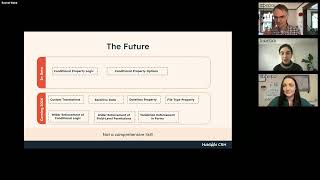
It's on a loop now. Yes, let me see if I can grab the link. It's a drive link and then I'll get us back into see if I can drop it in here so that everyone can watch that demo for themselves. I also see some feedback around. Like I would love to have a repository of examples and I will pass that right on to Shea. I'm sure she will love to hear that. I see other questions that I think Shea will also have answer. Okay, there we go. Okay, so that was a summary of all our features that are recently released. So now we're going to move to the talking about the future. So we have a couple of features in beta Today, Conditional Property Logic and Conditional Property Options that I'm going to demo, and in 2024 we'll be working on a few different things. Not a comprehensive list, but just a list of highlights. We're going to be working on custom translations, the ability to store sensitive data, custom date time properties, file type properties, wider enforcement of conditional logic, field level permissions, and as I mentioned, validation enforcement in forms. I'm not going to cover sensitive data in a ton of depth during this conversation because this initiative is so new, but the intention here is that we want customers to be able to store data of a sensitive nature, for example, financial or medical information, and have the ability to meet compliance requirements for this data. So that's coming in the future. All right, Conditional Property Logic. This feature is currently in public beta. So if you're in the beta and you have feedback, feel free to throw it in the chat. But this feature allows you to surface or require properties based on the value of another property. So this means that when a user creates a new record and sets values, or when they edit an existing record, the same logic will be triggered and we will not allow users to save until they've filled in the required properties. We're moving this feature to all customers. We're rolling it out live later this week, which is really exciting. So let me see if I can demo it for you. I think I only shared my tab, so one second. Oh, weird. Okay, the whole thing froze, so let me. Let me just. Let me just work with Bevy. All right, I think you can see my window now and hopefully you can see my property settings. I'm going to navigate to this new tab called Conditional Property Logic. This table shows all of my conditional property logic rules. For example, I already have a rule that says if Company role is equal to Product Manager, then show company name and make it required. I can preview this logic by saying if a user puts in Software Engineer, nothing's going to show up. If I put in Product Manager, then company name is going to be required. I can set up. Let's set up another rule together for Company role. This is a custom enumeration property. And let's say Engineering Manager and let's choose a random one like city, make it required and save. That logic when I go onto the contact record and let's say these oops. Okay, let's say that these properties are added to my left sidebar. Depending on which value I select, my dependent properties will show up. And if there's no dependent properties, then I'll just be able to save as I was before. This is enforced on this record page. It's also enforced on the index page. So if I were to make and edit to a property in this view. So Company Role, Product Manager, it's a slightly different ui, but the same requirements show up. And then also when I create a new contact, I'm not sure if yes, it is. If I create that contact, Company Role, Product Manager, the same requirements show up. The idea here is that all of your conditional logic is in one system between the Record creator, between your pipeline stage rules and any other enumeration properties that you've created rules for. It's all going to be enforced everywhere ideally, but for now it's in the Record Creator, index page and record page. Next conditional logic feature is Conditional Property Options. So this feature allows you to filter down property options depending on the value of another property. So the idea is that you select a controlling property for a given enumeration property and then you select which options should be shown for your property depending on the options of another property. I think it's easier again to just demo this one. So I'm in my Contact properties. I've defined a custom enumeration property called Company Role. Once you are in the edit page for each individual property, you'll see this tab called Conditional Options for my property Company Role, I've said that depending on the value of department, Department is Engineering, I only want to show the engineering options for Company Role. For Product, I only want to show the product options, and for Design, I only want to show the design options. Today this is. This feature is only enforced on the record creator, so if I choose Engineering, then only my engineering options will show up. And similarly for product, the other thing. Oh, and I also have a dependent field for that one, so that's a cool interaction. The other thing to note is that we won't let the user save a mismatch that has been configured. So if I've selected Software Engineer for Company Role and then I try to select Product for Department, we're letting the user know like, hey, these selections don't match. So you need to choose a valid option for you to be able to move forward and save your form. This feature is in an earlier stage of beta, so it's currently in private beta. You would need to request access for it through a customer success manager at HubSpot. And it's going to be. We're planning to expand its enforcement to the record page and the index page while it's in beta, so it will be enforced in all the same places as Conditional Property logic. Okay.
Getting a lot of love in the chat over that one.
Love to hear it. Any. Any particular questions to address on either of these features?
So one in the Q and A Shadab dropped in actually earlier with the. Not this one, the other conditional properties 1 if you're doing conditionality for multiple options in the dropdown, it's like each one is a separate flow. He was wondering if there's a plan to do something more streamlined, like what you showed with the conditional options.
Yeah, I think I'm following right now. When you set up conditional logic, you have to set up a separate rule for every single option, which I think can be. You know, if you have a lot of rules you're trying to set up, it can be a lot of work. We've heard this feedback. We are considering different enhancements that we can make to this feature and kind of ranking them to make sure that we're prioritizing the ones that that solve for the most for the most people. So other enhancements we're considering is additional operators. Like is any of is known more than less than having multiple controlling fields which I think would solve for Shadab's challenge is something else that's on. On our radar. So no commitments that we can make yet, but definitely listening for that feedback.
Cool. And then yeah, just a clarification for Theresa. The two conditional property things are separate betas. So Conditional Property Logic is currently public beta. You can opt yourself in going live this week. So even if you don't opt yourself in, if you have Pro or Enterprise, you'll be seeing that soon. Conditional Property Options is a private beta, so probably not seeing access to that one quite yet.
Yep, exactly.
Faster to my account manager says Trish Customer success. Going to hear a lot about this webinar.
I think they've heard a lot about conditional properties already, so hopefully they'll be cool with it. I did see a couple questions about Forms and I would love like the Forms Product manager and I would love to hear more about how folks would expect that to work. I think we don't currently have a plan to have this enforced in forms and the reason behind that is we're assuming that the same logic that you set for internal users, you would not want to be applied to an external audience outside of your company. However, that assumption could be wrong and I think we're looking to hear if that's the case or not. Because right now Forms has its own set of requirements around external users. I hear that it's wrong. Excellent. Can't wait to hear more about that.
Yeah, if I just had to speculate and people chiming in the chat tell me if I'm off base or not. I talked about conditional property options at inbound and the example I used is like you set a country and then for state or province, if you selected Canada, you see just Canadian provinces. If you select us, you see states. And I can imagine that being as useful on a form as in an internal one. Whereas I totally hear what you're saying. If this is tied to internal processes and you have someone filling out a form, you may not want some of these things appearing and disappearing.
But yeah, it gets a little complicated. It is coming in Playbooks though. I saw a question about that. We are planning enforcement in Playbooks at some point next year. Okay, before I get too distracted, I guess to round that out for folks who had like, takes on forms or things of that nature, please shoot me an email. Would love to discuss more or even just hear the feedback via email. Know that my assumption was wrong. All right, moving right along to another Calculated Properties feature. So the Calculated Properties team is currently working on calculation previews which would allow you to see the results of your formula in real time as you are creating it. So the idea is that once you enter your formula, you can enter sample values for each property and see what the output of your formula will be. This is part of the team's mission of making the Calculated Properties experience like, really seamless and Excel like. And I believe it's coming later this year. And that's about all I know about it. So I will direct you to Shay with any of your additional questions on that one. All right. Another project that we're working on is custom translations. So today all of your default property data is Default HubSpot data is automatically translated, but your custom property data is not. So we see a lot of users creating multiple properties properties that represent the same piece of data, creating multiple properties in different languages to get around this. And that's really what we plan to solve for. How we're planning to solve this is by enabling admins to import their translations using a set of keys that represent things like associations, properties, object names, pipeline, stage names, and having an import tool to manage each of those translations for each of those supported languages. We're targeting for this to come in the first half of 2024. That's a very rough target. It's. The project is currently in development right now, right. Another project that we're looking to pick up is an improvement to our file type property. Right now you can create a file type property in the CRM, but it doesn't actually allow you to upload a file. You can upload a file through the Forms tool using this property, but not in the actual CRM. So our plan is to make this possible, as you can see in the gif. And the idea here is that users would have a requirement of, or rather users would like to require files to be attached to a property or even conditionally require a file based on the value of another property. So this is something that's coming in 2024 as well. DateTime property is a is an ask that I think Properties team has heard for a while and so we're planning to finally make it possible to create custom date time properties so that you can display both date and time in a single field. And the way that this will work is that the property will display the date and the time in the user's local time zone. Both the date and the time will be editable, but the time zone will not be editable. In this first release and again coming sometime in 2024 and last update that I have to go deep into is wider enforcement of conditional logic. So we heard a lot of follow up feedback that we kind of expected around, you know, why isn't this enforcement enforced in Playbooks or in the Gmail extension or in, you know, XYZ tool? And so our plan is to expand the enforcement of conditional logic beyond just the record page, record creator and index page to things like Playbooks, Conversations, inbox sales Sidebar A We're not currently planning to enforce conditional property logic in import or in workflows because again, an assumption that we're making is that admins are not looking for hard requirements to be imposed on these more admin centric tools. But again, would love to hear if I'm wrong about that. And that really rounds out the features that we have planned. I have this slide of things that are on our mind, not being worked on yet and really not comprehensive and I'm curious to hear if folks have reactions to it. But for property management, we're listening to feedback and thinking about having greater control and customization of HubSpot default properties, knowing that today when you try to customize those, it's really kind of locked down as an experience and it might be useful to be able to have more control over them. We're thinking about easier ways to delete properties that are used in tools like Views because we know that sometimes it can be a struggle to efficiently delete properties. We're thinking about more filters and property settings showing property descriptions, color coding properties, which is something that's come up for the record page, especially when it comes to deals. We're also considering a few new field types. So I mentioned file type property, datetime property. We're also thinking about URL type property, address property, which I think would capture a lot of the feedback we've heard around conditional property options of like I want to make sure that there's valid inputs for street address, city, state, etc. We're also thinking about percentage properties. And then as I mentioned, for conditional logic we have a lot of improvements on the radar and we're kind of weighing them out to make sure that we're tackling the most important ones first. But as I mentioned, more operators being able to set multiple controlling properties and enforcement in the mobile app are some things that we're thinking of. There's a longer list here, but thought I'd just throw them on the slide as a starting place for the discussion.
I think every one of those has at least three fans in the audience. There you go.
Excellent. Love to hear it. That is all the slides I have prepared for today so we can spend the rest of the time on Q and A or I can go back to particular features where people needed more explanation or things like that. Whichever.
Yeah, we've got a lot happening in the Q A so I'm definitely gonna move over there again. Everyone love having Rachel here. Would love for you to give any feedback you have Deanna pinned in the chat our feedback survey. Please let us know how how this is working for you. We. We gather from the chat. It's. It's mostly pretty good as far as Q A. We no longer have an upvote down vote feature and we have, I don't know, three scrolls of questions here so I don't know what order to take them in top to bottom. Dana says top to bottom. So scoring properties on custom object Currently we cannot build one. Is this. Is there something on the roadmap?
Not that I know of, but that would be. That would be for Shay's team to consider for next year.
Cool. I have slacked. Shea everyone. Don't worry, we'll get some calculated properties action here at the admin hug if she's up for it. Hi, new team member to a service partner here. Is this the best place to get additional service partner updates? Best practices Madison that's a question for me. This admin hug. We just do what's new and happening in HubSpot and answer questions as they come. I would love to just to hear generally from people if this is a good place. What you use this for. Are you coming here to hear updates best practices? We have a little bit of that. It's not structured specifically for new people who are just getting started, but that is certainly you will get some of those things here. Any thought on getting a Today's Date property? Caitlin asks I saw today's date come up a couple times in the chat.
Yeah, yeah, I think we've been thinking about this one a lot from our side. The Native Today's date property I think poses some technical challenges and architectural problems with our system. What we've been thinking about are all the ways that users can solve for the Today's Date use cases across HubSpot and how to bring those into kind of like one set of guidance for admins. So for example, you can filter on today's date using advanced filters on the index page. You can do this using the reporting tool, the Data Sets tool and reporting. I think our first step is to make sure that the guidance is really clear on how to fulfill those use cases in each individual app. We don't currently have plans for the Native Today's Day property at the moment.
Because this is a thing that comes up a lot at the admins hug. I would love for people just in the chat to toss in their use cases for the Today's Date property just so we can actually see those in writing. I'm going to continue on with questions. Jordana asks Can I ask why is number of associated contacts on Deal native but I have to use a calculated property field to get a number of associated companies field?
I do not know the answer to that, but we do have an associations team who will be better able to answer why the defaults are in place.
Yeah, I don't know offhand discrepancies. I know we just earlier this year relabeled all those properties and added a lot of new functionality there. I can't promise Drew Onna that this is fixed. If the discrepancy is still there, let us know. But we did upgrade this a bit. The clarity of the titles and the way they're displayed on index pages and stuff. Maybe we fixed it but if not, let us know. Aurora hi, this might not be a question specific to properties alone, but it does relate Are there plans on making limits to which deal stage a deal can be created in? This is an option in a property, but I recognize it's more complex than that.
Yes. So this is a topic that are we have a team that manages like pipelines and pipeline stage and they have a few different kind of features planned around this one I believe is being able to limit upon deal creation limit which deal stages can be selected. So if you wanted to say like deals can only be created in the appointment scheduled stage, that is something I believe that we're working on. Another feature I think that team has on the roadmap is to be able to control, to be able to configure that you can't skip stages. So if a user is in stage three they can only move to stage four. They can't move the deal to closed one without going through all of the intervening steps. There's definitely more to come on deal stage management.
Cool Tilman asks is there any consideration given to allowing admins to require a unique value for existing properties? It's very cumbersome to have to add a new property and remap everything.
Yep, I hear you. Yeah, this is something that is a little technically difficult given all of the existing record values and the need to kind of audit every value in every property. This is something that we've investigated a couple of times but don't currently have plans to implement.
Cool. Parker oh, Parker Short. Hey, I know you too. Any. Any chance we can get formatting rounding separated from validation? We've had scenarios where we push in raw data from other systems and would like to round that data and format it but still allow more granular underlying data.
Oh, interesting. Separating formatting from yeah, it sounds like.
Maybe in partner Parker, if you're still here, feel free to add more color in the chat, but what I'm getting out of this is maybe in a particular import of data we want to round these values but we don't want to round all the values in all of the properties as a rule.
Oh, like import only maybe, huh? Yeah, I might need to hear more about that use case if whoever asked doesn't mind emailing me or go.
James is over my head. He asks will you have regex? I don't know if that's regular expressions option invalidations at some point.
Yeah, this is on the radar. Not on the roadmap yet, but I can definitely see it as something that we would do next year.
Cool. Zach says Love the recent addition of list properties, custom properties for lists. Can we expect the same thing for workflows in the near future?
Great question. I would assume so, but I am so far away from that new object creation plan that don't take anything I'm.
Saying for it's interesting we saw it happen in list and a while ago it happened with campaigns, new categories of things that count as objects in HubSpot and can have custom properties. But sounds like you're not necessarily the one making those decisions.
Yeah, I'm not making the decisions, but I am the one, for example, helping figure out how would we implement property requirements or conditional logic for list properties, things of that nature.
Yeah Jordana again asks is there a technical reason to limiting show in search to three properties per object? It's very limiting when we have deals in different stages.
I do not know the answer to that one, but let me check. It's most likely a technical limitation but I don't know the context of it.
Cool. See Aurora Again, Are there any plans to turn off options on a multiple or single select property? For example, if an option is no longer offered or applicable but the property is tied to reports and workflows and you don't want to delete the historical information or recreate the reports, this is.
A really interesting one. Yeah, and from my understanding it would be a similar control as what we have for showing a property in forms. So for example, you have a toggle right now for specific options to say whether or not you want to show them in forms. I've heard this feedback before and what I was picturing is a toggle that's like show this option in the CRM or not if you want to show or hide options. So something again I would say like on the team's mind that we're thinking about. Not on the roadmap yet, but love to hear more feedback about it.
Cool. Jennifer Meyer asks, would it be possible at some point to make the owner field at the company object a multi select? Go ahead. There are examples, but sounds like you've heard it.
I've heard it. Definitely see the use case here and hoping to tackle this next year. Although again, can't say where it is on the roadmap yet. But yes, being able to select multiple owners on a property is definitely something we're aware of.
Cool. Samantha says do we see a future where view and edit permissions are more broadly property based for some of the use cases above? So I think what we were just talking about with multiple owners, ownership is pretty nuanced in many scenarios and doesn't give the type of access structure most teams need. So I guess if a company could be owned by multiple people and if permissions are saying you can view or edit Just based on ownership. Maybe there would be like a. If there's like a primary owner who should be allowed to edit it and a secondary owner who can only view. Samantha, let me know if I'm misrepresenting this, but I wonder if maybe this would be a case where you would want two separate owner properties so that you could make these permissions more granular. I don't know.
Interesting. Yeah, I'm not sure I. I totally follow. Like, it's the. It's about like the intersection of like the owner permissions and then the user permissions that you see.
This question came in right after the previous question of having multiple owners on a single object. So I think this is just asking if there were multiple owners on a single object, is there a way we could break out what level of access each of them gets?
She clarified in the chat to view by business unit. Oh, interesting. For example.
Okay.
No plans for that yet, but maybe we should talk because I think I need to know more about the intersection of all these different layers of permissions on a property.
Is there. Okay, Nikki, we're going to need more clarification on your question. If you could remember what you were talking about. 11:16 Rachel, Nikki asked, is there a plan to use this across objects and custom objects in the future, but I don't know what this is.
Oh, no. Plan to use this across objects. Wow. I feel like many things are used across objects. Maybe I'll need a refresher.
Nikki, give us a little more detail there. We'll come back to it. Parker, again, might be a question for Calculate Properties team, but any insight into why the time between calculation properties changes value based on duration? Instead of consistently showing number of days, it switches to months, years, depending on how long the time period is.
I'll take that right to Shay.
Cool. Chris asks, will the AI formula generator that we saw a few weeks ago be in beta soon to help create custom fields like this? So in data sets they just introduced a thing where you can ask the bot to form a calculation for you. I think Chris is asking if calculated properties are going to get the same.
Treatment, but I hadn't heard the team talk about that. But I don't want to speak on on their behalf. But that's great.
One thing I will point out, Chris, and this is very much admin hug kind of stuff we talk about. The calculation builder for custom for calculate properties is different than the calculation builder in data sets. The thing that drives me a little bonkers is one is uppercase and one is lowercase they both have if now, but in one it has to be lowercase and in the other it has to be uppercase. Both teams built that functionality from scratch. I've brought this up to them. Feature parity across the two is not a guarantee at any one point. Now that that AI thing has been built in data sets, perhaps that same language modeling prompting thing could be used in calculated properties, but it's not. Even though it does a lot of the same stuff, it's actually not the same code. Just a little insider tip there a question about forms and validation Deanna mentioned in the chat. We'll try to get the forms team here sometime in the future. Also sounds like there's lots of questions James asked. Will sensitive data make HubSpot HIPAA compliant?
Great question. I believe that is the plan, but I do not want to speak on legal matters too much. But that is the goal. I believe one of the goals of that project.
Great, that's an excellent answer. Will conditional logic move beyond enumeration fields?
Another great question. Yeah, I think this is linked again to like operators. So if we were to expand if we were to say like operators like larger than, less than are really important. That means we need to expand beyond enumeration properties. Nothing on the roadmap yet, but we're ready to hear that feedback and enhance the feature to include more types of properties. I think I would be curious to hear like what what types of non enumeration properties would be most important for that feature.
Yeah, speak up in the chat for conditional properties. What field types are you most interested in? I would also be curious about that. Zach gives a wish list item that I think is not for your team export property history only for objects in a list rather than all objects in the portal import export team.
It might be it's across of a couple different teams right now when you export property history it's for everything and you want to filter down to objects in a list like selecting specific records or I might be asking to give.
A little more details on that one.
Yeah.
Can one property be included in many conditionals?
Yeah, yeah. You can have multiple multiple rules with the same controlling property. You can have multiple rules where the dependent properties are the same. So I think the answer is yes, unless I'm missing the nuance.
Cool. Lars says what happens to the conditions when HubSpot sets the opportunity lifecycle stage? So I assume if you're setting conditional things off of lifecycle stage and HubSpot automatically updates it, for example the opportunity when a deal is created, what Happens with conditional properties.
Yeah. So yeah, if there's like a HubSpot driven update to a property. Yeah, yeah. So the way that the feature works is that it's triggered upon edit, like manual edit. So when a user is manually editing a property, then we'll ask for the additional value. So for something that's not manually edited, I don't think that we would show the additional values.
So similar to like how you said workflows and imports are an intentional omission here, we're looking for when. When individual users, when humans are interacting with these properties will enforce these. But not on the back end. When automatic stuff happens. This would follow into. Fall into that camp.
Yep.
So James says original source type is not a deal. Property is cross object conditionality in beta. I think maybe one of the examples you showed had original source type in it. Maybe. I'm not sure what we were referencing, James.
Yeah, it might. I mean I have a lot of.
I have a lot of custom property also. Who knows.
Yeah. Yeah, we can check it out. I mean, without getting too deep into it, that the answer around is cross object type. Conditional logic available. The answer is no to that at this. At this point. But curious to hear if that is an important use case.
Okay. Lance says again, I'm not sure which part of your demo this is referring to, Rachel, how were you able to edit that one record in the table versus opening the specific record to make the edit? I'm not sure I've seen that before. So I don't know if you were just doing some inline editing. That is now a thing that is live on all index pages in. In HubSpot. Yeah, but I don't know for sure if that's what Lance was referring to.
Yeah, don't get too distracted.
But yeah, lots of questions about conditional property options and things being available on forms and playbooks. I think I'm assuming these were asked before you answered that, but some of those are in process. Yes, but not forms currently.
Not forms currently, but ready to be wrong.
Oh, here's a great question, Marlo. I'm so glad you asked this question because I have the same question. So he gives the example of a date of birth field where a date with a year could be optional. Right. So like if I just want to have my birth date as December 23rd, and so every December 23rd, we know it's my birthday versus having the year in there. Is that a thing we're thinking about a date field without a year?
Oh, interesting. Not. No, I don't think so haven't been aware of that feedback. But that's a I guess interesting customization. So like month and day. No year. Somehow as an admin you would want to configure that like year isn't editable or isn't displayed.
I think it's just not there at all. So like if we think of like a contract renewal date, right, every year on October 24th, my. My contract is going to come due. Yeah, I think that's the sort of thing that could be solved by like recurring tasks or something. But just to have a date without a year at all. Just every year when this month and and date are the the current one. Yep, that's the anniversary or whatever.
So makes sense.
Marlo and me are alone in this one, I guess. Alexander asks is there another way to append new values to the current values of multiple checkbox properties via a form submission, then duplicating the original property and copying every new value with a workflow? Or in other words, can we get the same two options for multiple checkbox properties as we have in workflows for forms as well? Append to current values, replace current values.
Yeah, this has come up a couple times recently. No plans for this yet and I think we would need to do some thinking around how this works. Like for example, when you. Yeah, it would be append and not overwrite. So yeah, that's. That's the best I have. Aware of it. Aware of it. Have a bunch of questions to answer and would love to talk about people who have used cases.
Are there any plans to have an annual company revenue default property?
We have annual revenue. No plans for that particular default at the moment.
Yeah, just a larger question for me. Is your team the one that decides when new standard properties are needed and how do you make those decisions?
Yeah, that's a good question. It's a bit of a mix. We own default properties, but a lot of times teams like for example Products Object or Lists Object will have default properties that they have in mind that work for their tools and we'll defer to those teams because they know their tools best. The question around around having additional default properties is interesting because I've actually been thinking along the lines of like perhaps we need fewer default properties and more configuration of default properties and more field types so that users can create the properties that really work for them rather than sifting through, you know, a lot of properties which may or may not be relevant for them. So it's always interesting to hear that more default properties are needed.
Makes sense so Aurora asked a couple of questions back to back here and maybe they are actually separate questions. I'll read them both and we can Decide for the HubSpot user properties. Contact Owner Deal Owner Custom Are there plans to have a filter option where you can filter for deactivated users? Like is a deactivated user Also if time allows, can you talk more about the deal collaborator field and if there are plans to make this editable and workflows.
Oh wow. Yeah, I don't have a ton on either of these. No plans on the first. Would yeah love to hear more about the use case for that. And then I am not super aware of the what was the question around Deal collaborator editing like making it editable.
In the CRM in workflows. So I guess adding collaborators onto a deal perhaps through automation.
Interesting. Yeah, not super familiar with those. Those areas.
James really zeroed on on your maybe in the future slide URL fields. He wants to know if they'll be clickable in views.
That would be the goal of having that field.
That would be amazing.
Yeah.
Cool. Steven asks what is the difference between creating permission sets for users and creating conditional property logic?
Oh, okay, yeah, sorry.
I don't see the two as related.
But yeah, yeah, exactly. And that's where I think I have follow up questions. But yeah, so the permissions that you. So you can as it relates to properties, you can set a permission on a particular property to grant access to a user or team. You would go into your users and teams setting to like define users and teams and define what objects and tools they can see. And I see that permission as separate but respected by conditional property logic. With conditional property logic we're still going to respect the permissions that you've set on a property. We're not going to show a property that's not accessible to a user just because it's required. But it's a totally different, I guess two different settings that you would put to control properties. One to manage access, one to put guardrails around when users should be entering required information.
Interesting. If I as a user have access to a controlling property but not to one of the dependent ones, will I not be able to save the controlling property value if the dependent ones are required?
Yeah. Right now this isn't as much of a problem in the record creator because we don't respect the field level permissions in the record creator.
Specifically.
Specifically, we assume. Yeah, we assume that users would want to be able like sorry, admins would want to allow users to enter values for properties. Although that is an area of, I think, debate among the product team. But yes, outside of that. So like we if there's a property that's no access that's been required as part of conditional logic, the user won't be able to save because they they haven't filled in the required information. And so we're really kind of doing our best to respect the permission settings and make sure that we're not showing, you know, information that should be hidden to users.
Great. We are coming up on time here and we're never going to get through all of them. Some of these have been answered. I'm just kind of hopping down looking for. Well, I think maybe we are good. Sorry to people whose questions we didn't get to. Rachel very generously has put her email address here on the screen. Once again, would love for you to fill in the survey that Deanna has dropped in the chat. Any. Any last thoughts before we call it a day? Rachel?
No, I mean, thank you for having me here. Please feel free to email me. I know that it seems hilarious to just throw my, my email out there. I've been on this team for six months and we're trying to plan for the next couple years. So I'm looking to hear everyone's feedback as we close out 2023. So yeah, cool.
Well, thanks for being here. I learned some stuff. There are some things I'm going to be hyping in 2024 sounds like that I did not know were coming. Very excited about that. Thank you everyone for coming and listening about properties. With that we will go ahead and shut this down. The recording will be set out afterward. Have a great Tuesday.
Bye everybody. Bye. Thank you. Thanks Rachel.










