Sales Enablement How to Reduce Friction in the Sales Process | HubSpot Admin HUG | 01.09.2024
Ryan Quinn from Workflow walks through how to reduce friction in sales processes by aligning sales and marketing teams, optimizing your tech stack, and improving CRM adoption. The session includes practical frameworks and a demo using HubSpot to automate sales tasks and boost team performance.
Without further ado, let's get to the actual topic we were hoping to address today. We have Ryan Quinn here from Workflow to talk about sales enablement things. Ryan, over to you.
Awesome. Thanks, Kyle. So, yeah, my name is Ryan. Super happy to be here. I'm excited to go through some sales enablement stuff with you guys. Just kind of a background. I am a solutions architect at Workflow currently where we focus on all things HubSpot, Rev Ops, sales enablement, user adoption, and marketing strategy. And I do have a previous experience in sales as well. So I have a little bit of marketing experience, a little bit of sales experience. I've personally worked with HubSpot and Salesforce. I have a preference, if you could guess, and I'll give you a hint as to which one that is. But anyway, so I have a lot of experience as far as working in sales, working with processes that are not, you know, super helpful for. For me as the sales rep. So I'm going to kind of speak to that kind of show you some. Some firsthand experience. Just some of the things that I've experienced as a sales rep, but also now in this role with Workflow. So before we start, I just wanted to share something that hit me this morning when I was prepping for this call, and that was actually my phone. Have any of y' all ever grabbed your phone in the morning and just dropped it straight on your face? That. That happened to me this morning. I'm not sure if you can see the little whelp here that I have above my. My eye, but as I was kind of going through that pain, I was like, man, it's super ironic that I'm talking about friction in the sales process this morning. How often do we. How often do we have some type of friction in a process or in our sales process? And we just want to constantly, like, drop a keyboard on our face or like, slam our head into our keyboard. So I don't know if y' all experienced that any at all, but that's definitely something that I go through a lot. So just wanted to make a joke there, but we'll go ahead and continue here with the presentation. Let me share my screen real quick. Okay, everybody.
See Ryan.
What's that?
You're not the only one. Lots of people feeling it.
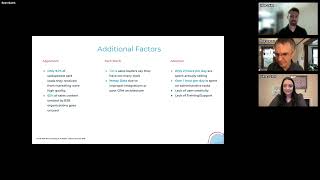
That's. I'm glad if you are feeling that you're in the right place. So glad you're here. Okay, so I'll ask another question. How many have you have. Y' all have completed the frictionless sales course in The HubSpot Academy that our very own Kyle Jepsen has so graciously provided for us. Show of hands. Put it in the chat if you've done that. That course, it's one of my favorite. So just to kind of speak to that. So Kyle has created that course for us, and that has really given us some inspiration into how we do sales enablement at workflow. And so shout out Kyle for creating that, kind of creating that framework for how we look at sales enablement. I will cover some of the things that Kyle talked about a little bit, just kind of with my own take on sales enablement. So things will be similar. We'll kind of look at some frameworks for how we can collect information from sellers and identify friction in the sales process. So we'll kind of look at that together. But just wanted to shout out Kyle for just kind of paving the way for us as we, you know, go on to the future with sales enablement. So without further ado, now I gotta figure out how to. There we go. Okay. Okay. So in order to understand sales enablement, we have to be able to define it. Right. So HubSpot's definition of sales enablement is the iterative process of providing your business's team, sales teams, with the resources they need to close more deals. And these resources can include things like content, tools, knowledge, information in order to effectively sell your product or service to customers. So I want to kind of focus on that term iterative, which is constantly seeking improvement. Right. So we're. It's kind of like that HubSpot inbound flywheel where you're constantly trying to provide more force and remove friction in the process so that your flywheel spins faster and faster and faster. And then you just continue to optimize, continue to improve those processes. So keep that in mind when we go over. Let me go over this. All right. Okay. So why do sales teams fails? Why do sales teams fail? Lack of alignment. Only 30% of sales pros believe sales and marketing are strongly aligned. That is not a very good number. I think we can get that a lot higher. But yeah, yeah, I kind of call this the running around like a chicken with their head cut off. Marketing is saying one thing, sales is saying another. Sometimes sellers don't even know what an MQL is or how to spot a low quality lead versus a high quality lead, and it's kind of just a mess. And so without that strongly aligned team, you know, the powerhouse of sales and marketing working collectively together, that's why sometimes sales teams fail. So with sales enablement, we're seeking to improve that. There's also issues with, you know, tech stack. Sometimes we have an over. We're overwhelmed with the amount of tools in our tech stack. So let's say, you know, you sign up for a new product and you like it for a little bit, and then you realize it's not, it's not a good fit and you just kind of keep it. Signing up for new products and you're never really getting rid of, you know, the tools that are entering your tech stack and to a certain extent it becomes overwhelming. Or maybe it's the opposite, where all of your external systems are siloed in its own platform and it's not integrated with the CRM. It's kind of twofold there. So you can, it could go one way or could go the other. I think typically a lot of sales teams experience the opposite where the majority of these tools that sales are using are, you know, in a different tab or in a different system or not, you know, directly integrated with the CRM. And so that's a big pain point there as well. But then also lack of adoption. Not all businesses are successfully adopting their CRM. And sales, sales sellers are not even using the CRM. That was kind of the case for me at my last job when I was actually a seller and I was using a different CRM. I'll give you a hint. Started with an S, ended with an alesforce. And so that's, that's a big issue as well, where your sellers aren't filling in the proper information that they need in order to move a deal along in the process, or they're just not using the CRM at all. And so there's a lot of gaps and a lot of friction in that. And, and with sales enablement, with some of these things we're going to talk about, we can seek to improve that and get those numbers up. Here are just some additional factors. Some of these statistics are based on some resources that I got from HubSpot. So like the 2024 state of sales report. You can find some of these statistics and other resources as well. But 9%, only 9% of salespeople say that leads they received from marketing were highly quality. And we don't know if that's necessarily true as far as the quality of the lead, or maybe that is an issue of alignment where the seller doesn't know how to define that lead or why that lead should be high quality or should be low quality. And so there could be issues there, 65% of sales content created by B2B organizations goes unused. So do we have the right messaging? Are we using content at all to kind of back up with marketing saying as they're coming through the buyer's journey and into the sales pipeline, are we kind of conveying a consistent message or are we just not using any content at all to kind of back up what we're selling? Tech stack issues, again, kind of goes back to the. How many tools do we have? Do we have too many? Do we have too few? Are we integrating them properly? And then if we are integrating them, sometimes, sometimes you have messy data just from poor integrations or poor CRM architecture where you don't have, you know, maybe there's, you don't have any best practices in place. So people are constantly creating custom fields that are, you know, you're just spinning the wheel with creating these custom fields over and over and over again or again with the improper implementation of these integrations, maybe data, data is going into the wrong field where it should be going into a different field. And so you have kind of a gap in context that sellers have to deal with. So those are some different issues. Adoption obviously is a huge factor in friction in the sales process. Most of the time, sellers are not actually spending a bulk of their day selling. They're spending time doing administrative tasks. They're spending time trying to probably navigate through the endless amounts of tabs that they have. And also sometimes the CRM is just hard to use. At my last company, that was the case for us. I didn't know. It took me an hour to build a report on something that should have been so, like, so easy to create. And so it was really hard for me as a seller to, to spend that time on selling the product that I was selling instead of just, you know, spending time on data entry, some of these administrative tasks, following up and creating a system for myself that allowed me to be organized, you know, outside of selling. So these are some additional factors that can create friction that we're going to try to fix here. So how do we fix that? With better aim. So AIM stands for Align, identify, maximize. So when I talk about align, I'm talking about that marketing and sales alignment. I'm talking about understanding your icps and the buyer's journey. So understanding how, how they come through the funnel. They start with marketing, they eventually will come into sales. Is your messaging aligned with where they're at in the buyer's journey? So if they're at the awareness stage, they should be marketing should be using messaging that is attracting them at the awareness stage. Whereas if they are talking to sales, they're most likely closer to the decision stage, if not already there. And so your messaging should not necessarily be, you know, aligned with the other stages, but it should be aligned with, okay, they're ready to make a decision, they have maybe a couple other questions or they need to know how your product can specifically handle their pain points. How do we communicate that and how do we get them to close identify. So this is where we will kind of look at what's working versus what's not working. Where are sellers spending the most time? So again, it kind of goes back to that manual data entry, the administrative tasks that they're spending so much time on and taking away from the selling aspect of their job, which is what they were hired to do. Right. Why are deals falling through the cracks? Do you have. One thing we recommend at workflow is to always have closed loss reasons. And we also recommend people are using their close one reasons. So, and with the closed loss reasons, what I like to do is I kind of like to categorize the closed loss reasons and then have an additional field where it is a closed loss reason description. So you can kind of bucket the closed loss reason into a category for easier reporting and then you can have a more descriptive explanation from the seller as to why this lead did not close so that you can go back and look at those, those closed loss deals and you can kind of analyze why these were not closing, what we can do better next time and things like that. Same goes for using close one reasons where you can truly identify, okay, why did this lead actually close? What was the deciding factor and why they decided to sign with us. And then you can use that to again, further improve your messaging or your content and align it with what is working. Are you collecting the right data? Again, that kind of goes back to the collecting of the information that is pertinent to finding the solution for the lead. And sometimes we might need to look at our tech stack as well. So we will look at kind of what does our tech stack look like now? Are people using it? Are sellers, you know, are sellers adopting it? Do they have any pain points with the tech stack? Is something not working for them? Is there, Are there things that are working really well? And so, you know, if, if, if so what are those things? And then also, like, if there's room for improvement, how can we improve our tech stack and make sure that everybody's on the same page and using it? Because if they're not using it. Chances are you're probably spending a lot of money, you know, maintaining a software that you're not using. And so therefore you might be able to remove that from your tech stack if it's not being beneficial to your company and then maximize. Where we'll talk about adoption, user adoption, automation, as far as automating some of the tasks and the manual entry, you know, data entry. That way sales doesn't have to do it. So there's a lot of obviously easy workflows that we can create that automate tasks, automate different things that will take, you know, take some of those responsibilities off the sale, the seller's plate in order to, to spend more time selling like they should be. I think again, content. Looking at some of the things that we talked about and identify just seeing where the gaps are in our content, whether it be marketing content that sells that sales is using or the seller's content as far as, you know, email templates, sequences, things like that. And then a lot of the KPI reporting one on one coaching and different training resources to kind of create a culture of learning and continually optimizing processes. All right, so slow me down. If I'm going too fast, just let me know. But I wanted to kind of talk about the different align topics here. So align. One of the things that we should do is create a marketing and sales sla. So this is going to really help you align your teams to together so that they're both on the same page and working towards a common goal. So at the top level, it kind of starts at the top. You know, what are your company goals, what are marketing's goals? What are your sales goals? If marketing has, you know, a goal of driving 100 leads to sales each month, you know, you can identify that here within this matrix. You can write this down so that teams are held accountable to hit these goals. You can see the initiatives that each team is working on. So if marketing has a goal to drive, you know, a hundred leads to sales in a month and sales goals is to, you know, book 50. Maybe 50 is not a good relevant number, but let's say like 10, 10 demos out of those 100 leads, you know, for sales, that's their, that's their demo goal, revenue goals, you know, whatever those are. And then as far as initiatives and like accountability, let's say that sales is required to, you know, According to this SLA, required to follow up within 24 to 48 hours of those leads being delivered to sales. So that's kind of how this can work. This is really going to align your teams together, make sure everybody's on the same page. This is also where you'll kind of create a cadence for meeting in the future to reevaluate some of these goals and report feedback back to each team. And then again, one of the things here that is big is for sales. Sales needs to be able to identify what an MQL is, where the handoff, like what the handoff criteria is for marketing to sales. And that way, that way the sales team is given the right context and they have the right context to know what lead is. What, you know, if it's a high quality lead versus a low quality lead and they can do their job a little bit better given the right context about that. Specifically, if lead scoring is used at your organization, you can also include, you know, what are those positive and negative attributes in this SLA so that the sales team can clearly see, okay, when this person views a page 10 times, when they fill out this form or when they attend a webinar, they're given the score and then based out of that score, they can see, okay, you know, a lead score of 80 is like a top, you know, high quality lead that I need to be focusing on, whereas a lead score of, you know, 30 or below is a lower quality lead that I don't need to focus on as much. Without this insight, without this context, sales might not know who to focus on. And so this is kind of where you can align both teams by creating this system where you're constantly coming back to each other, you're communicating, and you have a cadence for improvement. And then again, what is also important is aligning with that ICP's buyer journey. So they start at the awareness stage, they go to consideration, then decision. So you need to tailor your messaging to meet the buyer where they're at in their buyer's journey. Most of the time in this day and age, people have all the information that they need to make the decisions that they need to make. And so they don't necessarily need you to just be super generic in your response when you're reaching out. Like, this is what our product does. This is how it helps companies like XYZ and how we can help you. It's like, no, you need to get to the specific pain points that they're experiencing and solve for those pain points. They care about your product, they don't care about your company. They need to know how your product and your company can help them, how they, how it can help Solve their pain points and issues that they're experiencing. And so you want to kind of tailor your message at that decision stage when they, when they are ready to speak to sales based on this. Oops. Okay, so I know this is a lot, so don't freak out. There's a lot of information here and it's context. But I'm just going to kind of go over this as like a general guideline framework for kind of collecting the information that you need to from sellers in order to identify where the friction is. So I've kind of created this like table, if you will, for kind of like plugging information. So everything starts with the seller, right? So you're kind of like when you're trying to identify friction, you have to ask questions. You've got to know where to be able to find the friction and how we can improve it in order to get rid of friction and add force to the sales process. So I usually start with asking questions, asking a lot of questions. And I've kind of situated this, this table to kind of just be a fill in the blank. So for marketing, content, resources, sales content, messaging, tech, stack, pipeline, all these different things, how many reps within your sales team are using these things actively? What is the percentage? You can kind of start there and see, okay, this is being used more than this. And so maybe if this is, if this is being used more or less, maybe we need to start here and maybe this is something that we can, you know, we can get to last or something like that. You can kind of prioritize what you need to focus on. And so there's these, these fill in the blanks of, you know, what's working versus what's not working. So I put quotations around most of these points because this is essentially coming from a sales rep. So you're asking the right questions, you're asking them what's going well, what's not going well. And if there's something that you're struggling with, if there's something that you're stuck on, if you're having pain points with something, what are those pain points like, explain that to me. And so I've highlighted some of the ones that I wanted to touch on. Just because pipeline's a big deal, obviously. So just as an example, you know, I asked the seller what's working. You know, I love how I can filter my deals and see everything in a Kanban board. It really allows me to see what stages my deals are in at a quick glance. Obviously that's good. So we can continue to optimize stuff like that. But it's good to see, you know, what, what, what's the positive feedback instead of what's, you know, what's just the negative feedback all the time. And so we want to ask the good things, we want to ask the bad things. What's not working? Not having good visibility into my activities and open tasks. I'm dropping the ball on my follow up and reminders for myself. And so this is obviously a big, big pain point for the seller. And so realistically this is, this kind of goes back to not, not spending as much time on the manual entry, the, you know, trying to find what tasks you have next and you know, trying to find where you need to follow up with your contacts. And so this is something that we can use to improve and give reps that, that visibility into these things so that they can work faster and better. And then what are you stuck on? What are some of the pain points that you're struggling with? Sometimes I have no idea why or where my leads are coming from and why it would help to have a little bit more context so I know why I'm contacting them. I know what an MQL is, but I don't know why this lead was an mql. So that goes back to marketing and sales alignment. Are your teams aligned? Have you met, have you defined common goals? Have you had that conversation with the sales team? Like this is what an MQL is as defined, as we have defined. These are, this is the criteria that if this lead, you know, fits this criteria, they get this score and out of a score of, you know, zero to whatever, anything above this number is considered a high quality lead. And so being able to have that conversation gives them the power and the context to work in more confidence and you know, hopefully close more deals because of that. So this is just kind of an example of how you can kind of identify and collect that information from your sellers and you know, in the long term, hopefully reduce this friction and then just continue to improve this process. Next deck. How do we measure friction from a sales content and messaging perspective? So I'm talking email templates, scripts, playbooks, demo videos for, you know, email templates. You can click create reports based on templates. You can actually see reply rates, you know, success of how your email templates are performing from an email template alone standpoint, but also using them within sequences, you can report on all of this. For scripts. Are you maybe using call type and outcomes to track success of scripts or are you using that close one loss reason description, you can kind of see based on the conversations that you're having, the activity types and the outcomes, how successful are your scripts based on, you know, sellers using that script in, in that lead and using that, that are basically using the call type and outcome to record, you know, the success of that call based on the script. You can also use custom properties for scripts, and I'll show you that on our demo, which is pretty cool. But you can also use Playbooks to kind of track, you know, based on sellers using these Playbooks, how many are using these Playbooks, how many are not using these Playbooks, and in correlation, how many sellers who are using Playbooks compared to not using Playbooks are closing more deals than those who are not using Playbooks. So maybe Playbooks are a good way to collect the information that you need in the discovery to have a better close rate in the long term. Whereas somebody who's not using a playbook who might not be collecting the right information on the discovery call or throughout the process, are tending to see fewer close rates, less success with closing their deals. So you can kind of use those different methods to measure that. And then how can we improve it? You know, making sure that the messaging is aligned with marketing, that you're not telling them something different than what they already heard previously, that's a bad experience. You don't want to be telling a different story. And then I also have kind of an, an audit cadence here. So how often do we need to look at this to constantly improve? So again, it goes back to that flywheel. What are we, how often are we looking at these processes in order to improve them? For tech stack, that might be, you know, a longer cadence. Maybe that's semi annually or annually pipeline, that should be kind of a consistent thing. Most sales teams use some type of bi weekly or monthly, you know, check in as far as the pipeline health and things like that. But this is a good way to keep track of, okay, when do we need to do another audit? When do we need to look at things again and just consistently seek to improve the process? And then I wanted to point out as well, for the adoption training aspect of this, how can we improve this process using integrable enablement solutions like SIRF, like SuperD, like happily apps. These are great ways to make sure that sellers have everything that they need in the palm of their hands. And making it super easy to work leads to bring information back into HubSpot so that everything's within HubSpot. You're not having to work in external systems. And so we'll go into that a little bit more in the demo. But again, these are some of the third party enablement tools that we preach. These are all amazing products. Surf is a social selling LinkedIn to HubSpot Connection where you can add leads and add deals directly from LinkedIn and also sync LinkedIn messages as well. Super is a user adoption tool which we love. I talk about super all the time. Can't talk about them enough. They solve so many different user adoption headaches and really create a process of learning that you can scale as your team grows. So we'll actually go into that a little bit more in detail on the demo and then again, happily, products. They've got a lot of awesome products like Associate, Clone, Attack for data quality, keeping things really locked tight and making sure that there's not duplicates of anything to where your sales team would have to maybe go back and merge things together. Zebra for stripe, manage, subscription management, things like that. I know that was a lot. We're going to go into the demo now, but does anybody have questions so far?
I think people are just riveted. Not a lot of questions. The main question we've gotten is can we have this deck please? So that one's come up a couple of times.
Yeah, yeah, absolutely. I'll. I'll be sharing the deck afterwards for sure.
Oh, you did just get a question. How would you fit this best into the new prospecting functionality?
Yes. So we're going to get into that in the demo, so. Good question. Any other questions though before I jump in?
You're good to go.
Okay, let me get out of this. See if I do this right. Some of the things that I want to talk about are in the demo is how do we automate things that can be automated and probably should be automated so that again, we get rid of tasks that sellers have to do manually so that they can spend more time selling. How do we give them easy access to the data that they need to see? And so we'll show you kind of how to customize the CRM for sales as like a best practice. And what you see here is our morning brew dashboard. I'll get into that. But we also want to be able to show them visibility into reporting as far as their key metrics and performance, things like that embed coaching into the operating system. So how, how do we again kind of create that process of learning and that training and support. How do we provide sellers with that information, the information that they need to see and how can we do that within HubSpot directly? So we'll show you kind of how we use super to do that. And then I kind of want to talk about how we can scale sales enablement and use custom permission sets, teams, notification profiles and presets to kind of set the sales rep up for success from the beginning, show them exactly what they need to see every time they log into HubSpot and how that can benefit sales teams in the long run as they continue to add members to the team. So here you have our Morning Brew dashboard. We called it Morning Brew. There's no affiliation to the newsletter, but we called the Morning Brew because, you know, the idea is you log in as a seller every morning and you see the important tasks and all the data that you need to see that's relative to your business and your pipeline in one place. So this is kind of what we've created to show information relevant to activities. So you've got, you know, lead response time, activities, meeting outcomes, call outcomes, any outstanding tasks that the seller has that they need to get to. They can see the task status, any notes relevant to that task. So they can kind of have that context and leads overview. So this kind of goes into the new prospecting tool. You can see how many open leads that you're working, you know, in progress. You can see your conversion rate, average time to first touch all this information is really good. So you can see based on how many leads you've got, you know, how well are is your, your lead, how good is your lead pipeline right now, what's the conversion rate, how successful you are at converting those leads. This is a little bit more granular data as far as that leads conversion. So this just shows you a little bit more information, all super beneficial to have as a seller. So you can see what's working, what's not. And as a, as a sales manager, you can see that this for all of your sales reps as well in one place. And then this is very similar but for sequences. So you can see how many contacts are enrolled in your sequences, number of associated meetings, how many people are responding to your emails and getting out of that sequence or booking a meeting. That is the goal of sequences. And so you can see all that information here. And then you have your pipeline information. So how long did you spend in each deal stage? This is a demo account, so it's not going to have the best data. But as you can see, you can see how many days you're in appointment scheduled or qualified to buy, or presentation scheduled or Whatever deal stages you've got set up, you can see how long it takes each sales rep to get through the process. Deal push rate, pipeline breakdown, average deal size, all this just gives great information to the seller so they know how they're doing. So sales managers can help better train sellers and keep them on track to hit their goals. Sales velocity. How fast are our sellers closing deals? Any inactive deals that might be, you know, older than 14 days, 21 days, whatever the amount of time is where a deal could go dead. If you haven't, you know, put a touch point in it. You can see those deals here. Deal loss reason. Again, you can go back to this as a sales manager. You can see, okay, what deals are we losing, why are we losing them? And then you can use that information to improve things. There's just a ton of information here that we're able to provide in this one dashboard that sellers sign into and see every morning so that they're aligned with where they're at and they can continue to prove throughout, throughout the month, throughout the quarter, whatever. So this is something we use for every client pretty much. And it's a great way to relay this information back to sales. Some of the other things are things like custom record views, custom index views. So here I want to use the use case of real estate. So like I mentioned, I have some real estate experience. I got my real estate license a couple years ago. So I am a part time realtor. So I kind of know the process. So here I've kind of tried to customize this view based on information that the seller might be updating on a consistent basis across the board for each lead. So you can see information like why now? Like why is this contact? Why is this lead trying to buy a house? You can have all this information here. What I like about the index view is that you can just customize, you can edit things in the view. You don't have to actually be within the contact record. So if I wanted to update this, why now? Let's say Samwise Gamshi, I'm a huge Lord of the Rings fan, so that's why those two are in there. But let's say Samwise was buying. I could just type in yada yada, yada yada. This is his, you know, this is the explanation of why he's looking now. These are his pain points. I can do the same thing. I can see relevant lead score information. So you've got, you know, predictive lead score. If you have any custom lead scores set up, you can See this information right from this view and any other relevant information, you can customize the columns to provide this for the seller and have everything they need in one place. You can do this for each seller. So each seller could have their own view so that every time they log in or they look at contacts, it's already set so they don't have to mess with anything. They're enabled from the get go and they have everything they need in one place. Now this kind of translates very similarly to the prospecting page. So if I went to prospecting here, all information would show up again. This is a demo account, so I have a lot of information, but I can see my leads here. I can choose to follow up with them. I can click through them and see all the relevant information on one side. And what I've done is I've customized the default property fields on the left side on the contact record, left side. So what's important about the leads? The leads, the new leads object is this information that shows up here on the about tab under the lead. It's only going to show that default information. So if you have information that is, you know, relevant to sales and marketing and service in that one place, you're going to have all this and you're going to confuse the seller. Right? So you want to. What I do is, I recommend best practice is to, is to customize the default HubSpot architecture for sales. If you need to give, you know, context for marketing or service, you can create different sections, you can create different views that only they can see. But as a default, your, your sales team is going to be using HubSpot probably more than any other team. And it's most important for them to have the information that they need because they're the ones closing the deals, they're the ones bringing in the money. And so having this information here on the lead view based on this customized section on the left side just helps help sellers have everything that they need in one place. They can call this person, they can update this information live on the call, everything's editable and you have everything you need in one place. So I really love customizing that default section for sales because it allows them to see everything here when they're working in leads. And then, you know, if this person was qualified, they could just simply go back to the lead, move them to qualified and create the deal as the next step. So I love using like those custom views, but I also try to focus on customizing sales Hub especially, but just HubSpot as a default for sales because that is the information that, you know, you need to provide them to keep them aligned and, you know, working towards closing more deals and spending less time trying to figure out where to update all these different fields. So I love prospecting, I love the new leads object. So that is a huge unlock there and some of the other things I want to talk about. I kind of showed you the custom view on the side here, but you can do that for the middle, you can do that for the right side. So you see I have all the associations for this contact. I've got the lead that it's associated to the contact that it's associated to. I love the same object associations that HubSpot released a while back. So I can see Frodo is a household member so he is going to be involved in the process of buying this house with him. Right? These are the deals that he's assigned to. This is the listing that he's assigned to. So this is the house that he's looking at. If I have any software that's Connected Integrated to HubSpot, chances are you'll see that here too. So I've got DocuSign integrated. I can send out a DocuSign directly from HubSpot to Bilbo Baggins. He can sign it and then once he signed it, it's been updated and I can see that he signed it. I can then use that in other automation. I can create follow up tasks based on, you know, once he signed the buyer's rep, do this or call them and you know, check in or maybe schedule the inspection or that wouldn't be the case. But you can create automation to create those follow up tasks again so sales doesn't have to do that manually themselves. And then we'll get into the templates here. So here I've got a lot of real estate templates that are kind of generic templates but basically I've added this into the system so that I'm enabling sales reps to use this content so that they can sell better. Instead of relying on them to come up with their own content, I've provided a base, you know, level of content for them to use that they can, if they want, customize a little bit further based on, you know, how they want it to sound or, you know, the relationship to the prospect or whatever it is. And so sellers can just use this directly within the HubSpot record or they can use the Gmail or Outlook extension to send this out via that email provider and customize it from there. But creating Content that sales reps can use is just a huge, a huge benefit to sales reps. I mean, creating content alone, like trying to think of the right email, like that is not what sellers should be focusing on. It should be focusing on engaging with clients, getting them on the phone, having meetings, having demos and moving them along and closing deals or, you know, disqualifying deals, whatever it is. And so this is a huge benefit to sellers. Sequences is another way that you can automate task creation. You can automate email outreach. You can use those templates within sequences just like I have here. So I've got expanding your home search. This is the first email and then the next step would be to call that contact to follow up. And I've got all these different steps that are automatically going to happen without the sales rep having to do anything. Unless for instance, they have that task to follow up or they have a manual email task. Because some of these do will pause the sequence. So you can customize that however you want. But this is another way we can automate the task creation for sales reps and just kind of do a lot of the manual data entry and things like that for them. And then that way they can hopefully just rely on people replying to those emails or booking the meetings from there. Sequences is huge and you can also view the performance of the sequences. So you can allow your sales reps to create their own, you can create them for them as best practice and you can see how well those sequences are doing. There's any attributable revenue to that sequence. You can see that information here. And so you can use those analytics to further improve your process and the content that you're using. We'll try to wrap up here, but I wanted to show you what super can do. So super again is a user adoption tool that you can use to give everything, put everything in the sales reps hands as far as the information that they need to know the context about something. And you can use super as a training resource as you scale as you add people to the team so that they can learn as they go. They don't have to be, you know, constantly, you know, hand holding somebody. So what you see here are these little pink dots and what these are are cards. So for each deal stage I might have a specific requirement for that deal to move to the next stage. Or maybe I'm just defining what that deal stage means. So by clicking on this, this is an overlay. So every sales rep will be able to see this. So anywhere they see a little icon. They can click on that and they can see, okay, what does lender pre approval mean? And what pops up is kind of a knowledge base article, if you will, for what is the difference between a pre approval and a pre qualification? I've got all this context that I pulled from an article. I can add a video so that they can watch that so they can have a better understanding if they're, you know, an audible learner. And you can see all the information that you need to know to give you the right context to what that deal stage means. You can use that for common definitions. You can also use that for scripts, which I think is a really cool unlock. So let's say I go back to Bilbo Baggins contact record here. So if I have, if he's in a. Let me pull up the deal record. Actually if he's in a pipeline, let's say he's buying or he's selling. I can use automation to set this sales script field as a seller's or buyer's agent script. And then I can use SuperD to pull up that script right on that field or that that value. So I'm just going to use the seller's agent script here. So since this is selected, I could now click on this and I can see the exact script that I'm recommended to use based on what they're doing, what actions they're taking, what they're looking for. If he's looking to sell, which he's looking to buy. But I had this one set up already, so I want to show it. But you can see this is the script that we recommend and new agents can just follow this to have everything that they need in order to make a successful call. You can do this for objections as well. I've used a playbook to kind of show you what that might look like. You can use Playbooks as well. Same thing. If there's any objections, any common objections that they're experiencing in, you know, in the business, if there's a specific industry that you're working on, there might be common objections. You can provide that in a playbook as well. If you don't have Super. And so this is just a really cool unlock for sales enablement. It's a great tool. Definitely check them out. If you have questions, you can ask me or Deanna. But I know we're like at time already and I've talked a lot, so I'm going to stop there. Apologize if I talked too much.
No, this is great. We have just a handful of Questions in the Q and A. We'll do a lightning round and see if we can get through them in three minutes. I'll just go top to bottom. What have you found to be the most impactful content marketing can? Oh, most impactful content marketing can create for sales reps.
Most impactful content. I think the common ones are, you know, like testimonials, reviews, use cases or like business cases, case studies, you know, things like marketing pamphlet like one pagers explaining, you know, how the product works or, you know, providing visuals so they can understand how it might relate to their business. Things like that are probably the most common ones that I've experienced.
Cool. And then maybe a harder question.
At.
11:42Am I don't know what was happening, but Amelia asked, can we get a copy of this dashboard?
The morning brew dashboard?
Yeah. Yes. Oh, okay. Yep.
Cool. One Last 1. With 2 minutes left to go. Ruth, squeak it in here at the end. Do you have best tips? Do you have tips or best practices for setting up feedback loops?
That's a good question. I think, I think if. If they have feedback, they should communicate that to their manager. And then I think that the manager should have some type of database for feedback that they can then use to go back to, you know, marketing or they can discuss internally as far as feedback. You can also just use notes on the deal record or the contact record where you can, you know, at the person. So if you've got specific feedback about the deal or, you know, something, you know, something within HubSpot, you can chat that person on it and so that they can kind of have context into what's going on. I think it kind of just goes. I think it kind of comes down to just communicating to your, to your manager and having, you know, the teams kind of come back together during the, you know, the, the smarting meetings where they, you know, have that cadence set up, you know, monthly or quarterly or whatever, where they can communicate that feedback. I think it goes the same for, you know, marketing as well. Cool.
Well, thank you. With 15 seconds left to go, everybody on your way out the door, please fill out the survey. I just pinned it in the chat. Ryan, if people want to find you, connect with you, what do you have a preferred. Like, should they reach out on LinkedIn or whatever?
Yeah, yeah, you can reach out on LinkedIn. I think it's Ryan Quinn, Nine. And you can find me through workflow as well. If you've seen our page workflows, W O R Q flow, but you can find us there as well.
Great. Well, thanks so much for coming. Thanks, everyone, for being here. We are exactly at the top of the hour. So you nailed the timing, Ryan, and hope to see you all back here next week. Happy 2024, everyone.
Thanks, Ryan. Bye, everybody. See you next week.
See y.










