Supered Admin HubSpot Admin HUG | April 4, 2023
Matt Bolian, CEO of SuperD, explains how to boost HubSpot adoption by treating the CRM as a product, not a project. He walks through adoption frameworks and demonstrates SuperD's platform, which embeds training and documentation directly into HubSpot. The session covers KPIs, costs, and scaling adoption in large organizations.
Hi all. Welcome to the HubSpot admin hug. Today's hug is the HubSpot SuperD admin a 2023 guide for creating adoption in HubSpot with Matt Bolian, CEO and co founder of SuperD. Matt will give us some tactical ways on how to get and keep adoption of the CRM and how to become the SuperD HubSpot admin. Matt, take it away for us.
I'm super excited about this. I will be showing some super things to do, but the majority of this will just be HubSpot sales centric. I'll provide a framework for us to think about adoption at the very end. I'll show you how super can enhance that but that the primary objective is show you how to use HubSpot but just by itself to create adoption and some practice. Okay, what I'm gonna do, I'm gonna share my screen and I love using something called Miro. So we'll be doing Miro and just going through this. So first confirming y' all can see my screen. Give me a little. Yeah. Dana, can you. Yes. No see screen.
I can see you and you're good.
Perfect. Okay. So background about me. So as you're seeing this as I was in the military for about six and a half years doing military intelligence. Used to run head of Rev Ops and I was a former, I was a Microsoft Dynamics fanatic, then became a Salesforce fanatic and then bet all the house, all the money on HubSpot when I found it. So I helped found Spark tiers, did some RP and now I'm 100% doing super where I'm helping HubSpot users and partners get more and more adoption on HubSpot. Some HubSpot stuff that I've done in the past where I get people is I've done a whole platform of becoming a HubSpot super admin, did a whole bootcamp called the Summer School and RevOps and done lots of stuff in HubSpot. So there's a bunch of stuff in other that that that's if you want to hear more about it, feel free to reach out and I can lead you in the right direction. So what does super do? It does this very simply if you're thinking about it. So everything I'm talking to you about, it plugs knowledge directly into a CRM tool to draw prep process adoption and it equips CRM users when and where they are. So we see that at the end. Just what that's what I think about all day is how do you get people to adopt processes inside HubSpot CRM. What we're talking about today is we'll get to this but this is what is the problem that we face? Just I think it's important. Like is adoption really that important? Let's. Let's think through that. I'm going to say yes, adoption is that important. In fact it's so important, it's actually more important than the process and how it affects that the relationship between it and then last is giving you a adoption framework. And so instead of just like here are some tactics to do, you can actually see like here's how you think through it and here's how you need to be able to doing adoption and make sure you cover your bases. And then we'll end with Q and A. So let's go to I like bluff. Bottom line up front is here. The big idea is number one is your product. Your CRM is a product.
Are you sharing?
I am sharing my screen. It stopped sharing. Yeah, we got Infini, Infinity Infinite or we're resharing screen. Then we're back.
There we go, we're back.
Okay, so the big idea is this number one is the CRM is a product, it's not a project and it requires user activation and retention and a manacle focus on adoption which is activation retention and that those people are your CRM users, number one. Number two, waterfall project plans in the CRM hurt that number three, adoption is everything you do must be about adoption. As an admin, it's your true north. At any point in time your sales team tells you I'm not using the CRM you have we are failing as admin and so it's the true north and then adoption framework. I will introduce an adoption framework that we can all apply immediately after this that I will give a leave behind and I have it as a. Like you'll be able to go into super push a button and have this directly in your HubSpot so you can see it is called Crete. It is celebrate, remind, enforce, inspect and train and how and how you can apply those inside HubSpot directly. We're going through. Okay, so let us go through CRM as a proc. I think this is important before we get into adoption. Why the heck is adoption so important? Why do we talk about it? So there is this, the promise of CRMs. And at this point, if you haven't heard of a CRM, you're living under a rock. But most people are saying, hey, you leverage a CRM to make businesses more Profitable and more efficient. Thus, we've now have this professionalization of the people called the admin. And it's based on this promise that, hey, if you. And there's lots of this research coming out, if you spend every dollar you spend on the CRM equals almost $9 of return, you become more effective with sales because you are having consistent sales processes. You become more efficient downstream. And there's a whole litany of how that occurs. And people, this is, people are literally just happier when they use a serum. I was actually wearing a HubSpot T shirt. I was walking in a grocery store. Somebody saw that and was like, hey, Matt, I don't know who you are, but you have a HubSpot. My company just changed the HubSpot and I like my life more. So the reality is like this affects people's life and makes them happier at work. This is the promise drives revenue. Sometimes it's a promise. And I've had many promises broken in my life. So how do we as admin ensure that these promise, the CRM promise is not broken? And so what I mean by sometimes is it's actually 50% of the time this promise is broken. So there is a lot of people out there in this world, CEOs, COOs, CROs, VPs of sales who have broken promises. And you know who has never broke their promise? It's their Excel spreadsheet never broke their promise. So you're like, you have sometimes just to the point, you have people out here that have history and so how do we help them get through this history? So in fact, this is the reality. And people have questioned the authority of these different, these different studies. They're all over the place. The reality is like about 50% of them are failing. Now then you go into, why do CRMs fail? And holistically, if you look at all these studies, this is the order. It's number one every single time. Low user adoption, it is the number reason and everything else trickles down from here. You have too heavy customization, which causes low user adoption. There's, there's some kind of like lack of prioritization because a function is not getting put in by a core user. And that core user then uses an Excel spreadsheet, which is low adoption. You don't have the support and training that, that you need when a new user comes in or a current user comes in, which is called loser. It's called low adoption. And I don't have the data I need or the integrations I need for a CRM. So it's not useful to me. So I have low adoption. So it's the point, everything's about adoption. So the other point is if you do a project based implementation that has a cutoff date where you stop and I now have a customization I don't understand or I have, my needs have changed, I don't have the training that I used to have and I have a net new like data integration that's needed. Like we have stopped and you will de your, whatever you have built, the product degrades over time because you have a product manager. So I like to call this the CRM reboot cycle. And you see this and this is where this 50% failure comes from. And all these, this is, this is it. You have a phase implementation six to nine months. You then have another phase. It's about a year and a half to two years of increasing, decrease of usage, right? Decreasing of users across the entire popular base. Then you repeat phase one and two, you change CRMs, you migrate all your processes that you have created to Excel to a CRM. You purchase new, a new stack and a new tool and it happens every two years. It looks like this. It is. I get by a CRM half and then I do implementation. This is expensive. Just first off, think about the revenue that's lost because the CRM is not working for you number one. But number two, it's expensive because you are changing systems, you're retraining individuals and you're spending money to do all the customizations. This is fragile CRMs that create poor experiences and it's all like these things. So I go in a bit more, just know it's like what you'll see. How do you know this is happening? There's, there's rogue Excel spreadsheets, adoption's jumping over time, then the data becomes less and less accurate so people can't answer the questions they need so they stop using it and they make another spreadsheet. Then people buy their own IT systems to do what they need to do for point solutions. Then you have new requirements because there's new IT solutions for your CRM. And now I don't have a source of truth anymore and I am calling for it. So you're like, this is literally the path that every single any person or CRO I've ever talked to, this is the path and you can stop this. Like this is the, this is the admin. Like you can see these in order. If you hear these happening, admins hear me say like there is a way out and that's we're going to talk about in this framework today. And there is a software that's better to do it. And that's why I, and this is why I think HubSpot. I believe in HubSpot. This is what is possible. Now I'm not going into this framework that I like to call like, like a CRM as a product or growth driven CRMs. But the idea is if treated as a product you can do iterative without you get all the impact of having a CRM. You don't have to continuously change. And so if you're looking over the course, this is approximately six years and you're gonna have the same CRM because you are is a product that's functioning over time. Okay. So I hope what I want you to end with here is your CRM is a product and if it's not treated as such, it will have an inedible doom that will die in two to three years and then you will restart and you will get another chance. You're likely at another company. Right. Like, like it's important. I'll stop for one second. Is are there. I'll talk for like 30, 35 seconds or so. Are there any questions that need to answer? And then I'll. Have there been any questions to answer?
The only question was about is it for a HubSpot sales product only. But you're talking framework at the moment. So I think the answer to that is no. This is a framework so you can apply it to multiple products. Doesn't have to just be oh, this.
Is any CRM out there? Yep, correct.
Adam's got a question product meaning an internal thing that keeps evolving. Like if you made your own CRM.
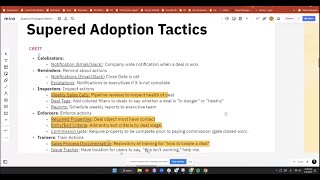
Yes. In fact I am a big proponent of naming. So let's say you do. I'm just going to talk in HubSpot centric. I say I am doing implementation that's for a HubSpot and you have a HubSpot CRM. I'm a big proponent of naming that CRM and internally giving it internal name and then training it as a product forever. And so yes it's. It becomes an internal as if you had your own internal CRM except it's built on a platform that you don't have to manage that makes that so it decreases the cost overall. And so that's the beauty of having something like HubSpot. See, I did there didn't say that. Yeah, exactly, exactly. Okay, so I'm gonna. Okay, I'm gonna go on to. Let's go To y' all seeing all my oops. I did not mean to draw a line. I. I just want to say this. I'm gonna sit here on this for a second. So if this is true adoption is this important and I've been in the consulting world before and what I was taught, what many of y' all may have heard is process is the process. Choose your process and the tools reveal themselves because you understand, you understand the requirements from all your users. And once you understand the requirements for users, you can then go go collect the right tools that will best fit those users needs. And I want to hear me say this, every single time you do that users are going to ask for things they don't need. It's going to be very difficult for you understand and you're going to end up with a tool that is. That is often over overly complicated and overly customized. I just want to submit this to you. When you think about if adoption is more important than process, let me say this. If there is no process, there is no what? I mean if there's no adoption, there is no what a process. A poor process, tenaciously executed with a hundred percent adoption allows you to iterate and make it better. A really awesome process with low adoption is useless. So make something useful. Adopt. Adopt. So if adoption is greater than process, which process is greater than tool? What happens? It's. We call it the flywheel. Your tool affects what your process. So if you pick a tool that is just less usable, you're literally saying I'm going to be waging a war of adoption with. With a. With a hand behind my back. The tool you pick matters and this and you can go to all these reasons but this is why I became a rabid HubSpot fan because of. And we go into more details there but that's why so know that MVP most viable product or most viable product is your minimal viable product is a term used in development. And then you have this agile iterate sprints. Just as a term is when you're doing a CRM get your what are minimum requirements build that and iterate over time. Growth, regrets, complexity and needs change. So as you grow just always start the mvp. And this also means you need to have some kind of training and prioritization like constantly going. You need a project manager that. That's managing this. That's the admin. So what is an admin? You are the internal owner of the project of the. Of the. Of one of the core tools that may cr. Maybe it's a product that may be several tools. You may have HubSpot and Pandadox and some of you might have a orchestration of tools but you are the product owner of those tools put together. That's the admin implications. If admin's king I I just want to is one person not adopting something? Like adoption rates have a outsized impact on use unusability of of a of a product. So just bringing this down is is if something executives can only use the CRM if they trust the data. And so if two or three sales reps out of a 10 person team are not inputting the data, the data is wrong. It's useless. And now you need an Excel spreadsheet. So there's just like we're going to go over this like why like why you have to have 100% adoption. This is not optional. This is like mandatory. And how we do that and the implications of this is adoption over function. I would like you should sacrifice the function the functionality of your CRM to make it easy one click like less inputs MVP and iterate adoption over function. True north. If if something's 100 adopted no one questions the ROI. Think of your email. No one thinks without an email or not. They think because why? Because everyone's 100 adopted it. Because it's useful when it's adopted and everybody's checking it. If it's adopted it is useful and no one questions roi. Just remember that when you have ROI questions it usually just means not everyone's adopting it. And you can go in and you'll find some people that are not adopting something. Number three is it's ongoing. It never stops. Once you implement a CRM you don't implement a CRM you actually deploy. You launch a product that now you must always be on guard. It's constantly decreasing in adoption. As one person leaves, another person comes in and one Excel, one XL has the power to destroy your million dollar investment. And then tools matter. Tools matter just as much or if not more than the process itself. And the undeniable winner of usability is HubSpot. So I just and like to finish it off. So let's do this. You have this keep like at the end of the day keep this thing simple. And now, now we're going to get into okay, great man. I understand, I understand how big adoption is. I understand that CRM is a product. But how do I think through what specific a framework? How do I how do I actual what are adoption tactics that are helpful and the today that's what we're about to tackle. Let us go through this. So number one, you've seen these five W's but I think it's important. Any person that's going into a CRM or asking these five questions, they might not verbalize them to you, but they're asking every single one of them every single time. And you must answer all of them. There is. I am in this CRM. If I have a problem, who should I ask? Who should I ask if I have a problem? Let's spell this. If I have a problem. Number number two, what should I be doing? Number three, when should I be doing it? Number four, where should I be doing it? And number five, why the heck are you making me do this? All five of these things have to be answered and every time you introduce something new or a change, you disrupting these five W's and they must be answered. How do you do it? I'm going to introduce this. Now this is a. This is tactics that I have used when I do this and I just like to keep this really simple and to respond to these questions and you have to do these actually multiple ways. You need to. I call it the crete. You need to have celebrators, reminders, inspectors, enforcers and trainers. Sometimes they all. Sometimes things cross. But each action you have in a CRM is going to be specific to one of these five different specific actions. You need to celebrate people, you need to remind people, you need to inspect them. You need to enforce and you need to train and and now I'm going to go through some very specific tactics that fit in that. But before there's also some characteristics of these is anytime you're doing any of these tactics they must have a rhythm so they cannot just occur one time. They must occur anywhere and they must be predictable. So predictable patterns create safety and people feel safe within those predictable patterns. You must have a clear requirement expectations for those users when you have it. So like for instance and we'll go into this and they must be. They must see the outcome or have an immediate answer. Must be immediate and have it have an answer very quickly. And so when you think about these adoption characteristics as we're going through. Okay, let's go to the actual adoption very specifics now I'm going to do two things after this. So you hear it is I'm going to in super. There are ways for me to create a package where just for people inside the hog that have attended can send me something and we can get a package that allows them to have like a quick deployable Click button deployment of some of these but it'll be a special offer only for people Here let me walk through these examples of celebrations. Number one celebrators a notification triggered by a HubSpot workflow that's company wide when a deal is won often this is done in Slack and it's done to everybody. Then congratulate number two reminders and clc. These are robust applications across but reminders is. It's the same thing is and there's often lots close date is old. No next step is is currently here. It is reminders about a specific action that needs to be done via email or Slack. Number two is escalations and I love escalations. It is it only happened only has to happen one time, maybe twice and it will never happen again. Is this debt? Yes it only happens is notify something like you have so you could have this I have a close date is old. It's hey this close date is 15 days old and if it goes to 16 day or if it goes to 20 days old you go straight to the CEO and you say hey Matt Bolian sales rep has a deal that is 25 days old. You cc the, you the the CEO and you put Matt when you put Matt on it and his managers Matt will never again, never again have a close date that's old. We try, we try all these sophisticated ways. All you have to do is shoot one sniper shot and I'm telling you everybody, everybody will love it. Number three inspectors. Now this is often where management's coming in and then HubSpot just came out with this new, this this new beautiful thing called deal tax which I'll show you how to get something I put together as best best case you can just click a button and deploy it. I actually use this as an example but is number one is you must have if you don't a weekly sales call and now this changes based on how large a sales team. So 100 person sales team with field reps is totally different than a 10 person fields reps and there's different reports that come into it period. If you if your team as a sales team is not looking at their pipeline weekly then your deals will not be correct ma'. Am. This would be like very simple with the officer this like so it needs to be weekly and it's got to be never canceled. So if manager X is out then manager Y and this person is holding it. Number two deal tax. This is in beta. It is one of the most glorious updates HubSpot has done and it's so darn simple. It just adds. You add filters on top of your deals. You color them based on if they're good, bad or immediate and you say whether something's in danger or healthy and it will immediate drive. It's a visual inspector. I will show you example of this today to go through. Number three is reports is um and this is another way of the inspectors is I just schedule. You can schedule weekly reports to the executive team. You have a dashboard. You just send it if that. It's a static dashboard too. So it's static. You can print them off PD PDFs. So if it's not updated say on Friday at 2pm or Monday at 8am and it's not updated then again this is one of these. Your people are. You're driving inspection of actions and people will do it. Number four enforce actions. Now this is. I'm gonna be omitted now this is like this is the thing that HubSpot gets your act together. I come from Dynamics and Salesforce and I could validate. I could conditional validate people all to death on here. HubSpot's coming and if HubSpot didn't do something about super is doing something about it. Enforce actions is right now you like if you have required properties you can do it on creation right. Where you can deal object must have contact and so you can do a. Where you can force somebody to make sure they have a deal contact the so you can say I need. You must have this specific thing created. Number two is on the deal object itself. You can do entry and exit criteria as properties to add. When you pull it over you can make people have specific requirements or add which is very helpful and I just wanted to add this one because this is I hope I don't say awful. I've been sales rep too. I wasn't some awful. The best way for enforcing something when you don't have specific validation conditions is and you can do formulas with Playbook. Adam's a really good point is but is you is a commission gate. If you require a property to be complete prior to paying commission like a close one or something after close one for putting it to billing it will. It will drive people. It is a great way to enforce and Adam's a really good point is there's a workaround for validation rules with Playbooks and some like in sophisticated just anyway we'll go up next and then training this is now if you haven't written a 30 page or a 50 page sales process documentation you should do it it's right of pass it. It's a rite of passage for admins. And then you need to feel the pain. You just need to feel the pain of creating it and then nobody reading it. Like you just need to feel it. Like you have to feel the pain. As we, as we were told when I was going through like military officer school, it would be. You have to plan. The plan you do is not like the plan will not survive first impact with the enemy. But if you don't plan, you plan to fail. So you need to have a plan your sales. This is you planning period which is a super. Helps fix this a little bit. So this is one of the things. But your is a repository of like how credit deals, like walking people through what they should do, giving training in it. And so you need to be able to. Because it. You have to remute. And I say this in the most loving possible way to every person because I do it myself. You, you must remove excuses. People are going to say, oh, I wasn't trained on that. Yes you were. Oh, but I don't know where to find it. Yes you do. It's the Google. It's the Google document. Oh, I couldn't navigate. Well, did you go to the appendices? Like you just, you have to already think through all these different voices. I'm still telling you they're still not going to read it and they're going to ask you a question in Slack and it will become as you grow over time, too much of your time. And then you'll need to hire someone. It's part of one of the things of being the army of one that is so difficult. And then number two is you have process documentation but it's not enough. I think we said this like you have to have this issue tracker and just people need a location where they can tell you this isn't working. And often it'll be like you created this incorrectly and it's really well, let's get on a call with you and let's train. It's usually training but you need, you need an issue tracker location. Whether it's in Slack or it's in teams or if you're in, you have Google conversations. Whatever you're doing, you need one place where you put everyone that can constantly give you input for issues. Okay. An internal inbox is also where they can just submit, they can submit questions to you because it's, it's in the moment. Like every, every one of these users, it's in the moment when they have a Question, let's go back to this. When they're asking this question, who do I ask? You have to answer, who, who, who do I have a problem? What should I be doing? When should I be doing, where should I be doing and why should I be doing? If you can't answer that immediately, you have lost the opportunity to win and create a, a champion. And so every internal user is either actively becoming a champion or actively becoming a detractor. And you have to answer these all the time. Okay, I'm gonna go to. I, I put super adoption tactics and I'm gonna put here for a second where I said these are the things, these are the, the, the, the ones where I have found the most problems in the past. It's these pipeline reviews to inspect health of deal. It's like what. Even if you train the sales manager, they're like, what is this? I, I just want to be able to control. I don't understand how to use this. I can't understand the information. So you have to train them and they forget it is why do these properties exist? Why do I have to put in this portion? It doesn't make any sense to me. My company hates me. Like this is like they'll start to talk bad about the CRM, um, and then they're talking bad about the CRM to their friends. Um, and that goes to the entry and exit criteria. And then sales documentation. We spend so much time here, but we're not able to deliver it in a way in which sales teams don't have to click another button. So if we're thinking about adoption, how can you put your sales process documentation, which is really the, like all your training into a place they can access and where they, where they are currently. This is where SuperD starts to like make makes headway and be able to go through this. Now before I get into. I'll show a quick demo. I was like, how super solves some of these problems and can help you do crete more effective. Are there any questions before I get into that? Let me do a time check. How much time do I have left?
Yeah, you're about 30 minutes, 27 minutes left. We do have a couple questions, but some of you're going to go ahead and you're going to answer it in the next portion. So if you want to hold on to them there, there's some questions on cost of the adoption and KPIs and things like that. So you let me know. You want to tackle those now?
Yeah, let's tackle them all now. And Then I'll go into super.
Okay, you got it. So Sean asked, how do we bring down the cost of this adoption process? I see you mentioned admins, etc. Seems like a lot of personnel overhead.
Bringing down the adoption is where you're going to. How you get personnel overhead is it's all, it's all five of these. So the question is, do you need one person to manage this or can you do it internally? But someone, instead of calling it the admin, I'd say someone's got to be the crete. And maybe we can make a better word than this. But I just. Someone's got to be creating people. And if you don't have the creep manager, then you need and this same person that has to know the process so they can create the process. And then someone has to be able to update the process and have the autonomy to think through it and get the requirements so that they can decide how am I going to create it and how am I going to build it into HubSpot. So we think an overhead if you're small, smaller is. I'm gonna, is these are really great ones in every single company. If you're not doing these things, you don't have this. You could get rid of the sales process documentation because something's going to change so much. Every other thing I recommend you do and, and, and, and scale until this becomes a problem and it just becomes I. When you can no longer answer these questions that are coming here, I. This isn't working. I need help. When it becomes too much, that's when you need either a, an age like a HubSpot Solutions partner or you're hiring internally.
Makes sense.
Hope that's helpful.
So we also, we have a couple questions on metrics. How do you establish CRM team KPI's? Which ones should be there, which ones should be their KPIs? And then what CRM metric should show value to the CEO? So kind of in the same breath, I think.
Can you repeat?
Number one, how do you establish a CRM team? CRM's team KPIs. That's a lot of S's in there.
Okay, well a CRM team, I'm hopeful that means, I'm going to assume this means the, I'm going to call it the ROS department. But like how you establish that that department's KPIs keep there. And then what's the second question?
What CRM metrics could show value to a CEO?
Okay, so this is a. If you haven't watched this, go watch Rev Ops summer school. It's a suit. It's another boot camp that we did. It's like nine hours of content. Nine hours of content. But it answered this and it's really it. And I also did. I did a. I did a post on this Monday. It is. This is the rev Ops and it's always this. Should I hire another sales head or should I hire another rev Ops? Which one has a greater roi? What's the ROI of sales efficiency or rev Ops or like doing revenue operations. It's. We can't even begin the answer the question if you don't aren't measuring the conversion ratios between your entire pipeline. And so rev ops lives in the conversion ratios. So what I mean. What I mean by this is if I took the your lead to opportunity conversion ratio and you are implemented just. If I you just implement these things, your. Your conversion ratio will increase because the. Because you will have adoption to a process and if it doesn't change you can actually iterate and make know it's working and that's working. So it roi and there's a whole lot this and I want to. It's a whole class. Um and so get up, send me a DM I can send. We can talk and I'll even get on a call and walk you through how to do that or how to think through it. It's in the conversions and you have to have your customer life cycle set up correctly and do conversion ratios throughout. And then it's super simple after that to be able to tell you what's the roi? Because it's literally am I, is my revenue increasing or decreasing and why not? And if you can't answer those questions then you're. Then you have to have robots. That's what. That's what robots answers.
I put a link to the event you mentioned in there so that people can go check it out. That's the one of three and you can find two of three and three of three on there as well. I think the last question we had in the Q and A was thinking of enterprise companies. How would you recommend managing the CRM plus all the hubs and nurturing adoption without having too many cooks in the kitchen? So after you get that headcount, how do you make sure there aren't too many people getting their fingers in the pie?
Yeah, there's three things as you go to enterprise. Number one is you have to very strict team permissions and everybody loves this. But it's just what happens when you go to enterprise. You move a Bit slow. Lower is you have team permissions have to be set up. So each user profile is what can what cannot be changed. Number two is we talk about cooks in the kitchen. That's where you start getting in. You have to have true requirement sessions because you are have a product and guess what happens with the product. As my CTO tells me all the time Matt, you can only do one thing at a time. And what happens is adoption is every. Every feature release, every net new change is a feature release. And you can't like a feature release must be adopted. And so if you start changing HubSpot changes as feature releases you're able to change and have and then you can do Sprint management instead of project management. So that's my number number two and that goes to the other like growth driven, growth driven CRM approach. And number three is a lot of with these larger, larger enterprise there's so many net new like you may be losing 5% of your workforce and then chain and then growing another 7% at any given time. There's this constant where they call it ever boarding now and there's this new way especially in a hybrid. How am I just teaching people what's on the CRM when I'm not in the office? I'm not going to just say super but I'm going to shoot like what you're about to see is a way where everybody can have access to your brain and it can scale so there's not many cooks in the kitchen and then they can then just send issues directly to you so you can do change management better. So there's my three perfect.
If anybody has any more questions go ahead and pop those in the Q and A and we're let Matt keep going and we'll answer those as they come up.
Watch that. Okay, so I'm going to, I'm going to. I'm going to do a quick overview of super and I would like we can sit there and do questions on top, on top of super for this but it's how do I take this creep methodology and be able to and use super to enable it. It's mostly going to be around your sales processes. So let's. This is nothing but a slide. There's nothing made click. I have to go up here. So if you haven't seen super is it's this idea of being able to equip your teams where and while they work. I have lots of demos on this page that you can look through many I'm going to be going throughout them here when you click into super, this is a blank super instance where you come in. What I'm going to show you very quickly what super allows us to do. So let me log into a, a HubSpot instance and this is just for today hard training session. So I'm in a brand new HubSpot instance. If you go, let me just give you example of say I'm a net new person coming in and you'll see this. This is out of the box HubSpot appointment scheduled, qualified to buy, presentation scheduled. Right. What comes out of the box, it hasn't been touched by admin. We all know these are bad stages. We'll just sit with it for a second is let's pretend these were fabulous stages and I wanted to define each one of these by what it is and their gates and entry requirements and put training directly into the CRM. If I go into cards, I go packages. This is by the way, this is just. This is for demo. This is not for like these just I'm going to show this, I'm going to view package, install package and I do refresh. What I've just done is I imported like 84 cards. So think I've taken my sales documentation process, all my sales stages, what my pipeline is and I've been able to slice them and input them directly into HubSpot. Here it is. If I go to appointment scheduled it says hey, here, this is the definition of this field. You can see who I would talk to if I needed to change it. I would say what it is and you could give the who, what, when, where, why. You can include decks, you can include videos all directly inside HubSpot super, super powerful, right? But you can do this throughout. Also you can define. I don't know how many times I've been asked this. What's the difference between. Let me show you this. What's the difference between last contacted and last activity? I don't know how many, like how many times I've been asked that. Now you click and it would directly have. And you can define any property you have in your CRM. So this is last activity date. It's an activity that was locked on the contact record and last contacted is something different. It's and it's. And you can say it's set automatic so you can start to define it. This is guys and gals. This is just out of the box HubSpot definitions but you can yourself customize them and put them in. But that's not all. Wait, there's more. I click view Sidebar. So there is a. There's something. I call this the super base. What's the super base? It's the combination of your knowledge base, your entire sales documentation directly inside the CRM so people can look at it and question it, and HubSpot. So let's type in. If I wanted to type in qualified to buy, you'll notice that card qualified to buy, which is right here. Or click that's the same card. That is. That is on the screen. So you'll see the same card. Same card, same card. But if I type in and let's say how to create a deal, I could have a card that's like here, how to create a deal. All these questions that you get asked, you can create a card, answer them, put the video in. I haven't done that yet. I don't have this card. But guess who does. HubSpot's answered that this brings in the HubSpot knowledge base combined with your knowledge base so you don't have to click less buttons, get more answers directly where people are. We're turning sales reps into Super Nicki. I'm looking at fun facts. Nicki Minaj used to be a HubSpot Superman admin. I'm. I don't know if that's true, but we will pretend it is. So like that is this. That's number two. You have your. Your cards and then you have the base directly inside. Let's say I. Let's say how do I get c. The super feature? I may have missed it. I'll go over, I'll send a whole video. How. Just. Just log in and get started for free and then you can start your adventure. Okay. Think about all the places you can put this. I'm just going to do another use case. So it's here. Like you could put. Hey, this is why this sales stage is here. You know, Sometimes you have 18 different pipelines and you don't know why they're here. You can actually say, here's the one you use here. Like put it in. But you can put these cards anywhere. Let me show how easy it is to put these cards. And let me give a really good example. Let's say I'm training a new marketing ops person I have and I don't know how many times I'm gonna go to create workflow from scratch. I just want you is. It took me a second to like, why am I doing contact based? Why am I doing company based? What are the use cases between them? Why would I start with a deal Base versus a contact base. What's the difference between schedule or specific date? What if I could put a training video for all my team on which one to pick and why directly on how do you want this workflow to start? Here's how here's how I create that their cards I'm going to create a folder I'm going to say mo for big hugs because we like they go for big hug safe inside of here I can then create a card I'm going to say how to do work flows difference between contact and company just making it up and I'm going to get a loom video of me of me talking about that I don't have a limb video of me talking about that I'm going to get another serum called the best and then you put your lim video in this is called the best CRM is the CRM you actually use. So you'll see that coming out on HubSpot soon but you can put. You can put training you can put say I wanted a table I could build my table directly in about when to use difference and I could say hey this is when you use contacts based I could put deal based right and so you put your contacts Now I push create inside create. It's as simple as going to trigger putting my words in let's go to what I want to put in shoo and now I'm going to pick about like you can have different we can put different let's put fire. That's going to be awesome. Fire And I only want this to show up I'm just gonna. This is if I wanted to only be in a specific URL pushing save now it's as simple as that. I'll push refresh. You're gonna see fire I just put it right there. So you can put these anywhere in embed not only that now if I type in how do I do it look it becomes searchable and so I had the question and you can get strictly there so a knowledge base that you can that is where when and where people are and anywhere they are powerful but that's not it. That's not all like what's not. We're not. We're not finished. This doesn't just work on HubSpot this works on any application. So this is built for HubSpot which is built for HubSpot ecosystem but many times you have going different I'm going to so like I'm going to Let me show you how easy this is. Let's pretend I needed to add this to sales Loft or I needed to go to salesforce. Right. Or I needed to put this somewhere. I'm going to put this on ClickUp. So let me go to ClickUp and let's put it on ClickUp and let's make something. Let me get there in a second and then if while I'm getting ClickUp ready, are there any questions?
No, just a lot of wows and fires and booms and oh, I like this. Everyone's dead quiet. They want to hear exactly and see exactly what you're doing. So I say keep it up. I did put a link in for today's survey. If you guys could figure fill that out. Let us know how awesome Matt did. And if you had any questions or feedback you want me to pass on to the HubSpot team on our behalf, I'm happy to do that.
So here is bullying household. I I once upon a time tried to run my household and click up. It felt miserably. Just not that just if you wanted my advice. So bullying household. Let's say I wanted to put something here again anywhere there's a word I could put this in. But let's put it bullying household. The first thing that you do is you add I'm just going to add the app URL. Just app it super. Put it in save. Now the first thing you'll notice is when I go to refresh is super will now have the sidebar will now be here. So you'll notice I now have a sidebar. So now I could now if I'm on now if I'm on super I can say hey, how to create a deal and it's going to come up but I'm going to put something on bowling and household let's put it there. So I go back I'm going to go to cards, let's go to demo. Let's go to add a card. Let's call it household create for this text and let's put a We don't want to burn the house the fire. So put an info push save and now I go to and here's something. You see this application any I don't want to if their bullying household tends to be somewhere else I'm going to restrict this only to this URL so it only shows up on ClickUp somewhere else because it means you could have different definitions on different pages. App save. Now if I go and I click refresh the I hopefully if I do everything right in the moment demos I get nervous. The eye now shows up there the Eye shows up in ClickUp so you think about the ramifications you can embed. You can plug your knowledge into the sales tools that your team's using to create process adoption and answer questions, answer the five W's leveraging the Crete tactics throughout the so this is less so I will. I have one more thing to show that's using Irad. If you haven't used Irad, it is fabulous where you can create click through but I'll do questions and if we have time I'll go through that.
Yeah, we have a couple. Will it work on teams? Question number one.
Yes.
And assuming this works with Notion in a similar fashion to what he's demoing for ClickUp.
Yeah, Notion, um to. And you'll today. Yes, it works on the left side inside the content. It does not work today because it's an editable field, but you can go through Notion and just be able to on the left side and any of your H1 tags be able to put them on. Yep.
Awesome. And then some jokingly, when is HubSpot acquiring Super?
That's a great I. We had a meeting with Yamini and she wouldn't answer that either.
So.
Any other questions?
I think that's it. If I miss one, just I will.
Show you one more really cool thing. Really cool thing. If you haven't seen this, this is more me a fanboy of Irad. Let's go. So if you go to cards, I'm going to make another card and I'm going to say how to use Super. If you have the Irad extension, you'll see this little bar here. This is the. This is Ira's like a box and I've made. I've already made a training video. If you haven't seen this, these are as. It's a Rad. If you would. So okay, I'm going to click this, I'm going to click Settings. Click complete. Now this is going to now take IR Rad and put it into that card. And if you haven't seen Irad, it's this look I've made How to do partners. Anyway, it allows you to click through and do lots of different views. So it's really cool. Should put. Yes. Okay. Now if I go back to this card, well, put the I right here. So it did not work as I wanted. This is me doing bad demo. But I was super excited. It came out yesterday and I was super excited. If you hadn't done Irad, you can. The point is you can embed them directly into a card and it will make your team can literally do step by step guide as they use HubSpot. So if you look at this thing, this is what this is, right? It is right. And then you just click, you can click through and it will show you so you can make those Same irads for HubSpot and put them in and your team is like here's how you create it and it's more than just as part of your documentation. Okay. With six minutes I'll give over to everybody and open all questions.
Yeah, I think we had one question on pricing. Super pricing is separate from HubSpot. You can speak directly to the super pricing if you'd like.
Yeah, it's. I like the super. Super pricing is super awesome. It is free unless you have over five users in it. So you can be able to test with the team, you can pilot with the team, you can do anything you want to all for free. And then once you want to do it's just $5 users you go over to expand it past like you want it to work anywhere is going to be the $10 user license as a point. Just so you know. So most people are end up on scale because they want to do more than just hotspot. But no, it is that. That is how the pricing works today. Another point, don't get scared when you put it in. Only you see. Like if you put in all this overlay on HubSpot, it's only you see it. Nobody else sees it unless they're in the team. So if you did something really bad, don't get scared. Only you see it, you can delete.
Yeah, makes sense. Sounds good. All right guys, do we have any other questions? I put the survey link in there. Definitely. Let us know your feedback for today. Do not forget to sign up for any upcoming events. We've got a ton coming out. Matt, I very much appreciate it. When we talked about super, the first thing I thought was wow, I can take some of this stuff out of my head and finally put it somewhere where other people can access my brain without talking to me.
Yes. Scale yourself. Yes. Get supered like that. Like you're able to do. You're able to finally scale yourself and and enable your team. And you talk about ROI is if you're everywhere and they know you're everywhere, it becomes a really like. It's a way to ensure that everyone like provide value for the entire team very quickly. For sure.
Absolutely. We did get one more question. Rob said, are there metrics and data on super usage by users?
Yes, there's an analytics portion in the back and you actually see every question every user is asking. And so if there's a question that has happened multiple times, you can then make a card for it and you can see by user how many cards have they viewed, how many times have they clicked it if they're not? So you can see the usage data.
Awesome. Internal customer service at its finest right there. Awesome. Any other questions from anyone before we wrap it up? Love it. Love it. Thank you so much, Matt. I really appreciate it. I have supered up and I even have it on the HubSpot admin hug, so just FYI, it's in there. I'm getting Kyle all caught up on everything. We're going to get him. Going to get him. HubSpot eyes on the back end, so. Well, I appreciate everyone coming. Thank you so much. And I will shoot out the recording as soon as it's done downloading. When we're done here. Have a great day, everybody.
Thank you, everybody. Adios.
Thanks, Matt.
It's a rad. If you would, so. Okay, I'm gonna click.










