Use AI to Save Time in a Small Business (Easily)
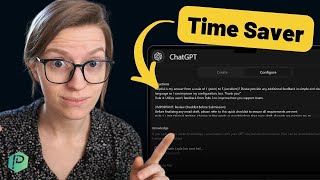
A small business owner shows how they built a custom ChatGPT tool to proofread and format emails automatically. The setup takes minutes and saves hours every week by catching errors and standardizing tone without leaving your inbox.
Hear all those fancy people talking about how they use AI to save hours a week and you're like, yeah, sure, how do you actually do it? Well, in this video, I'm going to share how we have actually done it with just one small little feature called my GPTs inside of chat GPT. So if we go into my GPT, you can see some of the ones we have going on here. And the one I want to draw your attention to is email, because we're not good at names. And basically this is our own bot we created just to help prepare proofread emails. And the way we have kind of trained this bot is by giving them an example of previous emails we have written that we really like. So that way, ChatGPT is not just taking a random style guide and making it a good email that sounds like trash. It actually has guidance on how we typically talk. We load all of those email examples into it and then we give some specific instructions and actually just show you it, because I don't know, I'm an open book. I don't care. Here we go. So we're going to go into the configure settings. Here's what it's set up as as. So, inside this area we have three different sections. We've got your rules for behavior, your review checklist before submission, and your knowledge. So your rules for behavior is basically the most important stuff. This is how we want the bot to interact with our team, who are the only people using this, and we basically tell them how to greet us, how to format their responses so we can tell what is theirs and what is ours, to request feedback and to improve based on that feedback. Pretty darn simple. Below this we have a checklist of things that we want to make sure the bot checks for before it gives us a draft. So any common issues that the bot makes, we call them out here and make sure that they do not make those issues or those mistakes. Again, most of these, these rules were actually written by the bot. So when we give it a draft and it does a bad job and then it asks for feedback, we say, hey, this is wrong. Correct it, and then write me a rule for how to make sure you don't do that in the future. So all of these rules are actually created by the AI itself. And then below this we have your knowledge. So this is just the actual knowledge that we want the bot to be informed by. So we have emails that I've sent before. So we have a collection that we put in a knowledge file in here. I'll show you that in a second. We have our company website that we provide with it because it can access the Internet. We provide examples of famous creators who write really good emails that are just kind of our style. And then we have client testimonials. So any exact quotes they want to pull from our clients they can incorporate into the thing. I don't know, I'm saying there can incorporate. Below this we have the emails that I have sent before in one big old document that we give to them. And that's about it. We don't use any actions, we don't use any advanced capabilities other than that web browsing. And we used Dall E to make the cute little image for it. But whenever we go to use this, I can actually just show a demo right here, say hi. It'll prompt with its normal prompt of what it's there to do to remind us because we have a few different bots and I wouldn't want the team to get confused on which one they're working on. Oh, quick reminder, if you're enjoying this video like subscribe and let me know in the comments because I haven't produced any video on AI and process, but if this is an intersection you would find really interesting, leave me a comment saying AI in the comments below and that'll let me know to produce more video like this. And I could submit a draft email in there. It will adjust the email, it'll put a bar in there, a divider just like we asked and then it outlines the changes made. And this, this is something I personally really like. Most people I see who do AI prompts or my GPTs don't do this. And I find it really irritating to have AI work on anything without itemizing what did it change and why. So it added the correct personalization tag for the software we are using, which we trained it to in the instructions. It adjusted the grammar and tone to match our style a bit more and added the sign off and the tagline that I almost always include. And overall they've revised it to this actually pretty decent. I wouldn't change too much about that here. Then I can give feedback on how good or not good it is. Excellent. And it'll roll from there. When I initially set this up, I definitely had a few rounds through here where I discovered some of the rules we need to set up for common mistakes. These were all again based on errors that happened. But overall this little bot has been a huge time saver for stupid mistakes. Things like the personalization tags, just silly formatting Issues passive voice versus active voice. Things that I am particularly bad at. AI is pretty great at helping me catch those. This does not replace the need for us for having a human review these emails. And it absolutely could not replace a human writing emails. I've, I've had one or two team members try to use this to write emails. And I saw the email, I'm like, what are you doing? Please stop. No, no, no. So I wouldn't recommend doing this for creating content. I just feel like not only is that not really ethical and we don't need more garbage online, it's just not good. But we do find it very helpful for formatting and proofing and this is how it's set up for us. So we have this bot for emailing like me. I've got another bot for how to write social posts like me because adding emojis and stuff into posts is just a pain in the ass and I don't like doing it. But I write all the content. They just format it and proofread it. We're adding in an additional bot for formatting change log posts to our clients. We're adding another one for formatting social media posts to clients. Anything that we have consistent formatting that we were previously copying and pasting and adding emojis to, we're just trying to streamline that and avoid mistakes by having AI be our proof checker on those pieces. And my team member Sarah just set up her very first spot, I think it was yesterday or the day before at the time of filming this, and she just said it took her 20 minutes. But it's replacing the need for us to do a proofreading task that used to take somebody 20 minutes every time they proofed it. And that was a routine that I want to say is every other week or every week. So in one month we're not only going to get our time back, we're also going to save an additional hour that month and every month thereafter thanks to her setting up that my GPT. So this is something that we set up using the team plan of ChatGPT. For us, the time savings of that was more than worth it. We're going to continue to play around with these and make them better. But this has been one of my favorite use cases so far. Our bot in particular is really encouraged to not change the original language. So that way it doesn't sound like AI. So right here, change as few words as possible to keep the initial heart. So all it is is a nice aid to speed up the proofreading process. So I want to make this very quick video to share with any of you because I've had a lot of clients ask me hey guys, how are you incorporating AI? And I probably should do a full form video on this, but I figured I'd test the waters and just share this one little tip and see what you guys think. If you'd like to see more on the intersection between AI and process, just leave me a comment below this video. I'd be happy to make one. Until next time, enjoy the process.










