Yes, you guessed it... More HubSpot Updates!
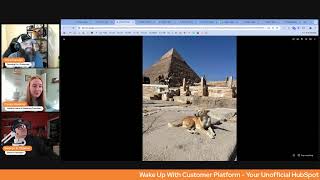
Chris Carolyn, Casey Hawkins, and George B. Thomas break down HubSpot's latest updates, including workflow improvements, form editor enhancements, and new bot detection features. They cover beta releases and new capabilities in a casual morning show format.
Good morning, HubSpot Nation. Welcome to Wake Up Customer Platform, your unofficial HubSpot morning show, where we help you discover the platform value you already own. I'm Chris Gallon, and I'm joined by my co hosts Casey Hawkins and George B. Thomas, as we make sure you're not sleeping on HubSpot's true capabilities. If you're joining live, drop a hello in the comments and let us know what you're building in HubSpot today. Happy Monday, March 31, 2025 Georgia. Casey, how are you doing today?
I am good. The time change means that I'm good in the morning and then actually falling asleep at dinner. Um, so you got me a good time?
Yeah.
Yeah. How many hours difference is it?
Um, I think 10.
Oof.
Yeah, the. On a positive note, I would. On the way back, I was up for 24 full hours, so I was able to fall asleep as soon as I got home. So that's, you know.
There you go.
There you go. Victory right there. You got it. You got to claim your victories daily, ladies and gentlemen.
Yeah. All right, well, we'll hit these updates and then, time permitting, maybe dive into a picture or two and then play the Is it AI or not game.
This whole thing was an illusion.
All right, number one on the list. Drafts in Help Desk, Medium Impact Private beta. What is it? Drafts automatically save unsent messages, allowing users to leave and return to a ticket or find it in the new Drafts view without losing progress. What is changing, George?
Yeah, what's changing is users will retain draft messages in the channel in which they were composed. Users can retrieve a draft in the Composer or via the Drafts folder in Help Desk. And Drafts will be saved per user, not shared across team members, and are saved across multiple devices. I love when stuff just is where it should be when I need it.
Why does it matter? Multitasking is a central part of the support reps role. Reps frequently start writing messages and need to pivot to another task before they can send them one. Without Drafts, they either have to copy and paste text elsewhere or risk losing progress. Drafts ensures reps never lose in progress work, allowing them to pick up right where they left off. It improves efficiency, reduces frustration, and meets support teams expectations for table stakes messaging features. I didn't know that Drafts was not a thing. Did not notice.
I just switched views with Autosave too. Not the guy, I guess.
I don't know. It's been auto saving in lists and I'm not the biggest fan of that.
Well.
Well, then maybe not, maybe not. I will say though, I have a. I have a thing that every time I sign up for a beta now, because I've realized the amount of beta since starting doing the show with you guys has been crazy. But every time I sign up for a beta, I'm just gonna give it up real quick. So we know there's a new beta in the portal talking.
George adds a lot to the show. His sound effects add just, you know.
Yeah, yeah, someday I'm gonna actually use the Steam Steam deck that's sitting right in front of me. But until then, I'll just let George take care of business. One question. Are we accepting defeat with this statement right here? Multitasking is a central part of the support reps role.
Do we have an hour today?
My gosh, I got nothing going on. I'm technically off today.
There you go.
All right, I'll take the hint. We'll move on. Just something to think about. Number two. Custom channels API include channel, image and description. This one has many lives and many updates. Been over it a few times. What is it today? When an admin goes to help desk settings to connect a channel that comes from a connected app, they see the app name and app icon. With this enhancement, a developer can use the custom channels API to directly configure metadata about a channel they own, like name, image and or short description so that admins have more confidence about what they are about to configure.
Why does it matter? App developers can make it more clear to admins how to set up channel integrations that they offer.
That is the shortest why does it matter ever?
I don't think that's even very clear.
Can I, can I phone a friend? Do I have an app developer friend that can tell me really why this matters to them? Because yeah, come on.
I think they've changed this. I think it's the why it matters has been better.
I'm starting to like, maybe the other ones were actually for the developer and this was for the admins. And there's so many like layers to this. What comes to mind is, you know how when you're using any of the service or any of the, oh, I need the object library objects like listings for example. And you don't want to use it for real estate, but you have to sit there and look at that little house icon every time you use that object. And that can be confusing to people who need help understanding how they're supposed to use tooling. So I haven't heard anybody doing this yet, but as it's Been described throughout the number of updates that we've done. It's more like, okay, instead of just having an sms, you know, message icon for everything or having an email icon for everything. I'm sure there's a little bit of branding in here too. If you got a branded channel that you want to set up, if you're.
Using this, let us know. Also, house icon. Chris loves you. He was just using you as an example.
So I actually dislike you very much and all the address fields that come with you. Anyway, number three, Create Workflow redesign. Oh, another change to workflow design. That's fair. Or maybe they're finally letting us know about the reason that's been happening. For sure that's true for a while.
Is it a little bit of both, maybe.
What is it? You can now start building your workflow by browsing all of the available triggers instead of being forced to choose an object first, which immediately limited the triggers you could choose from. Wow.
All right, George, if you thought the last why doesn't matter is too short.
They'Re making up for it.
Warming up. This one matters because in the past, when creating a workflow, the first step was to choose an object type. For newer customers who haven't yet learned HubSpot terminology, this choice is overwhelming and confusing. That's all right, I'm with you, HubSpot. For all users, this meant you had to commit to one object before even knowing if the trigger is you need exists within that option. If the trigger you needed wasn't available there, you'd either assume it was not a feature workflows offer, though it really might be, but somewhere else, or go through the trouble of abandoning that workflow and starting a new one all over again with this change. After clicking Create Workflow from the workflows homepage, you'll go directly into the workflow builder, where you can browse all of the possible workflow triggers and start building based on that choice. When a trigger is selected, the object type will be set for the workflow automatically where possible. For example, if a form submission trigger is set, the workflow type will be a contact workflow, or you'll be prompted to choose an object if the selected trigger could apply to multiple different objects. For example property change triggers. This update makes it easier for you to find the best fit trigger for the task at hand, while making the workflow building process quicker, with fewer clicks and decisions required in order to get started.
Can we go Back to line two, please? God. If you buy HubSpot and the first place you go is tool and you're trying to build a workflow and you have not yet to learn the terminology of HubSpot. Houston, we have a problem.
Oh.
Oh man. But George, we just spent thousands of dollars. We gotta start getting value right now. Give me the workflows.
Blow up your Just blow everything up. Just don't learn anything later terms and just fire off that automatic nurture sequence to everybody.
I love it when HubSpot keeps it real here in the why this is like why it's not been the best experience and now why it's going to be better. This finally came to mind for me as Casey was reading through this. Yeah. So fair. Fair high impact rating here.
With all of my energy I did forget this. I did sign up for beta sign.
Up for that people using workflows too quickly than you.
Yes. That's why I'm always honest. Outside workflows and reports are my weakest spots because I'm busy helping everybody with the data model first so that stuff can work. Number four Ticket properties in the new Forms Editor. Low impact. I'm not so sure about that.
What you talking about?
What is it? With this update you can use default and custom ticket properties, incorporate ticket properties in multi step forms, leverage conditional logic and redirects.
Why does this matter? Tickets in HubSpot are used to track and manage customer requests. With this update you can now add ticket properties to forms created in the new Forms editor and collect ticket information directly through forms. New Forms Editor. They're saying that pretty much everywhere.
Yeah, yeah, yeah. This is what this. This. Why does it matter? It should have looked like the last one. I know how you can use it in the old Forms editor. Yeah.
Now.
Now you can use it in the new one.
Yeah. Yeah.
Holding a ton of people back a ton of people back from using the new Forms editor is.
Can we.
This is a fun day.
Can I just. I know this is not why we're here but I need. Can I get queued fields in the new Forms editor? Please, please, please. Okay. I'm done.
I don't know. All right. Steps. Steps of progress here being made about as awkwardly as I just said that statement.
Is this details tab new does that new.
Yeah.
While you were gone.
Yeah. I think day after you left this.
Might have been the most important update of updates while you're gone. There's a detail step. We're not sure if we love it or hate it by the way.
Yeah. Also we've got these. I don't know if these are here.
Last time they were There, but not as they didn't look like this.
Yeah, right. I haven't tried this yet. Chris got.
Oh, I have. By the way, I went to the workflows app. Chris got all excited because he thought this was like Zoom and Kixie and, you know, apps that you integrate. But it's just HubSpot apps.
Yeah, well, we saw one from a specific app.
Something other than app.
In updates. Yeah, in updates.
All right, Number five. Updated Customer success Workspace. Medium Impact. Just kidding. Impact already received, apparently. Recaptcha Score Based Bot Form Submissions Detection. All of the words. What is it? With the introduction of ReCAPTCHA score based bot Form Submissions detection, form submissions are now validated against the score provided by Google's ReCAPCHA tool, which provides a risk score ranging from 0.0 to 1.0, with 1.0 meaning low risk, highly likely to be legitimate, and 0.0 being high risk, likely to be fraudulent. Any submission with a recaptcha score between 0.0 and 0.1 will be automatically marked as spam with spam type filtered by recaptcha. This validation applies to all regular HubSpot forms that include a recaptcha. By implementing this feature, you can prevent bot submissions from corrupting your CRM data, ensuring only genuine form submissions are prioritized or follow up and engagement.
Why does it matter? Bot form submissions can significantly pollute your CRM data, making it difficult to separate genuine leads from fraudulent interactions. This not only wastes your team's time, but also hampers the efficiency of your marketing and sales workflows. The new recaptcha Score Based Bot form submission detection feature addresses this issue by leveraging Google's recaptcha score to assess the risk of each form submission. By automatically identifying and flagging high risk submissions as spam, this feature ensures your CRM remains clean, reliable, saving you valuable time and effort. It's a little bit repetitive of the what is it?
But I'm like, it could be one line. This one could be one line. I'm just saying. By the way, does anybody feel like the what is was like either super nerdy or like somebody wanted to get I'm like submissions from corrupting your CRM data.
I'm like, yeah, feels like a little.
You can tell on Marketing Hub. The Marketing Hub product team shows up. Definitely. They definitely like. But by the way, as hard as it was for me and Casey to read through this camel cased name of a thing. Also, people that are reading will have a similar time, so maybe don't camel case the whole thing.
I don't know. That was. That was a time.
Unless that's an app and then we're not camel casing it over anyways. Yeah. Is this a top five or recurring problem posted in Sprocketeer?
The filtering.
Like how do I filter out bad form submissions or form submissions that I don't want, don't like.
Which I feel.
Like it's up there.
There's probably. And there's a couple other updates like historically that have kind of gone along this vein of like helping you to get rid of that corrupted data.
Sound bite.
I feel like 0.0 is not a maybe. Like if that's the score. Like yeah. Anyways. Undo edits to Association Stage Tracker Card Properties Live Medium Impact what is it? We've enhanced the property editing experience for Association Stage tracker cards that can be added to the middle column of the record page. Now users will see a save status component in the bottom left of their screen with an undo action when editing properties in the Association Stage tracker. Clicking undo within a number of seconds will revert the most recent edit to the property.
Why does it matter? This enhancement will inform users when a property edit is saved and give them the option to automatically undo any data entry mistakes.
Ah, it's like when you send that email and you're like crap, there's five. No, never mind, I didn't mean to submit that undo.
I like that they're adding undo a lot of places. I think they're also adding autosave. So I guess it's kind of.
Yeah, it's interesting to see like how modularized the system is as they like build this addition on like index screen versus left pane, middle pane, right side pane.
Like yeah, and I literally am starting to get the feeling of there's like a team of two to seven people on each one of these things. Like hi, we're the left hand Contact Records Project management team. Like. Like it's. But you almost have to like it's. It's crazy what's happening.
Yeah. Doing work and we appreciate it. CRM team. We love you. How far that record view has come is. Is quite amazing. Number eight Target Accounts Home Revamp Integrated Account Research and Account Sourcing Private Beta. What is it? The new Target Accounts Home help Sales and marketing teams implement an effective account based strategy without the complexity and resource intensity that typically comes with it. Teams can now prioritize high value accounts, research them efficiently and coordinate engagement all from one central place.
Why does it matter? Key problem solved Find promising accounts. Faster research in minutes, not hours. Keep your team aligned. I guess I should go into those. Those weren't actually that Chris cut it short before and I was trying to.
I think it's fair. Like, this is. This is not the first time we've been over this. It's. It's a big deal if you've been. If you've been using Target Accounts, Goal Accounts tool, major upgrade. Also aligned with a lot of the prospecting agent stuff they've been doing. Just this ability to research. Right.
Mention that.
Yeah. Have you been playing with us at all yet, George?
I have not, but I need to. I need to.
Yeah. I'll just note takes care of all the heavy lifting so you can do the other heavy lifting. Not so you do no heavy lifting. Other heavy lifting is managing relationships with human beings. Yeah.
There's always some type of lifting involved.
Yeah. Number nine, pick things up or put them down. Right. Update updated content Remix homepage and manage screenshots Public Beta. I don't feel like I remember this one from March 10th. Medium impact. What is it with the new content remix homepage experience? You can easily keep track of and manage the remixes you've recently created, as well as your custom remix templates.
Why does it matter? The updated content remix homepage and manage terrains make it easier to keep track of your recent remixes and custom remix templates. This looks cool.
There's like one glaring question that I would love to ask somebody and I don't even know if they'll ever see this, but it's like, are we using the new GPT 4.0 image model yet? Inside of Remix? Because. Dang, I'm just saying that would be cool if we are.
I've always been impressed by the image capabilities, so I would imagine they are. They're on the cutting edge, wherever they need to be. But it'll be interesting because it's outperformed, like GPT, like when I've used it in the past for a while.
Yeah, yeah, yeah.
So very cool to see that improvement. And Ankur watches all of my shows, don't worry.
Oh, well, there you go.
So, yeah, we're definitely enjoying this beta though. This is how I, like, know it hasn't actually been on the board yet because I smash every content hub beta button for sure.
And I like that you're looking into the detail just in case there's something right.
And it's like, oh, more information than normal. Wait a second. Beta enrollment. That's kind of cool. I think this is the first time I've seen that. A little bit added here. All right, well, that's. That's all the updates. So I guess we got time for. For the Egypt. Egypt show.
We also this week, the pro, the Tuesday marketing admin hug. Tomorrow is the show and tell. I don't know, just a call out. I'll be there. I'll be showing.
Can't resist throwing the word marketing in there as if it's just for marketing people.
Did I say marketing? That was a slip.
I mean, all super admins are marketers, right?
Tuesday admin hug, not just for marketers. Yes. Show and tell. Does that mean you're showing and telling?
I'm showing, I'm telling. I gotta get some things together today. But.
That'S good. Good to see. Well, you got. You got one picture for us.
Yes. Oh, gosh. One. I picked five.
George can real time try to reproduce with GPT.
No, no.
Oh, my God. But I'm gonna rapid fire. This is the best doner kebab I've ever had in Turkey. This is a dog with one of the pyramids. There were lots of dogs there. They don't tell you that. There were like, puppies. It was very distracting. You're trying to, like, look at the pyramid and there's all these puppies. Hard, rude. Here is a very authentic picture of me and my friend who I was traveling with looking at the top of the pyramid. It's amazing. This is Karnak Temple. This is in Luxor. If you're going to Egypt, don't mix, don't sleep on Luxor. Karnak Temple is like the most magical place I've ever been. This is another wonder picture. Very authentic. And then here is me and my friend in King Tut.
Oh.
Seeing better days. Alrighty, where's my outro? Here it is. Remember, folks, you probably already own the solution you're looking for in HubSpot today. It's the new forms editor with ticket properties added. Get after it, folks. And a lot of people have been asking for that. Sometimes you just need to wake up to it. Join us tomorrow morning as we continue exploring what's new in HubSpot and the ecosystem. Drop your biggest takeaway in the comments and let us know what capabilities you want to wake up to next. Until then, I'm Chris Carolyn.
I'm Casey Hawkins.
And I'm George B. Thomas.
And this has been Wake up with customer platform. Now go build something amazing. Have a great week, everybody.










