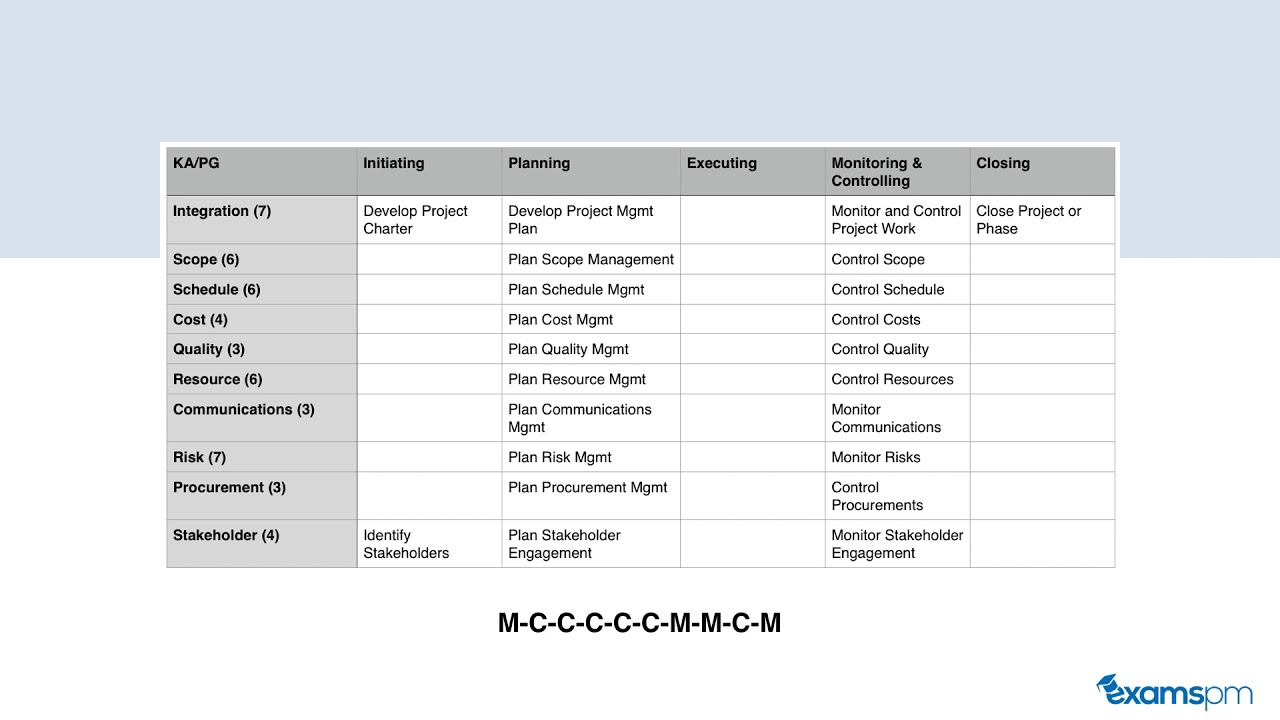
In this instructional video, Helena Liu (Examspm) addresses the common difficulty PMP candidates face when trying to memorize the PMBOK 6th Edition 49‑process chart. She presents a series of concrete mnemonics and study habits to make the chart easier to retain. First, she introduces the “phone‑number technique,” converting the count of processes in each of the ten knowledge areas into the memorable number 766‑436‑3734, which serves as a sanity‑check. Next, she highlights three corner processes (Develop Project Charter, Identify Stakeholders, Close Project or Phase) as anchor points. She then explains a “plan‑first” pattern: every knowledge area begins with a planning process (e.g., Plan Scope Management), except Integration, which uses Develop Project Management Plan. For monitoring and controlling, she offers a rhyme (M C, C, C, C, C, M, M, M, C, M) to recall whether a process starts with Monitor or Control. To cover the remaining processes, she suggests typing the chart in a document, turning the font white, printing it, and filling it in daily to reinforce memory. Finally, she gives exam‑day tips: draw the chart on the two blank sheets provided in an in‑person PMP exam, and even for the online exam, practice visualizing the chart. The video concludes with a call to action to practice the chart daily, subscribe, and explore free classes on Examspm.com.
Chapters
One of the main things that PMP candidates struggle with is getting this chart memorized. Here, what you see is the process chart from the PMBOK 6th Edition guide, and what this chart is telling you is how PMI wants you to manage a project from start to finish. Essentially, this is a skeleton of the entire exam, and it is a great idea to have this memorized, but it is so hard for so many candidates to have this entire chart memorized. First of all, it looks like gibberish. So in this video, I'm going to share a technique with you that's going to help you memorize this chart faster. The first tip that I will give you is something called the phone number technique. So let me share with you what this is now. Across the rows of this chart, you have your 10 knowledge areas. So these are essentially buckets or categories of different processes that you can have on your project. And the 10 knowledge areas are integration, scope, schedule, cost, quality, resource, communications, risk, procurement, and stakeholders. And there are a number of processes that fall under each of these 10 knowledge areas. For example, there are 7 within integration, 6 within scope, 6 within schedule, and so forth. So if you write out the number of processes within each of the 10 knowledge areas, it spells out a phone number, and it is 766-436-3734. So writing this number next to the knowledge areas will jog your memory as to how many processes you have to put in for each of the knowledge areas. So if you forget something, This is a sanity check to help you see that you have all of the processes that you need, and it is a good idea to have this process chart memorized. I don't suggest that you memorize many things in the PMP exam, but since this is really like the backbone or the skeleton of the exam, it's a great idea to have a very firm understanding, if not having this chart memorized. The next thing you want to do is fill in the corners. There is a process in three out of the four corners in the chart. The only corner that doesn't have a process in. It is the bottom right-hand corner, and the 3 processes in the corners are develop project charter, identify stakeholders, and close project or phase. The next pattern you will see is to fill out all of your planned processes. So every single process, before you can proceed with the remainder of that knowledge area, you will have to first plan out how you're going to approach all of the processes within that knowledge area. So for example, you don't You can't just dive right into schedule management. You have to plan out what you're going to do in schedule management, what is your methodology for coming up with the project schedule and managing and monitoring and controlling that process throughout the project. So you have to plan out your schedule management first before you can go on with the remainder of the processes within schedule management. So essentially, the plan schedule management process will tell you how you're going to develop your schedule and how you're going to control it throughout your project. The same logic will apply for all 10 of the knowledge areas. So you have to plan out what you're going to do first before you actually do it. So every single one of these planning processes will begin with the word plan, the name of that knowledge area, followed by the word management. So Plan Scope Management, Plan Schedule Management, Plan Cost Management, Plan Quality Management. You get the point. So right there you got another 10 processes filled out. The only exception to this rule is the first one for integration. Instead of Plan Integration Management, you have Develop Project Management Plan. It still has the word plan in it, but just doesn't follow the same pattern that we just spoke about. And another pattern you will see here is that in the monitoring and controlling process, every single one of the knowledge areas either has a monitor process or a control process. For example, you have control Scope, control schedule, monitor communications, monitor risk, monitor stakeholder engagement, and so forth. So you know for sure that there is either a process that begins with the word monitor or the word control. And so knowing this, the pattern that I found was that you can use kind of the rhyme that I have at the bottom of the slide here to jog your memory as to whether it's a monitor process or a control process. So the rhyme is M C, C, C, C, C, M, M, M, C, M. So if you say that enough times to yourself, you'll naturally have it memorized. Another way you can look at this is that there's 5 C's in a row in the middle, followed by M, M, C, M, right? So if you have this rhyme memorized, then it will jog your memory as to whether the process is a monitor process or a control process. Here is a chart again in its full form. And so right there, just with the 3 techniques I just shared with you, you already have half of this process chart memorized. So I know it can look pretty intimidating at first, but once you dissect it for yourself and really dive into it, you'll notice it's actually quite intuitive. Here's another tip I want to share with you to help you memorize the remainder of the chart. Unfortunately, there isn't as nice of a pattern as what we saw, but what I can tell you is that what you can do is type out this chart for yourself in Microsoft Word or Google Doc, and you'll get something like this. Then what I want you to do is turn all the font white. So turn all the font white so you just have the borders here. So then what you can do is print out this chart, print out this chart, and once a day you will fill out this chart. And the reason you want to make all the font white is because now you have a grid like this which is in the perfect proportion, and so you know exactly how big it needs to be. So you're just going to fill out this chart once a day with the appropriate knowledge areas, process groups, as well as processes so that you, you will be able to create this chart from memory. On your actual PMP exam, if you are taking it in person, you will be given 2 pieces of blank paper at the start of your exam. You can always choose to draw this chart using the first 5 or 10 minutes of your exam. It's a great idea to get into the practice of drawing them so that you can naturally recall them on your actual exam date. Now unfortunately, if you are If you are taking your PMP exam online, you will not be given these 2 pieces of paper. So it's a great idea still, even if you're taking it online, to draw it often so that you have it ingrained in your memory, and when you're taking your exam, you can almost visualize or see it throughout your exam. So this is a great tip to help you speed up your process on memorizing the 49 processes. So I encourage you, after you finish watching this video, to Draw out this chart in, in any tool that you want, be it Microsoft Word or Google Doc or whatever tool you want to use, and then make all of the font white. Then print out this chart and fill out your 49 process chart once a day leading up to your PMP exam. I hope you found these tips helpful, and I hope to see you again in a different video. Thank you so much for joining Examspm, and don't forget to subscribe as well as sign up for one of our free classes at www.examspm.com. pm.com/free. Thank you so much.