After two years away, the creator shows their new workflow using Claude Code on the $200/month Max plan, which made them roughly ten times more productive than Cursor alone. They run three independent agents simultaneously handling different tasks, spending more time directing agents than writing code themselves, coordinated through tmux and voice-driven coding via SSH.
Chapters
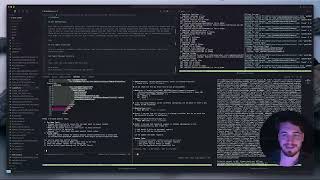
What's up guys. So I'm deep into a project at the moment, but I wanted to make a quick video to just introduce myself because I haven't been posting for about 2 years on YouTube. And what I've been doing in the time since I last posted was I've just, I've just been coding. I've just been coding and learning and building a lot of different things. I'll give you a quick sneak peek of one of the things I'm working on right now. So this is just a project that I'm busy with. I'll make a lot more videos about it moving forward. But today's video, I wanted to keep it simple and just show you a bit more about my workflow using Claude Code. And I wanted to show this because since I started using Claude Code, like I feel like I'm at least, at least 10 times more productive now than I was when I was just using Cursa. So make the shift to Claude Code is the first thing I will say. I'm using the, the Max plan, $200 a month. Totally worth it. And I'm going to show you why. So you can see inside of my window over here, I've actually got a Cursor window open and there's a couple of different panes. So on the top, I've got my, my, my server that's busy running. I also have a database that's running on Convex. Then at the bottom over here, I've got 3 different agents. So 3 different agents completely separate from each other that are all open at the same time. And the reason why is because nowadays I'm not really coding that much anymore, as much as I am just directing and giving the agents what they need. And so it's made me much faster because instead of having to sit there and wait for one agent to do something, I can fire off multiple different agents. So I can basically say like, hey, like check, um, using Gemini 2.5 Pro MCP. And I can just fire off this command. I have one agent, one engineer that's busy working on the frontend of my project, one engineer that's busy working on some API key stuff. And then over here is a completely separate project that's also using the API key. So what you'll notice is on the left sidebar, I also have all of my projects open. This is very different from how I used to use Cosa. I used to have it open with just like a single project and then I would switch between them in multiple windows. But nowadays, because I'm using most of my coding, like doing most of my coding from the terminal with my voice, I don't really have to have too much open at a single time. Um, so let me, let me dive a little bit further into this. So what you're seeing over here is actually all possible because of a software called, uh, tmux. So tmux is, It's kind of like a window management agent for terminals and it's amazing. Like this tool is so, so, so cool with Claude because it opens up a lot of possibilities into ways that you can work with this app. So I'm gonna be sharing a bit more about like how I'm using it, but I'll give you an example here quickly. So let me just quickly pull this up. You could see over the past few weeks since I started using Claude Code, I'm actually documenting as I go all of the things that I am learning. And there is some, so many things in here, things that you will just not have seen on other videos because most of these things are just figuring out through trial and error. And it's stretching my understanding of what's possible. This is a completely new time to be developing. Using these agents, uh, things that I've been doing, uh, such as basically getting agents to work 24/7, having, you know, 5 or 6 different agents working together on the same project, um, with different windows open, being able to code from your phone using your voice. These are all things that I wanna make videos about. But yeah, today's video is really just like kind of like a, a preview of that. And I'm, I'm just down to, to get more questions. I wanted to, make this as a promise to myself. I said I was gonna share a bit more about my workflow. So yeah, that's me. This is what I'm working on at the moment. This is how I'm using Cloud Code. And let me know if you want me to talk more about tmux, if you want me to talk more about how I'm using SSH to have this same workflow also on my tablet, on my phone. I can basically code from anywhere now. And just be able to pick up where I'm— where I left off with my development. So, uh, yeah, a lot of cool things, a lot of cool things to come. But thanks for watching this video, and, um, yeah, I look forward to making the next one very soon.