A developer sets up two AI agents (Project Manager and Developer) that run continuously in tmux, executing coding tasks autonomously even while they sleep. Using Claude and a custom Orchestrator, the agents handle webhooks, code changes, and quality checks, with a self-scheduling system that restarts them every 15 minutes without manual prompts.
Chapters
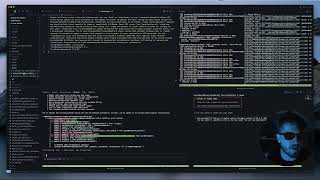
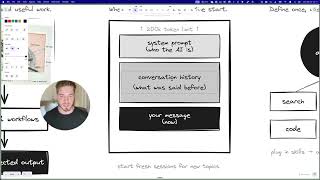
And so just taking a look at what we've got over here, this agent has essentially created a list of tasks for itself to check on a project manager and check on a developer agent. And it's also scheduled in time for itself, uh, to actually restart this session with itself to continue working. And this is true agent autonomy. Agentic coding. This is the future of coding where you have multiple agents that are running in the background. All right, it's the next day. And just to show you, this is what it looks like once the, the agents have finished working. So while I was asleep, you can see the project manager said major milestone achievement. It's completed all of the to-dos that it gave itself and then also gave that kind of like a status update on everything that's been completed. Then We can see the engineer. What's up guys? It's late over here. I've been working all night. I wanted to show you something before I go to sleep, because this has basically been my routine for the last week, which is to actually set up agents to run while I'm busy sleeping. And I'm gonna demonstrate for you exactly how to do that in this video. And I'm also gonna give you access to the exact Claude files and the exact like repo that I'm using to make this possible. So if you saw my last video, I walked you through kind of how I've got my coding workflow set up over here. So as I mentioned, I've got my, my servers and my, my database running at the top. Then I've got my engineers, which I'm using tmux over here. So if I just open this up, you can see I've got a bunch of different tmux windows. And on the right, I've got an entirely different project, which is really the magic of what I'm gonna show you here is I'm gonna get this project to talk to this project and essentially act as the project manager to help me get this to completion. So, um, what I like to do is I first just commit everything and make sure that I've got all of my work backed up, saved, and then using my voice, using, uh, Whisper Flow, I'll basically just write out a bunch of things that I want the agent to work on. And tell it to create a plan. Once it creates the plan, then I ask it to take that plan and turn it into a spec sheet. And once we've got the spec sheet, uh, it asks you, do you want to proceed? I'm gonna say yes. And now it'll kick off the agent to actually begin working on this. This is step 1. Now the next part of this is to actually, uh, kick off this project manager on the right. And so what I'm gonna do is I'm gonna find the spec sheet that I just created. But first I need to use the command, PM oversight. I'm gonna say, I'd like you to please oversee the agent working in the AI Chat Unified project and help it to see its spec sheet to completion. Here is the spec sheet for your own understanding of the project. All right. And then you can literally just drag in the spec sheet. Okay, great. And so this is the second part. Now, to give you a better view, you can kind of see over here, this agent is going to start reading the spec sheet, then it's going to actually go and find what this agent is busy working on. So it's pretty amazing that they can actually start working together. And while they're like, well, first I'll just show you how. Yeah. So you can see agent is actively working on the webhook configuration. Okay, cool. All right. Now the next thing I wanted to actually show you is how is this possible? How is it possible you could have one agent that's actually talking to a separate agent and instructing it and guiding it. So what I've done, I've created a GitHub repository, which I like to call Orchestrator. And this is something that I'm basically just making open source, and I'm very happy to give you access to this. And I'd love to make this a community project that we could build together. Essentially what the orchestrator is, it takes inspiration from, uh, one of the articles that Anthropic published where you have a main orchestrator agent that monitors and coordinates with different project managers and different engineers. So if I go back to my window now, you can actually see that the orchestrator, which we, which we launched over here. Has now started a separate window with a project manager. And so it's basically going to start, um, giving tasks to the project manager. And guess what? The project manager is busy giving tasks to the developer. Now, one of the beautiful things about this, and this is what allows it to actually run while I'm asleep, is I've actually set it up to automatically schedule itself to restart. So you'll notice generally when Claude reaches the end, it just waits for the next command and you have to basically give it the next instructions. But what if you could schedule the agent to actually restart itself and not even need you to prompt it? So that's essentially what I've created here with the Tmux Orchestrator. So what it does, you can see some examples over here. I'm not gonna dive too in, in depth into it, but I'll probably make future videos on it. But it can essentially work autonomously 24/7. And as long as you have the Claude Max plan, the $200 one, uh, $200 a month one, which I highly recommend, again, this agent can literally just work for you and, uh, self-schedule. So there's a bash script that it has where it literally schedules in time to check in on itself, and it will coordinate and keep track of multiple different agents using the, uh, tmux framework. Yeah, that's, that's in a nutshell, uh, what I've just set up over here. And as I said, it's getting late on my side. I am going to go to sleep now, but I've got these two agents running. So now I can, you know, rest easy knowing that work is still gonna be done. And you can see over here it says every 15 minutes, check in with the developer progress via the tmux, uh, monitor the server logs, uh, do spec compliance, quality gates, cross-coordination. And there you have it. That's pretty much my Agentic workflow. So thanks for watching guys. And I hope that this video, you know, gave you some new ideas of some things that you can use Claude Code to build. And, um, yeah, let me know what your thoughts are in the comments. I'm looking forward to making— I have a lot of great idea, a lot of great video ideas that I really want to share. And so, yeah, I'll see you in the next one.