Google Workspace ownership transfers only work within the same organization. To move a Drive folder to someone at a different company, create a Shared Drive, add the folder to it, invite the recipient as a Manager, then have them transfer ownership to themselves.
Chapters
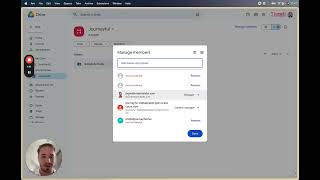
Hey, what's up YouTube? So if you have Google Workspace and you wanted to transfer a folder or a bunch of folders across to a completely different Google Workspace account, a different domain, then this video is going to show you how to do that. There's a bunch of videos online that will show you how to transfer Google Drive folders from a personal Google Drive account to a different personal Google Drive account. And the method that they use is basically where you would go to share the folder, you would essentially add yourself or you would add a different person to the people with access and make them an editor. And then once you make them editor, you can click transfer ownership. But the problem is when you click this using a Google Workspace account and you say, yes, make them an editor. Sorry, cannot transfer ownership. Ownership can only be transferred to another user in the same organization. So this made things a little bit more complicated. And I tried every possible method. I tried downloading the files. I tried sharing that like, like, you know, like exporting them and re-uploading them, and nothing really worked. Now eventually I figured out what works, and what you need to do is actually create a shared drive. So when you have a shared drive, the ownership is no longer only to the organization. You can actually transfer ownership. So for example, if I take this folder and I drag it into my shared drive, like you can see over here, I'm let me see if I— there. Okay, move it to the shared drive. It's gonna basically review items, and then once it's in the shared drive, here's the cool thing. You can then go to Manage Members in the top of your shared drive, and you can add a completely different domain. You could add a personal domain, it doesn't really matter. You can, you can add them to shared drive and you can make them a manager. Once you make them a manager, if you actually open up that same shared drive on their side, So you go to the shared drive, then when you find that folder, now you can actually drag it across and it's going to say, make yourself the new owner. You say yes. And amazing. So there it actually works. So hopefully this helps someone else because I spent multiple days trying to solve this. And, uh, yeah, hopefully this helps. So take care.