0:58
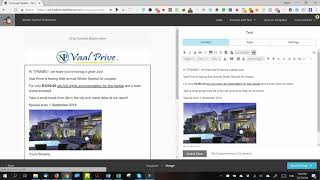
Fix Mailchimp emails showing unwanted bottom bars on mobile by adding one line of CSS. Switch to HTML view, insert a <style> tag with img { max-width: 100%; }, save, and your images will resize properly.
Fix Mailchimp emails showing unwanted bottom bars on mobile by adding one line of CSS. Switch to HTML view, insert a <style> tag with img { max-width: 100%; }, save, and your images will resize properly.
Hi guys, I just ran into an issue while I was busy making my email in Mailchimp. So if this is happening to you, when you make the email mobile-friendly, you see it's got these bars at the bottom. Okay, now it's actually a very simple fix. All you have to do is go into your text and then go to the HTML side over there. What you're going to do is type in style with the two brackets around it, and then you're gonna say image and parenthesis and then max-width: 100%. And then you just close the style tag. And there you go. So now when you preview your email on mobile, it's gonna actually be mobile-friendly. Thanks guys, I hope you enjoyed that video. Peace.