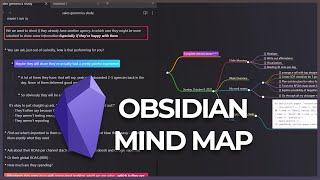
Jason Edward shows how the Obsidian Mind Map plugin automatically turns your note's headings and bullet points into a visual map that updates live. Install it through Community Plugins, run it from the command palette, and use it to study notes with lots of nested content.
Chapters
Hi YouTube, it's Jason Edward here. Today I want to share with you a new mind map plugin that I discovered, and I found it to be extremely helpful. So let me just quickly show you how this works. You can see on the right over here, this is a mind map that's created automatically just from the document on the left. And it's a really cool plugin because it, it basically just lists out your most important bullets that are within each of your notes. Like I can show you another example over here. You see we've got 3 different headlines, sub-item 1. So if I just removed one of these, you would see it's gonna automatically update now to just one headline. And then yeah, just by adding this, it automatically creates it just using the headline and bullet points. So even if I did stuff around it, like let's say for example, just said this is a test, it's not gonna, it's not actually gonna show that part. It'll only show the part with the bullet points. So yeah, just wanted to share this plugin with you. If you want to install this for yourself, it's very simple. You just go to Community Plugins, you go to Browse, and then type in Mind Map. So Mind Map, and then, so this is basically the plugin. Make sure that it's enabled. And then what I do from here is I basically just, I'll close it. And when I want to use that, I open up the command tab, I type in Mind Map, and then hit enter, and there you go. So yeah, it's a really nice, small plugin and it can be helpful, especially when you're studying in a file with a lot of different, a lot of different bullets and things that you wanna keep track of. So with that being said, that's it for this video. By the way, if you wanna find out how you can get this type of colors and stuff set up inside of your Obsidian vault, I've created a video on this. And this is also something that I give you inside of my sample vault that you can find on my Patreon. So what I've created is an entire blueprint of like different Obsidian tricks CSS hacks, like using these bullets. And yeah, I'm constantly adding to this. And also you can let me know if you have any ideas for future videos you want me to make. So hopefully you enjoyed this video. Let me know if you have any questions in the comments below, and I'll see you in the next one. Bye-bye.