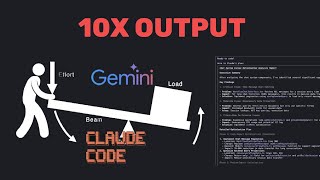
Claude Code spawns five sub-agents that each call Google Gemini through a custom MCP server to handle complex tasks like database query optimization. The demo shows how to set it up: clone Console7 from GitHub, add the Gemini MCP endpoint, and insert your Google Gemini API key from Google AI Studio.
Chapters
So every day I'm busy working with Claude Code and I had this interesting idea today, which is that when we're working with agents, the most important thing that you can learn as a developer is how to maximize the output with a single prompt. So how can you get the agents to do more with less effort from your side, essentially creating leverage for you as the developer. And I have an experiment that I've started working on today and I wanted to show you kind of the process. So what I've done is I'm, I'm busy building a SaaS right now. And one of the things that I'm working on is a, optimizing the database for the read and write queries. So I went into ChatGPT first and I actually just asked it to give me a breakdown of how I can optimize this. And I pasted this into Claude Code with the following prompt. So what I said is, I would like you to make a very detailed plan going through all of this, but I want you to act as the operator. And as the operator, I want you to create 5 subagents. And for each subagent, I want you to use Google Gemini's MCP server, which is what I'm gonna show you how to set up. To ultimately make the agents more efficient. And this is quite an interesting, quite an interesting workflow because what, not only are you getting Claude to work with subagents, but the subagents are also working with their own Gemini API calls. And so they're also more efficient. And so just with one single prompt, I'm able to go through the entire code base. It launches, it launches 5 different subagents. You can see like all of these different tasks that it launches over here and then it plans out everything everything that needs to happen and it asked me if I want to proceed with that. So it's just a, a simple example, but I think this is something that everyone needs to start learning is like how can you take one single prompt and maximize it using these AI agents. So to set this up real simple, all you need to do is go to this GitHub page, Console7, which I will link to in the video description. And you want to get, you want to basically find this part over here where you can add your MCP server. So the one that I used is this one that's highlighted Claude MCP add, and then you just put in your API key for Google Gemini. So if you wanna get your Google API key, you just have to go to Google AI Studio, just type that in, and then you would find your API key there, paste that over here, and now you've got Gemini that, uh, Claude Code can call on to make your coding more efficient. So hope you enjoyed this video. Let me know if you have any questions. And yeah, I'm learning a lot of stuff, so I'm, I'm looking forward to sharing more. And I'll talk to you soon. Take care.