3:33
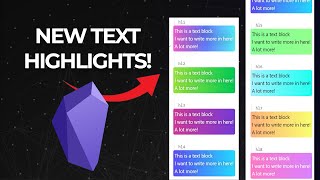
Jason Edward shows updated HTML text highlight styles for Obsidian that work with simple shortcodes, no coding needed. Copy a shortcode, add your text, and it renders instantly. Styles adapt to dark mode and stay responsive across devices.
Jason Edward shows updated HTML text highlight styles for Obsidian that work with simple shortcodes, no coding needed. Copy a shortcode, add your text, and it renders instantly. Styles adapt to dark mode and stay responsive across devices.
Hello, Obsidian users. It's Jason Edward here, and I've got something really exciting to show you today. So here are a whole bunch of text styles that I've created, and I'm going to be showing you in this video how you can start using these for yourself within your own vault. Now, I actually made a video on this previously, and this was the original ones I made. I started using them inside of my notes, and I was really like excited about it. I really love what they look like to make your text stand out. So I ended up creating a whole bunch more and they're, they're really cool. So the way that it works is it's actually created with HTML. And if you're not a coder, don't worry. I'm going to show you how you don't even need to know code to actually create this. For example, if I wanted to create one here, I would just type a shortcode, hit that button. And then I can say, this is a test. And there you go. So, That's pretty, that's pretty much how you create it. It's super fast, it's really intuitive, and it, uh, it also is responsive. So you can see, even if you have a large amount of text, it will work perfectly. It even works on mobile. I'll just show my screen so you can see. So a couple more things I want to mention. These ones over here, the cool thing is it actually still keeps the, the original background color. And even if I change to a different theme, like let's say I changed to dark mode, it's still going to keep the text the right color and it's still going to have this, this outline. So, uh, I really love these. I think that they're, they're going to work really well. I'm actually going to continually add to these. Now, the thing is I put a lot of work into actually building this all out. So I have got two versions of how I can help you set this up. And so I've created a little bit of a bonus one for the people that subscribe to my Patreon. I've already made a video on how you can set these ones up. I'll link to it in the description, or I'll link to it above this video as well. You can see the link. And if you want to get these set up for free, you can literally just follow the steps in that video, and I'm going to be giving you access to these following ones. So all the way from here with the first outline gradient and all of these. Now, for the people who have also joined my Patreon, I've got a sample of of my entire Obsidian vault that includes all my templates, scripts, blueprints, things that I've already created and that I'm constantly updating. And that, that's where I'm gonna put all the rest of these styles where you can literally have these downloaded. Plus I'll include a video there of how you can actually set this up for your mobile as well. So yeah, it's really simple. I'm gonna give you all the instructions that are necessary so that all you would need to do is literally just create the shortcode. So for example, let's say I wanted to use this one. I'll just copy that, go down there, hit the space key, and then just say, "This is a test." And there you go. So now we've got this quotation mark. And so I highly encourage you, go and check these out and download them for yourself so that you can start seeing how they work in your vault. There'll also be a video inside of the Patreon showing how to download them and set them up for your mobile as well, 'cause it doesn't sync across right now. If you want me to do a tutorial on how I was able to build these, then feel free to leave me a comment in the comment section below, and I'll consider making a video that breaks that down. Once again, you can download all of these with the link to my Patreon below. Um, that's it for this video. So thanks so much for watching. I look forward to hearing how you use these within your own Obsidian vault. Uh, I'll see you in the next video. Bye-bye.