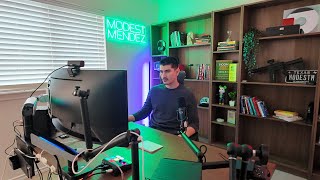
Jesus Gabriel Mendez, a 21-year-old real estate entrepreneur, walks through his $15k home office setup. He explains each piece: a 49-inch Samsung ultrawide monitor, MacBook Pro, Herman Miller Aeron chair, and professional audio gear including a Shure MV7 Plus microphone. He justifies every purchase by how it supports his workflow for property reviews, investor calls, and video production.
Chapters
This is pretty much going to be an office tour desk setup tour and everything I use on a day-to-day basis to run my business operations. And if you guys watch my channel, you know I just moved into this house only a couple months ago, so I'm just about done tweaking my setup to be the most optimized possible. And this isn't my day-to-day content, I normally only talk about real estate, but ever since a kid I've always loved watching desk setup tours tech reviews, all of the above. So I decided to make my own version now that I'm grown up and I have some money. Now, as a 21-year-old business owner, most of my day consists of calls, looking over properties, talking to sellers, and meeting with investors. So obviously my setup has to be catered towards that, and I have everything accordingly. Now, as far as what's powering this whole setup is a 2024 MacBook Pro that I completely specced out late last year. The reason I went with a MacBook Pro over a PC is because I like to be mobile. Sometimes I want to go work at a coffee shop, sometimes I want to work downstairs, sometimes I even travel.. So you can't really be mobile with a PC, and I don't like switching from Microsoft to Apple. Now, as far as connecting multiple monitors, this is the dock that I'm using, which is the J5 Create. I bought it only a couple years ago and it still works perfectly fine. And with that dock, I've ran single monitor, double monitor, even triple monitor setups without a problem. As far as monitors concerned, this is a Samsung 49-inch ultrawide that I picked up only a couple days ago, and this one is specifically the non-OLED model because I do spend upwards of 10 hours a day on my computer. And as far as the monitor stand, you can see we have this one that has some RGB components. I bought it along with the monitor. It was only like $150, but it seems to work just fine. As far as a webcam, this is the Logitech one that I use. It works just about fine. I've tried about 5 other webcams, and this one's one of the only ones that's not complete dogshit, including the Opal Composer. That's about a $400 webcam. That was the worst purchase of my life. Now, whenever I am making YouTube videos, obviously I use my FX3 that has a zoom lens on it. And sometimes when I want to feel fancy, I use it as a webcam. As far as lighting is concerned, that light box worked just fine for about $100 from Amazon, but I decided to step my game up and get this very, very nice one that's about $300, and it's day and night difference, and it comes obviously with its own stand. Now one thing I absolutely despised growing up about my setups was that I always had a very small desk. This one specifically is from IKEA, and it is a sit-stand desk, and it is the most stable one and completely worth the money. This was about $800 compared to all the the other ones you see on TikTok shop and on the internet for about $200, $300. This thing is stable as fuck even when you put it at the highest setting possible, and it's massive. You have so much space to the point that you don't feel crammed when you have a huge monitor just like this. As far as speakers, I just picked up these from Micro Center, which are some Edifier, and as long as you tweak them the right way, you'll have no issues and the sound is great. As far as audio goes, I do have this Rode XSound board that doubles kind of as a dock for all my microphones, headphones, and audio purposes. It also has cool little settings. That way on group calls or on Zoom meetings, I can play some nice sound effects. Do have this Shure mic, the MV7 Plus, I believe. Best mic I've had. With other mics that I've bought before that were on the cheaper end, you could hear the sound coming from the speakers going into the actual microphone. With this one, completely avoid the issue. 100% recommend. As you can see here, I do have the trifecta as far as peripherals, from the MX Master 3 to a nice mechanical keyboard to a nice Mac trackpad. This is the perfect set of productivity. I honestly could not live even without the trackpad. It is great. Previously I had an IKEA chair that was about $150, completely ruined my back and caused fatigue. But since I'm sitting for about 10 hours, I decided, hey, why not invest in a nice chair? And this is the Herman Miller Aeron with the Atlas headrest that does not come included. And this was $200. Can you believe that? So total cost for the chair was about $2,000. But man, I'm sitting on this chair for about 10+ hours a day. I have to be somewhat comfortable. As far as the rest of my office in this house, I obviously have my whiteboard where I write down my to-do list in the morning and some video ideas. Then I have that for accent lighting just in case I want to turn off the blinds and make sure that the room is good for lighting. I have my nice LED sign with my Instagram on it, which you guys should follow. And let's look at this nice background. I have some nice accent lights on the sides just for colors. As you can see, we have some camera parts, some tripods over here. Then you have the last contenders of my blue light series where I was trying to find the best blue light glasses that would fit my face. The winners are these Gunner ones, or actually, yeah, Gunner. These are the best ones. And as far as style, I like these Tom Ford blue ones. Then you can see more camera parts, some mics, some keyboards. Then you got some books, a nice BB gun, some art, my watch box, more books. And on this side you have some headphones, one of my license plates for one of my cars, As you can see, that's the background if you're used to my channel. I tried my best with the cable management, but as you can see, it's nothing crazy. It's kind of crazy thinking back to when I was a kid watching these videos back to back to back from other tech creators, and now I have my own crazy setup. Now I'm posting my own setup tour, and now I have my own YouTube channel. Kind of a full circle moment. But yeah, if you guys like this type of video, if you guys want more, let me know down below. Like, comment, subscribe. And if you guys want to learn about real estate wholesale, which is what pretty much paid for this $15,000 to $20,000 setup, Click that first link down below in the description. I'll see you guys in the next video.