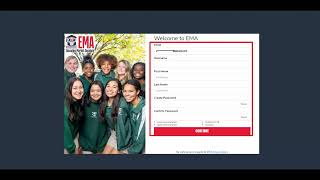
Parents can create an EMA account for the New Worlds Reading Scholarship Program by visiting www.stepupforstudents.org, clicking Apply Today, and signing up with an email. You'll verify your email, set a username and password, answer three security questions, and fill in your address and contact details.
Chapters
Hi and thanks for your interest in the New Worlds Reading Scholarship Program. Today we will learn how to create your parent account for the EMA or emma, also known as Education Marketplace Assistant. First let's navigate to www.stepupforstudents.org.
Reading.
From there, please click the red Apply Today button to get started.
You will then be guided to a.
Page with a navy background and the.
Image of a child.
There you will see a box that.
Reads welcome to EMMA or ema. Please select the option to sign up at the bottom of the box beneath the red login button.
You will then be asked to provide your email address so that we may.
Send you a one time password.
For security purposes. Please enter your email address and select.
The Send Code button.
Next, please check your email.
You will receive the Verification code to.
Type into the Verification Code box. Once entered, select the Confirm button.
The screen will then advise you that your email address has been successfully verified.
You may then continue to the next step by selecting the Continue button.
The next screen that displays will read.
Welcome to EMMA or ema. You will be asked to provide some specific information. In this box you will need to create a username for yourself, provide your first and last name, and then create a password for your new account. Once done, please select the red Continue button. When the next page loads, you will.
Be asked to select three security questions.
And provide their answers. When you finish, select the red Continue button.
When the page loads, you will receive a pop up box asking you to check to certify that you agree to.
Our Terms and conditions. Once done, select the blue OK button. The page will then display the EMA.
Or EMA Scholarship Portal. From here you will be asked to.
Finish your profile details by providing your.
Marital status, mailing and or physical address.
If both are available, your phone number.
And managing your consents.
Once all questions have been answered, select the blue Save button to proceed.
Congratulations. You just successfully created your parent or guardian account in order to add your students so that you may apply for a scholarship program. Please click the My Students link on the left side of your dashboard. Should you have questions, you may contact us using the Chat feature on our website or by calling our Service center at 877-7-357837. Thank you for your time today and for choosing Step up for Students.