In this instructional video, Marissa Brennan recounts a crisis she faced after managing over 100 brides in a single year, where she missed hiring an assistant for a large bridal party, leading to panic and overwhelm. Recognizing that scattered spreadsheets and generic CRMs were causing missed details, she built a visual, all‑in‑one "bridal dashboard" using Airtable. She walks viewers through the dashboard’s structure—each bride gets a card containing hair‑prep notes, product details, trial photos, vendor contacts, assistant assignments, payment status, and timeline screenshots. Marissa demonstrates how the dashboard’s gallery, grid, and calendar views support quick at‑a‑glance status checks, financial tracking (invoice totals, profit after assistant fees), and assistant payment via Venmo. She contrasts this system with popular CRMs like Dubsado and HoneyBook, highlighting their limitations (no photo storage, cumbersome navigation, lack of private notes, no click‑to‑text). Throughout, she offers practical tips, shares a free Airtable template link, and provides a Dubsado discount code. The video aims to help bridal beauty professionals scale their business without forgetting critical details, emphasizing visual organization, automation, and self‑compassion.
Chapters
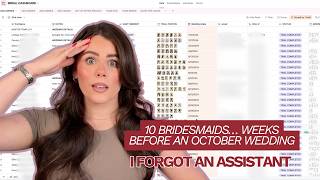
In a single year, I was able to work with 100 brides, and in that year I was exhausted, overwhelmed, overworked that I forgot to add an assistant on for a wedding. It was for a bridal party of bride plus 10. Clearly I wasn't doing that myself. Here's the system I created from that nightmare experience so I never forgot any of my bride's wedding details ever again. When you start working with more brides, more things are going to break in your business unless you have systems to back that up. You're going to misplace things, things are going to be in DMs, you're going to think that you're going to remember that detail she told you at the trial, you're trial photos are going to be all in your photo album and you can never find them on the day of the wedding, and you're gonna have more problems and you need systems to manage it. So let's talk about the wedding timeline that set me into ugly cry mode. It was a Tuesday, my first day back in my inbox, email overload. I had my coffee ready to go before getting into my new inquiries. I was in checking emails from brides that I had booked. I had 4 emails from this one bride. I was like, oh, what's going on? Let me see what's going on here. And I needed to create her timeline. Then I had more emails from another bride. She needed a timeline created. And each timeline that I was creating, they needed to be ready way earlier than I expected because they were adding on more people. And as I'm creating this one, like, my stomach turns into knots, my palms are getting sweaty reading these emails, knowing full well we're only like 2 to 3 weeks away from their wedding and I have no second stylist on their wedding. Mind you, this was an October wedding. Yeah, you know how booked and busy everybody is. Like, who was I gonna find to help me out? Everyone I trust, it was booked. There's no way I can handle bride plus 10 by myself, and there's no way the bride would be okay starting at like 4 AM AM so that way I would be able to do everyone myself. I was in full-blown panic mode, like ugly cry mode. So I didn't remember to hire an assistant for this wedding. So it was a me problem. Love that. So at this point I was totally beating myself up. Like, how could I be so stupid and not hire somebody on? I had spreadsheet on top of spreadsheet on top of spreadsheet. How did I miss this? How did I miss this little core detail that is like so important? I thought I had systems in place to make sure that this doesn't happen, but it did. And that's when I realized I had way too many variables in place. Everything was all over the place versus like all all-in-one system where I could see like a visual. And I know how you are too, you're a visual person. We need— we want everything like an all-in-one dashboard versus like over here, then I gotta pull up this spreadsheet. So then you wind up missing things because it's just too many variables to keep track of. And I need you to know that if you've been in this situation, like, it's human. We forget things. It's not possible to remember every single detail that your bride tells you because it's a lot of information that we need to take in and keep track of. So please be graceful with yourself, be gentle with yourself if you ever found yourself in this situation or something similar. First and foremost, you are human, okay? We're not AI. And that's when I created my bridal dashboard. Literally saved my life, keeping you more organized with less anxiety so you don't miss any single details for your bride's wedding day. Okay, so I'm over here at my desk and this is the bridal dashboard that I created. So first thing that I love is you can do this gallery views. It's a dashboard that I created within the app Airtable. Airtable is completely free. I have a dashboard that you can grab down below to start setting it up. So what it is is every single bride will have their own card and then you can create different views. So within each one of my bride's cards, what I have is their name, details, literally their hair prep of exactly like how I prep their hair, the curling iron size that I use, the different products that I use, how I would do a curl, whether it was to the left, to the right, how I would do the front of her hair, and write detailed notes. Then I would do details of like, okay, am I staying for a second look, just so I can have things at a glance. Vendors that I'm working with, again, photographer, you can put that there so that way everything's at a glance. If you need to reach out to the photographer after and photos, assistant details. You can put their name, different things. Then I have this right here, which is where you can add if you need an assistant, need 2 assistants, if you hired one, so you can see it at a glance. My bride's trial photos, her email, and then I can put the wedding timeline of photo so that way it's there if I need it. One of the best things is there is an app for Airtable, so you can put the bride's phone number here and then you can go on the app, you can simply tap that and it'll bring you over to a text message so you can easily text her in a minute versus having having to go through a bunch of different emails and your CRM to find her phone number. It's all in one place, so you can ask her what the hotel room number is, tell her that you're here, different things like that. So this is the gallery view where you can see all of your bride's photos, and this is at a glance. But there is also the grid view, which is a standard spreadsheet view. So in the standard spreadsheet view, different things that you can see are going to be like the status, your bride's name, how many services total, how much each wedding is, the trial preview appointment. So those are different things I like to track. I also like to I would put the morning timeline photo. So I would just screenshot the morning timeline photo and put it here because at a glance I'll be able to see, okay, she completed her trial. I sent over the morning timeline. When I sent over a morning timeline, I would screenshot it and upload it into here. So then I knew it's sent, it's done. I would put the assistant details here. If she paid in full, if I hired an assistant, and then here's all of our photos, wedding date, different things like that. Another thing that I like to track by so I could see it visually at a glance is things I used to do was like second look touch-ups. Hair extension rentals, different things you want to track so that way you're preparing yourself for the wedding day so you can stay organized is you can add a glance right here. Like the week of a wedding weekend, I would go through and I would see who had a star so that I would know that I'm either staying for a second look or I need to prep hair extensions to bring for that wedding. That saved me so much time because then I was able to prepare a couple days in advance. Another really great thing too in the dashboard that I built in is if you are somebody who works with a team or you work with assistants, you want to make sure that you're tracking how much you're paying them as well as making it easier for yourself to pay them on the wedding day. So what I would actually do is I would go in here and where I have assistant details, you can open this up. And what I would do is put like the name of my assistant, the date, how many guests they're doing, travel fee I'm paying them, and the total. So I would just copy this on the day of, and then I would Venmo it over to them. Super easy, super simple. So as soon as I finished the wedding, I would sit in my car, open up my Airtable if I worked with an assistant, copy this, put it in a Venmo, and pay them. So done, dust it before I even get home, right? You can also track how much you make. So you can put in the invoice total, you can put in profit minus assistance, so how much you're profiting. And some other different views you can do is a calendar view. So you can go and see on a calendar, okay, these are the weddings that you're working for, different views like that. But my favorite view is definitely going to be the gallery view again, because this really keeps all of her trial notes in one place. And then you get the visuals of your bride. So before a wedding weekend, I I would open this up, I would review all of my bride's notes so then I'm refreshed for the wedding day. I know exactly what I'm doing with their hair, I know all of those little details she told me, because sometimes I feel like we guilt ourselves that we need to remember every little detail, but we're working with so many brides, that's kind of hard. So I want to remember if my bride is going to Maui for her honeymoon. Those are little details that I would put in here. Okay, so now that I showed you the dashboard, I just want to show you a visual of where CRMs typically fall short in the organization. So you're not able to see things like at a glance, so you can decide if the dashboard is right for you. I find Dubsado and HoneyBook are typically the same. You have like a project dashboard where you are able to filter like where your bride is at within the timeline or pipeline. I feel like HoneyBook calls it a pipeline, but I use Dubsado. I am a stan because Dubsado, you can do a lot more automations than you can within HoneyBook. If you want to sign up for Dubsado and save 20% off your first month or year, you can use my code Marissa Grace, and it's also linked down for you below. But with Dubsado, she does fall short in some places. In the dashboard, this is what it's going to look like. So you can have differences for if she is an inquiry versus booked, and you can see where she's at in stages, but it's a lot of clicking around. It's nothing where you can see, and you can't house your bridal trial photos in Dubsado. You would have to link out to something externally, or there's no real notes. Like, let's just say when I click into this bride's project, you can do notes and I can add in notes, but whatever is here is going to get added onto the calendar. So let's just say you're sharing it with the bride or you're sharing it with a team member. Or something like that, and these are just internal notes for yourself that you don't really want anyone to see, you want them to be more private, you can't do that if you're sharing the calendar or something like that. So what I do love in Dubsado is I will put the timeline here because then it'll link over to the calendar for myself in your Google Calendar, but you can't add photos. So again, back on the projects where this is your dashboard, it's not going to show you at a glance. It's going to look like this, and you're not able to see who I need an assistant for. You can filter by tag, so that is something that I would do is like, did I send them a DM, did add an assistant, did I create the timeline? You can do that with tags and filter like that, but it's a bunch of clicking around. That's where I find the dashboard is so much cleaner. So you can come in with the grid view and then you can do way more filtering within the dashboard. So let's just say you want to filter by a condition where assistant needed has any of need assistant. So then everyone's gonna populate and you can just do a lot more filtering within the dashboard than you can do within Dubsado. And again, another thing where Dubsado falls short is let's just say I need her phone number. Like I know Dubsado has an app, but you can have the all-in-one dashboard where you can just click the phone number and it pulls you right over to send her a text message. And I can also track all of my assistant details, how much I'm paying them, different things like that. As creatives, we're visual people. We want those visuals all in one place, not a bunch of different browsers or a bunch of different spreadsheets, or missing details. That's what this dashboard has allowed me to do, so I never miss a single detail. You can grab your bridal dashboard down below. Let me know if you use it. She has a special place in my heart. I hope this was helpful for you, and I'll see you in the next one. Bye!