Google Ads Secret: Beat Booking. com and Airbnb at Their Own Game!
Mark Simpson shows how to set up Google Ads campaigns for rental properties to get direct bookings instead of going through Booking.com and Airbnb. He walks through optimization strategies to compete with the big platforms and keep more money from each booking.
Chapters
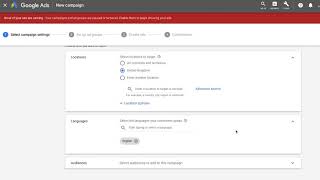
Hi, welcome. This is a video that I wanted to update and re record for a while now it's to bid on your own brand strategy with Google Ads. If you want to know more about what bid on brand means, just simply go into Google, type in Boostly bid on brand. So I am using the granary as an example here and, and the reason why I'm updating it is that now Google and Google Ads have given us more options and more features that we can do to make the most of when somebody does a search on Google for property, number one is you need to have a Google Ads. Just go to ads.google.com as you can see up here, create an account. Now when you first try and create an account, what they will do is they will try and get you on Google AdWords Express. Now if this happens and you do not see this screen when it all gets set up and created, all you need to do is click on the question mark button and all you're going to do is you're going to call up Google and you're going to tell them your customer id. What we're going to do is we're going to start off in Google Ads. So you can see that right now you go into here, you click on campaign and you're going to look for the plus button, okay? That is how you start off a campaign. This next bit is optional but important. So come into campaign and then click on tools and we're going to be going to conversions. So what we're doing here is we're going to tell Google Ads that when a specific action on our website takes place, then that is tracked as a conversion and that means that our ad has been successful. So in simplistic terms, when a booking gets made, so when you click on conversion action, you're going to click on website and what we're going to do is we're going to focus on purchase. Enter a conversion name and booking has been made. The next step is totally up to you. Use the same value for each conversion or don't use the value for this conversion. So what this means is if you had a product in a shop and if that product was be bought, it would always be the same price. So for example, if you were to buy a jumper at £30, it would always be £30. Now with hospitality, obviously we have different room rates, we have different property rates, we have different rates for throughout the year. So there's two ways you could do this. Number one is don't use a value for this conversion and Instead you would just look at the number ie 1, 2, 3. Or what you could do is you could just work out your average price. So say for example you a 10 bed mini hotel or you know, a five bed bed and breakfast or you've got rental properties, work out what the average rate would be per booking. So if I was to do this, I would change the currency obviously to be pounds for me, but it could be different for you. Just find it here, British pound. But the other option, use different values for each conversion is really complicated and I don't suggest it count. Select how many conversions to count per click or interaction. So you can do it for every recommended purchase which is the one that they've highlighted here, or one recommended for leads, signups and other conversions because only the first interaction is valuable. So what that means is again if you've got an online shop and people would come in and buy a product one day and come back the next day, for example, Amazon or wherever, then you can have every but for us. And the way that I interpret this and the way I use this, I change this to one because you know, realistically you're probably going to get only one booking from them in a year. If we're talking, you know, majority of I like to leave these options as the default and I click create and continue. Now this is the cool bit. So you can install the tag yourself, email the tag or use Google Tag Manager. Now what it does when you click on Google Tag Manager, it gives you a conversion ID and a conversion label. Now if you are using Free to Book, then all you do is you come into home, come into analytics, scroll down and as you can see here, you can just copy and paste your conversion ID and your conversion label into here. So conversion id, put it in there and conversion label, really simple and free to book. And Google will talk to each other and this will be tracked. Now if you are watching this and you do not currently use Free to Book, please go to them directly and they'll be able to show you where you can put this tracking code in. If they do not have it, it's not the end of the world. You'll just have to go down the route of installing the tag on a different page onto your website. For example, where I am right now in the world, the Sahaja Sour resort in Bali, they use Checkerfront as their property management system. We can't add the Google Tag Manager code for this. So instead what I have done is when somebody goes to the availability page, I'm tracking This as a conversion, because this shows to me that they've gone from the home page to the availability page, so they're interested. And the goal that I've done here is where they've viewed a page instead of it being a confirmation of the booking. And I haven't put a value on it. So when I'm talking about the value on it is when we're on the last page to this and I could put a value to it, I just left it as zero and I went to the one where we wasn't putting a figure on it. So now you've created your conversion. So all you do is you come back into the campaign section here and you click on plus and we're going to go to new campaign. Now what we're going to do. In the past I was just doing website traffic, but now we want to have the goal as sales because we want to drive sales via our website. A sale is obviously a booking and when it selects a campaign type, again, you've got lots of options here. I just want search and I want website visits simply here. Put in your website the campaign name, call it bid on brand. So you can identify this from all the other Google Ads work that you may or may not do in the future. When it comes to networks, take off display network and just have search network. Do not get involved with dynamic search ads. Google will try and get you down this route, but basically what they do is they will be automizing this process. And anything that gets automized by Google or Facebook means you'll end up spending more money. Locations. Again, this totally depends on where your target potential guests live. And again, languages. What language do your customers speak? Is it, you know, French, German, English? Leave audiences as is and we're going to come down to budget. Now this is important when it comes to budget. You could put three pound in here a day, you could put in a thousand pounds a day, but Google will only charge you for a click or in this case a conversion. So if you were to put a budget of say five pound a day and say that you had a cost per Click price of 10p or 20p or 30p or 5p or a pound or 2 pound is Google will only charge you when someone takes an action on your ad. So when they see you on a Google search and they click on your Google Ad, that is classed as an action, you will never ever go over that that spend on a monthly basis. The minimum you can put in is £3. You can't do £1 a day bidding, what do you want to focus on your bidding on? And that is conversion. So you could do conversions, you could do clicks. Now obviously I want to focus it on, on conversions. Now if you want to, you could set a target cost per action, which is totally optional, but that would basically mean. And you can have a little bit look in a bit more detail on this is enter the amount you're willing to pay from conversion on your website. Smart bidding. Optimize your bids to reach your target. Now, because we have got such a varied figure, because every booking could be a different amount, I just like to keep it as is. Let them work out the rate. Now the way that they work their rate out is how many times does your ad appear on a Google search with impressions. And then what they do is they, they multiply that or they work it out on how many times your ad gets clicked on. That's what they base their, their figures on extensions. And this is something that Google have been adding more and more and more to. So as you can see, we've got sitelink callout and call extensions. But you can add more. So you can add in message extensions, promotions, extensions, price extensions, locations extensions. Let me go through them each individually. Site link extensions I'm going to click on here. Now this is what I spoke about right at the very start. If I click on sitelink extensions and I click on new site link, what I can do is I can put a bit of text and I can send people to a page on my website that I want to direct them to. So I would put in here, check availability and you can put in a bit of text. You could put check our latest availability book direct for best rates. So instantly what we are doing here is we are getting across to the potential guest that they should book direct with us. And then with the final URL, the next one is callout extensions. So this basically means you can add in bits of text to your ad that will appear at the bottom. So if I type in new callout extension you get 25 characters here. So I would use something like book direct Close to the Sea Farm Stay Yorkshire. Just you want to really be putting in keywords here or enticing words in here that will draw your ideal guest to Click on your @ now call extensions is one of my favorite ones here you can put in your phone number. So for example, and what this means is that when a potential guest runs a Google search on their mobile for your property, your phone number will appear in the Google search right at the very Top and in your advert the next and the new one. So message extension. What you basically can do is you can add in text messaging feature straight from Google Ads which is so cool. So again we're gonna change it to our country code and you put in your your phone number. So business name would be the granary and the extension text you basically want to input here what the guest would send you to make their life easier. Can you please send me availability for example you can see what the preview means and then this is the auto reply. So it would be thanks for contacting a member of staff will get back to you asp or you could just put thanks for the text, please could you call and I will help you directly. And again you can see see how it previews in here. The next one is promotion extensions. So promotion extension is where you can talk about a special offer that is coming up. So come in, change the currency so it matches yours. You can set a monetary discount or a percentage discount. And the item could be book direct and get 10% off promotional details, promo code and hours. You can create a promo code within free to book or with any of these online booking engines now and you can track how effective it is. So I would come into promo code on free to book and I would create one specifically for this. So create promo code and I'm just going to call it put in that. And then what you're able to do is when a booking comes in and if they've used the promo code, you can see exactly how effective that Google Ad is doing. And then we've also got price extensions. So add prices to your ad. So again, change the currency so it's applicable to you. Loads of different features that you can do here. You've also got other ones, location extensions, you've got structured snippets. I don't get involved with these. Feel free to find out a little bit more and to utilize this in any way, shape or form to help the next step. What I'm going to do is I'm going to put in the keywords that someone would type in Google to find your business. So again, we're going to call this bid on brand the key phrase that we want to do here. And this is really important. So many people at this stage go wrong and this is where they end up wasting a lot of money on this. There's two different, three different types of keywords that you could put in a broad match, a phrase match or an exact match. So what I want for you to do Here is to focus on phrase and exact matches. So to do a phrase match you get the speech bubbles, quotation marks and all you're going to do is you're going to put in your business name. So I'm going to go for Granary Scarborough. I'm going to go for the Granary Scarlet. Now what's important with the actual bidding and brand setup is that you put in your name and you put in the location that you're in. You can put in as many keywords as you want. So this is why I am just throwing in a few different types of keywords in here. A phrase match means that they have to put in Granary Scarborough. So they could put in Granary Scarborough B and B, it could be put in Granary Scarborough Farm Stay, but as long as they've typed in the word Granary Scarborough, then my ad will show. Once you are done, click on save and continue and it comes to the final step. This is where we actually create our ad. Now, as you can see in the preview, because of the work that we have done, a lot of it has already been filled in as in check availability, what's going on? You can call and you can message, but this is one of the key bits. So final URL you put in your website, the headline, you're going to put in your business name and make sure you don't go over 40 characters in the headline 2 section. This is important. Official property website. So by running this and putting in official property website or official bed and breakfast website or official hotel website, it is clear from the start to the potential guest that this is you and this is how they book direct. Now Google have decided to put in headline number three so you can put in book direct. You could put in best rates or limited availability. It is literally up to you. You could put in award winning Property in description 1, these are your callout extensions. So book direct, close to 6, farm state, etc etc, you can go a bit overkill with the amount of description. Don't feel like you have to put in all of the text and use all of the features. But what we're looking to achieve here, this is what we're wanting to do is to get as much of the text as possible onto Google. So when it appears on a search, you can see here that we're directing people to, to where we want it to go. Click on done, click on save and continue. And that is it. You have created yourself a Google AdWord campaign that will stop booking.com, stop Expedia taking your direct bookings now. It won't happen overnight. You won't just cut down on all OTA bookings, but if you can just move the needle 5 to 10%, this will make a massive difference. What I recommend you do now is just let it sit for about 24 to 48 hours and then come back in and just see how the results are going. The cool thing about Google Ads is that you can pause, you can resume, you can amend this at any time and it happens instantly. But give it 48 hours to get going, come back in and if you want to increase the amount of money you spend a day, great. But you'll be able to see after this has been done how many people are clicking and booking, if you set it up correctly, how many people are clicking on the actual link but not making a booking. You can see how many times it's appearing and you can see as well how much money you are spending per click and how much you're spending overall. If you want any more videos on this, which go into more advanced features and shows you how to take it to the next level, please let me know.
More from Mark







I Tested AI Search SEO for Rental Hosts... Here Is What Happened [Live Training]



