How to setup your Facebook Business Page Correctly
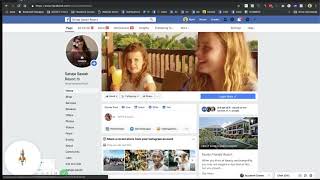
Step-by-step guide to setting up a Facebook Business Page for a hospitality property. Learn how to write your about section, add photos and cover video, set up a Shop tab for rooms, create posts with polls and live video, and configure your call-to-action button.
Chapters
Okay, so in this video I'm going to show you the basics of getting started on a Facebook business page. Now the example that I'm going to show you in this video is the Sahaja Sour resort in Bali. Now why should we have a Facebook business page? Social media is one of the most popular tools when it comes to keeping in contact with past or future guests or potential guests. We have. Social media is particular. Facebook is one of the biggest social media networks in the world with over a billion people active over it on a monthly basis. There's videos that show you how you can target potential guests with Facebook ads. That is available on the Boostly Academy. This video is to make sure that you have the basics set up when you come to creating your business page. Now, when you get started, you will have a pretty much a blank canvas to work from. This is an updated video from last year. As Facebook are always evolving and are always giving you new things that you can do. So I just want to make sure that you've got all the basics in place to make sure you've got a successful Facebook business page. The first thing that you need to do is come to the front page here and I'll show you the back page in a second. Come in to here. This is your story. Now this is one of the most popular new features that Facebook have launched. It is pretty much an about us page for your Facebook business page. If you want to take the easy way out, all you do is you go to your website, go to your about us page, copy and paste it into here. Now once you're done, really important, you got to click the publish button to fully publish your story. So many times people just save and what will happen is it will just save the draft, it won't publish it. So make sure that you publish it once you are done. The cool thing about this is that not only can you add just text, but you can also add images, videos and even web links if you want to. The next thing to sort is your profile. Now so many people go wrong here and they will use a logo or they'll use an exterior shot of the building. Don't forget that Facebook is social media and social media has social in it. You can't social media spell the word social media without the word social. So make sure that your profile picture on here is something social. Now what do I mean by that? If you are a property that greets your guests, that interact with your guests, where the guests get to know you, then it needs to be you. That is the profile picture for your business. Now, before you say, well, surely it should be something else, no, it needs to be a picture of you or you and your team or you and your partner, either in front of the property, interacting with guests or just giving off that personal feel. Now the reason why this is important is that people come onto Facebook for that social aspect. When they're doing the scroll on their newsfeed and they just see a logo or an exterior shot, they're not going to relate to it, they're not going to want to interact with it. But if it is a picture of you or a picture of you and your team, a picture of you and your partner, then they're more chance to stop the scroll and look to see what you're posting. And plus as well, they've got more of a chance of recognizing you as well. The COVID photo is where you can get a little bit creative. Now, as you can see here, the one for Sahaja, we have a promotional video. If you click on this button here, you've got the chance to choose from photos, you've got chance to upload a photo or video, or you can even create a slideshow. So a slideshow is just a selection of pictures that will just slide along the COVID photo in an automatic basis. If my suggestion on here is to really use this section to sell your property with pictures. Now, a video is obviously a fantastic opportunity to do so, but. But you can also add pictures. You could add a picture of your room, you could have a picture of your food, again of the staff. You've got to add the images that really sell and promote the business. Now, when it comes to the next steps, what you're going to need to pay attention to is the tabs on the left hand side. For a lot of the time you can just ignore some of these. But the most important ones that I want to draw your attention to is shop. Now, where it says shop, you can pretty much substitute that for rooms and accommodation. Now, for a lot of the time, the basic template will not show the shop section, so you need to go and add it. So to do so, you come into settings, come into templates, and if you scroll right to the very bottom, you'll have a few of these tabs that are hidden. So you just got to change it from being hidden to being active. Now when we go into it and when we go into the Shop tab, you get to add your rooms and your properties to here. So let's just go into one of the ones that we did for Sahaja as an example, in the shop section you can add pictures of the rooms, you can add a video if you like. You give it a name, you give it a start from price. So this is not the actual price because as we know our rates are going to fluctuate. Have it from a start from price, give it a description and then let them know where they can book. That is the key here. Send them to your booking page. Once you've done one, Facebook will pop it For a review 9 out of 10 times it is accepted and you can add more. Really recommend you check out that feature. Let me know if you have any troubles with adding the shop. The next section then that I want to show you too is we're going to come back to the post itself. So when you come to creating a post on Facebook, you now have got a plethora of options to choose from. So not only can you add a picture, get people to send you a message on Facebook, add how you're feeling, but if you tick this little box here, then all of these different options come up so you can create a poll. Polls are new on Facebook, they're very popular and it is easy people to engage. Again, content that is distracting, content that is easy to interact with is will be the content that will get seen by not only your followers but other people as well that aren't yet followers of your Facebook page. So what you've got to do is you've got to look to see what Facebook are doing that is new and adapt to it. So polls are new, going live on Facebook is new. Starting a question and answer, tagging a product, you know, getting calls, getting shop visits, adding a milestone, checking in all of these things Facebook are wanting you to use. So have a play around, try and use different variations. So for one of an example of something that I recently did with the Sahaja Sawa, the question was what would you like to see us posted more on Facebook? Now what this did, it gave the user or the Facebook fan the chance to respond, either add their options or to vote as well. Which was really cool feature and we got a lot of engagement. As you can see here on the top, you got a chance to go live, post an offer or even create an event. So my advice would be don't just go for the bog standard post on Facebook. Try and explore and look to see what else they are adding. Apart from that, the final thing you need to make sure that you've got your about page very, very clear. So make sure you've Got the correct phone number. Make sure that your email address, your website address are all added and you can easily do so by just clicking the edit button. And you've got the chance to edit all of these. Make sure you give it a username, make sure you give it a name, make sure you get your category right. All. All of this is going to be important for when a potential guest is looking at your page and is looking for how to contact you. There's so many Facebook pages that I see that have not got the basic information in here and that they struggle. One of the final things that you can play with is this little blue button here. When you click on the blue button, you've got so many different ways that people can interact with you. They can go and book, click on the Book now button. They can contact you via messenger, they can learn more about your business, they can download an app which you shouldn't really have, or they can shop with you. So let's change this to Book now. Click on Next and we're going to send them to a link to the website. Click on Finish and that will change from Learn More to Book Now. Now. If at any point you want to see what your page looks like as a visitor, instead of being the admin, come and click on these three little dots, have a little scroll down, and when you click on View as Paid Visitor, you'll see it's a slightly different layout. So the shop is there, recommendations is there, photos, videos and the posts show there. Okay, these are the most important things to look for. My recommendation is with the pictures and with the videos is just make sure that you've got good quality ones. Like I said, you only get one chance to have a really good first impression on a potential guest. So make sure you're picking the right images when you're doing so.
More from Mark







I Tested AI Search SEO for Rental Hosts... Here Is What Happened [Live Training]



