How To Use A Touchstay Guidebook To Inform your guests about new COVID-19 policies
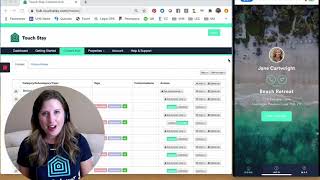
A short webcast/demo where Mark Simpson introduces the goals (update digital guidebooks with current COVID info and create local guest rewards) and Diane Marsink Hammond (Touchstay) demonstrates: uploading a custom image for a Google Business place entry, editing the place description to insert a local special/reward code, adding Touchstay's prewritten COVID19 FAQ template and subtopics, assigning content to multiple guidebooks via tags, reordering content, and refreshing the Progressive Web App so guests receive updates (including offline caching).
Chapters
Foreign. Good afternoon, good evening, welcome wherever you are tuning in from in the world. I'm really excited to be back. Got my new boom arm as you can see. So hopefully you can hear me a lot more clearer. So anyway, by the by, we are back. Bruce Lee Academy. What I really want to do over the course of the next couple of days is to do two things. Number one is help you update your digital guidebook so you can get all the latest Covid information in. And number two is I want to show you how to create local networks, relationships, building, but also rewards for your guests. The reason why, number one, by building this local relationships and then it's going to help not only you in the long run, but your local community as well, but also your guests. Now just imagine that you've got your digital guidebooks, whether it's touchday, who we're going to feature today or hostfully, who we're going to feature on Wednesday, video free and you should all have either or you know, those two are the two biggest out there. You should have either touchday or hostfully. There's no by the by here. We need to start having digital guidebooks everybody. Okay, so today's about Touch Day and the reason why it is so important is that just imagine you're a guest, right? You're arriving at the property or you're a day away from arriving at the property. And especially with COVID and especially with things changing literally by the day at the moment and they don't know when they're going to arrive. Number one, what's happening in the local area, Number two, food, can we get delivery, is things going to be open, etc. So if you can provide that information pretty much up to date, then the guest experience is going to go through the roof. And that is how you build your brand. This is how you build your online brand. This is how you build your word of mouth brand by going thing doing things above and beyond what everybody else is doing. And just by being in this group you are 20% ahead of everybody else out there in your local area who is not in the boostly academy. Okay? This is the thing that I have realized from being in other Facebook groups. So this is by the by. So number two, the reason why I want to do this is how can you number one create a guest loyalty reward system within your digital guidebook. And number two, how can you keep everybody updated with COVID And here we go, Video one Touch Day. Andy and Tian from touchday, thank you so much for doing this. Number one. It is a holiday weekend over in America, but yet Tian spent took time out of her holidays and her son's birthday to record this for you. Nine minutes. So if you're with touchday, this is how you can do it. Please watch it and please action it as soon as possible. On Wednesday, we've got David Jacoby of Hostfully Again watching Holiday Weekend in America. Thank you so much for doing this, guys. In this video we're going to focus on touchday. If you've not yet got touchday or Hostfully again, please do go and join. You can go and check out more on hostfully boostly.co.uk touchstay and if you want to go find out more about hostfully, it's boostly.co.uk hostfully go and sign up to either or. There's pros and cons to both. You know I love them both equally. So please do make sure you go and join one. Right, I'm going to flip the screen. The next thing you're going to see and hear from is Tian. So please do make sure that you say thank you in the comments. I will be back tomorrow. Tuesday is our group call. I'm going to be going through exactly how I believe you can create a group membership or a membership subscription program for your hospitality business and the importance of of doing so. Then on Wednesday, we're going to be back with David at Hostfully. All right, guys, speak soon.
Hey there Boostly friends. I'm Diane Marsink Hammond with touchday Digital Guidebooks and Mark asked us to do a quick video on how to add a coupon or reward to your touchday Digital Guidebook on a Google place. So that way your guests can take advantage of the business partnerships with the local businesses that you have made and make you look like the students superhero. Your guests feel awesome because they got that little bit of insider information and the local businesses are happy because they're reaching a demographic of traveler that they might not have necessarily reached, but because they have you as the end, they get to reach this guest. Okay, so we are currently in the touchday Digital Guidebook back end and we're looking at the content hub. So let me make myself a little bit smaller so you can see a little more. Okay, so we're going down to the local area information and we're going to go to the village roast right here under coffee and cake and we're going to click on actions and first thing we're going to do is add a photo or video. Now apologies in advance. I Am at home. I'm not the best Internet connection. I'm really slow here. So add from my computer's hard drive and this is the exact same place. You would also add a video. You would upload a video to YouTube or Vimeo or Wistia and you can add that link there. But we're going to add a photo. I've created a graphic for this and we're going to hit submit. As it uploads. You can look over here on the right. I've got my phone on and we're going to hit get started. Food and drink. Coffee and cakes and there's the village roast. So name off and save. Now the information about the village roast is actually pulled in from Google business. So you don't have to enter all this information. The address, the phone, the Google reviews, the hours and then if they have a website it will also show up as you can see here on the farm village. So all of that shows up automatically from Google business. And you can also add an image from Google as well from Google Business. But we're replacing the one for the village roast with our special graphic. So this will be our local recommendation and they get the special here. Now the other thing I want to do is add or should I say edit the text. We have great coffee spot in Newark with a tempting selection of pastries too. But before that I want to add let's do a star. And we're gonna say ask for our local special of $off with code boost me up sc. Alright save. So now that's saved. I'm going to go ahead and close out and reopen so that all the information is refreshed. So we're opening up the app again and we're going to hit get started. Food and drink go to our coffee and cake. And there we have the village roast. The graphic has now been updated to the special to the reward. And if we go to the map and let's filter down to those coffee shops and let's see if I pick the correct one. Nope, there's Cafe Roul. See if that's it. Yep, the village roast. So you can see right there at the very top it says ask for our local special of a dollar off and the code boost me up sky day. So that's how you really very simply and easily add a reward to your guidebook for your guest. Now one other thing I want to show you quickly is Covid information. This is something that you need to be communicating with your guest. As you already know and at touchday we have actually provided a professional pre written content for all of our touchstate guidebook users and put it into the template so that you can literally within a few clicks have that information in your guidebook and you're welcome to use the information that we've already written or you can tweak it for specifically for your area. So I'm going to go to the top of the guidebook of the content hub and right here at the very top, see how it says category, subcategory, topic tags, customizations, access and then we have the add button. So I'm going to click add and in the dropdown these are the sections that are not in the guidebook yet. So I'm going to click on COVID19FAQ and it's doing its little thinking work and now it is there. So we come down to that area and it's automatically added it right here, COVID 19 FAQs. Now we need to also add the other sections so we can add all these different subcategories or just one or two, you know, whatever it is that you want to add or you can add your own subcategory as well. So for this one I want to put is our booking still in place? I do want that question in the there. So that's part of my FAQs and that's going to load it up and then we're going to add the topic. So there's different topics for each one. This one has booking status or my own topic, Google place or my weather widgets. Well the weather widget doesn't belong there, but let's do booking status. So we add that. And since I have more than one property, I do need to tell you the system which guidebook I want the information to show up in. So literally with one single click I can have this information show in all my guidebooks, no matter how many guidebooks I have. So clicking on the all tag and any guidebook that has that tag now has that information. So just to show you, we're going to come back here over to our beach retreat guidebook and I've closed it out to refresh the information and it's now going to reload. We're going to choose get started. And here we have the COVID19 FAQs right here at the bottom and the question is our booking still in place? And then here's the information that we've pre written for you and you can absolutely tweak it, add to it, do what you need to. Now what if we don't want it on the bottom, which we really want it on the top. So. So I'm going to click the crosshairs in my content hub next to Covid19faq and I'm going to scroll up here to the top and I want to place it under before you leave home. So let it do its little bit of thinking. And while it's doing that, I'm going to close it out so we can refresh it here. Now, if you have the app open in a web browser, all you have to do is hit the refresh button on your web browser and it'll open. But I'm showing this as the progressive web app because I've saved it to my home screen and now it looks and acts like an app and it actually downloads all the information in the background of my phone so that it can show the information while your guest is offline. So that's why I have to close it out, so I can tell my phone, hey, there's new information. Or if you know, a little bit later, the system will automatically check for that too. But I want to instant. So that's why I'm refreshing it. So let's hit get started. And now we have the COVID19 FAQs right there on the second level and guests can click on that and then look at the questions. So there's a whole bunch of other questions you can add or you can add your own as well. You might want to add your risk assessment information there too. Anything that you need to do. So thank you so much for your time and showing you to how to do this and I appreciate mark you asking us to create the video for your group. You guys can find this@touchday.com or on the social medias, whatever platform is your favorite. Also email us infouchday.com and supportouchday.com and once you're a user and those of who are, we have an incredible Facebook group. It's private, it's secret. It's called the Touch Day Rockstars when love to have you in there as well. Cheerio.
More from Mark







I Tested AI Search SEO for Rental Hosts... Here Is What Happened [Live Training]



