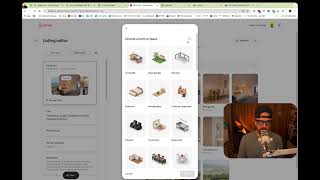
Mark Simpson shows how to game Airbnb's photo tour algorithm by duplicating room entries and filling the first one with your best 5-7 hero images, so guests see your dream sequence before the standard room photos. Airbnb ranks listings higher when photo tours are enabled, but the auto-generated order buries your strongest shots.
Chapters
Doing a lot of these roast videos recently on the Instagram and in the roast. Every single time, I'm talking about this one thing that host just aren't taking advantage of. So what I wanted to do, quick video show you what it is. I can leave it, I can document it. And whenever I talk about it and a host goes, oh, how do you do the photo tour? Show you what I mean. So basically, Airbnb are now prioritizing or giving favor to listings that have the photo tour turned on. The problem is the photo tour is crap when you're looking at it from a guest perspective of again, we talk about the dream, the experience, the something else in the practical. Let me just get that. Where is that? I've literally been talking about it. I should know what I mean. But when they come onto your listing, you want experience, the detail to the practical. That's what we talk about. Right? And the problem with this is that it just literally dumps it based on room. And you still want your Airbnb listing to go through those experiences that you want your future potential guests to go through. Right? So how do you have your cake and eat it? This is how. And it's so simple. So I'm in a dummy listing on. On Airbnb in the Extranet. Come into listings. Come into listing editor. The first thing you'll see, I have got a listing and I've not turned the photo tour on. All right, so all I'm going to do, create photo Tour. It's going to go ahead and it's going to do it. It'll take a couple of minutes to do for a listing like this. This is a really old one, so it'll just take a few seconds. It's ready now. What you'll notice is, is it instantly sets it up as Living Room being the first one. And Airbnb go and decide where things go. Okay, so if we were to look at this, how do I view this from a guest perspective? It goes like this. You click this and then the photo tour looks like this. Now I want to make sure that those first 1, 2, 3, 4, 5, 6, 7 pictures are like my best pictures. Because that what is going to get them going from dream to experience to yada tia. So how do we do it? Super, super, super simple. Okay, so all you're going to do, come back into your photo tour. On your listing on Airbnb, click plus, click Add room or Space and you're going to go and choose Living Room. If you can't see it, choose Type in living and living room. Now what it will do is it will create living room one and living room two. Now in living room two is where you actually want to living room pictures. So I mean, there's nothing there, but let's just say that is the living room. It's obvs not. So now you've got living room one and living room two. Now living room one, you can go and change these pictures out. You can go and take all of these pictures out, okay? And you can replace them with your top five images. So if you want to manage photos, I will come into here. Click, click, click, click click Delete. You're going to remove it from living room one and then you're going to go and find pictures to sit in here. So let's just say, for example, these are my best ones. They're obviously not of the living room, but they're my top five, top six, top seven pictures that describe the dream and the experience phase. Okay? So depending on your niche, depending on the type of property, depending on the type of year, that is what you will put here. Now if I come out of here for a second, I think it'll auto save. Now when I come back into my Airbnb listing, okay? And I click on show all pictures. Living room one has got my top seven six ones in here. So they, the user can go through that dream and experience phase. Then it can go for all the practical stuff, all of that malarkey. But this is how you can have your cake and eat it with the Airbnb Photo Tour. Simple to do. Obviously there's so much more to your Airbnb listing that you need to optimize. And you know, Bart from autorank has discussed all of that on another video. But this is a super quick video on how you can take advantage of the Airbnb Photo Tour listing hack. Thank you very much for watching. If you want more of these, go to the Boostly YouTube, go to the boostly Instagram, and if you want me to roast your listing on a future video, go over to Instagram, send me a message and type one word and one word only, and that's roast.