Learn how to set up automations in Shift CRM using triggers, campaigns, and workflows. Triggers fire on form submissions or stale opportunities, campaigns send email or text sequences, and workflows combine them into automated flows. Examples include auto-creating Zoom meetings from appointment triggers and adding leads to nurture campaigns.
Chapters
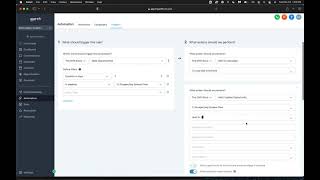
Alright guys, today we're going to be talking about setting up your automations using Shift CRM. Okay, so we're going to go over here to the sidebar and then we're going to go to Automation right here. And then under the automations tab we're going to have three different options. Okay, so workflows. Well let me, let me go back to workflows. Okay, let me explain. First, a trigger is anytime in the CRM when you have some event happen. Okay, so an event could be somebody filling out a survey on one of your landing pages or a form on your website. Another example of an event could be somebody replying to a campaign. Okay, so these are all events that need to have triggers so that when the event happens that it can fire these specific actions. Okay, so you'll have a set amount of some standard triggers that come with and then we'll also be integrating you, you can integrate your own triggers as well is what I mean. So just for an example, right here you can go into your, what should trigger this automation? Okay, so this is the first step in the process. Maybe they're added to a campaign, maybe they're added as an opportunity. You can even do like stale opportunities. If a lead hasn't responded in seven days, in which pipeline then what are we going to do? Then we're going to add them to campaign nurture. So the campaigns here, those are our email, text and ringless voicemail combinations. Think of these like your outbound nurturing system. Okay, so when, when a trigger happens, we add to the campaign and, and then from there we can update the opportunity and send notifications, send emails and really we can add any other actions that we need to through here. Okay, so that's triggers and campaigns, what workflows are. Workflows are a combination of the two. So now with workflows you can start with a basic template and then you can create this all at once. Instead of having the campaign in one and the trigger in the other, you create them together essentially and map them out with this flow chart here. Okay, so this is kind of how this works. You kind of to get familiar with it, you have to play with it, play around with it a little bit. And that's where you're gonna learn what's possible. You're gonna see what you can do and what you can automate. But basically you can set the automations to fit your own business model and your, in your business for your operations, for your follow up and for your, you know, appointment reminders, things of that nature so that everything is all automated and we actually have it to the point now where we have a trigger that goes off with appointments that is already set up with a zoom call, so that now we don't have to be creating new zoom meetings all the time. The zoom meetings, Autumn, are automatically created by the campaign and the trigger. So stuff like that. Just to show you what's possible, you can do a lot inside of Shift CRM. In the next video, I'm going to talk about more advanced automations and when we're going to be using another tool to help connect other apps and things like that into Shift CRM. All right, thanks so much. See you in the next one.