Nate Tilley walks through verifying your domain in Facebook Business Manager and setting up Aggregated Event Measurement for your pixel. You'll add your domain via DNS TXT record, configure up to eight prioritized events, and wait up to 48 hours for changes to take effect.
Chapters
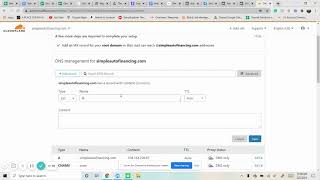
If you haven't noticed yet, Facebook makes you now verify domains. So if you're going through, I'm on the ad level, we got the website events and it gives you this message. And so I'm going to show you how to set that up. You're going to go to business settings, which I have over here. And we want to scroll down to brand safety domains. This is where we're going to add that you want to put in. So ours is simple auto financing. Simpleautofinancing.com add domain. Great. I always refresh it, show it again and here it is. Now you have to actually verify it. There's three different ways to do it. I think DNS is the easiest one. So you log into where you own the domain. For us, we have cloudfare and so we're on there and we go to DNS. We want to add a new record and it is Txt record and we're going to copy that in there. So txt. At Interesting. Okay that. Save it. Okay, that makes sense. Down there. And then that the root put at right there, save and there it is. And now we just verify and it works. Sometimes I refresh it and then verify to make sure it works there. And now you'll see refreshing again. That's going to be screen like this. I want to add the page that it goes to and there. And then now you have to actually work with a pixel. When you get a pixel that's set up, you have to verify it with Apple. So we have symbol auto finance pixel already set it up and now we have this aggregated event measurement. So I want to configure web events and your domain will be verified. So you click on that, edit the events. Yes. And now this is where you do it. Sometimes when it's new it takes a while to do this. So I'll have to wait for a little bit, but I'll just choose the pixel and then choose the events that we want to configure. It could choose up to eight different events and if you can see it goes to highest priority to the lowest. So. So whichever one you want, especially if you're running a cut a conversions add to do that, do that. You can add events and then you submit it. When you submit it, it says that it could take up to 48 hours to be configured and then everything will be good from there.