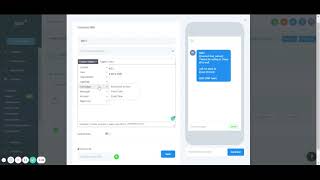
Nate Tilley walks through Shift CRM's campaign tab, showing how to set up marketing campaigns, add text messages and emails as events, and use custom values to personalize messages to contacts.
Chapters
All right, next up on the tab list is our marketing, specifically campaigns. This is one of the most powerful parts about this, so we can create pretty much a campaign is setting up automatic email, text messages, voicemails, anything like that. And so you could put them into folders or we're going to create a campaign, new campaign name save. I'll show you what this looks like. So this is where you could add events, so you could add text messages, emails, phone calls, voicemails. We could add a task to assign to one of our employees. Facebook messages keeps going through all that. And so let's say we want to send a text message and now this is what it's going to look like. We can start saying hello. They just say they just opted into our lead form and now they're a lead. Thanks for opting in. You know you can say anything. Hope all as well. Shift c or empty. Now, to even make it more custom, there's this thing called custom values over here. This could be anytime they fill out a lead form, they give us all their information and so we can say hello, first name and so it shows that we know their name. Any information that we get from them. Do full name, first name, last name. We could do their phone number, do date of birth codes, all that. Make sure it's contact user is you. And so if you're like call me back at. You could say user phone number. And so now automatically put your phone number that you set up in here on there. Same thing you could do with email, all that. If you want to do like appointment. So say they just booked an appointment with you. It was an automatic message of saying your appointment at start date, start time, things like that. So it can be very powerful with those things. You get attached files through here or use a URL and then pretty much you could save it when it. Always save it when it's done. You could test it out and this is kind of what it'll look like. Hello, blank. Thanks for opting in. Hope all is well. Call me back at my phone number. Shift CRM team mobile phone number to send, test and then you'll get there. Make sure you always save it. Yes, always copy that. Anytime you click that, you have to make sure you actually put something. And so I'll just go back to edit, paste it there, save it and now it's right there. Now you could say when you want it. So say they opted in. Let's wait. We could wait one minute to send this. We could wait an hour a day. You could do fractions. And so let's do a half which is 30 seconds, 15 seconds. You can do 1.25. All that you could do before immediately Sensor immediately, right away. Before we do this specifically for appointments. So say that they did appointment and now we want to send it before one hour. Say just a friendly reminder your appointment is going to be here in an hour. Could edit, remove it. Same thing, email. Always do a subject with email. And then we're just save that. You could test it right there and now say we want this one to send immediately and this one to send one hour later after this one. We could set that up whenever you're ready. Always make sure it's published. It will not do anything until it's published. Once it's published, bam. And now you could go back through and you could see who it was sent to. You could see that it's published. Could see if we've had 50 leads, it would say hopefully it completed. Hopefully every single email they got, they gave us was correct. And so we got 50 emails, we sent them out, maybe 10 of those replied. And then it'll give us a reply percentage rate and show us right there. Could delete that. And then you could even click on this and it will show all the people that we sent it to when we sent it to. If there's still campaigns not complete still in progress when it's going to be executed. Going through that whole list. And so this is one of the most powerful parts of it.