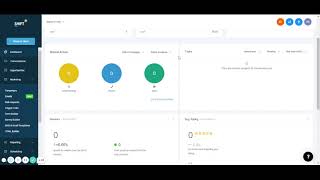
A short training video transcript for the Shift CRM dashboard. The speaker walks through dashboard features: Opportunities (lead counts, date filtering, status: closed/open/lost, assigned monetary value per lead, and conversion rate), Manual Actions (logging calls and texts, filtering by employee to view who contacted leads), Tasks (assigning tasks to employees and tracking completion), and Google Calendar/Reviews integration (sync calendar, view review sentiment and average rating, invite customers to review). The clip is an overview-level walkthrough and summary of the dashboard tab.
Chapters
Hey there, guys. The launch of our shift CRM, I kind of wanted to go through everything. And so we're going to have basic training videos for everything in our CRM. Going through the first one is our dashboard. And so once you get your account set up, it's going to have your account here and it's going to go right towards your dashboard. We got our opportunities here. So opportunities are anytime you get a lead in, it's going to show how many you've gotten. Right through here. You could select the dates of when you want to filter those out. Shows you who you close out of all those leads. Who's still open if you lost any. If you assign value to any of them, it shows you the price of that. So say a lead, if you were to sell it, you make a hundred dollars. You put that in there. So you have a hundred leads times $100. That'd be right there. And it shows how many you closed. Open Loss also has your conversion rate. So if you got 30 leads and only closed a couple of them, I'll show you conversion rate right there. Manual actions are anytime you call or text somebody. If you have multiple employees, you could actually choose the employees and see what they've done. Have they called the leads, have they texted their leads, what have they done manually? Tasks. You could assign tasks to your employees as well and see if they've done anything with those. If you sync up your Google Calendar, you could see your reviews going through. And if they're positive, if they're negative, you can see your average rating for Google reviews. You can even invite people to review your business on Google and it shows right there. That's pretty much a summing up of the dashboard through everything on here.