Learn how to build and customize forms and surveys in Shift CRM, including text fields, checkboxes, captcha, and conditional logic. Forms can be styled, embedded via link or redirect, and tracked with pixels. Surveys show one question per page and can automatically disqualify leads based on answers.
Chapters
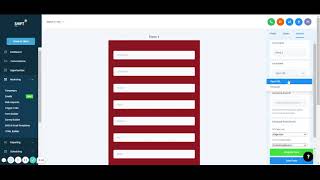
Okay, going next through the list, I skipped emails, bulk requests, trigger links. We'll get to those later because they're a lot more advanced. And so we'll do form builder. Form builder is pretty nice if you've ever had software. We had to create forms like Jotform is one. This completely replaces that. And so create new form. And now you could do whatever you want. Say we want people to say our first, last name, phone, email, always click on there. I say it's always required. So this is the title. Let's see if I delete that, it would delete right there. Placeholder is what's in that box right there. So if I delete this, it'll delete that right there and so on. I always do make sure it's required. It does an asterisk. So people have to do it. And so there's already a standard list of things that people could do. We maybe want their address, city, state, if it makes sense. You could add text, you could add images, a captcha button if you want to. With the I'm not a robot, you could add buttons. And maybe this is with the button that they say submit, submit form, form. You can even change the background and color of it. Great. Put in the middle. Change of text form. Change the radius. There we go. Corner radius. Make it full width or not. And so you can do all that. Always make sure you save the form going through. Now there's these cut things called custom values. This is where if we want to add a custom question. So say if it was cars, we're trying to sell cars, we could say, I do text most of the time. But if it's like amount question to deal with money, you do check boxes if there's multiple answers and they want you to check one. So we'll do text. Say, do you have a trade in your car? I just copy that and do that. Save now. I could put that in there. Require. And now that question's in there. And then so going back to opportunities, if you were to click on them, you could see that they filled out this question and it'll be in there. And you create any type of custom field. Here's a checkbox. Do you have a trade in. You want to give them the yes, no. Maybe that's what that will look like. Do you have a trade in? This one thinks that it's the same thing. So we'll get rid of that. Okay. Oh, there you go. You can put it down there. So now people can click yes, no, maybe on there you can change the style of the form. So maybe we want the background red. Agency branding. I never do agency branding options. So upon submitting you could go to a certain URL, you could give them a message, a thank you message, sticky contact. I always turn this on. This just means that if you had two separate forms, maybe in the same website, if they filled out the first form, the second form it would save all their information and auto fill it and so they don't have to repeat it. So if they already put their first name somewhere else, if they go to this form it will have it on there. And so it just makes it easier. You can even set up a pixel Facebook Pixel id. If you don't know what that is, that's all right, it's not a big deal. Change the name of it right there. Go through all that border radius, see if we did 100 maybe corner. So save form, bam. You can integrate it into any thing or you could just have it as a simple link. So let's say we copy that and we open it and then it'll go to a new tab and go. And it would just be that form. So go into form. That's where, that's where it is. It's active. We could edit it again going back through a copy it, delete it all that. You'd even analyze all the submissions. So if there's anytime someone submitted stuff it'll show you how many and give you analytics and submissions will show you their actual contact, what they filled out answers all that survey builder I'll do because it's the exact same thing practically. But the great thing about surveys that's different is that you can make it so it's one question at a time. So instead of a long list where people go through, you can make it if you do one question at a time that they fill out the first answer and then click next and then the next answer. Click next next answer. And so that's why and you could play a little bit more with it like this animation back button. That's why this one's a little nicer. You get to automatically disqualify people if they answer differently. Then what answers. And so this way leads can be kicked out right away if they're not good enough. But everything else is the same with the custom fields, standards, all that save survey get integrated. You could have the link so all that's the same and then same with analytics and the submissions here.