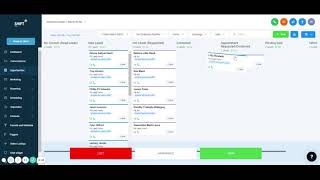
This content was created by Nate Tilley. This content was uploaded by Nate Tilley. This is a YouTube video titled "Shift CRM Opportunities Tab Training" created on November 23, 2021. It provides a training session on managing opportunities within a CRM system, explaining how to track leads through various stages of the sales pipeline.
Chapters
All right, going down the tablets, we got opportunities next over here. And so with opportunities, it's going to show we show how to change these. The pipeline is what it's called. And so these are all the leads in there and you can slowly move them all the way through until you get closed. So we got this one. All the new leads will show up here. It shows their name right here where they came from. This was a Facebook lead form. You click on this and it'll show you all the information about it. You could click on them directly, show information about it and then where you could add an appointment for them. You could even press that button to call directly with them. You could add a task for them with that and you could easily just switch them and going through down the list. So it's new leads right now. If they responded to our automatic messages, they'll go to hot leads. Once we reach out to them, they'll move down to the contacted and then they request an appointment, put them there and it just keeps on going down all the way to pending deal vehicle sold. And so once we put them to that vehicle sold, that's where if we go back to dashboard, it'll say that they won going down the pipeline. And so always make sure that we have the correct timeline. Sometimes this doesn't update as well, and so I just do all time to make sure. And then we could create multiple pipelines and I'll explain more of that later. And if you want you everybody or if you want just certain people, you want to assign these to certain people, you could do that. And it keeps on going down, all of them. Anyone lost or anybody that was abandoned, pretty nice.