Pete Ericson walks through how the Austin Monitor used a metered paywall to double paying subscribers in 18 months. The setup lets readers see five free articles monthly, then blurs premium content. The paywall also drove a 68% annual increase in total readership.
Questions this video answers
February 1, 2017.
"With the help of leaky paywall, there was a 68% annual increase in readership."
"Paying readership in 18 months more than doubled."
Five free articles per month.
Any article that is 60 days or older turns to premium archive status.
Chapters
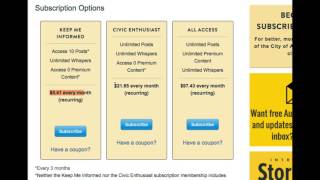
Hi, I'm Pete from Zine 101. And today we're going to talk about how a Texas news publisher doubled their paying subscribers by setting up a metered paywall. Now, the Austin Monitor is a news publisher covering much of the political landscape in Austin, Texas. Their challenge was to attract new readers who were searching in Google and encouraging social sharing of their articles in Facebook. Once a reader landed on their site, they needed to be able to turn them into paying subscribers. They wanted to be able to offer their readers a few articles of their choice before they were required to buy a subscription. This means any article shared in social media or searched in Google could be linked to and read for free by any reader, essentially letting the reader choose what articles they would try before they buy. And a final requirement was to be able to sell their archive content at a premium subscription level. The awesome Monitor covers local politics. At the town hall level. They're quickly amassing a gold mine of archived content that holds great value for those who depend on local political and business coverage. Their previous hard paywall was not an option anymore as it was blocking articles from Google and social media. So what was the solution? They chose our metered paywall system, which we call leaky paywall. And the metered paywall has come of age. The New York Times, which pioneered the metered paywall, proved it a success when they surpassed a million Digital subscribers in 2015. And this helped them realize real digital revenue in the face of declining print subscriptions. And even the Wall Street Journal, which has had a hard paywall, is now looking at softening it by giving free access to socially referred readers and and setting up a free 24 hour guest pass. The numbers from the Austin Monitor's latest annual report are pretty eye opening. With the help of leaky paywall, there was a 68% annual increase in readership. Paying readership in 18 months more than doubled. And if you want to know more, the full annual report is available on the Austin Monitor site. Let's take a closer look at how the subscription process works at the Austin Monitor. By pretending to be an interested reader searching in Google for news about Austin, Texas. I'll search for Austin Water official resigns in Google and notice what happens here. One of their articles shows up at the top and I click into it and I can read the entire article for free. The way this is set up is the Austin Monitor is providing five free articles per month before requiring a subscription. And if I scroll down here, you can see that this entire article is available. It shows up in search and I can share this article with my friends or colleagues at work anywhere on social media. I've already been on this site and I've used up my free allotments so when I go to the next article it's going to trigger the paywall. So let's click into this article, cancel kicks off process and what you'll see here is an article that's now premium. I get the title of the article, I get the excerpt, the teaser for the article, and if you keep looking you get this blurred text which is a very clever way of making the article look premium. I get the call out to subscribe and if you keep going down you notice that there is a Do you like this story? Box which encourages people to contribute. Now let's click subscribe. That will bring up three subscription cards, which by the way is the way to sell a subscription. It's proven that choices of three for us humans is a great way for us to keep it simple but give choices to the reader. And in this case we really have two current news options and one all access premium option. And the way it works here is if you pay your $5 every month, you get access to 10 articles per month. It's a way to try it. If you pay 20, say $2 every month, then you get access to all articles, all current articles. And if you Pay say the $97 a month, you get access to not only the current articles, but you get access to all the archive articles that the Austin Monitor has. Any article that is 60 days or older turns to premium archive status and requires an all access subscription. Let's switch gears here and talk a little bit about email marketing. The Awesun Monitor uses mailchimp, which integrates with Leaky Paywall and automates their email blasts. For a true one click Publishing Everyday mailchimp is set to scan the site for new articles. All new articles are assembled in an email, titles and excerpts and automatically blasted to the list. Anyone can subscribe to the list. If you see here there's a callout that says Want free Austin Monitor News? Even if I'm a non paid subscriber, I can click this and I can drop off my email address and sign up to be alerted of all the headlines and excerpts of the news that'll get automatically delivered to my mailbox and and then I can click in and read an article or two or three. And beyond that, once I consume five free articles, the next article will prompt me to subscribe. So in a way it's a daily reminder to subscribe to the Austin Monitor and collecting an email address in today's digital publishing world is one of the top priorities you should be looking at, and the key here is to always be asking for your reader's email address and even for a limited free access. As an option. You could even set up a free level of subscription that gives readers additional free articles in exchange for their email address. There are last few details that you might be interested in and what you can do with Leaky Paywall the awesome Monitor can restrict specific Super Premium articles to subscribers only. So let's say there's an article you publish. You don't want it to be available to the public and really only available to all of your premium subscription levels. You can tag it as always premium and know that that article is available only to paying subscribers. Also, they sell corporate subscriptions, which means Anyone with an abccompany.com email address can have access anywhere they are. And they also sell bulk access to universities and libraries, which allows anyone sitting in that university or library instant access to all their articles without having to log in at some point in the future. The Austin Monitor can easily hook up unipress iOS and Android apps that integrate with Leaky Paywall for automatic app publishing. If you're considering setting up a metered paywall, why not try Leaky Paywall for free at zine101.com and subscribe to our YouTube channel.