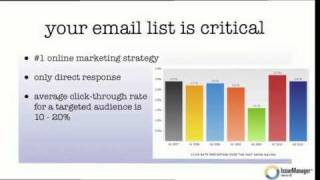
Pete Ericson walks through building an email list for a magazine, from signup forms to automated delivery. Industry benchmarks show 3% click-through rates overall, 10-20% for niche audiences. Use free issues or freemium offers to collect emails, then automate newsletters through Mailchimp or AWeber.
Questions this video answers
About 3%.
10% to 20%.
Mailchimp and AWeber.
RSS 2 email (RSS-to-email).
Email address only.
Chapters
In this video, I'm going to show you how to build and automate your email list. Now, one thing I want to say is that your email list or your creation of an email list is critical to your success. You need subscribers to find out what's going on in your magazine. It is today the number one online marketing strategy and it still beats out social media. Why? Because it's direct response. In other words, once you get a subscriber, that subscriber will get an email from you in their email box which interrupts their day and tells them, hey, hey, this is new and please click on me now. A lot of emails get deleted, but some get clicked on. And if subscribers are paying for your magazine, they obviously will want to read your magazine. And if it's free, they will see that there's something of interest and they can go to your magazine and get exposed to your advertising. Take a look at this chart on the right. What's interesting here is this shows you the average click through rate for email across the last few years and for all industries, all magazines, all newsletters, it runs around 3%. But what's really interesting is in the last couple years that's up to 2010, the click through rate has actually increased. In other words, people come to me and say, hey, hey Pete, I don't know, I don't like email, I just delete everything. I think email is on the way out. Well, what the data is telling us is no, actually the click through rate on email is going up and it's higher than it was a few years ago. And yes, it's still only 3%. But 3% isn't bad across all industries. If you look at the average click through rate for a targeted audience, one that a magazine, especially a niche magazine, might have, the click through rate is 10 to 20%. So keep that in mind and let's build that list. Now, why should readers subscribe to your magazine? Well, they want to read your articles, but really you want to give them free stuff. And in those articles you might be, if you have a paid magazine, you might be teasing your stories and you want to provide them with some teasers to get them to subscribe. But what will really get them to sign up is, let's say, a free issue or maybe some selective stories. In other words, you're going to give away the December issue, all the stories and that will bring people in and hopefully get them to subscribe. Or maybe there are just some selective stories that are going to show up in their email box that will Drive them back to the site and have them subscribe. Now, there's one more thing you can do if you have a free magazine, and that's create something called a freemium story or a freemium piece of content. So, in other words, even though everything is free, what you might do is ask for an email exchange in return for being able to read an article or watch a video or listen to an audio. And we call it freemium because technically you're not paying anything, although you are dropping off your email address in order to read that. Okay, now, how is this executed? So here in WordPress and issue manager, on this story, all you have to do is go to the level and say, hey, this is for subscribers only, or this is freemium, so it's level one, and then update the story. What that does is it automatically creates a teaser for that story online that someone has to either be a paid subscriber or. Or have dropped off their email address if it's a freemium article. And that's it. That's all you have to do. So this is managed right on the story side. Okay, switching gears a little bit. How do readers subscribe to your magazine? How do they get on the list? Well, they're going to have to opt in on your website, and you give them a form that has the name and email. And what I would suggest is, better yet, just ask for an email address. Forget the name, forget everything else. What you really want is to deliver your stories into their email box. And we are busy, we are rushed, we are distracted. And the more you ask for, the less chance they are going to have at subscribing to your magazine. And also very, very important, tell the potential subscriber what they're going to get before they drop off their email address. I see this happen over and over again. It says, subscribe now, and there's an email form and a submit button. Okay, great. Well, what am I getting? You have to be transparent. You have to be clear about what they're actually going to get. So if I don't know that, I might think, maybe I'll just get advertising, or maybe I'll get a feature story. Maybe I'll get a PDF download. I don't know what I'm going to get. I think it has something to do with the magazine and the stories, but I'm not really 100% sure. And the confused customer never buys, so be very clear, as demonstrated here. Okay, now let's talk about how to automate email delivery. And this is every marketer's dream, right? So the emails just get pushed out. And this is how we do it today. And it does work. It uses a technology called RSS 2 email. You don't have to know what it is or even worry about it, but that is the official technology and what the two biggest providers, two best providers we like anyway is Mailchimp and AWeber. They both work great. And the way it works is the mailchimp and Aweber. They actually check your site every day and see if there are new stories on the site. And if there's a new story on the site, what they do is they use that RSS feed and they actually pull the story off your site and match it up to the list people that have subscribed on your site to the email list and it sends your stories to that email address automatically. You don't have to do a thing, unfortunately, in constant contact, you have to log in. You have to copy and paste all your stories and then mail it out manually, which takes time. Here with this, the way we set it up, it happens automatically. And you set a schedule. So you can do it every Friday, you can do it once every two weeks, once a month, whatever you want. You set the schedule and you forget about it. The other thing you want to do is drive your readers back to your site. So in other words, they get the email. What they do is they get a teaser and a link back to your website. I'm going to show you here in my Gmail account. Here's the Dartmouth now news. I get it. It has titles and thumbnails. I click on a title back to school. It takes me straight to the story, Back to school. I can read more about the story here. I can go off and click and read other stories. And if I am potentially going to pay for this, then I might actually subscribe and pay for it. So you want to drive your readers back to your site for lots of reasons. Okay, so what should I email subscribers? It's kind of a funny question, but if you have a small magazine, what I would recommend is just deliver all your stories. Just set mailchimp or aweber up so all the stories get sent out. But if you have a large magazine, it might be too much to end up in a mailbox. And what you can do is you can create a category and for example, you could say, I want feature stories to be delivered to a subscribers email box and then they can click in and read some of the other stories. That might be a nice approach for a larger publication. And the way this works is very simple. So with the software and we're looking at a story again, all you have to do is go down to section called categories, check off features and that's it. Update the page and you're done. That story is now categorized as a feature story. And mailchimper Aweber knows that it's going to mail only feature stories to the list and it works great.