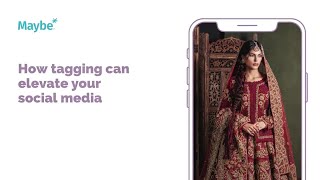
Tag every collaborator on your posts—photographer, makeup artist, stylist, model—to trigger the algorithm and get them to reshare. A wedding brand uses this strategy with professional photos and evocative copy to stop the scroll and reach new audiences across Instagram, Facebook, and Twitter.
Chapters
Today we're with one of Bradford's Green street pioneers and we're looking at how tagging can really elevate your social media. This business is an Asian focused wedding bridal wear company and they're really strong on social media. And what they've done here actually is quite a lot of things done really, really well. However, um, what the first thing I wanted to focus on is their incredible use of professional photo. It's really striking, it draws the eyes and it definitely has that stop scroll effect. It's also a really, really well written, beautiful post as well, which really shows, I guess, the inspiration behind the look. And so it's got quite evocative copy if you like to sell their product. But the big thing that I wanted to draw your attention to is this. So it's all of the tagging. So what they've done here is they have tagged in the content photography, they've tag in the hair, the makeup artist, the jewelry, the styling, the models tagged in everyone that's had anything to do with the look whatsoever. Now what that does is it gets them extra people interested in their Instagram because guess what, the second that you tag in all of these guys, it means that they're much more likely to share your post as well. And it means that you are much more likely to be seen by a bunch of people that are going to be interested. So, you know, if they're interested in this person who's done the hair and makeup, then they might just be interested in having a look at the bridal collection as well. So anything at all that you do on Instagram, make sure that you're tagging everyone involved in the process. Because not only does Instagram love it from an algorithm perspective, it also means that you might just get some new people interested in your posts. If I was these guys, what I would want to do is make sure that I'm keeping on top of my mentions. If all of these people then went on and mentioned me later on, I would want to make sure I was interacting with that. So I would go to my maybe dashboard and I would have a look at mentions in here. As you can see, this is the number of people who are talking about you in the last seven days in their posts. And it pulls together Facebook, Twitter and Instagram so that then I can keep on top of everything all in one place. I can then go back and I can engage again with the, with the post. I could reshare it, but it just means that, you know, you're keeping on top of it without having to go in to all the individual accounts, which is just. It's a lifesaver, really. Now, if you have any questions whatsoever, click on the little blue button here. We love to help.