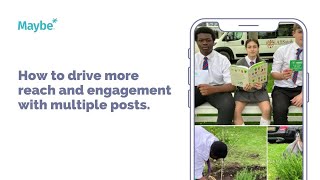
Post multiple times around a single event to boost reach. All Saints Catholic School's mini-marathon in London used four posts: start line, live updates, finish line, and medal highlights. Pre-schedule content and use Facebook's benchmarking tool to see how other schools perform.
Chapters
Today we're looking at how you can create more reach and engagement on Facebook by posting multiple posts. This is All Saints Catholic School and they decided to get together and go along to do a mini marathon and in central London. So they did a series of multiple posts to promote this. So the idea would be that it was right at the beginning. So this is them in the beginning and it's showing team pes already at the start line for the mini marathon this weekend in central London. So it's showing the team here. You've got the kids, you've got everybody all excited. This was, I guess, you know, the sort of first main pose and then you've got the next one. So this is. We had all 40. We had 46 All Saints Catholic School runners who completed the 2.6 kilometer race. There is telling you who won, which was Lewis in year 10, Patrick in year eight, Barney in year seven came fifth. We're so proud of everybody and it's everyone showing their medals. So it just shows you the power of, of posting more than once. Because you post at the beginning, everybody that's following and anyone that's connected to you on, on Facebook will get the alert, make you excited, want to go in and see it. Especially if you've got your kids there and you're not able to attend, then you've got the. Then you've got the finish line. So. And again you're going to get. Generate extra reach, extra engagement because you're posting more people are already on there that engaged, which makes Facebook obviously likes it and then makes them want to push it out to more people. Now if I was all Saint school and one of the things that I'd want to do is make sure that I planned in my content as best I could so I would get all of my content put in. So again, if you're doing on the day, that would be difficult to do. But it means that they could plan in their say on a Sunday, they could plan in all their posts for the rest of the week. So here, this is what it would look like. They would just create all of the posts. They can even do their ads, manage their ads in there. And. And the other amazing thing that they can do is they can compare themselves to literally any other school as well. So they can see what other schools are doing on social media and they can do that through here where you can compare yourself to any other business to get some, to get some ideas or indeed they could compare themselves to a specific school that they could type in. But it just means that not only are they planning in their content, they can see at a glance what other people are doing. And get some. Get some insights, get some inspiration. Now, as always, if you've got any questions at all, click on the little blue button. Love to help.