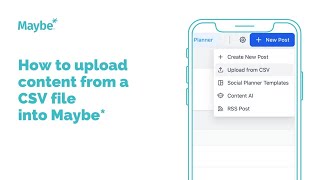
Learn how to bulk-schedule social media posts in Maybe using a CSV file. Download the sample template, fill in your post copy and media URLs, upload the file, and set publish times before importing all posts at once to your planner.
Chapters
Foreign. Let me show you how to use the upload from CSV feature in maybe. So you'd use this. If you wanted to upload multiple posts at once, you find it just here. So under marketing in your social planner, go to new post and then you've got the upload from CSV option. First time you do this, download the sample file because it gives you the headings in this first row that your spreadsheet and your CSV file need to have. Obviously they need to match exactly for the upload to work, so you can see them in the first row. And then what I've done is created a spreadsheet that's got those exact headings. If your image, gif or video, if you have a URL for any of those, then you can actually add that here and actually upload that at the same time. So then I've added two posts in just here. So 10 time the content and any link I want to be in the content. And then once I'm happy that my spreadsheet is complete, obviously you can add more than two. I've just added two for the purpose of showing you. You then do download as comma separated values or a CSV file. As you can see, it's really quick. Then you go back to maybe upload a file. I go and actually upload that file that I just created. And then you click next select a social account. Now, those two posts were actually for X, previously known as Twitter. Obviously you'll want your copy to be different for different channels. So the way to do it might be to do it channel by channel. Or alternatively you could upload them to multiple channels, but then go in and obviously change the posts. But personally I think doing it by channel makes it more logical and easier. And then what you'll see just here, if you scroll down, we've got all these different headings, but if you look at the CSV option, you can see that this is the file we've just downloaded and it's in progress. A file that you have downloaded that's ready for you to go in and review will show us this status review and schedule and one that you've actually already gone in and reviewed and obviously added the content to. Your planner will show as completed. Now actually goes to the review and schedule status very quickly. So if we actually refresh it should be ready for us to go in and have look, there you go. So this is our file. So I'm going to click review and schedule. So there's our two posts at the moment. They're not obviously live in the. In the planner. I'm going to click this to actually expand the post and then I can obviously see my piece of content as an individual post. I'm going to add an image to this one. There we go. And I'm going to actually change when it's scheduled for and then schedule. And as you can see then what it's actually done is it's added the image and it's obviously put the time that I've just set for it to schedule. I'm going to do the same with this one. So that's the image to go with this post. I'm actually going to put that one in. For that time. Just there. There we go. So my two posts are ready. So obviously you'd want to go in and, you know, fully review the posts before actually getting them ready. Because as soon as you click import posts here, top right, and then click Import, it actually puts the content into your planner. So if I open our planner and I actually added those pieces of content for. There's the first one just there, and the other one was the 30th, and there's the second piece of content just there. So it's a really good way to actually bulk, upload, save you actually doing the post individually. If you've got all of your content planned out on a spreadsheet, I hope that's been useful. If you've got any questions at all, please use the button bottom right inside your maybe account connects you to us 247 and I'll see you on another video. It.