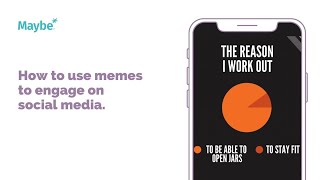
Use memes to boost social media engagement by creating original ones in Canva or sharing existing ones that match your brand voice. Y Club Manchester saw success with a fitness joke about working out to open jars. Schedule posts in advance with a content calendar so your team can focus on responding to comments instead of constantly creating.
Chapters
Today we look at how you can use humour on social media to engage with your following. This is Y Club Manchester and they keep a really friendly tone throughout most of its social media presence. They'll often post little memes and little, just little posts to kind of create a little bit more engagement to alleviate more of the business focused posts. Memes are a really great way to keep engagement high and maintain a fun atmosphere for your business. Now this is super easy to do on something like Canva, where you can take inspiration from other memes. So it might be one that you've seen already and then literally you just create it in your own brand colors and brand it up as your own. Or it could be something that you've actually seen on a different meme and you literally just share it. So it's. You can do it in two ways, but effectively it's about making sure that whatever you share is something that works for your business or resonates with your audience. So for them, obviously everything here is about fitness. And so they've done the reason I work out, to be able to open jars or to stay fit. And then they've made a joke about it there and people have had a bit of a giggle about it in the comments. It clearly resonates. So the idea is it should be something that would be shareable or something that people can go, oh, that's so me, or want to tag someone else in. Now these guys really like to post and one of the best things that they could maybe do is to start scheduling in all of their posts ahead of time so that the, so that they can focus, I guess on doing the engagement, which is one of the most important things that you can do is make sure that you're driving new people to your feed. So all you have to do is go to, is go to the content and go to Content Calendar and then there they can see any of the posts have already done, but then they can go in and they can actually add in a new post and they can add it in now or they can choose to, to schedule it in for maybe the next day or the following week. For example, Here you are. So you just select a channel that you want to. So whether it's Twitter, Facebook or Instagram, for example, you write your post, you add in your media and then you can choose to share now or schedule in the post and then it shows you again how it works as well. But it means that they can focus on getting the engagement done during the week and then it means that all their posts are done for the rest of the week ahead. Now, if you've got any questions at all, please click on the little blue button. And we love to help.