NEW Google Ads Insights Data
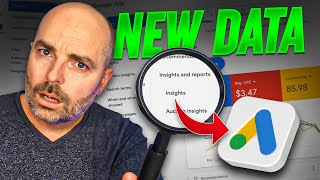
Aaron Young walks through Google Ads' new Insights & Reporting tab, showing how Search campaigns reveal which audiences drive clicks and conversions, and Performance Max campaigns display actual search terms and audience signals. You can now add high-performing audiences like women's apparel directly from the insights view.
Chapters
Over the past couple of months, Google has been introducing its new and updated Google Ads Dashboard. And I have to admit that one of the best features of this is the new Insights and reporting menu tab which has been appearing in the new Google Ads dashboard design. Now the reason for why this is such a big deal is because historically whenever Google Ads has updated its dashboard design, it's usually either taking away some data which you were able to previously see that you can't now previously see, or it has put that data in a different place which is just really hard to find. But what's happened in this case is that Google has not only given us more data which was not previously available even for our search campaigns, it has put it front and center in an easy to find place. And because of this new data, I want to give a great big thumbs up. Well done Google. So right now let's jump into a screen share so that I can show you what this self confessed Google nerd is, is so excited about. So what I wanna show you in through here is this Insights and reports tab. And you can see this when you go into an individual campaign. So at the moment we're on a performance max campaign. If I was to take that over to a search campaign, you can see this Insights and reports data is here, is right here. Now let's firstly look at this. This is for a search campaign. So we're looking at a search campaign here. And when you go into this Insights and reports tab, go into insights. Now for your search campaign, I do wanna also let you know that this is where you would see your search terms previous under keywords. Now it's under your insights and reports. But that's not what I want to talk about. What I want to talk about is this section in here which is the audience insights. Now the reason why this is great data is because when you go over into your audiences and I'll just add this in a new tab, we've always been able to see this data in here where these are the audiences that you've added and you've been able to see this level of data in here. Now what I want to show you is you can see for this one the news and politics has been getting the highest level of impressions. But when we go over into here in the audience insight, you can see that that's nowhere to be seen. And it's actually women's apparel which is getting the greatest share of clicks. And you can see in here that this is not actually even added into this campaign. So there's Two things that we would do here is that what you can do from there is that this woman's apparel, I would then go through and add that as an audience so we can get some more specific data. Because in this section you are allowed to add in more columns, whereas you can't do that over here. And what you also do get is that for some campaigns, in search campaigns, when you go into insight section, you'll even be able to break this down by convers, so you can break this down by clicks, impressions and conversions, which takes this to another level where you can actually see if you're getting this data. Once again, where we're getting family focused is getting a high level of conversions. If we go into the audiences and the audience segments, once again, you can see that family friendly is not in there. So what I would be doing is once again adding that into this audience so we can see a greater level of data here. What I really want to stress there is that previously when you would go into your search campaign and you would go into the audiences, you would just see this other section in here. So you still get those clicks and impressions, but you didn't know what specific audience or category they were a part of. Whereas what Google is doing now is Google is actually giving you this data, which is a great level of data to be able to see what are the different audiences which are generating those clicks and impressions. And as I showed you in here, if you're lucky enough in the current rollout, eventually this will come to everyone. But in some of your search campaigns you can even see it in conversions as well. So that's the great bit of data which was not available previously until now. So this is something that's going to be really beneficial for your search campaign. Now let's move over into your performance max campaign. So what you want to be going into here, go into a performance max campaign. We're going into that same section which is the insights. And what you want to be looking at in here is you want to be looking at two things, which is the keywords and also the audiences. So what you want to be doing in through here is you want to be going through and reviewing the keywords. And I like to break this down by conversion value or conversions. And what you want to be looking at is if you go into here, say for example, breastfeeding, friendly clothes or nursing hoodie, you want to be looking at. And if you click on the View Details, this is Google giving you a breakdown of different keywords which are actually generating Conversions. And what you can do is you can go through, copy these, and then go through and add them to your audience signal so that you're giving that positive reinforcement to Google that yes, I want you to continue to target this keyword and for performance max. Now, it doesn't operate in the same way, but this is very similar to in your search campaigns where you would see the individual search terms. So it's not exactly the same, but it does give you some really great data where you're seeing the actual search terms. And when you go to the view details, once again, you're not seeing it all down by all the different columns, but you can break it down individually. You can see the clicks, you can see the impressions. And when you do click up on the impressions, you can see what the growth has been. So we can see that this is a growing search trend for us. So that way we can go through and add it to our audience signal. And then the second section you want to be going into is you want to be going into your audiences. And what you're looking at here is you're looking at these blue tags and these green tags. Now what the difference is here is that we know with our performance max campaigns you may remember, remember or you should have is that when you set up your asset groups, you're adding in some different audiences. And these blue ones are ones that you've already added to your campaign. So they're audience signals, suggestions that you provided to help Google optimize. The green ones are ones that you haven't given to Google, so you haven't added it to your audience signal. But Google is finding positive results here. And what you can see in through here, this one here, hone decall enthusiasts, it's been getting 80% share of conversions. And then also as well, it gives you this index score. And we'll just read these out. So this is the share of conversions coming from an audience divided by the share of the general population from the audience signal. So what you're really looking at here is a higher index is the positive. So you can see in through this one. This one would be a good one to add because it's got a high index score. But I would go through and add all of these different green ones. So that's the new data that you can now see in your Google Ads campaigns, especially for your search and your performance max campaigns that you can use to help optimize your campaign. Now, seeing that data is the first step. Knowing how to correctly optimize that data is the next step. And that's how I want to help you even further. Because if you follow the link in the description below, you can get access to my Google Ads Optimization checklists which I've created for my search campaigns, which is my Google Ads Optimization checklist. And I've also got a checklist called my Google Ads E Commerce Optimization Checklists, which is perfect for performance max and shopping campaigns. And what these checklists do and how they help you is that they don't only give you a list of what you need to optimize, but also lets you know how often you need to complete that optimization optimization action, whether it's every week, every month, or every 90 days. So if you want that extra help with your Google Ads campaigns, just simply follow that link in the description below. So thank you for joining me. My name is Aaron young. I'm from Define Digital Academy. I'm your 15,000 hour Google Ads master. And if you want to learn more about the coming changes that are coming for the new Google Ads Dashboard design, all I want you to do is I want you to go through and watch this video right here. Once again, it's been a pleasure having you here and I look forward to seeing you very soon. See ya. Thanks.








