2026 Email Deliverability Guide: How to Get Out of Spam (Email Marketing)
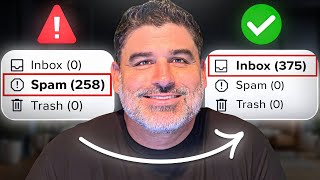
A step-by-step system for getting newsletters out of spam folders and staying in the inbox. The three pillars are domain reputation, sending consistency, and recipient engagement. Keep complaint rates under 0.1%, segment by recent clicks and opens, and verify DKIM, SPF, and DMARC authentication.
Chapters
If your emails are landing in spam, nothing else matters. It doesn't matter how good your content is, how much you spend, acquire subscribers, or how big your list is. People are not seeing your emails. You're not generating revenue. In fact, I've seen companies lose 90% of the revenue overnight from a single algorithm update because their durability wasn't set up right. Today's video I'm going to break down everything you need to know, get out of the spam folder and stay in the inbox with your newsletter, covering everything I've learned from nearly two decades of email marketing. Let's dive in. Let's start with what actually controls the lower ability. There are three factors that actually affected the lower building. The first and most important is your domain IP reputation. It's basically how Gmail, Yahoo, Microsoft and other inbox providers rate your domain. With Gmail, you actually check this through Google Postmaster tool, a free tool that tells you exactly where your reputation is high, medium, low, or bad. The lower your reputation, the harder it is to inbox. Factor number two is consistency. It's not just your sending frequency, but also your volume. If you're sending consistently 100,000 emails a day, then one day you decide to blast 500,000. That, my friend, is a red flag. Inbox service providers, Also known as ISPs, view Spike clients like this as risky and will trigger filtering or throttling of your email. Third and final factor is your engagement. How many actual people are opening, clicking and replying to your emails versus negative signals like complaints? These concentrate heavily on opens, but you can't really count these anymore because of all the false opens from security, scanning bots and Apple Mail's privacy policy. That's why over the last three years I focused on Click Activity as the main engagement signal. The higher the engagement, the better your reputation and the more you inbox. Now let's talk about my proven delivery strategy. The Base Sending segment Unfortunately, you can't directly control your reputation, but you can control your consistency easily as long as you don't do anything sketchy. More importantly, you control your engagement. Your engagement comes down to one critical decision who you're actually sending. To find. The best way to do is by creating a base setting segment. This is the default segment that you're sending all your emails to. Now, if you're sending multiple times a day, you also have additional segments on top of the base setting segment for those. There are three types of people you include in this segment. First, people have clicked in a certain amount of time I Recommend Starting at 60 days. Second, people have opened a certain amount of time. I Recommend Starting at 30 days. And thirdly, people have recently subscribed, which I recommend in the last 10 days. Now these numbers assume you're sending one email daily. If you send more than one email a day, I would cut these time windows in half. Instead of 60 day clickers go to 30 day, 30 day openers go to 15. Now on the other hand, if you send less frequently like once a week, you can extend the windows out. For instance my audience that are set at 120, 9060 anyone who clicked the last 120 days, open the last 90 or subscribe in the last 60 days. You can. You can create this directly in your ESP Beehive, Mailchimp, ActiveCampaign, Customer IO, whatever you're using. Every platform has a segmentation feature. You're just creating a segment with these rules. Make sure that's an OR condition, not an and or. If someone meets any of these criteria, they're in the segment. This works because if people fall off and haven't engaged, automatically move to the side, meaning your list stays healthy and engaged as you grow and don't have to manually clean your list. It just happens. By the way, if you find this helpful, I share strategies like this every week in our free newsletter links in the description and let's keep going Now. Having a tight base setting segment will keep your engagement high, but there's one metric that can still tank your deliverability even if everything else is right, and that's your complaint rate, the percentage of subscribers who mark your email as spam. Most deliverability issues are tied to complaints, and it's one of the more difficult things to monitor. The best chance to inbox your complain rate must be under 0.1%, play rate can go up to 0.3% and still deliver with a high probability you have a medium domain reputation. Push above 0.3% and you can take your reputation real fast. I've seen reputation destroyed in days, which can take months to earn back. The worst part, Gmail doesn't have a traditional feedback loop, so your ESP won't show your complaint rate for Gmail. So if this is 80% Gmail and 20% other domains, that 20% is the only complaint data you're seeing, and your actual complaint rate for Gmail could be much higher than you think. And on top of that, if you're looking at your complaint rate as a whole on a campaign, perceived complaint rate overall is dramatically lower. As Gmail is usually the largest portion of the list these days. This can give you false positives that everything in the world complaints is all good. As I said before, you can monitor your domain reputation with Google Postmaster Tools. You can also monitor your Gmail complaint rate. If your reputation dropped from high to medium, that's their signal that something's wrong. But instead of waiting for it to drop, keep a close eye daily on the reported complaint rates Inside of Postmaster Tools. What about Yahoo? Well, first did you know that Yahoo manages a bunch of email inboxes like aol, Verizon, bellsouth, SBC Global, Cox Frontier and many more. Luckily, they recently released Yahoo Center Hub Insights which now shows you exactly what your complaint rates are. The best part about it is they only base complaint rates on what emails are actually inboxing, which is a huge deal. Before you would see complaints on the feedback loop sent to your esp, it would be applied to the entirety of your Yahoo emails that were sent that day, not just with Inbox. So your rates were probably much higher than you always thought. That's why you might have had delivery issues from Yahoo when you thought your complaint rates were really good. Now for Microsoft, you can always access IP reputation from Outlook snds, which is a smart network data service. It provides a feedback loop so you can see the complaint rates in your esp. Now that we know how to monitor the complaint rate, the obvious goal is to make sure that people aren't marking emails as spam that often. To do this, you should only send people to people who actually want your email. So that's what your base setting segments for. Make it really easy to unscribe so there's a lower chance of subscriber hitting spam. You also need to make sure that you have one click unsubscribe in place. You're honoring any unsub requests that are made. Go to Google Postmark Tools to check your compliance ads and see if you are good to go. Worst thing you can do is email someone who tried unsubscribing driving. That's a surefire way to get them to complain. Also, when you're sending emails, don't use misleading subject lines because people feel tricked. Don't complain doing list growth through co Red. You're buying leads. Monitor those sources separately and closely because bad leads are the fastest way to spike complaint rate. If you got this point in the video and you're thinking great, I'm already landing on spam. The good news is there's a way to fix this. The first step is to Time your base setting segment immediately for the three groups I told you include in your base setting segment. I'm going to go from a 60, 30, 10 down to a 30, 15, 7 or even tighter. In other words, only send to the most engaged people. Lower your data acquisition to 25 or 50% of normal volume as we still want to show the ISPs new people subscribing. We also don't want to waste money for stuff that might not get in the inbox at first. Next step is to identify if landing and spam is ISP specific. Check your reporting segments for Gmail, Yahoo and Microsoft to see if they're having issues because you might be okay on Gmail. They'll get them blocked on Yahoo. If this is the case, create exclude segments for problematic ISPs and only send to super engaged people from that ISP. This is actually one of the things that we built Smart Delivery for gave you full visibility into the deliverability and engagement. Decay by ISP can catch issues before they tank your deliverability. I use it with all the newsletters that we run in case you want to try it as well and speak with us. You can also use the first link below for that. Next you check your technical setup. Make sure your dkim, SPF and DMARC records are all set up correctly. Quickest way is to go to Google Postmaster Tools version 2 dashboard. Check the compliance status for your domain. All three check marks say compliant. You're good to go. If those aren't set up properly, your emails will balance automatically the set requirement for now. Finally, the biggest and most important piece. Be patient takes time. You can take your domain reputation a couple weeks. It may take three months to get it back. This is why trying not to get there in the first place is so important. And finally, the other problem you might have is your emails are not landing in spam but in the Promotions tab. Promotions folder was originally created for promotional content and bulk email. Unfortunately, newsletters are considered bulk email as you are sending the same message to a large group at the same time. Doesn't matter if it's a newsletter or a sales message. The good news? There are ways to improve your chances of avoiding it. Having strong domain reputation is one way because if you have high reputation, you have a better chance of hitting primary. People consistently engage in your emails. They'll show up in primary more often. If you're able to get someone to reply to an email, that's another great way to get in the primary for our subject lines. Try to avoid salesy copy. I had a client who used limited time off of the subject line, then wondered why the email is in the promo folder. There are some things you can do within the email as well to increase your chance of landing in the primary inbox. Less imagery and more text tends to perform better for inboxing. More text, less hyperlinks if you're including ads in your newsletter, make them feel native. Write it like a testimonial or personal recommendation you're giving, not a flashy banner screens. This is an ad Now. One of the biggest tips is to always use unique copy. The ISPs are fingerprinting the content of emails that are sent across multiple senders and expands and hurt your deliverability. Next, check any external links in your email for Blacklist using MX Toolbox or another Blacklist checking tool. Link is flagged. Remove it from the email or replace it with a link that is not blacklist. Finally, ISPs do not like a lot of link ops. That's when you have multiple tracking links and redirects triggering before you get to the end destination. This is a major issue with affiliate offers and their tracking links. I've seen links that hop six to seven times before it gets to the destination. Even Gmail itself doesn't like when people use their YouTube short URL format like YouTube be with the real hash versus the normal which is YouTube.com forward/watch? Bunch of other stuff which actually is a page that the video is hosted on. I've been experiencing this myself and hear from others that YouTube shorten URL is causing issues when it's used inside of an email. If you remember that your ESP is already adding a tracking link to your emails, that's already one hop to start. Any additional hops keep compounding onto that. You have to use links with lots of hops. You can always create a hot page on your own website. That page then uses JavaScript to redirect to the actual offer link, but the original destination page is your own website. I've seen many of the largest publishers use this technique. I hope you enjoyed these insights. Now if you're dealing with deliverability issues and want help fixing them, subscribe to our free newsletter using the first link in the description. We'll send you actionable tips like this every week. If you need more hands on help, we've got options for that too. So again, click that first link below and subscribe. And if you want to see how to build a seven figure newsletter from scratch, watch this video next.
More from Chris


Audience Bridge Insights #21 - He Kills Most Facebook Ads in 3 Days. One Has Run for 2 Years.
Audience Bridge Insights #20 - $3 to Acquire, $3 Back in 7 Days w/ Andy Mackensen, The Assist


Audience Bridge Insights #18 - The AI Standing Between You and Your Subscribers — with Chad S. White

Audience Bridge Insights #17 - AI Is the Biggest Change to Email Since the iPhone w/ Dan Oshinsky

Audience Bridge Insights #16 - CPM vs CPC vs CPA: How Newsletter Ad Money Actually Works
Audience Bridge Insights #15 - Why MarketBeat Just Cut Their Email List in Half (On Purpose)

Audience Bridge Insights #14 - Co-Reg Isn’t Dead — You’re Just Doing It Wrong (w/ Tim Bourquin)

Your Newsletter List Size Is Lying To You! Make sure you identify this hidden metric.

Audience Bridge Insights #13 - Your List Size Is Lying to You (with Armando Roggio)