A short, screen-recorded YouTube tutorial (2009) by Sarah Hill and Christina Dimini teaching viewers how to create a Twitter account. The presenters open a web browser to twitter.com, explain Twitter as a microblogging service (answering "What are you doing?"), click the signup (green) button, and walk through the Join the Conversation form: enter full name, choose a username (try alternatives if taken), set a password, provide an email, optionally check "I want the Inside Scoop," solve the captcha/text prompt, and optionally import contacts or skip to the step showing suggested people to follow before finishing.
Chapters
Hi, I'm Sarah Hill.
And I'm Christina Dimini.
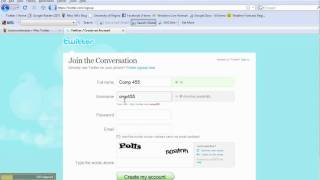
And welcome to our Step by Step tutorial page on how to make a Twitter account. You might be wondering what Twitter is since you've been hearing Oprah and Ellen DeGeneres talk about it on their television shows. So let us help you find that answer and teach you how to make an account. Now, the first thing you need to do is open up your web browser and type in twitter.com into your address bar. After pressing enter, this is the homepage that we will see. Here you will see a nice little explanation on what Twitter is. Twitter is a service for friends, family and co workers to communicate and stay connected through the exchange of quick, frequent answers to one simple question. What are you doing? So let's click the green box at the bottom of the page and get started.
So once you get to the Join the Conversation page, you need to enter your full name, a username, which is the way you will identify yourself to the Twitter community. So be careful, and a password. You notice that before our username was already taken, so you have to change it until one is available. Once you have that, you also need to enter email. And you can choose the box I want the Inside Scoop if you want to receive instant updates from Twitter and type the words above, Then hit Create my Account. So if you have the address book and you want to see which friends are on Twitter, you can enter your email password and it will connect directly to your contacts. If not, hit the Skip this step.
Now here you can see who else is following. You can choose to follow them on Twitter or you can click Finish and skip this step again.
Now you are an official Twitter user and you can answer the question what are you doing?