This content was created by Alec Couros. This content was uploaded by Alec Couros. This is a YouTube video titled "Embedding GPT into Google Sheets" created on January 15, 2023. It features a speaker discussing the integration of GPT into Google Sheets to create a knowledge hub for storing queries and outputs, with examples like lesson plans and article summaries. The speaker explains the process of using GPT with Google Sheets, including setting up prompts, using API keys, and adjusting parameters for creativity and output length.
Chapters
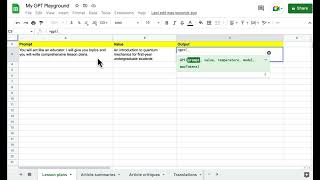
I've been playing around with GPT embedded in Google sheets as a way of thinking about a query hub or a knowledge hub of some sort where I would have a number of different queries that I might use a fair bit or quite regularly that there would be one place where I could store not only the queries but also the outputs as well. So I have a number of sheets where I would have different questions. In this case I have as an example, lesson plans, article summaries, article critiques, translations. You can have a sheet for just about any query you want and then store all of the queries and outputs. In this case, under lesson plans, I have a prompt around GPT acting as an educator. So I have written, you will act like an educator, I will give you topics and you will write comprehensive lesson plans. And the the next cell here would be a value. So this would be like a lesson plan about what and or for who. I'll just paste what I have here. An introduction to Quantum mechanics for first year undergraduate students and then the output and you have to have a certain plugin and you have to have the. The API key for this. It doesn't. It's not really hard and I can certainly create a or or point to a tutorial for this. But essentially once you've done that, you're able to type in equals GPT and then the qualifiers come up. So for the prompt I will just click on this cell. So that's a three. Then I'll put comma and the value would be the next cell and comma and then this temperature means I think you have an input of either 0 or 1. If you put in 0, it'll be a less creative search and it'll be stuck. It'll stick more to the actual query you've given. If you. If you give it a one, it'll be less or it'll be more creative and stick less to the script or the query that you've added. So you can play around with that. I'll put zero for now. The model, you know, there's several language models. The most oft used one would be text-davinci-003 and then I'll put comma and then this max tokens has to do with the output and eventually how much you'd actually pay if you're doing this with a paid account. So I'm going to hit enter and see what sort of output it shows. It shows up when I say paid account. This would be a paid account. When you get an open AI account, you get $18 of credits that you can play around with. And so I haven't paid anything yet for this, but eventually I think that's the model. So I've got here a lesson plan and I can look through this. I'm not sure how good it is, but of course with tweaking the query, you can get a better result, but looks like a decent start, I guess. Anyway, I hope that's helpful.