How to find and save images for your website without copyright trouble. Use Google Images or free resources like Pics4Learning and Creative Commons, then save them to a folder with clear filenames.
Chapters
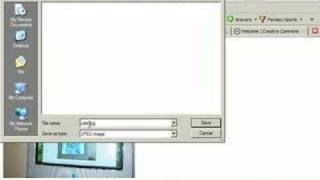
This is just a short video to give you an idea of how to find photographs or digital photos online. I'm just using a Google search right now and I'm going to type in the word cats. And notice that I'm under the images tab. So I'm looking not under web or groups or anything else, but just images. And I'll hit search images Here I have a number of thumbnails photographs of cats. What I want to do is get to the larger photograph. So if I want to see this cat or this cap, I click on it a couple times until I get the image all by itself. And that way you'll get the largest of the images and that's what you want to do. Make sure you get a large digital photograph, the largest one you can find. So wait for that to load. It'll slow. Alright, here it comes. Must be on a slow server. Now if I wanted to take this photograph and save it to use it on a website, all you would do is do a right click on the photograph and save image. I'm using Firefox, so save image as. And then what we want to save it in is that webpage folder we created. So I created a website folder and say I want to use this for my eportfolio. So I'm going to choose eportfolio and then I'm going to put it in my images folder. It's very important to name it something that you'll recognize later on. So rather than just cats, which is the default one here, I'm going to call it CatonTV, something like that. And I try to keep no spaces, no special characters. I've included capitals, that's not a big deal. And I'll just hit save. Now this particular image, I may not be able to use it properly because or use it in my webpage because it might be a copyright image. So it's sometimes also important to go to other sites that have copyright free images. For instance, if you go to the course schedule Ecom 355, if you look on schedule week number four, if you scroll down a bit, you should notice that I have under Websites of the Week a bunch of different image and graphic resources. I have things like free photo pics4learning, geek, philosopher, gimp, savvy, etc. And the creative Commons. A couple of them look like this here's free photo. And you have other photographs that are royalty free and copyright free and you can use them for educational uses. Another really good one is the creative Comments. You can get a lot of really good ready to use audio, images, video or text here. So you may want to try out some of these.