Alec Couros shows how to bypass geo-restrictions on Spotify, Pandora, and Netflix. He recommends Wetopia, a paid VPN service at $70 a year, and demonstrates Hola, a free Chrome extension that spoofs your location to unlock region-locked content.
Questions this video answers
January 6, 2014
Rachel Bath from Adelaide, Australia
Wetopia; about $70 per year (speaker's estimate)
Hola, Better Internet (free)
Spotify, Pandora, Netflix
Chapters
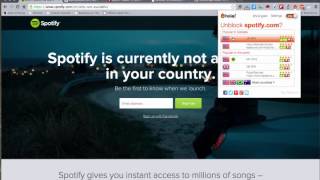
Hi there. Just the other day I got an email from Rachel Bath from Adelaide, Australia and she was asking me how I get around some of the international restrictions, some of the blocks that you'll see. For instance, if you want to access Spotify in Canada, this is what you'll see. You'll see Spotify is currently not available in your country. The same goes for something like Pandora or, or in the case of something like Netflix, you'll notice that programming will be different depending on where you actually access it from. So there will be different programming from the US or from Canada, from the UK for instance. So in the past I've used a tool that I've used that I pay for actually every year. I think it's around $70 or so. I use something called Wetopia, which allows you to, when you're running this, connect to basically any place across the world. And I use this a lot when I'm traveling. And this is kind of a high end system that also allows me to make some of my communications private as well and a little bit more secure than I would. So I use this one and I recommend it. But if you're just looking for something to allow you to get to services that you want to access, there's a really great Chrome extension called Hola, Better Internet. You just add this to your Chrome, it's free. And what you'll see here, there's actually, once you install it, there's a little icon over here and I'll just turn that on. So I'll enable that and what it does. So for instance, if I need to access Spotify with that running in the background, it'll actually give you a couple of places or few places to run into it. You just click on. So for instance, if I want to pretend right now that I'm in the us I'll click on that. And I believe if I just sort of hit Spotify again, it'll think that I'm in the US and all of a sudden I have access to that. So that's one possibility. So there you go, the same thing with Pandora, it'll no longer think I'm in Canada. Oh, I never switched it. Oh, that's adbuckpress. I'll just click on. While I'm in Pandora, I'll say that I'm in the US and I'll just reset that. It might take a second. So. And when it refreshes, I now have access to Pandora and other, other services like that. The same would go with Netflix that automatically have access to Netflix. So that's a real quick tip on one way of getting around some geo restrictions. I hope that's useful for you.