Alec Couros shows how to work around a broken Google Bundles subscribe feature. Export your bundle as an OPML file from Google Reader, then import it into a different Google account through Reader settings to subscribe to the bundle there.
Chapters
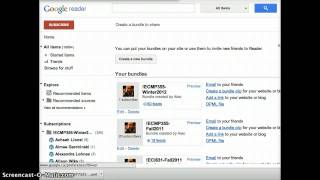
Hi Lorena, I'm just responding to your tweet about Google Bundles. I know things have changed in the past. You've been able to click on this subscribe button and obviously you can't anymore. If you want to ever subscribe to blogs, Google Bundles seems to be busted. So there is a way to create a bundle and subscribe to Bundles, but it's a little bit trickier than it was before. Okay, so this is how you would do it. So first of all go to your Google Reader, create a bundle like you normally would. So take a folder, click on the little right click button or the little menu here. Create bundle, here's a bundle. And when you've got everyone in there, it should automatically bring everyone in the folder. But you can always drag and drop others. Click on save and and then normally you would be able to go to add a link and that would be the end of it. But in this case you actually have to since things have are no longer working, you have to click on this button that says OPML file. So if you click on this you get this really ugly looking file. But what you can do here is actually go to file like save this to the desktop file. You won't be able to see this all but save page as and then save this file. It's going to be a XML file to the desktop or somewhere on your machine. Alright, so it's an ugly looking file saved to my desktop. I think that's where I saved it anyway. All right, I want to try that again because I'm not sure if I did actually save it at the desktop. Yeah, I did. All right then. So what I'm going to do is actually log into another account. I've got two Google accounts just to show you how to subscribe to this. So I'm going to just switch my account quick. I remember how to do that. Switch account. So I'm basically just in another account, or at least I thought I was here. Switch account again. Here we go. Okay, now I am. So this account doesn't have any subscriptions as you see over here. So in the other account, so your students would have this account. What they do is basically go to. Now I'll have to move this over a little bit. But if you click on this button in the Google Reader there is Reader settings and then we'll move it over again, Reader settings and then go to where it says import export and then it says import your subscriptions here. So students would first have to save their that XML file somewhere or you provide it to them via Bit, ly or something else. So they have to have access to that file. So you could do that for them if you want. Just put it somewhere or point to it for instance. But they just have to save it somewhere, then go to import, export, choose file. So on the desktop here I kept a big long name and then I'm going to go upload. So when you go upload, it should bring in that all those subscriptions. If you go back to Google Reader you will see a bundle there. So hopefully this makes sense and that you can do the same thing. I wish Google would fix this.